
Implementing the Google Ads Conversion Linker server‑side using a GTM Server Container helps preserve accurate conversion attribution as browsers restrict cookies and tracking.
This setup ensures reliable GCLID storage, improves cross‑domain attribution, and reduces the impact of ITP and browser‑level limitations, leading to more accurate ROI measurement.
Prerequisites
- A configured Google Tag Manager account
- An active GTM Server Container
Create and Configure the Conversion Linker
- Open your GTM Server Container workspace.
- Go to Tags → New.
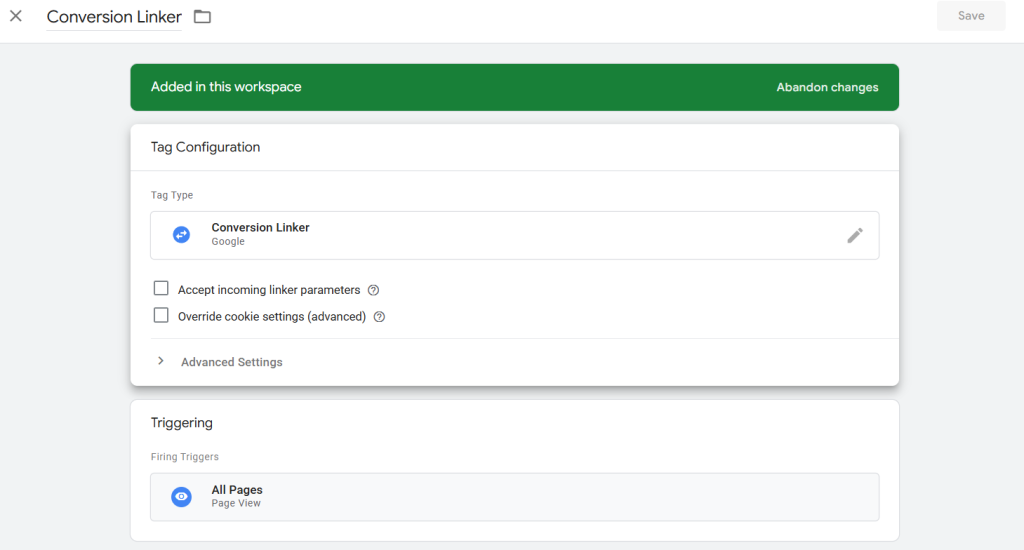
- Click Tag Configuration and select Conversion Linker.
- (Optional) Adjust linker settings for cross‑domain tracking if needed.
- Under Triggering, select All Pages.
- Name the tag (e.g., Conversion Linker – Server).
- Click Save.
Firing on all pages ensures GCLID values from ad clicks are captured and stored in a first‑party cookie.
Publish
- Click Submit in GTM.
- Review and Publish your server container.

Your Conversion Linker is now live and collecting GCLID data for accurate attribution.
Troubleshoot
No GCLID cookie set
- Ensure the tag fires on all pages
- Confirm the URL contains a gclid parameter
Cross‑domain issues
- Enable linker options for multiple domains
A server‑side Conversion Linker is a simple but essential step for maintaining accurate Google Ads attribution in a privacy‑first, cookieless environment.