
If you collect phone numbers through forms, checkouts, CRMs, or webhooks, you’ve likely noticed one issue:
Phone numbers are rarely stored in a consistent format.
Examples:
- 07700 900123
- +44 7700 900123
- 0044 7700900123
- (07700) 900123
When sending this data to CRMs, advertising platforms, or analytics tools like Google Analytics 4, inconsistent formatting can cause:
- Failed user matching
- CRM duplicates
- Broken enhanced conversions
- Hash mismatches
In this guide, you’ll learn how to standardize phone numbers in both web and server Google Tag Manager using the Phone Number Formatter variable, maintained by Stape.
Step 1: Understand What the Phone Number Formatter Does
The Phone Number Formatter variable:
- Takes a raw phone number
- Uses a country code (ISO 3166 format, e.g., GB, DK)
- Converts it into E.164 format (international standard)
It uses Google’s phone number library to correctly interpret the number based on country rules.
⚠ Note: Currently supports European countries.
Step 2: Add the Correct Template from GTM Template Gallery
- Phone Number Formatter variable for Web Container the Template Gallery.
- Phone Number Formatter variable for Server Container the Template Gallery.
You need to download the appropriate version of the variable:
- Web container version (for client-side GTM)
- Server container version (for sGTM)
Step 3: Add the Template into Google Tag Manager
Inside your GTM container:
- Go to variable Templates
- Go to template gallery and add it to workspace
Step 4: Create the Phone Number Formatter Variable
Now create the actual variable:
- Go to Variables
- Click New
- Select Phone Number Formatter
- Configure the inputs:
- Phone Number → Your raw phone number variable
(Example: {{Form Phone}} or {{Event Data Phone}}) - Country Code (ISO 3166) → Example: GB
- Phone Number → Your raw phone number variable
- Click Save
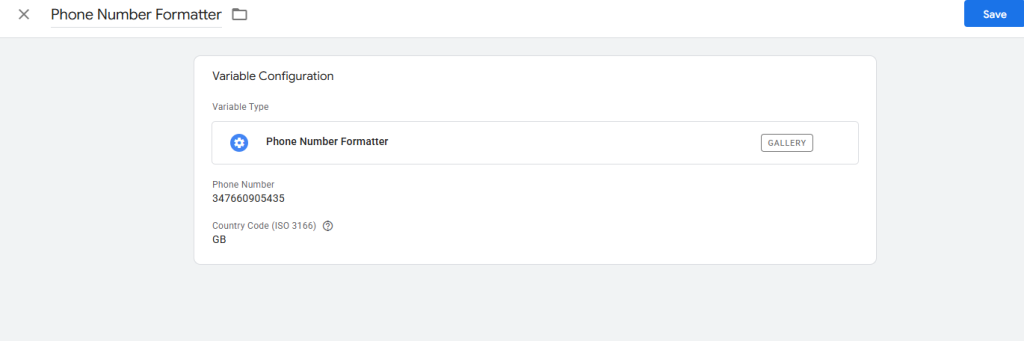
Your formatter variable is now ready.
Step 5: Test the Output
Let’s say the input is:
Phone Number:
347660905435
Country Code:
GB
The output will be:
+44347660905435
That’s the standardized E.164 format.
Step 6: Use It in Your Tags
You can now use the formatted variable:
In Web GTM
- Send it to enhanced conversions
- Push it into the data layer
- Use it in GA4 user properties
In Server GTM
- Normalize phone numbers received via webhook
- Format before hashing
- Pass standardized numbers to APIs
Important: Format Before Hashing
If you plan to hash phone numbers (for example, SHA-256 for privacy compliance):
✔ Always format first
✔ Then hash
If you hash inconsistent formats, user matching will fail.
Correct sequence:
Raw Number → Format → Hash → Send to platform
When Should You Use Phone Number Formatter?
Use it when:
- You collect phone numbers from multiple sources
- You send phone numbers to ad platforms
- You use enhanced conversions
- You sync data with a CRM
- You handle phone numbers in server-side tracking
It ensures consistency across your entire data pipeline.
Final Thoughts
Phone numbers may seem like a small detail — but inconsistent formatting can reduce match rates and break integrations.
By following these steps, you can:
- Standardize phone numbers
- Improve CRM accuracy
- Increase advertising match rates
- Keep your tracking clean and reliable
If you’re working with user identifiers inside Google Tag Manager, the Phone Number Formatter variable is a simple yet powerful addition to your setup.