
For performance marketers, knowing whether a purchase comes from a new customer or an existing one is extremely important. It helps measure how effectively your marketing campaigns are bringing in new buyers versus relying on repeat customers.
However, most analytics and advertising platforms struggle to identify this correctly.
Browser cookies expire.
Users switch devices.
Privacy restrictions block tracking.
Ad platforms rely on modeled data.
Because of these limitations, many “new customer” metrics in platforms like Google Ads or Meta are not fully reliable.
A better solution is to create your own first-party customer identification system using Server-Side Google Tag Manager (sGTM) and Stape Store. This allows you to classify customers accurately using server-side data instead of fragile browser signals.
In this guide, we will walk through how this system works and how you can implement it.
Why New Customer Tracking Is Important
Not every purchase provides the same value for business growth.
A repeat purchase usually means:
- The customer already knows your brand
- Conversion is easier and cheaper
- It doesn’t significantly expand your customer base
On the other hand, a new customer purchase means:
- Your marketing successfully reached a new audience
- Your brand is acquiring new buyers
- There is potential for future repeat purchases
Advertising platforms try to estimate this information using signals like cookies or account data, but these methods are often inaccurate.
By creating your own server-side logic, you can send clear and reliable signals to advertising platforms, improving campaign optimization.
Overview of the Tracking System
This setup relies on three main components.
1. A Customer Database in Stape Store
Stape Store works as a small database connected to your server-side GTM container.
Instead of relying on browser cookies, customer identifiers such as email addresses are stored here.
Because this data is stored server-side, it remains stable even if users change browsers or devices.
2. Purchase-Based Customer Classification
Instead of simply marking a user as “new” or “returning”, the system keeps track of how many purchases a customer has made.
For example:
| Purchase Count | Customer Type |
| No record found | New Customer |
| 1 or more purchases | Returning Customer |
This method avoids unreliable assumptions and provides deterministic classification.
How the Data Flow Works
Here is a simplified overview of the tracking process:
- Import historical customer data into Stape Store.
- When a purchase occurs, extract the customer’s email.
- Hash the email for privacy.
- Look up the hashed email in Stape Store.
- Determine whether the customer already exists.
- Update the purchase count.
- Send the classification to advertising platforms.
This approach ensures the classification happens server-side and independently from browser tracking.
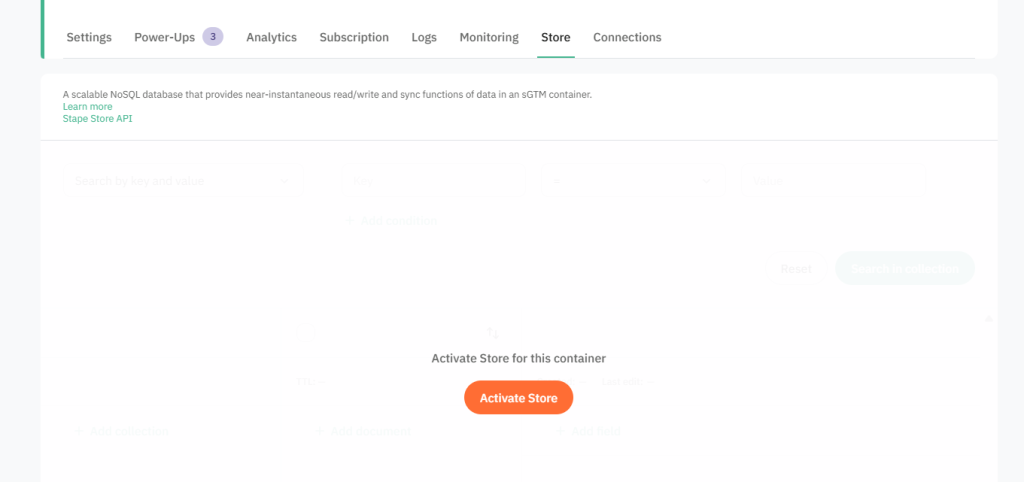
Step 1: Enable Stape Store
To begin, you need to activate Stape Store in your server container.
Steps:
- Log into your Stape account
- Open the settings of your server-side container
- Enable the Store feature
Once enabled, your server container can store and retrieve customer data.
Step 2: Upload Existing Customer Data
Before tracking new purchases, you should import your historical customer list.
Process:
- Export customer emails from your ecommerce platform
- Hash each email using SHA-256
- Upload the dataset to Stape Store
Each record should include something like:
- hashed email
- purchase_count
This ensures that customers who already purchased before the tracking setup are recognized as returning customers.
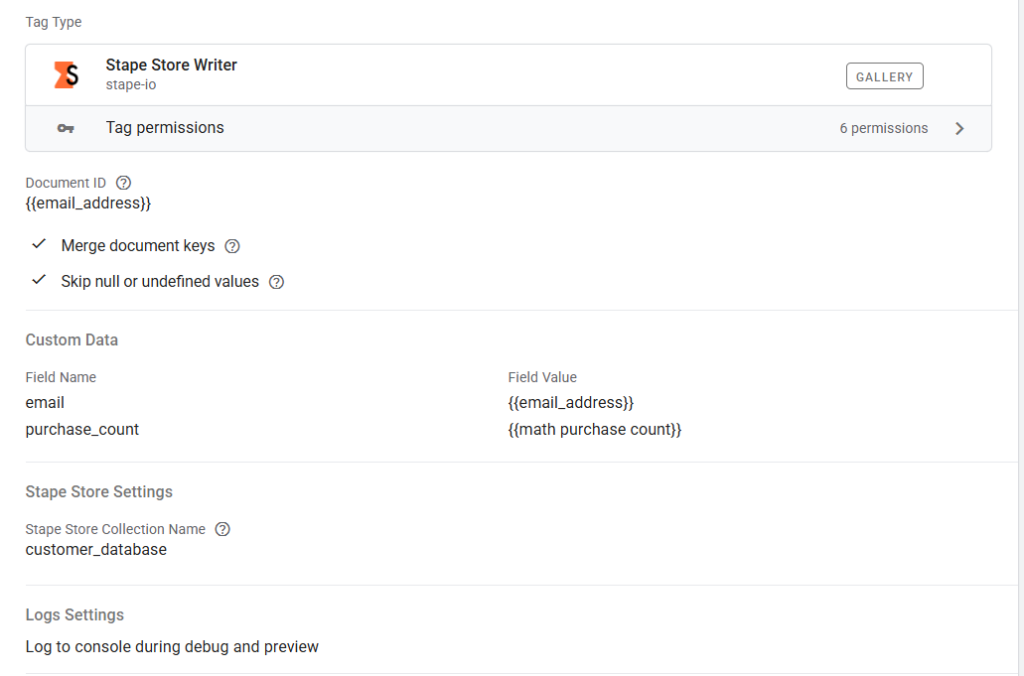
Step 3: Hash Emails Inside Server-Side GTM
When a purchase event reaches your server container:
- Extract the customer’s email from the event payload
- Convert the email into a SHA-256 hash
- Send the hashed identifier to Stape Store
Hashing protects personal data while still allowing identification of the same customer across purchases.
Step 4: Check If the Customer Exists
Next, create a lookup variable in your server-side GTM container.
The lookup will:
- search for the hashed email in Stape Store
- return the stored purchase count
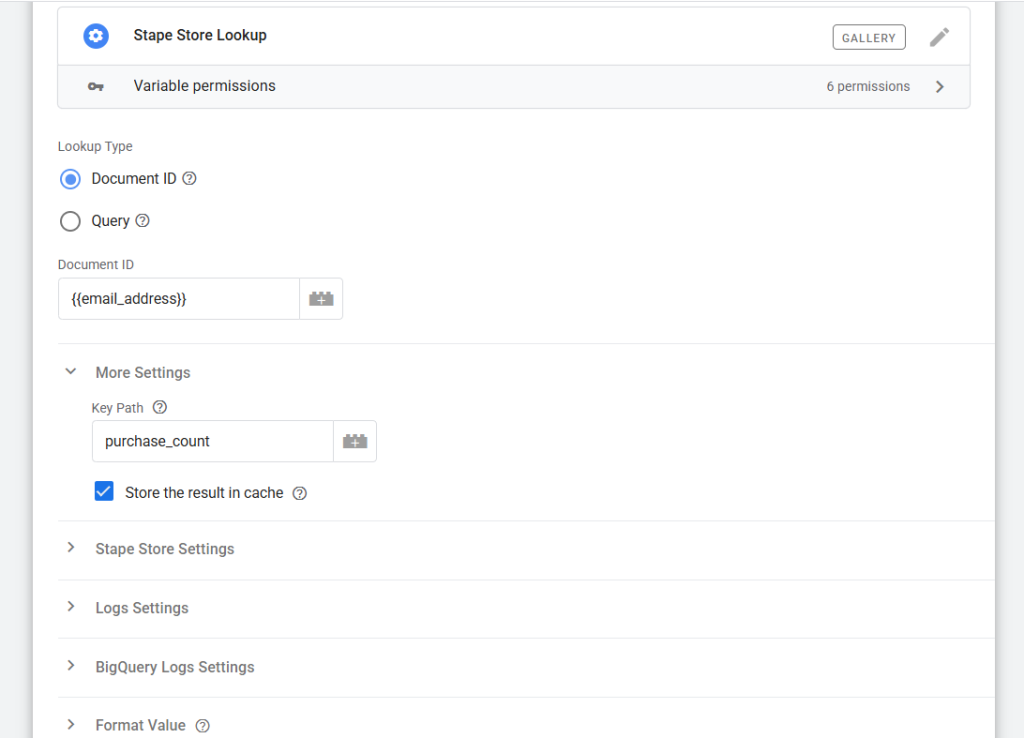
Based on the result:
- If no record exists → the buyer is a new customer
- If a record exists → the buyer is returning

Step 5: Update the Purchase Count
After identifying the customer status, update the purchase count.
Example:
- First purchase → purchase_count becomes 1
- Second purchase → purchase_count becomes 2
This ensures the database stays updated for future transactions.
Conclusion
As browser privacy restrictions increase, relying on traditional tracking methods is becoming less reliable.
By implementing a server-side customer identification system, you gain full control over how customers are classified.
Using Server-Side GTM and Stape Store, you can:
- accurately identify new vs returning customers
- provide stronger signals to ad platforms
- improve campaign optimization
- make better acquisition decisions
This approach creates a future-proof measurement framework that works even in privacy-focused environments.