
Enhanced Conversions help improve Google Ads attribution by securely sending hashed first-party customer data—such as email addresses or phone numbers—along with your conversion events. This allows Google Ads to better match conversions to ad interactions, even as browser privacy restrictions and third-party cookie deprecation reduce the reliability of traditional tracking.
This guide provides step-by-step instructions for developers to implement Enhanced Conversions server-side using Google Tag Manager (GTM) Server Container, ensuring your setup is accurate, privacy-compliant, and future-proof.
What is Enhanced Conversions?
Enhanced Conversions are privacy-friendly by design. Instead of relying solely on cookies, they use hashed, first-party customer data collected at the point of conversion. Data is securely transmitted and matched in a way that respects user consent and privacy regulations.
Benefits include:
- Improved conversion attribution accuracy
- Greater resilience against browser tracking restrictions
- Better performance measurement for Google Ads
- Compliance with modern privacy standards
Prerequisites
Before you begin, ensure that:
- A GTM Server Container is set up and running
- Google Ads conversion tracking is already implemented server-side
- You have access to first-party customer data at the point of conversion (email, phone, etc.)
- User consent is collected and managed in line with regulations such as GDPR
Enable Enhanced Conversions in Google Ads
- Sign in to your Google Ads account.
- Navigate to Tools & Settings → Measurement → Conversions.
- Select the conversion action you want to enhance.
- Click Enhanced conversions and follow the setup prompts.
- Choose Google Tag Manager as your implementation method.

Send Customer Data for Enhanced Conversions from GTM web to GTM server through the Server Side Purchase event.
At the moment of conversion (for example, a purchase or lead submission), collect relevant customer data such as:
- Email address
- Phone number
- Name and address
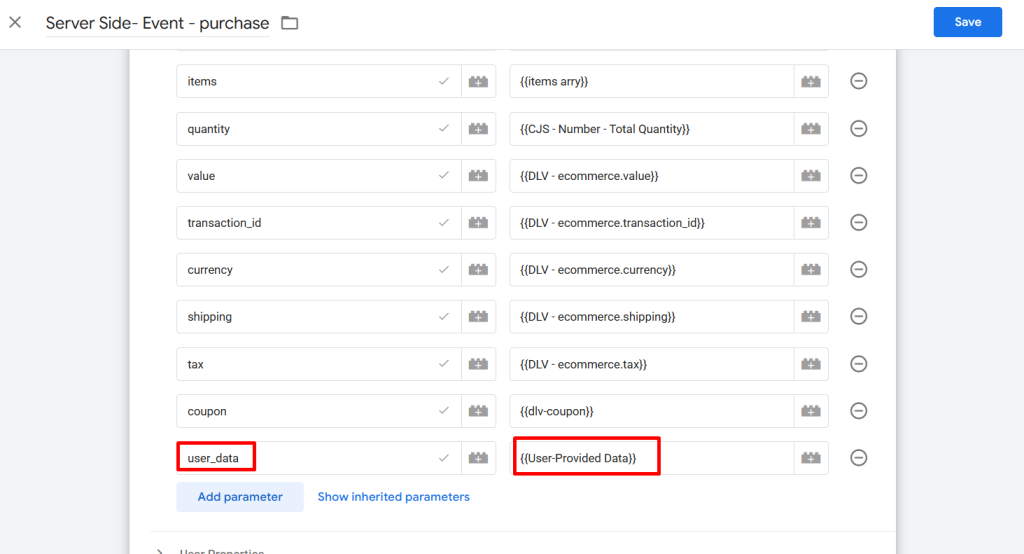
User Provided Data variable
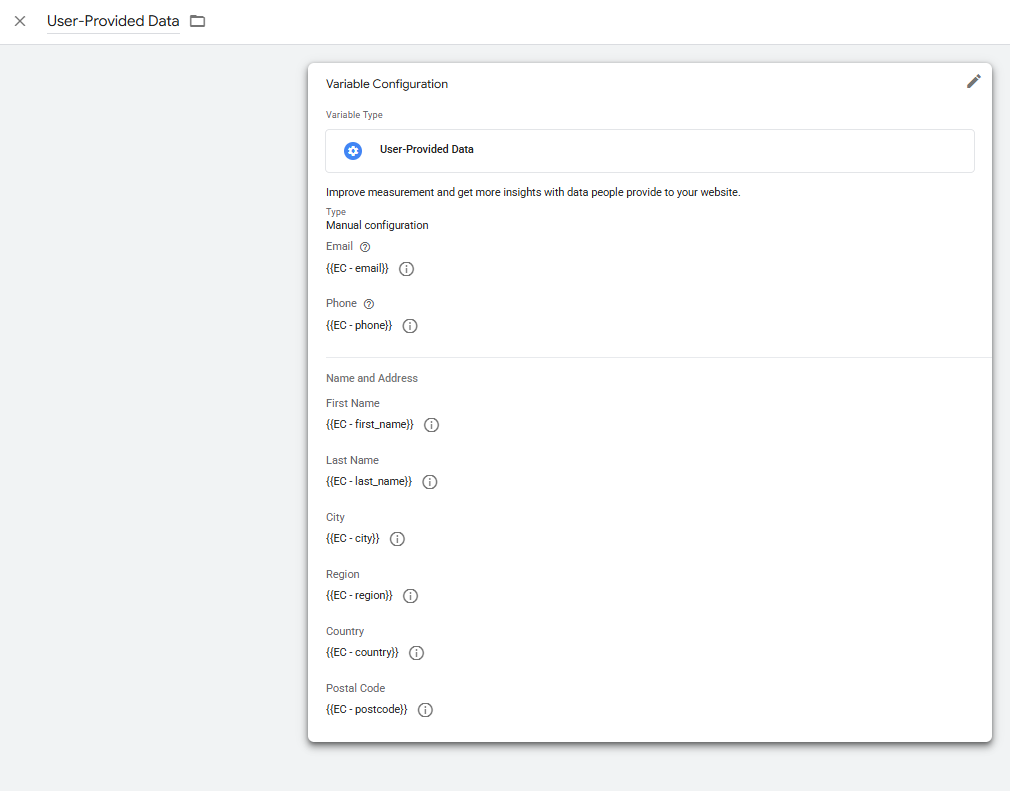
Considerations:
- Only send data for users who have provided valid consent
- Never send raw personally identifiable information (PII)
- Ensure the data is available in your data layer or server request payload at the time the conversion event fires
Hash Customer Data (SHA-256)
Before sending customer data to Google Ads, each field must be hashed using the SHA-256 algorithm.
Hashing can be performed:
- On your backend/server (recommended for security), or
- Within the GTM server container using built-in hashing features or custom logic
Configure Enhanced Conversions in GTM Server Container
- In your GTM Server Container, go to Tags.
- Add Google Ads User Provided Data tag.
- Then add the conversion id and trigger it to purchase event
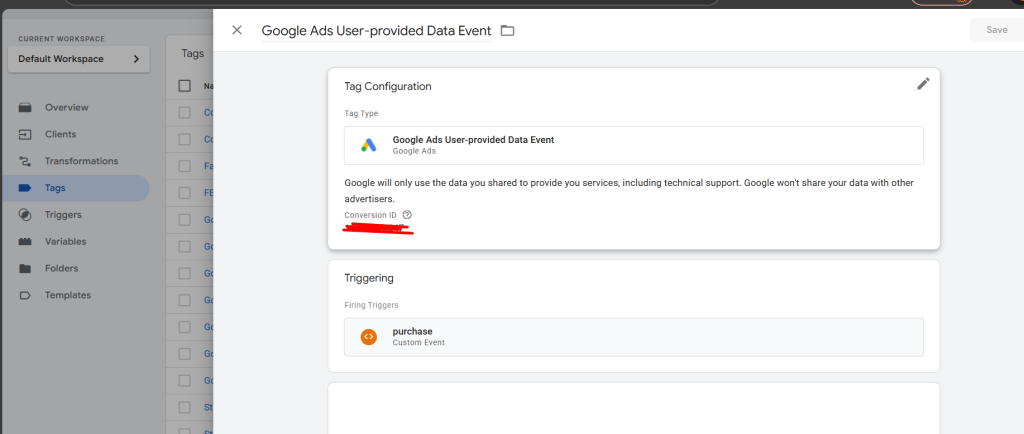
Update Your Conversion Trigger
Ensure your conversion tag fires only when:
- The correct conversion event occurs (e.g., purchase, lead_submit)
- All required hashed customer data fields are available in the event payload
Test and Validate Enhanced Conversions
- Use GTM Preview mode and server container debug tools to confirm:
- The conversion tag fires correctly
- Hashed customer data is included in the outgoing request
- In Google Ads, monitor the Enhanced Conversions status for your conversion action.
It may take up to 48 hours for Enhanced Conversion data to appear in Google Ads.


Best Practices
- Always hash data using SHA-256 before sending
- Send only consented first-party data
- Prefer server-side hashing for better security
- Use Tag Assistant or server logs to validate outgoing requests
Troubleshooting
Enhanced Conversions not active
- Confirm the feature is enabled in Google Ads
- Verify hashed parameters are mapped correctly in GTM
Data not appearing in Google Ads
- Check hashing format and normalization rules
- Ensure the conversion action matches the tag configuration
Privacy or compliance concerns
- Never send unhashed PII
- Always respect user consent signals
Summary
Server-side Enhanced Conversions strengthen Google Ads attribution by securely leveraging first-party data in a privacy-first way. When implemented correctly, they provide more reliable performance insights and help future-proof your conversion tracking strategy.