
Understanding the difference between open funnels and closed funnels is essential if you want to avoid confusion and get meaningful insights from your data.
What Is a Funnel in GA4 Explore?
A funnel in GA4 Explore shows the steps users take to complete a goal—like making a purchase, signing up, or submitting a form. For example, a typical eCommerce funnel might look like this:
- View product
- Add to cart
- Begin checkout
- Purchase
But in reality, users don’t always follow this exact path. Some skip steps, some enter midway, and some come from completely different entry points. This is where open and closed funnels come into play.
What Is a Closed Funnel?
A closed funnel is strict. It only includes users who start at the first step and then move forward through the funnel.
So if your first step is “View product,” only users who actually viewed a product will be included. If someone lands directly on the checkout page or skips a step, they won’t be counted at all.
This makes closed funnels very useful when you want to analyze a specific journey you’ve designed.
For example, if you want to understand how well your product page leads to a purchase, a closed funnel gives you a clean and focused view.
What Is an Open Funnel?
An open funnel is more flexible. It allows users to enter at any step in the funnel.
This means someone who lands directly on the checkout page or skips earlier steps will still be included from the point they enter.
Open funnels reflect real user behavior much more closely. Not every user starts at the beginning—especially if you’re running ads, email campaigns, or deep links that send users to specific pages.
Where to Find This Setting in GA4
You’ll find this option inside Funnel Exploration in GA4:
- Go to Explore
- Create a Funnel Exploration
- Add your funnel steps
- On the right-hand side (Settings panel), look for:
👉 “Make open funnel” (toggle)
- Toggle ON → Open Funnel
- Toggle OFF → Closed Funnel
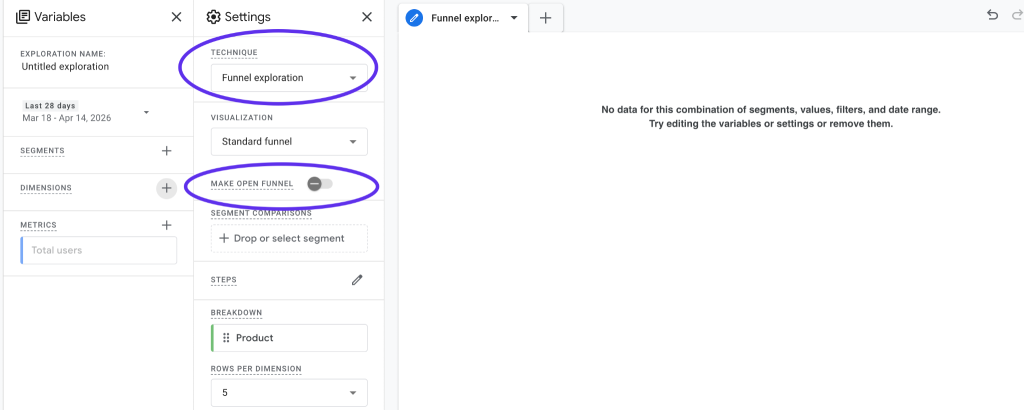
It’s easy to miss, but it plays a big role in how your funnel works.
Why This Difference Matters
The type of funnel you choose can change your numbers significantly.
With a closed funnel, your data will usually look smaller because you’re only including users who followed the exact path from the beginning.
With an open funnel, your data will be broader because users can enter at any stage.
Neither is wrong—they just answer different questions.
When Should You Use Each One?
Use a closed funnel when you want to:
- Analyze a specific user journey
- Measure step-by-step drop-offs
- Optimize a defined flow like checkout or onboarding
Use an open funnel when you want to:
- Understand real user behavior
- Include users from multiple entry points
- Get a complete picture of how conversions happen
A good approach is to start with an open funnel to understand overall behavior, and then switch to a closed funnel to dig deeper into specific issues.
A Common Mistake to Watch Out For
One common mistake is using only closed funnels and assuming the data tells the full story. This often leads to underreporting—especially if many users are entering your funnel from later steps.
If your funnel numbers seem lower than expected, try switching to an open funnel and compare the results.
Final Thoughts
Open and closed funnels are simply two different ways of looking at user journeys in GA4.
A closed funnel helps you understand how well a specific path performs. An open funnel helps you understand how users actually behave in the real world.