
Server-side tracking is no longer optional for serious marketers. With ad blockers, browser restrictions, and shrinking cookie lifetimes, relying only on client-side tracking means you are almost certainly losing data.
At Optizent, we work with businesses and agencies implementing server-side Google Tag Manager (sGTM), and one question comes up repeatedly:
“How do we prove that server-side tracking is actually improving our data?”
This is where Stape Analytics becomes extremely valuable.
Let’s break it down clearly.
The Problem: You’re Losing More Data Than You Think
Modern browsers and privacy tools block or limit tracking in several ways:
- Ad blockers stop tags from firing
- Safari and other browsers shorten cookie lifetimes
- Tracking prevention reduces attribution accuracy
- Client-side scripts fail before data reaches analytics tools
If you only use client-side tracking, your reports in tools like Google Analytics 4 may be incomplete.
Server-side tracking helps solve this.
But simply setting it up isn’t enough.
You need proof.
What Is Stape Analytics?
Stape Analytics is a built-in feature inside Stape that helps you measure how effective your server-side tracking setup is.
Instead of assuming improvement, you can see:
- How many requests were recovered
- How much traffic would have been lost without server-side tracking
- Which browsers are most affected
- How much bot traffic you’re receiving
- How individual clients (like GA4) are performing
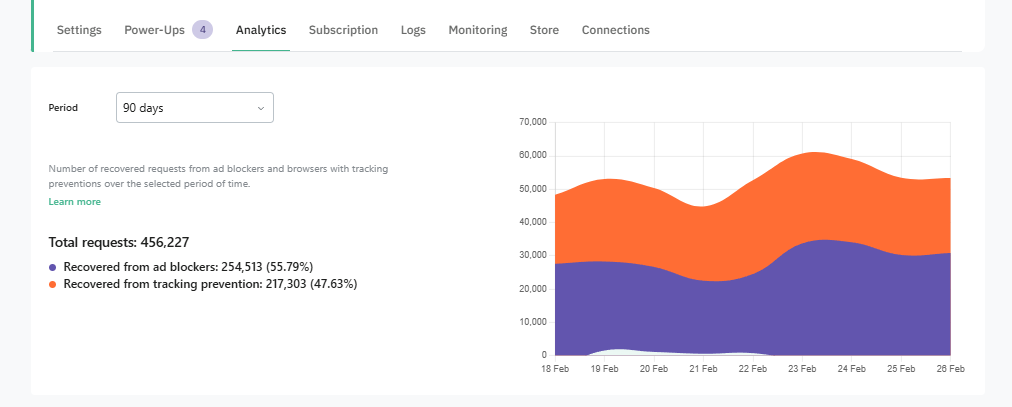
It turns server-side tracking from a technical upgrade into a measurable performance improvement.
How Stape Analytics Actually Works
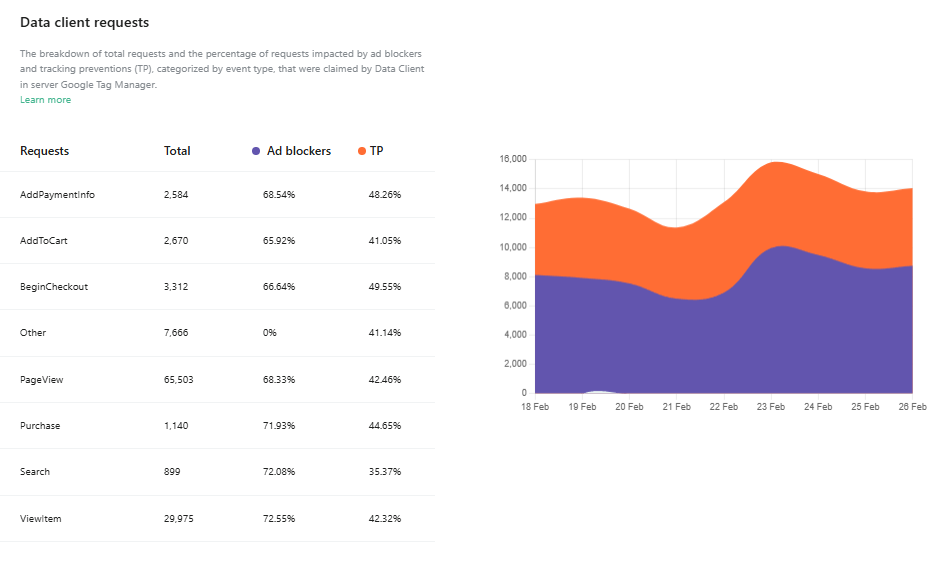
Stape Analytics relies on the Custom Loader power-up.
The Custom Loader makes GTM scripts more resistant to ad blockers. When enabled, it helps recover requests that would otherwise be blocked.
Stape Analytics then analyzes:
1. Recovered Requests
It estimates the percentage of requests that would have been lost due to ad blockers or browser tracking prevention.
2. Cookie Lifetime Impact
Browsers like Safari limit how long cookies live. Server-side tracking helps extend this lifetime. Stape Analytics shows the effect of that extension.
3. Client-Level Request Data
You can see how many requests are being processed by each client in your sGTM container, including:
- GA4
- Data clients
- Other integrations
This gives you visibility into your actual data flow.
Why This Matters for Businesses
If you run a website, you want to know:
- Is server-side tracking worth the investment?
- How much data am I recovering?
- Are my attribution numbers more reliable now?
Stape Analytics provides answers backed by real numbers.
Instead of guessing, you can quantify improvement over 10, 30, or 90 days.
Why This Matters Even More for Agencies
For agencies implementing server-side tracking, this is a reporting advantage.
Instead of saying:
“We moved you to server-side tracking.”
You can say:
“We recovered 15–25% of previously lost tracking requests in the last 35 days.”
That’s measurable ROI.
How to Enable Stape Analytics
Stape Analytics is OFF by default.
To enable it:
- Log in to your Stape account
- Open your sGTM container
- Go to Power-Ups
- Enable Custom Loader
- Navigate to the Analytics tab
- Turn it on
Important points:
- Custom Loader is mandatory
- Plugin steps differ for WordPress, Shopify, Magento, etc.
- Data may take up to 48 hours to populate
- Analytics only tracks from activation date onward
Key Features Inside Stape Analytics
1. Overall Statistics (10 / 30 / 90 Days)
You can see:
- Total requests
- Requests from users with ad blockers
- Requests affected by tracking prevention
This gives a clear estimate of:
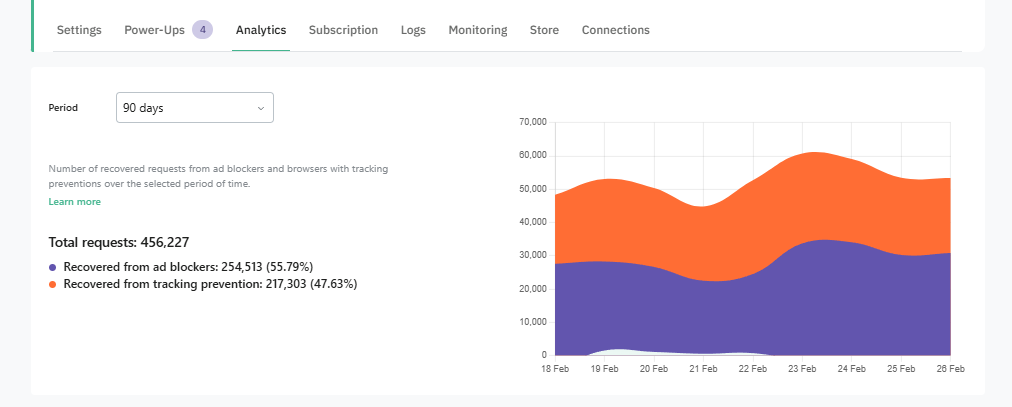
How much traffic would have been lost without server-side tracking.
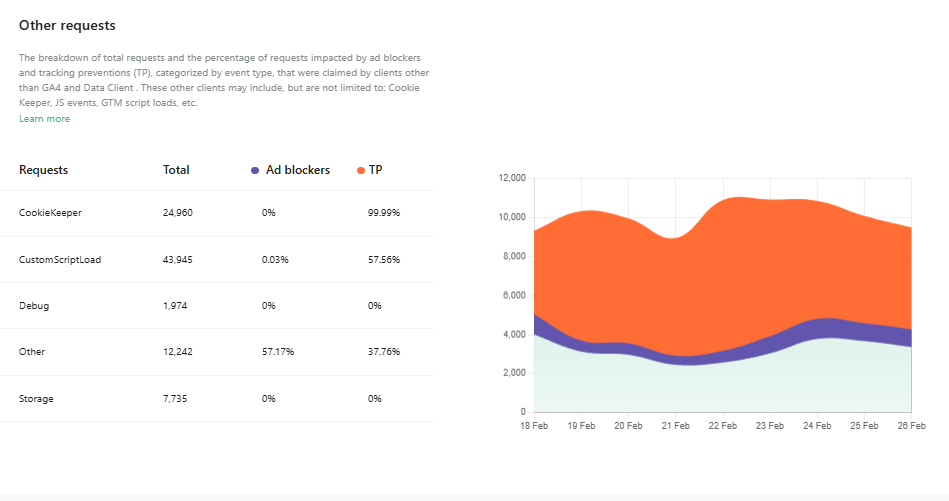
2. Client-Level Breakdown
You can view statistics for each client connected to your sGTM container separately.
For example:
- GA4 request volume
- Event-level breakdown
- Trends over time
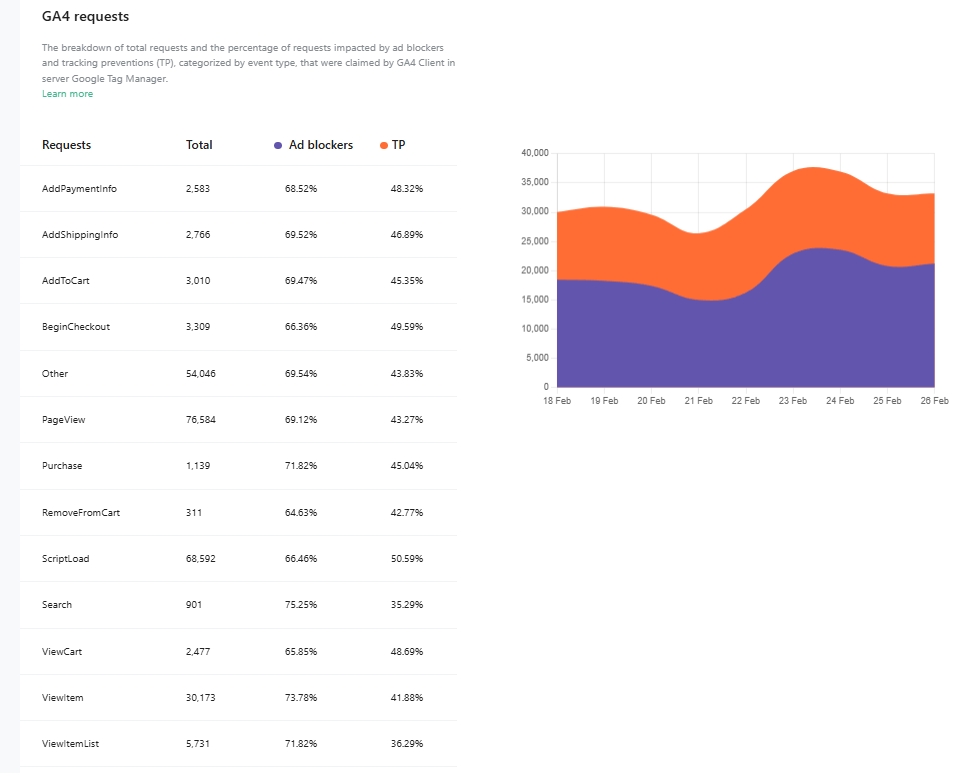
This is especially useful when debugging discrepancies between platforms.
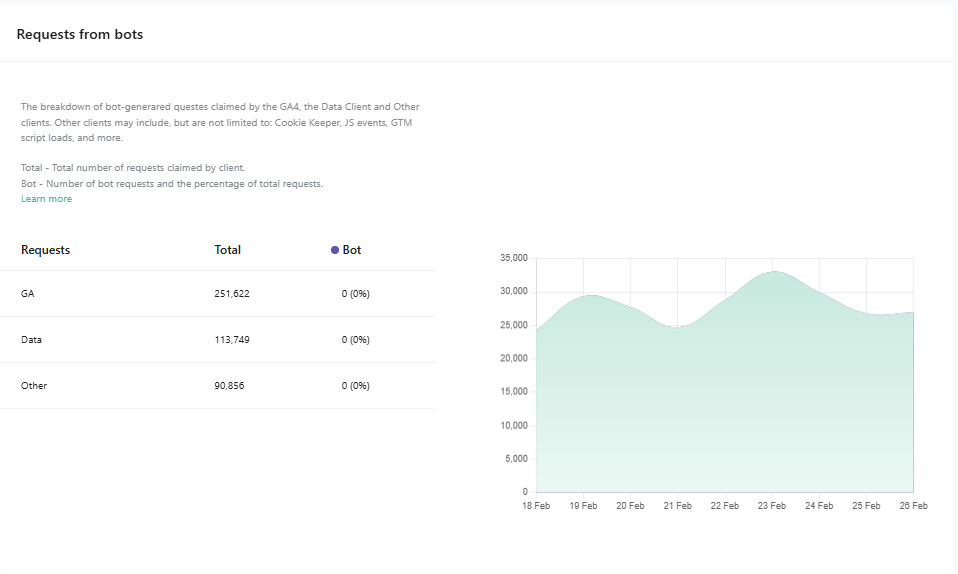
3. Bot Traffic Insights
Stape Analytics identifies bot requests from:
- GA4 signals
- Data clients
- Script loads
- JavaScript events
- Other sources
You can monitor both the number and percentage of bot requests.
This helps improve reporting accuracy
4. Browser Statistics
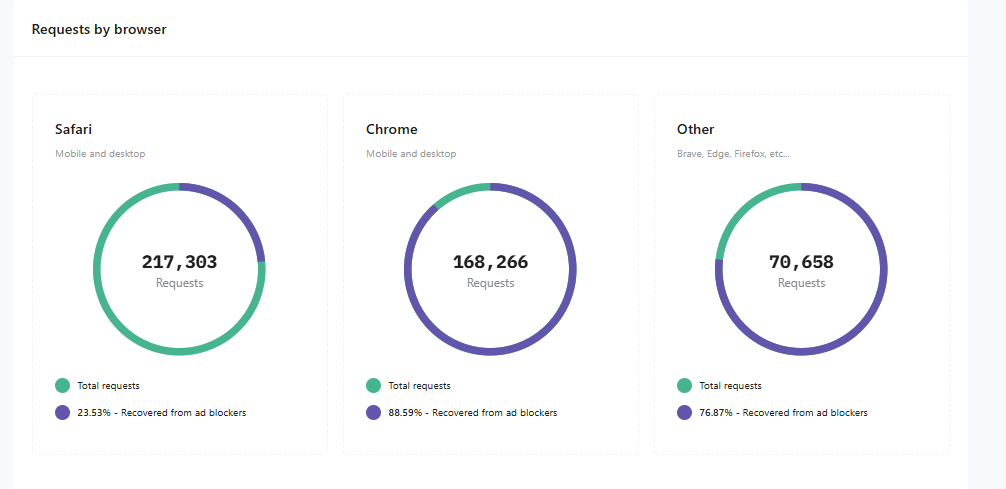
You can analyze:
- Browser distribution
- Percentage of recovered requests per browser
- Impact of ad blockers by browser
For sites with heavy Safari traffic, this is particularly important.
A Clear Takeaway for Optizent Readers
At Optizent, we focus on practical, measurable analytics improvements.
Server-side tracking is powerful — but only when:
- It is implemented correctly
- It is monitored properly
- Its impact is measurable
Stape Analytics bridges the gap between technical implementation and business results.
If you’re using server-side tracking and haven’t enabled Stape Analytics yet, you’re missing a key piece of the picture.
And if you’re still relying only on client-side tracking, the bigger question is:
How much of your data are you losing today without even realizing it?