
When you use both Meta Pixel (client-side) and Meta Conversions API (server-side), Meta can receive the same conversion event twice. Without proper deduplication, this leads to inflated conversion numbers, inaccurate attribution, and inefficient ad spend.
This guide provides a clear, step-by-step process to implement Meta event deduplication using:
- Google Tag Manager (Web container)
- Google Tag Manager (Server container)
- Meta Pixel
- Meta Conversions API (CAPI)
By the end of this setup, each conversion will be counted once and only once—even when sent from both browser and server.
Why Meta Event Deduplication Is Critical
Meta recommends that all Pixel + CAPI implementations use deduplication. Here’s why it matters:
- Accurate attribution
Prevents the same conversion from being counted twice. - Reliable performance reporting
Ensures CPA, ROAS, and conversion volume reflect reality. - Protection against browser restrictions
Server-side tracking helps recover events blocked by ITP and ad blockers. - Improved data durability
Extends the effectiveness of Meta cookies and event matching. - Compliance with Meta best practices
Required for stable and scalable tracking setups.
How Meta Event Deduplication Works
Meta deduplicates events when both the Pixel and Conversions API send:
- The same event name
- The same event_id ( thats mandatory)
- Fbp cookies
The event_id acts as a shared identifier that tells Meta both events represent the same user action.
Step 1: Set Up Event Deduplication Client-Side (Web Container)
1. Create a Unique Event ID Variable
In your GTM Web container:
- Go to Variables → New
- Click Variable Configuration
- Open Discover more variable types in the template gallery
- Search for Unique Event ID
- Add the variable and save
This variable will generate a unique ID for each event and serve as the deduplication key.
2. Add the Event ID to Meta Pixel Events
There are two common ways Meta Pixel is installed in GTM.
Option A: Meta Pixel via GTM Template
If you are using a Facebook Pixel template:
- Open the Facebook Pixel tag
- Click More Settings
- Add a new field
- Select the Unique Event ID variable
- Save the tag
If you have multiple Meta Pixel event tags (one per event), repeat this step for each tag.
Option B: Meta Pixel via Custom HTML
If your Meta Pixel is implemented using custom HTML, add the eventID parameter directly to the event.
Example (PageView):
fbq(‘track’, ‘PageView’, {}, { eventID: ‘{{Unique Event ID}}’ });
Apply this change to all Meta events fired via custom HTML.
3. Pass the Event ID Through GA4/Data Tag
To ensure the event ID reaches the server container:
- Open your Google Tag/Data Tag
- Under Configuration Parameters, add:
- Parameter name: event_id
- Value: {{Unique Event ID}}
- Save the tag
Repeat this step for all GA4 event tags.
Once completed, publish the Web container.
At this point, Meta deduplication is correctly set up on the client side.
Step 2: Set Up Event Deduplication Server-Side (Server Container)
1. Create an Event ID Variable
In your GTM Server container:
- Go to Variables → New
- Choose Event Data
In Key Path, enter:
event_id
- Name the variable
- Save
2. Configure Meta Conversions API Tag
- Open the Facebook Conversions API tag
- Go to Server Event Data Override
- Click Add Property
- Set:
- Property Name: Event ID
- Property Value: {{Facebook Event ID}}
- Save the tag
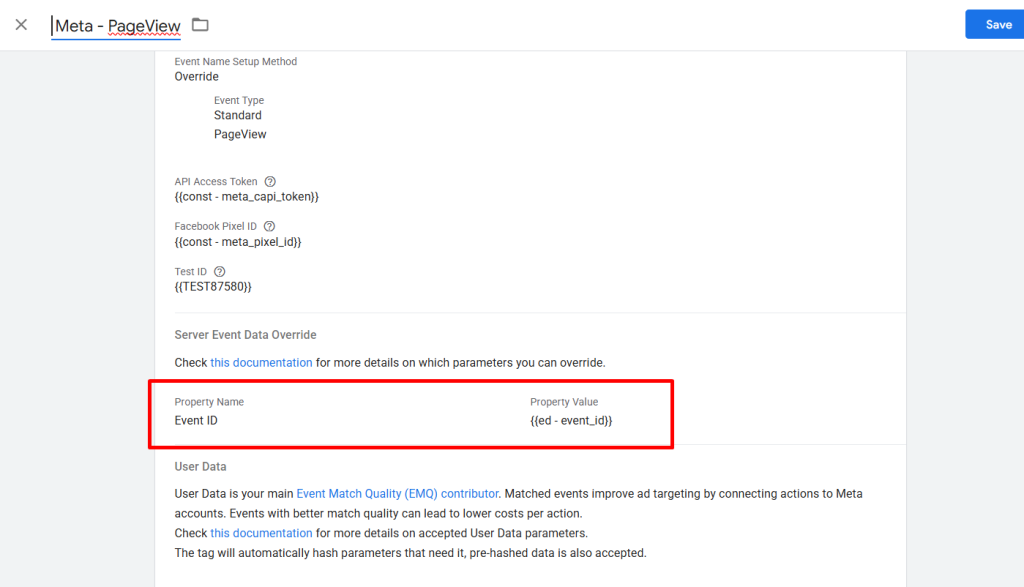
Publish the Server container.
Now both the Meta Pixel and Conversions API are sending the same event_id, enabling Meta to deduplicate events automatically.
Step 3: Test Meta Event Deduplication
To confirm deduplication is working:
- Open Meta Events Manager
- Select your Pixel
- Choose an event
- Click View Details
- Check Deduplication Keys
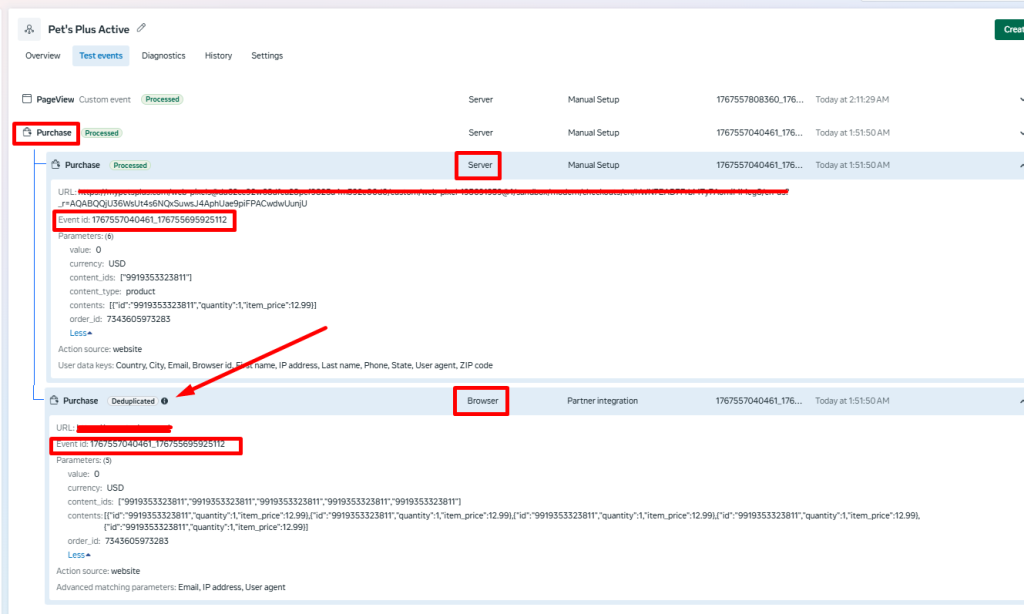
You should see Event ID listed:
- Browser events (Pixel)
- Server events (CAPI)
FAQ
How can I monitor Meta event deduplication in real time?
You can monitor deduplication by reviewing event diagnostics and deduplication metrics directly inside Meta Events Manager. Compare browser and server event volumes to ensure consistent matching and deduplication behavior.
Final Thoughts
Implementing Meta event deduplication is essential for any modern tracking setup that uses both browser and server-side data collection. With a shared event ID across Pixel and CAPI, you gain cleaner data, better attribution, and stronger confidence in your advertising decisions.