Modern browsers are steadily reducing how much advertising data can be passed through URLs. In particular, Safari and Brave—especially when users browse in Private mode—often remove ad click identifiers such as GCLID (Google Ads) and MSCLKID (Microsoft Ads).When those identifiers are missing, conversions can no longer be reliably matched back to the original ad interaction. The result is incomplete reporting, weaker bidding signals, and misleading campaign performance metrics.
Stape’s Click ID Restorer power-up is designed to solve this exact problem for advertisers using server-side Google Tag Manager (sGTM).
How Click ID Restorer Works
Click ID Restorer operates entirely on the server. Instead of relying on the browser to preserve native click identifiers, it uses a custom query parameter as a fallback.
If a browser removes the original identifier from the URL, the power-up automatically reconstructs it using the backup value and passes it forward as a standard gclid or msclkid. This ensures downstream platforms still receive the identifiers they need for attribution.
The power-up is included at no cost for all Stape users.
Advantages
Preserves attribution accuracy
Conversions from privacy-focused browsers are no longer lost, helping your ad platforms reflect actual performance rather than partial data.
Maintains bidding and optimization quality
Automated bidding systems depend on consistent conversion signals. By restoring click IDs, Click ID Restorer prevents data gaps that can degrade campaign optimization.
Built for long-term stability
Because the logic runs server-side, your setup is less exposed to future browser changes or client-side tracking limitations.
Implementation Overview
Note: The example below references Google Ads. The same configuration approach applies to Microsoft Ads using msclkid.
Step 1: Define a backup click ID in Google Ads
Start by creating a custom parameter that stores the click ID value.
- Open Google Ads → Admin → Account settings → Tracking.
- In the Final URL suffix, add a custom parameter that captures {gclid}.
- Example: backup_id={gclid}
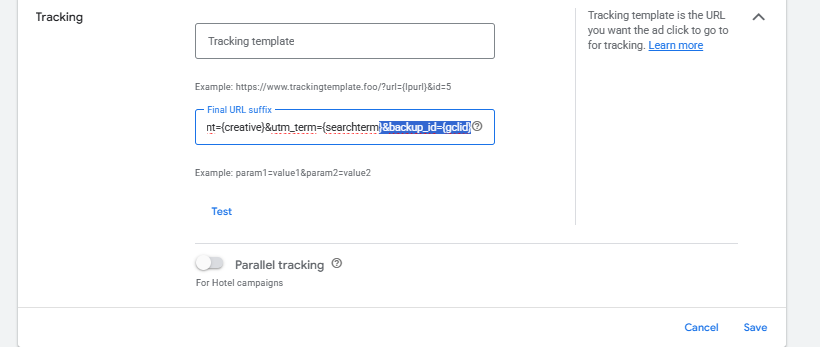
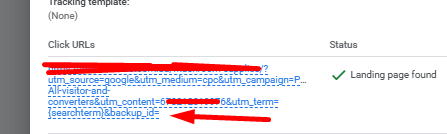
With this in place, landing page URLs will contain both parameters when possible. If the browser strips the native one, the backup parameter remains available for recovery.
Step 2: Enable Click ID Restorer in Stape
- Sign in to your Stape account.
- Open the relevant server-side GTM container.
- Navigate to Power-ups and activate Click ID Restorer.
- Enter the name of your custom backup parameter.
- Save your configuration.

Once enabled, the power-up will automatically restore missing click identifiers during server processing.
Validation and Testing
To confirm correct behavior:
- Open your sGTM container in Preview mode
- Visit your site using Safari or Brave in Private mode
- Trigger test events
- Inspect incoming server requests to verify that restored gclid or msclkid values are present
If the identifiers appear, the recovery process is functioning as intended.
Why This Matters Now
As privacy protections become stricter, advertisers can no longer rely solely on client-side identifiers. Click ID Restorer provides a practical, low-effort safeguard that helps ensure conversion tracking remains dependable—even when browsers interfere.
For teams serious about accurate reporting and sustainable ad performance, this power-up is a critical addition to a modern server-side tracking stack.
Stape Currently Provides only gclid or msclkid restore.
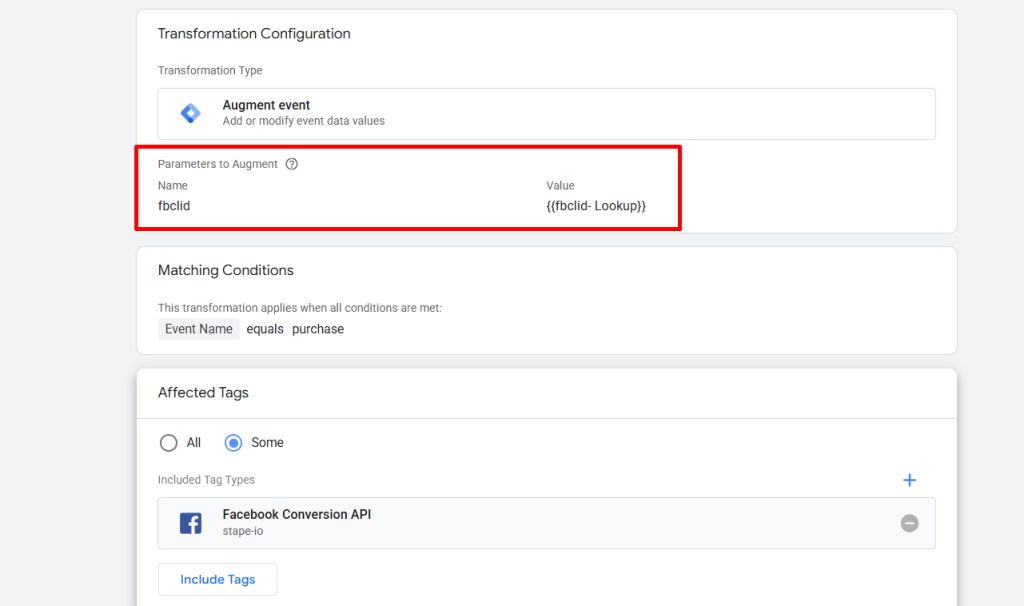
But you can add fbclid for facebook ads attribution as well by the transformation of on Server Container.