
One of the biggest challenges in server-side Google Tag Manager (sGTM) setups today is user identification.
User IDs can be lost due to:
- Cookie blocking
- Cross-domain tracking issues
- Session expiration
- Browser privacy restrictions
- Misconfigurations
- Network failures
When identifiers are missing, your analytics becomes fragmented. Sessions break. Attribution weakens. Personalization suffers.
To help solve this, Stape offers a simple solution: the User ID power-up.
Let’s break down how it works and why it matters.
Why User IDs Matter in Server-Side Tracking
Without consistent user identification:
- Returning visitors may appear as new users
- Cross-device journeys become disconnected
- Attribution models lose accuracy
- Campaign optimization suffers
In privacy-focused environments where third-party cookies are restricted, maintaining reliable user identification requires smarter infrastructure.
This is where server-side identification becomes powerful.
What Is the User ID Power-Up?
The User ID power-up automatically adds a Stape-generated user ID to every incoming request in your server GTM container.
It attaches a unique identifier called:
X-Stape-User-Id
This ID is added to the request header for every incoming request processed by sGTM.
You don’t need to modify your website code or create custom logic.
It works automatically once activated.
How the Stape User ID Is Generated
The User ID is generated as a secure hash based on:
- User IP address
- User-agent
- TLS settings
- Hostname
By combining these elements, Stape creates a consistent identifier that helps link user interactions more reliably within your server environment.
Importantly, it is generated in a way that respects privacy regulations while maintaining functionality.
Practical Use Case
Imagine a visitor:
- Visits your website from mobile.
- Returns later from desktop.
- Clicks a paid ad.
- Makes a purchase in a new session.
Without a stable identifier, these actions may appear unrelated.
With the User ID power-up:
- Each incoming request receives a consistent ID.
- You can use it inside your server container logic.
- You can pass it to tools like Google Analytics 4 for improved user stitching.
This results in cleaner user journeys and more reliable reporting.
Benefits of the User ID Power-Up
1. Reduced Data Loss
Because the User ID is added in a first-party server context:
- It is less affected by browser blocking.
- It avoids common cookie limitations.
- It improves data continuity.
2. More Control Over User Identification
You manage identification inside your server container rather than relying entirely on browser-side mechanisms.
This gives you:
- Better governance
- Clearer data ownership
- Improved compliance flexibility
3. Improved Cross-Session Tracking
Consistent identification across sessions allows:
- Better attribution modeling
- More accurate user counts
- More reliable funnel analysis
4. Enhanced Personalization
When user interactions are consistently linked:
- You can build stronger audience segments.
- Campaign targeting improves.
- Reporting becomes more meaningful.
How to Enable the User ID Power-Up
The setup process is straightforward.
Step 1: Log in to Your Stape Account
Register or log in to your Stape account.
The User ID power-up is available for free across all Stape plans.
Step 2: Activate the Power-Up
- Go to Stape Admin
- Navigate to Power-Ups
- Click Use next to User ID
- Turn on the toggle
- Click Save changes
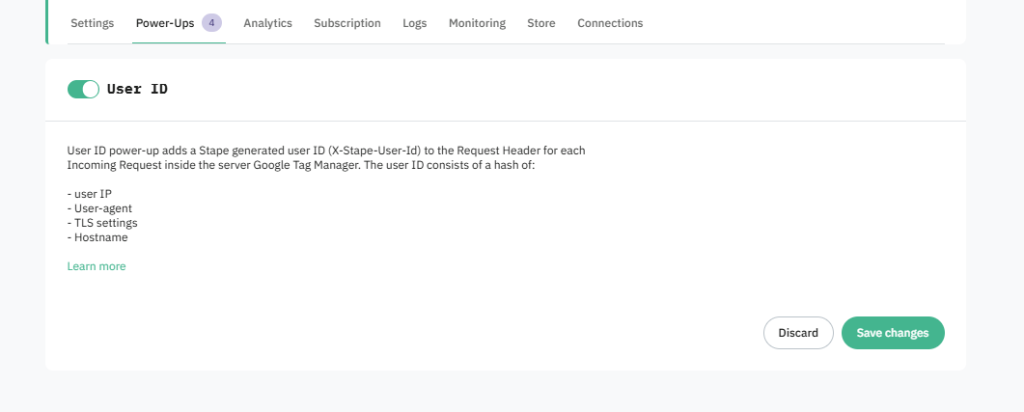
Once activated, Stape automatically adds the X-Stape-User-Id header to every incoming request inside your server GTM container.
No additional configuration is required.
Important Considerations
While this User ID improves continuity, it should be used thoughtfully:
- Ensure compliance with applicable privacy regulations.
- Update your privacy policy if necessary.
- Use it responsibly within your analytics stack.
The power-up is designed to balance functionality and privacy, but governance remains important.
Final Thoughts
As third-party cookies decline and privacy regulations tighten, maintaining consistent user identification becomes increasingly complex.
The User ID power-up inside Stape provides a practical and privacy-aware way to strengthen your server-side tracking.
By automatically adding a unique identifier to every sGTM request, you gain:
- More reliable user tracking
- Reduced data fragmentation
- Improved analytics accuracy
If you’re running server-side GTM and want to improve user-level data consistency, enabling the User ID power-up is a simple and effective step forward.
And if you encounter any issues during setup, Stape’s support team is available to help.