
There’s a belief I run into constantly, and it’s one of the more expensive misconceptions in analytics: “We moved to server-side, so consent is handled.”
It isn’t. And the teams that assume it is are often the ones carrying the most compliance risk – because they’ve moved their tags to a place where consent is less automatic, not more, while believing the opposite.
Let me explain exactly why that’s true, how consent actually travels to a server container, and how to configure it properly – including the part that trips up most implementations: non-Google tags.
First, what server-side actually changes
Standard Google Tag Manager runs in the browser. When a page loads, the container script downloads, evaluates your tags, and fires them directly from the visitor’s device to GA4, Google Ads, Meta, and everywhere else. That’s why ad blockers can intercept it, why Safari’s ITP caps the cookies it sets, and why a privacy extension can pick off individual tags.
Server-side tagging moves that execution off the device. The browser sends a single request to your server container – usually on a first-party subdomain like sgtm.yourdomain.com – and your server fans the data out to the vendors. The browser only ever talks to your own domain.
The wins are real: better cookie durability (cookies set via HTTP response headers aren’t capped the way JavaScript cookies are under ITP), a lighter client-side payload, and genuine control over what data leaves your infrastructure before it reaches a third party.
But notice what didn’t change: you’re still sending a user’s behavioural data to Meta, to Google, to TikTok, for advertising and analytics purposes. Consent law cares about that – about who receives personal data and what they do with it – not about where your code runs. Relocating a Meta pixel from the browser to your server doesn’t make the data transfer to Meta consentless. It just changes the mechanics of how the transfer happens.
That’s the whole myth in one sentence: server-side changes where tags execute, not whether they need consent.
Why server-side is actually less consent-aware by default
Here’s the part that surprises people. In the browser container, Google’s own tags – GA4, Google Ads, Floodlight – have consent checks built in. Consent Mode is native there. You configure defaults, your CMP updates them, and Google’s tags respect the state automatically.
Move to the server container and that built-in awareness only partially carries over. The GA4 Client in your server container can read Google’s consent signals automatically, and Google’s server-side tags will respect them. But every non-Google tag in that server container – Meta CAPI, TikTok Events API, LinkedIn CAPI, Pinterest, any custom HTTP tag – has zero awareness of consent unless you build it in. They don’t read Google’s consent parameters. They fire unconditionally.
So the naïve mental model (“it’s on my server now, it’s more private”) is backwards for exactly the tags that matter most for advertising. Without explicit configuration, your server-side Meta tag is less consent-aware than the browser pixel it replaced.
How consent actually travels to the server container
To fix this, you need to understand how consent state physically gets from the browser to the server. It rides along inside the HTTP request as two encoded parameters.
gcs – the Google Consent State (v1). Format G1xy:
- x = ad_storage (1 granted, 0 denied)
- y = analytics_storage (1 granted, 0 denied)
So:
| gcs value | ad_storage | analytics_storage |
| G100 | Denied | Denied |
| G101 | Denied | Granted |
| G110 | Granted | Denied |
| G111 | Granted | Granted |
gcd – the Google Consent Default (v2). This one encodes all four v2 parameters (ad_storage, analytics_storage, ad_user_data, ad_personalization) and the journey each took. Each position carries a letter describing how the state was reached – for example l = defaulted to denied and never updated (the user never touched the banner), q = defaulted denied then updated to granted (the user accepted), t = defaulted granted with no update (a region where consent isn’t required). That “journey” encoding is why gcd matters: it distinguishes a user who actively accepted from one who was granted-by-default.
Both parameters travel inside the /g/collect request from the browser to your server endpoint. The GA4 Client in your server container decodes them and exposes the consent state to your tags as event data.
The consent gate belongs in the browser – not the server
Before touching the server config, one architectural point that’s easy to get wrong.
The place where consent is decided is the browser container. Your CMP captures the choice, Consent Mode records it, and the browser gates behaviour accordingly. The server container only ever receives what the browser already sent. It has no independent way to know the user’s consent state – it’s entirely dependent on the incoming request.
This is why “fire everything to the server unconditionally, then sort out consent on the server” is a broken pattern. If the browser sends the event, the server sees an event; it can’t retroactively know the user actually refused. Your defaults and your CMP updates must be correct in the web container first. Everything downstream inherits from that.
If you haven’t got the web-side foundation right – consent defaults set to denied for GDPR regions, the CMP tag on the Consent Initialization trigger so it runs before anything else, wait_for_update set (typically ~500ms) for asynchronous CMPs – then no amount of server-side configuration will save you.
Google tags in the server container: automatic
Assuming the web side is correct, Google’s server-side tags need essentially nothing extra. The GA4 Client reads gcs/gcd off the incoming request, decodes it, and Google’s tags (GA4, Google Ads, Floodlight) adjust their own behaviour. If ad_user_data is denied, the Google Ads tag won’t include personal data in what it forwards. If analytics_storage is denied, GA4 adjusts its cookie behaviour and sends cookieless pings.
This automatic chain holds as long as three things are true:
- The web container is correctly setting defaults and processing CMP updates.
- Nothing between the browser and your server – a CDN, reverse proxy, or load balancer – is stripping or rewriting query parameters. (This happens more than you’d think.)
- The GA4 Client is the one claiming the incoming request. A generic HTTP client won’t decode Google’s consent encoding.
Non-Google tags: the manual gap you have to close
This is where most server-side consent implementations quietly fail. Meta CAPI, TikTok Events API, LinkedIn CAPI – none of them read gcs or gcd. Left alone, they fire on every request regardless of consent.
Picture it concretely: a user in France rejects consent. The web container respects it and sends a cookieless ping with gcs=G100. Your GA4 Client parses that, marks consent denied, and your GA4 server tag behaves correctly. But your Meta CAPI tag, sitting in the same container, fires to Meta’s servers with whatever arrived in the request – potentially IP, user agent, event data. The user refused. Google respected it. Meta didn’t.
You close this gap one of two ways.
Option 1: Stape’s consent-aware tags (the fast path)
If you’re running Stape’s server-side tag templates, this is largely handled for you. Stape modified its tags to read the consent state passed from the web container – either via GA4’s own signals or via the Stape Data Tag – and gate themselves accordingly. The tags that support this include:
- Facebook Conversion API
- TikTok Events API
- Snapchat Conversion API
- Pinterest Conversion API
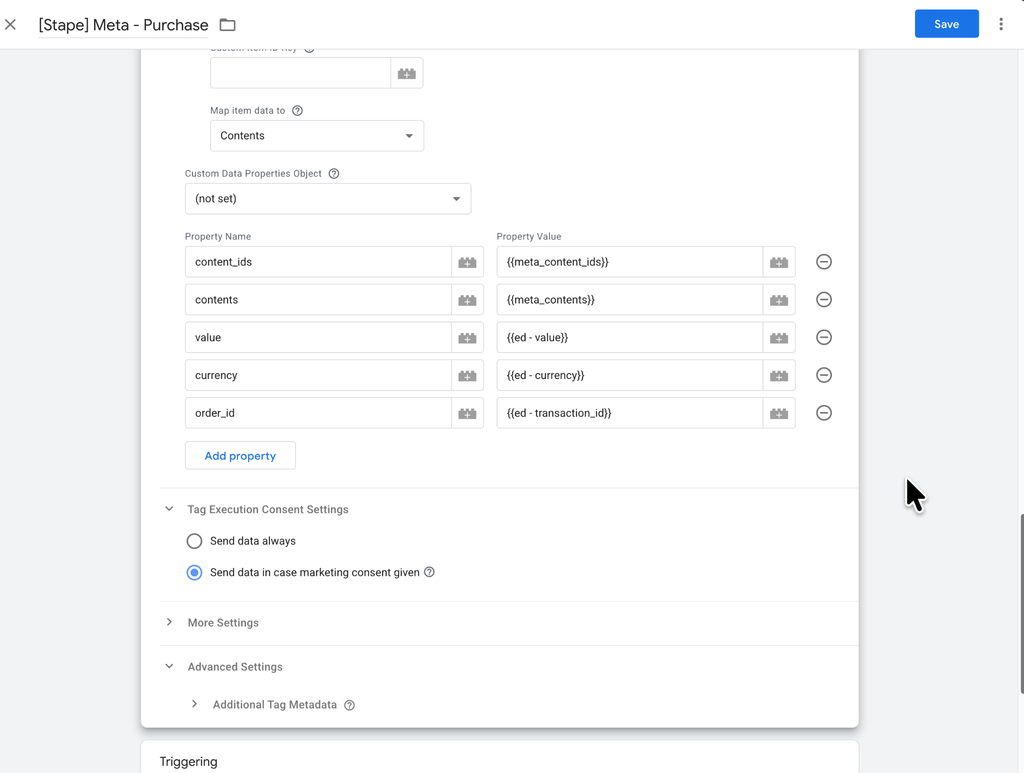
In the tag, you expand Consent Settings and enable “Send data if marketing consent is given.” Once that’s on, the tag only fires when marketing consent is present (gcs=G110/G111, or the Data Tag reporting ad_storage granted). It turns a manual trigger-building exercise into a checkbox, which is the main reason I lean on these templates rather than hand-rolling consent logic on every vendor tag.
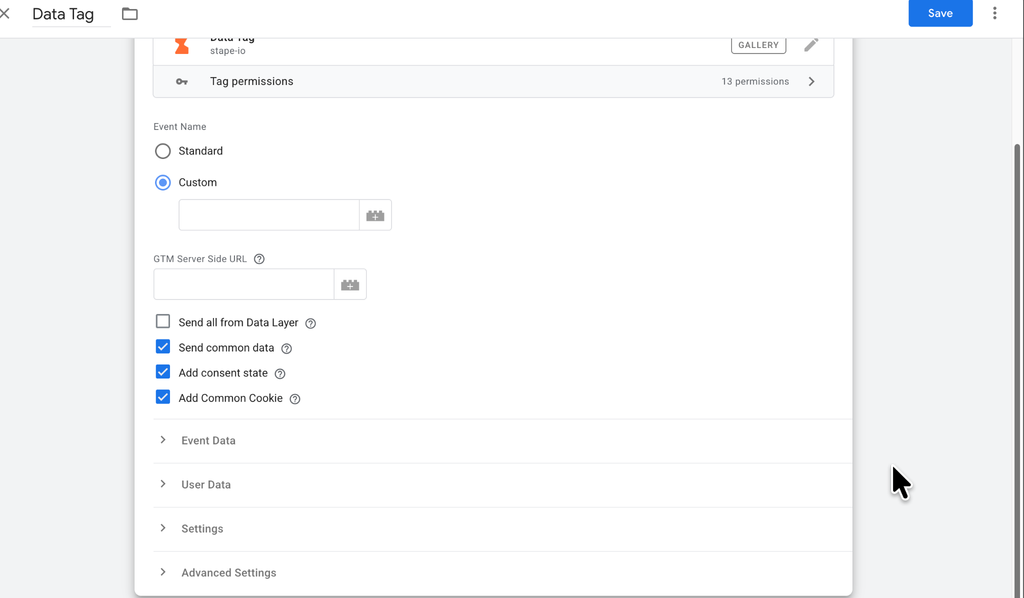
There’s also the Stape Data Tag approach for getting a richer consent object to the server. With “Add consent state” enabled, it attaches a consent_state object to the request containing ad_storage, analytics_storage, functionality_storage, personalization_storage, and security_storage – which gives you all four v2 signals explicitly rather than decoding them out of gcd.
Option 2: Build the triggers by hand (the portable path)
If you’re not on Stape’s templates – or you want the enforcement to be explicit and auditable – you build the consent check yourself.
Create a User-Defined Variable of type Event Data in the server container, reading the key path x-ga-gcs. That pulls the consent string off the incoming GA4 request. Then gate your non-Google tags with trigger conditions or exceptions against it.
For example, to block a tag whenever ad_storage is denied, add an exception matching:
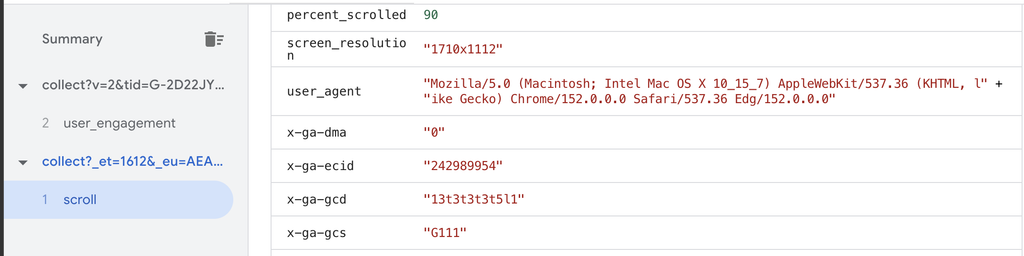
x-ga-gcs matches RegEx G(100|101)
(Both G100 and G101 have ad_storage = 0.) To require analytics_storage, block on G(100|110).
The cleaner, more maintainable version is to parse the full state once and gate on named signals, so your Meta CAPI purchase tag reads like a specification rather than a regex puzzle:
Tag: Meta CAPI – Purchase
Fire when:
– event_name equals “purchase”
– ad_user_data equals “granted”
– ad_storage equals “granted”
That’s the version I prefer, because it doubles as documentation. When a privacy review asks “how do you enforce consent for Meta server-side events?”, the answer is visible in the tag’s own trigger conditions – not buried in a policy doc that may not match reality.
Build the consent map – it’s your audit artifact
For anything beyond a trivial setup, write down which consent signals each server-side tag requires and what it does when they’re denied. Something like:
| Server-side tag | Required signals | When denied |
| GA4 | analytics_storage | Automatic (GA4 Client) |
| Google Ads | ad_storage, ad_user_data | Automatic (GA4 Client) |
| Meta CAPI | ad_storage, ad_user_data | Manual trigger / Stape checkbox |
| TikTok Events API | ad_storage, ad_user_data | Manual trigger / Stape checkbox |
| LinkedIn CAPI | ad_storage, ad_user_data | Manual trigger / Stape checkbox |
This table is worth more than it looks. It’s the difference between believing you’re compliant and being able to demonstrate it from your actual container configuration.
The failure modes I see most often
A few specific ways server-side consent breaks in the wild – worth checking against your own setup:
Stripped parameters. A CDN or reverse proxy in front of your server container rewrites or drops query strings, and gcs/gcd vanish before the GA4 Client ever sees them. Verify in the server container’s Preview mode: open an incoming request and confirm both parameters are present in the event data.
The wrong Client claiming the request. If a generic HTTP Client grabs the incoming request instead of the GA4 Client, the consent encoding never gets decoded. Only the GA4 Client knows how to read Google’s format.
Case-sensitive name mismatches. Server-side GTM trigger conditions are case-sensitive. If your Client is named ga4 but a trigger checks for GA4 in the Client Name field, nothing matches – and that can silently break firing across the container, consent logic included.
The GCS-parameter method missing late consent. If you gate purely on the gcs value of the first request, you can miss the user who lands, gets a denied state, then accepts on the same page – because the browser may not resend an updated value on that same pageview. This is exactly why I prefer driving server-side consent off the CMP’s custom consent-update event (the dedicated event most CMPs push when the user makes a choice) rather than off a single request’s gcs snapshot. It catches the update instead of freezing the first state.
Assuming server-side means consent is handled. The one we started with. Moving tags server-side changes where they execute – nothing more. Without explicit configuration, server-side tags respect consent less than their client-side equivalents, not more.
How to actually verify it
Don’t trust a server-side consent setup you haven’t watched work. Before you rely on it:
- Web container, denied path. In web Preview, land on the page in a GDPR context and confirm defaults are denied for all four v2 signals before any tag fires – check the Consent tab’s on-page default values.
- Web container, granted path. Accept the banner and confirm the on-page update flips to granted.
- Server container, incoming request. In server Preview, open an incoming request and confirm gcs and gcd are present and that the GA4 Client parsed them into event data.
- Server container, tag outcomes. In the Tags tab, confirm each non-Google tag shows Fired or Blocked according to the consent state – reject consent and watch your Meta/TikTok/LinkedIn tags actually get blocked, not just your Google ones.
If rejecting consent still lets a non-Google tag fire, your gate isn’t real yet – regardless of how the setup looks on paper.
Summary
Server-side tagging is one of the best things you can do for data quality and resilience. It genuinely helps against ad blockers and ITP, and it gives you real control over what leaves your domain. But it is not a consent strategy, and it is not a shortcut around consent law.
The mental model that keeps you out of trouble is simple: consent is decided in the browser, encoded into gcs/gcd, and must be explicitly enforced in the server container – automatically for Google’s tags, deliberately for everyone else. Get the web-side defaults right, let the GA4 Client carry the signal, gate every non-Google vendor on that signal, and validate the denied path with your own eyes.
Do that, and server-side gives you the accuracy and the compliance. Skip the non-Google gating, and you’ve just built a faster, more durable way to ignore your users’ choices – which is the opposite of the point.