
When looking at website traffic in Google Analytics 4 (GA4), one of the first things marketers want to know is where their visitors are coming from.
Are people finding the website through Google Search? Are they clicking on paid ads? Are email campaigns bringing visitors back?
GA4 provides two reports to help answer these questions: User Acquisition and Traffic Acquisition.
At first glance, both reports may look similar because they show traffic sources, campaigns, and engagement. However, they measure different things. Understanding the difference can help you read your reports correctly and avoid drawing the wrong conclusions.
Let’s take a closer look.
What is the User Acquisition report?
The User Acquisition report helps you understand how people first discovered your website or app.
It focuses on new users and the source or channel that originally brought them to your website.
For example, imagine someone visits your website for the first time after clicking an organic Google Search result. A few days later, they return by clicking a link in an email campaign.
In the User Acquisition report, that person is still attributed to Google / Organic because Google Search was the source that first brought them to your website.
This report is useful when you want to understand which marketing channels are helping you attract new users.
Some commonly used dimensions include:
- First user source
- First user medium
- First user source / medium
- First user campaign
- First user default channel group
For example, you can use First user source / medium to see whether new users initially came from google / organic, google / cpc, or newsletter / email.
What is the Traffic Acquisition report?
The Traffic Acquisition report looks at things differently. Instead of focusing on how someone first discovered your website, it shows where each website session came from.
A session is a period of activity when someone visits and interacts with your website or app.
Let’s use the same example.
A person first visits your website through Google organic search. A few days later, they return by clicking an email campaign.
In the Traffic Acquisition report, the first visit is attributed to Google / Organic, while the later visit is attributed to Email, assuming the email campaign is correctly tagged.
This report helps you understand which channels are bringing visitors back and generating sessions.
Some commonly used dimensions include:
- Session source
- Session medium
- Session source / medium
- Session campaign
- Session default channel group
User Acquisition vs. Traffic Acquisition: What’s the difference?
The easiest way to remember the difference is:
- User Acquisition: Where did the user first come from?
- Traffic Acquisition: Where did each session come from?
Here’s a simple example:
Imagine a visitor discovers your website through Google Search, returns through an email campaign, and visits again by clicking a Facebook ad.
| Visit | Traffic source | User Acquisition | Traffic Acquisition |
| First visit | Google / Organic | Google / Organic | Google / Organic |
| Second visit | Google / Organic | ||
| Third visit | Facebook / Paid Social | Google / Organic | Facebook / Paid Social |
Notice that the User Acquisition report continues to show the original source, Google / Organic, for that user. The Traffic Acquisition report shows the source associated with each individual session.
This is why the numbers in the two reports can be different, even when you’re looking at similar metrics.
Where can you find these reports in GA4?
You can access both reports from your GA4 property.
- Open your GA4 property.
- Go to Reports in the left-hand navigation.
- Select Acquisition.
- Choose either User acquisition or Traffic acquisition.
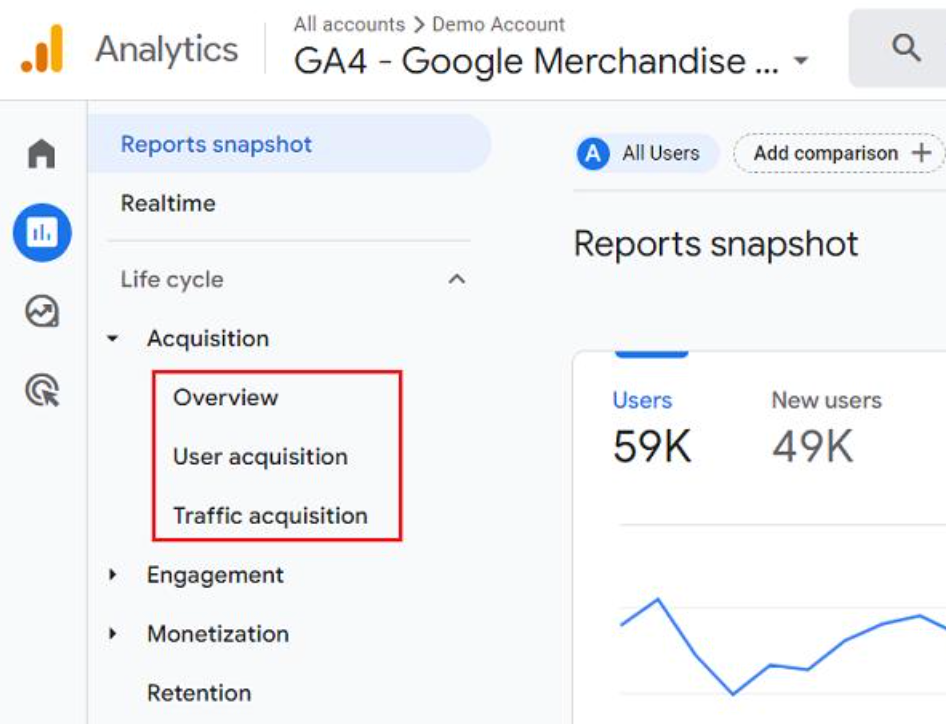
You can change the primary dimension in each report to explore different sources, mediums, campaigns, and channel groups.
If you don’t see one of these reports, it may have been removed from your report navigation. An Editor or Administrator can add it back.
When should you use each report?
Both reports are useful, but the right one depends on what you’re trying to understand.
Use User Acquisition when you want to know:
- Which channels are bringing new users to your website?
- Are SEO efforts helping attract new visitors?
- Which campaigns are helping us reach new audiences?
Use Traffic Acquisition when you want to know:
- Which channels are generating the most sessions?
- Are email campaigns bringing visitors back?
- How are paid and organic campaigns performing across website visits?
You don’t necessarily need to choose one over the other. Looking at both reports gives you a better understanding of how people discover your website and how they return.
Final thoughts
User Acquisition and Traffic Acquisition may look similar in GA4, but they answer two different questions.
Understanding the difference between these two reports helps you get more value from your GA4 data. One shows how you attract new users, while the other shows how your marketing channels continue to bring visitors to your website. Looking at both gives you a better understanding of your audience and helps you make more informed marketing decisions.
GET EXPERT ANALYTICS HELP
Need help making GA4 data work for your business?
Tell us about your tracking or reporting challenge. Optizent can help with GA4 implementation, audits, key events, attribution, and training.
We will use these details to respond to your request. Please do not include passwords, account access, or customer data.