
If your business handles health-related data, tracking setup is no longer just a marketing concern—it becomes a compliance concern.
Many healthcare providers, clinics, telehealth businesses, and health-tech platforms use analytics and advertising tools without realizing their setup may create HIPAA risk.
In this guide, we’ll break down what HIPAA means for tracking, why traditional analytics setups can be problematic, and how server-side tagging can help you build a more privacy-conscious tracking architecture.
Why HIPAA Matters for Tracking
The Health Insurance Portability and Accountability Act is a U.S. law designed to protect sensitive patient health information.
If your organization collects, stores, or transmits Protected Health Information (PHI), you need to be careful about what data is sent to third-party platforms.
That includes analytics and advertising tools.
Sending PHI to vendors that are not authorized to receive it can create serious compliance risk.
Why Standard Analytics Setups Can Be Problematic
Most common analytics tools were not built for HIPAA-regulated environments.
For example, Google Analytics is generally not designed to receive PHI.
That means if your website sends identifiable health-related information into GA4, ad platforms, or similar tools, you may be exposing protected data inappropriately.
What Counts as Protected Health Information?
PHI can include:
- Patient names
- Email addresses
- Phone numbers
- Physical addresses
- IP addresses
- Medical record numbers
- Appointment/treatment details
- Diagnosis information
- Billing/payment information related to healthcare
Even combinations of data points can become PHI if they identify an individual in connection with healthcare services.
The Core HIPAA Tracking Principle
A practical rule of thumb:
Do not send PHI to third-party analytics or advertising vendors unless the legal and contractual requirements are met.
That often means one of two things:
- The vendor signs a Business Associate Agreement (BAA), where applicable
- You remove/de-identify protected data before forwarding it
How Server-Side Tracking Helps
Server-side tagging gives you more control over what data is shared with each platform.
Instead of browser scripts sending data directly to multiple vendors:
Traditional Client-Side Setup
Browser → Google / Meta / Other Vendors
Server-Side Setup
Browser → Your Server Container → Vendors
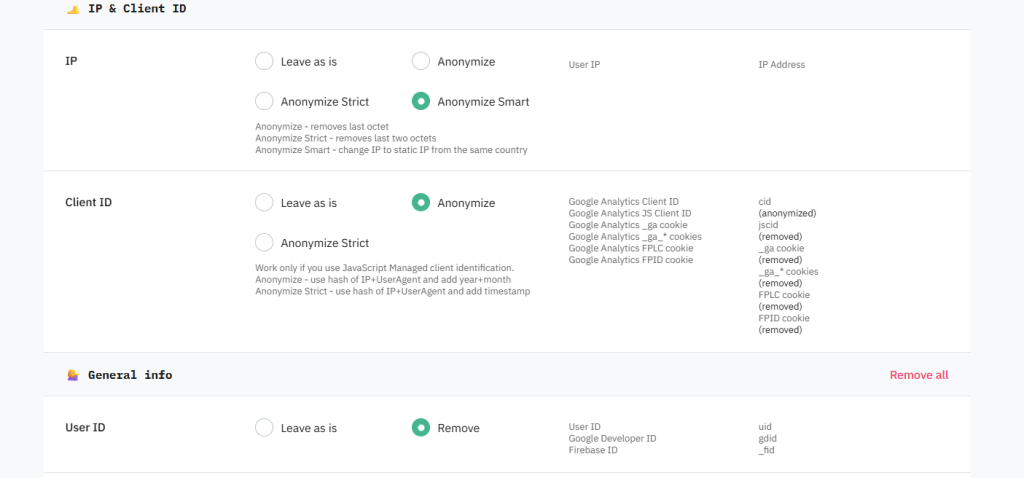
This architecture creates a control layer where you can inspect, modify, and restrict outbound data.
That makes privacy filtering significantly easier.
Key Ways Server-Side Tracking Supports More HIPAA-Conscious Architecture
1. Centralized Data Control
Inside your server container, you can define:
- Which vendors receive data
- Which parameters are removed
- Which identifiers are transformed
- Which events are blocked entirely
This is far more controlled than loading multiple third-party scripts directly in the browser.
2. Data Minimization Before Forwarding
Before sending events to analytics tools, you can:
- Remove personal identifiers
- Strip PHI-related parameters
- Mask IP addresses
- Replace identifiers with anonymized values
3. Reduced Vendor Exposure
With client-side tracking, every embedded third-party script can potentially access page-level data.
With server-side tagging:
Vendors only receive the data you explicitly send.
That reduces unnecessary exposure.
Business Associate Agreements (BAAs)
If a vendor will process PHI on your behalf, a Business Associate Agreement may be required.
A BAA defines how that vendor must handle protected information.
Without appropriate agreements in place, sending PHI to a vendor may be problematic from a compliance perspective.
Important Limitation: Server-Side Tracking Does Not Automatically Make You HIPAA-Compliant
This is critical:
Server-side tagging alone does not make a setup HIPAA compliant.
Compliance depends on:
- Your legal obligations
- Your data flows
- Vendor agreements
- Internal policies
- Security controls
- Actual implementation details
Server-side tracking is a tool that can support a more privacy-conscious setup—but it is not a substitute for legal/compliance review.
Practical Best Practices
If you operate in a HIPAA-sensitive environment:
Review Every Parameter Sent
Audit exactly what data enters your analytics pipeline.
Remove Sensitive Data Early
Filter PHI before forwarding events downstream.
Limit Vendor Access
Only send each vendor the minimum necessary data.
Involve Legal/Compliance Teams
Do not treat tracking architecture decisions as purely technical.
Final Thoughts
Healthcare and health-adjacent businesses need to approach tracking differently than standard ecommerce or lead-gen sites.
Traditional analytics setups can expose more data than intended, especially when multiple browser-side scripts are involved.
Server-side tagging provides a more controlled architecture by letting you:
- Centralize data routing
- Filter outbound payloads
- Restrict vendor access
- Build more privacy-conscious data flows
But implementation matters.
The technology helps—only when configured correctly.
If you are handling sensitive health-related data, treat tracking design as part of your compliance strategy, not just your marketing stack.