
One of the most common problems in analytics isn’t missing data.
It’s bad data.
A developer accidentally ships a typo in an event name.
A new feature launches with tracking that wasn’t reviewed.
A third-party integration starts sending unexpected events.
Before anyone notices, dashboards are using inconsistent data and analysts are trying to figure out which event is actually correct.
If you’ve managed analytics for a growing product, you’ve probably experienced some version of this problem.
The larger your team becomes, the harder it is to maintain control over what gets tracked.
That’s why Mixpanel introduced Event Approval.
Instead of allowing every newly ingested event to immediately appear throughout your project, Event Approval gives organizations a review process before new events become visible to the rest of the team.
In this article, we’ll explore how Mixpanel Event Approval works, why it’s important for data governance, and how it can help organizations maintain cleaner and more trustworthy analytics.
Why Unexpected Events Create Analytics Problems
Analytics implementations rarely stay static.
Every month, teams release new features, update tracking, add integrations, and modify existing workflows.
As a result, new events are constantly being introduced into your analytics platform.
The challenge is that not every new event should automatically become part of your reporting environment.
For example, imagine a developer accidentally sends:
signup_complete
instead of:
sign_up_completed
Or a new feature introduces:
user_clicked_button
without following your organization’s naming conventions.
These events may seem harmless, but over time they create several issues:
- Inconsistent reporting
- Duplicate metrics
- Dashboard confusion
- Increased maintenance
- Reduced trust in analytics
When analysts can’t confidently determine which event should be used, reporting quality begins to suffer.
This is where Event Approval becomes valuable.
What Is Mixpanel Event Approval?
Event Approval is a Data Governance feature available on Mixpanel Enterprise plans.
The feature gives organizations visibility and control over newly ingested events before they become visible across the project.
When enabled:
- New events are hidden by default
- Administrators receive notifications when new events arrive
- Events can be reviewed before being exposed to users
- Teams can add descriptions, tags, and metadata before approval
Think of it as a moderation workflow for your analytics implementation.
Instead of allowing new events to immediately appear in reports and dashboards, they first pass through a review process.
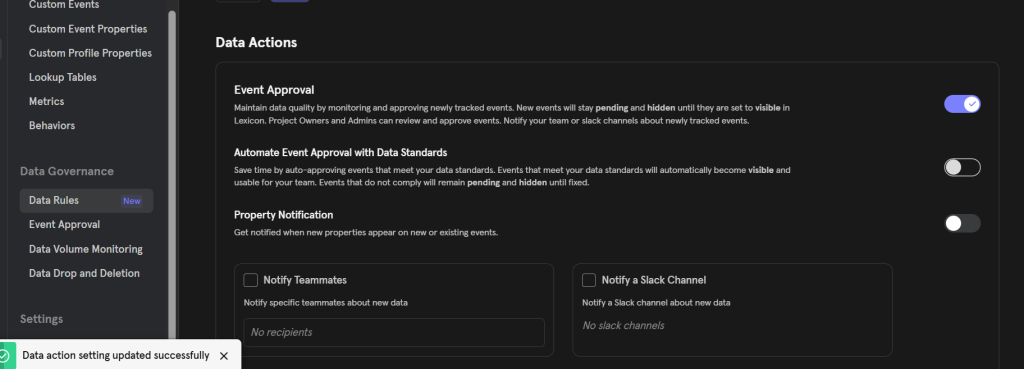
This creates an additional layer of quality control for analytics teams.
How Event Approval Works
The workflow is straightforward.
Once Event Approval is enabled, Mixpanel automatically monitors incoming events.
Whenever a previously unseen event is detected:
- The event is hidden from general users
- Administrators receive a notification
- The event appears in a dedicated review queue
- The event can be approved, documented, or categorized
- Once approved, it becomes visible throughout the project
This ensures that every new event receives at least some level of governance before becoming available for reporting.
Setting Up Event Approval
Event Approval can be configured from the Data Governance section within Lexicon.
Its now moved to Data Rules.
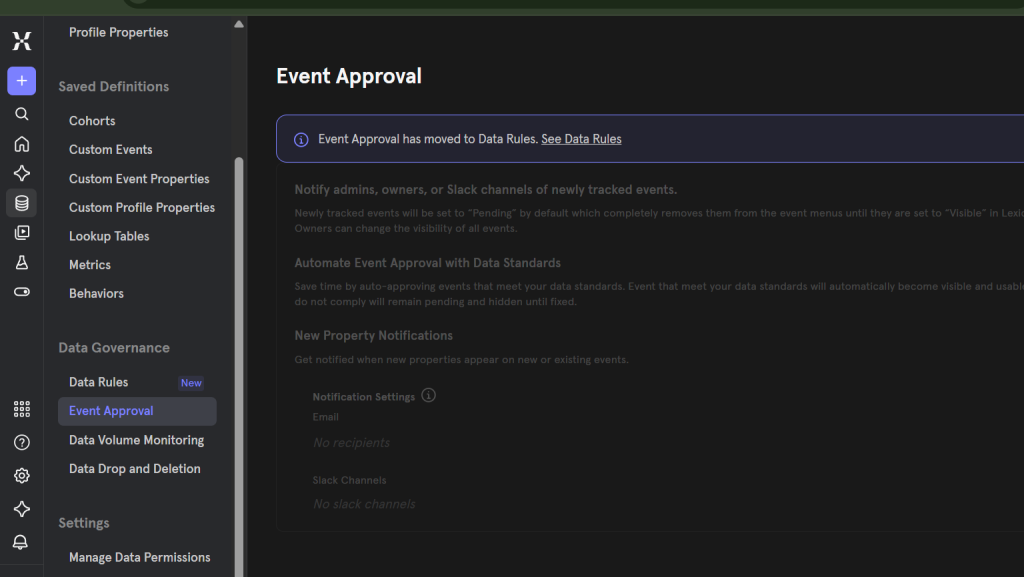
During setup, administrators can define who should receive notifications about newly detected events.
Notifications can be sent through:
- Distribution lists
- Team aliases
- Slack channels
This flexibility allows organizations to align event reviews with existing workflows.
For example, some teams may route approvals through an analytics team, while others may assign responsibility to product managers or engineering leads.
Daily Notifications for New Events
One aspect I particularly like is that Mixpanel batches notifications.
Instead of receiving alerts every time a developer creates a new event, notifications are consolidated and delivered once per day.
This prevents notification fatigue while still ensuring administrators stay informed.
If multiple events are introduced within a single day, they will all appear in the same notification.
For busy product teams, this creates a manageable review process rather than a constant stream of alerts.
Reviewing New Events in Lexicon
When an administrator receives a notification, they can jump directly into Lexicon to review newly detected events.
New events are automatically:
- Tagged as “New”
- Sorted to the top of the list
- Hidden from general users
From there, admins can:
- Approve events
- Add descriptions
- Assign ownership
- Add tags
- Update metadata
This turns Lexicon into a centralized governance hub rather than just a documentation tool.
Understanding the “New” Event Status
An event continues to be marked as “New” as long as specific conditions remain true.
The event must:
- Be hidden
- Remain unmodified
- Have been created within the last 30 days
This makes it easy to identify which events still require attention.
Once an event is reviewed or updated, it exits the new-event workflow and becomes part of the standard event catalog.
New Property Detection
One of the biggest analytics risks isn’t new events.
It’s new properties.
Many data quality issues occur when developers introduce unexpected properties without notifying analysts.
For example:
- A new user identifier
- A new revenue property
- A new campaign parameter
- Sensitive user information
To help address this, Mixpanel allows teams to enable New Property Detection.
When enabled, administrators receive notifications whenever new properties are detected on either:
- Existing events
- Newly created events
This provides visibility into tracking changes that might otherwise go unnoticed.
Why Property Governance Matters
Imagine your organization uses a revenue property called:
purchase_value
A developer accidentally introduces:
order_value
Now there are two properties measuring similar business data.
Analysts may unknowingly build reports using different properties, leading to inconsistent numbers.
Property governance helps prevent these situations before they impact decision-making.
For mature analytics programs, monitoring property changes can be just as important as monitoring events.
How Event Approval Supports Data Governance
Event Approval is most valuable when combined with other governance practices.
Many organizations use it alongside:
- Lexicon documentation
- Data Standards
- Event ownership
- Verified Data
- Naming conventions
Together, these features create a structured framework for maintaining analytics quality.
Rather than cleaning up data after problems occur, teams can proactively prevent issues from entering the system.
Best Practices for Using Event Approval
If you’re implementing Event Approval, here are a few recommendations:
Assign Clear Review Owners
Determine who is responsible for reviewing new events before enabling the feature.
Review Events Weekly
Even though notifications are automated, a regular review process helps prevent backlog.
Require Documentation Before Approval
Encourage event descriptions and ownership assignments before making events visible.
Enable Property Detection
Many analytics issues originate from unexpected properties rather than new events.
Combine With Data Standards
Event Approval becomes significantly more effective when paired with naming convention and governance rules.
Final Thoughts
As analytics implementations grow, maintaining data quality becomes increasingly difficult.
Without governance processes in place, unexpected events and properties can quickly create confusion, duplicate reporting, and reduce trust in analytics.
Mixpanel Event Approval addresses this challenge by introducing a review process for newly ingested events and properties.
By hiding new events until they are reviewed, notifying administrators of tracking changes, and centralizing governance within Lexicon, organizations gain greater visibility and control over their analytics implementation.
For teams managing large-scale product analytics environments, Event Approval can serve as an important safeguard against data quality issues while helping maintain a clean, trustworthy, and scalable analytics foundation.