
One of the biggest challenges in analytics isn’t collecting data—it’s knowing when your tracking breaks.
Most teams spend significant time implementing events, defining tracking plans, and building dashboards. But once everything is live, it’s easy to assume the data will continue flowing correctly forever.
Unfortunately, that’s rarely the case.
A deployment can accidentally remove tracking code. A server-side implementation may start sending duplicate events. An integration can stop working without anyone noticing. Even a simple configuration change can dramatically impact the volume of events being collected.
The problem is that these issues often remain hidden until someone spots an unusual number in a report.
By that point, dashboards may already be inaccurate, teams may be making decisions based on incorrect data, and analysts are left trying to figure out when the issue started.
This is where Mixpanel Data Volume Monitoring becomes valuable.
Rather than manually checking event volumes every day, Mixpanel automatically monitors your event activity and alerts your team when unusual spikes or drops occur.
What Is Mixpanel Data Volume Monitoring?
Data Volume Monitoring is a Data Governance feature available for Mixpanel Enterprise customers. It continuously analyzes event activity and looks for significant changes in volume that could indicate implementation issues.
When an unusual increase or decrease is detected, Mixpanel automatically notifies designated administrators so they can investigate and take corrective action.
Think of it as an automated health check for your analytics implementation.
Instead of waiting for someone to discover a reporting issue, your team receives proactive alerts when something looks wrong.
This allows organizations to identify tracking problems early, reducing the risk of inaccurate reporting and poor business decisions.
Why Monitoring Event Volume Matters
Many analytics issues don’t completely stop data collection.
Instead, they create subtle changes that can easily go unnoticed.
Imagine a purchase event that normally fires 1,000 times per day suddenly drops to 600. The decrease may not be immediately obvious when looking at dashboards, especially if traffic fluctuates naturally.
Now imagine the opposite situation.
A checkout event starts firing twice because of a duplicate implementation. Revenue reports may suddenly show inflated numbers, making performance appear stronger than it actually is.
Without monitoring, these issues can persist for days or even weeks.
Data Volume Monitoring acts as an early warning system that helps teams detect anomalies before they affect critical reporting.
Common Tracking Problems Data Volume Monitoring Can Detect
One of the biggest advantages of automated monitoring is its ability to identify issues that are often difficult to spot manually.
A common example is broken tracking after a product release. Developers may unintentionally remove tracking code during an update, causing important events to stop firing entirely.
Another frequent issue is duplicate tracking. This often occurs during migrations from client-side to server-side tracking, where events are accidentally sent from both implementations.
Third-party integrations can also create problems. An API failure, expired credential, or configuration error may suddenly stop events from reaching Mixpanel.
In some cases, unusual spikes in event volume may indicate bot activity, spam traffic, or implementation errors that generate events repeatedly.
Regardless of the cause, unusual changes in event volume are often one of the earliest indicators that something needs attention.
How Mixpanel Detects Anomalies
Unlike basic monitoring systems that rely on manually configured thresholds, Mixpanel uses historical event volume data to understand what normal behavior looks like.
The platform analyzes historical trends and establishes an expected range for each monitored event.
When event volume moves significantly outside that range, Mixpanel flags the event and generates a notification.
This approach is particularly useful because every event behaves differently.
A login event may occur tens of thousands of times per day, while a subscription event may only occur a few hundred times. Applying the same threshold to both would either generate too many alerts or miss important issues.
By using historical baselines, Mixpanel can deliver more relevant and actionable notifications.
Notification Options
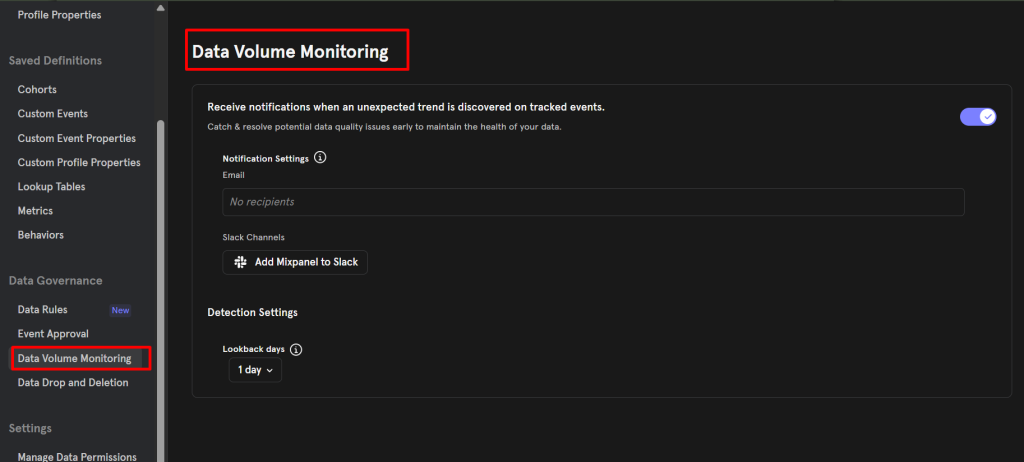
Once a significant spike or drop is detected, Mixpanel can notify your team through email or Slack.
Organizations can configure individual email addresses, team aliases, distribution lists, or dedicated Slack channels.
This ensures that the people responsible for analytics governance are informed as soon as potential issues arise.
Rather than relying on someone to manually discover a problem, the alert is delivered directly to the appropriate stakeholders.
This can dramatically reduce the time between issue detection and resolution.
Reducing Alert Fatigue
One common challenge with monitoring systems is notification overload.
When teams receive too many alerts, they eventually begin ignoring them.
Mixpanel addresses this problem by batching notifications together.
If multiple anomalies are detected within a single day, they are grouped into consolidated notifications rather than generating a separate alert for every issue.
This helps ensure alerts remain meaningful and actionable instead of becoming background noise.
For organizations with large analytics implementations, this can make a significant difference in how effectively monitoring is adopted.
Handling Data Delays
Not all event data arrives instantly.
Many organizations rely on server-side tracking, data warehouses, or third-party integrations that may introduce delays before events appear in Mixpanel.
To accommodate these situations, Data Volume Monitoring allows teams to choose between different look-back periods.
The default configuration analyzes event volume from the previous day. However, organizations experiencing ingestion delays can extend the monitoring window to reduce false positives.
This flexibility makes the feature useful across a wide variety of analytics architectures.
How Mixpanel Establishes Expected Volume
One of the most interesting aspects of Data Volume Monitoring is how much historical context it uses.
Mixpanel can analyze up to 24 months of event volume history when determining expected behavior.
This allows the platform to account for:
- Seasonal trends
- Product growth
- Historical usage patterns
- Event-specific fluctuations
As a result, monitoring becomes more intelligent than simple day-over-day comparisons.
An event that naturally increases during holiday periods or promotional campaigns is less likely to trigger unnecessary alerts.
Which Events Are Monitored?
Data Volume Monitoring focuses on the events most likely to impact reporting.
Rather than evaluating every event in a project, Mixpanel analyzes up to 1,000 of the most active events that meet minimum volume requirements.
This ensures monitoring efforts remain focused on the events that matter most to the business.
For organizations with large-scale implementations, this approach provides meaningful coverage without generating excessive noise.
Data Volume Monitoring as Part of a Governance Strategy
While Data Volume Monitoring is valuable on its own, its real power comes when combined with other Data Governance features.
Organizations often use it alongside:
- Lexicon for documentation
- Data Standards for naming conventions
- Event Approval for reviewing new events
- Ownership assignments for accountability
Together, these features help maintain a clean, trustworthy analytics environment.
Instead of reacting to data quality issues after reports are affected, teams can proactively identify and address problems before they spread throughout the organization.
Best Practices for Using Data Volume Monitoring
To get the most value from Data Volume Monitoring, focus on the events that have the greatest business impact.
Events such as signups, purchases, subscriptions, product activations, and revenue-related actions should receive particular attention.
It’s also important to investigate both spikes and drops.
Many teams focus primarily on missing data, but unexpected increases can be just as damaging to reporting accuracy.
Finally, make monitoring alerts part of your regular operational workflow. The faster anomalies are reviewed, the easier they are to diagnose and fix.
Conclusion
As analytics implementations become more sophisticated, maintaining data quality becomes increasingly difficult.
Tracking can break for countless reasons, from deployment errors and integration failures to duplicate event firing and configuration mistakes.
Mixpanel Data Volume Monitoring helps organizations stay ahead of these issues by continuously analyzing event activity and alerting teams when unusual spikes or drops occur.
Rather than discovering problems after reports have already been affected, teams gain immediate visibility into potential implementation issues and can respond before data quality suffers.
For organizations that rely on analytics to drive product, marketing, and business decisions, automated event volume monitoring is an essential component of a modern data governance strategy.