
A few years ago, I was reviewing a GA4 implementation for a business that couldn’t understand why their marketing reports looked inconsistent.
Google Ads was driving traffic.
Users were reaching the checkout process.
Sales were happening.
Yet the acquisition reports didn’t tell a coherent story.
After tracing the customer journey, the problem became obvious.
Users started their journey on the main website, moved to a separate checkout domain, and completed their purchase there. GA4 treated those transitions as entirely new sessions.
The original source was lost.
Attribution was fragmented.
The marketing team was making decisions based on incomplete journeys.
This is exactly why cross-domain tracking deserves attention during every GA4 audit.
Most businesses don’t operate within a single domain anymore.
You might have:
- A main website
- A checkout platform
- A booking engine
- A customer portal
- A help center
- A separate application environment
If users move between those environments, GA4 needs help understanding that they’re still the same person.
Otherwise, your reports can tell the wrong story.
How GA Auditor Helps
Cross-domain issues are difficult to spot because nothing appears broken on the surface.
Traffic continues to flow.
Conversions still appear.
Revenue is recorded.
The only problem is that user journeys become fragmented.
Marketing teams may believe campaigns are underperforming because conversion paths no longer connect properly.
GA Auditor reviews cross-domain configurations as part of its 150+ GA4 audit checks, helping organizations identify whether users are being stitched together correctly across multiple domains.
The objective isn’t simply tracking sessions.
It’s preserving the integrity of the customer journey.
What Is Cross-Domain Tracking?
Cross-domain tracking allows GA4 to recognize users as they move between multiple domains that belong to the same business experience.
Without it, GA4 may assume:
“This is a new visitor arriving from a referral source.”
Even when it’s actually the same user continuing their journey.
For example:
A visitor may:
- Click a Google Ads campaign.
- Browse products on your main website.
- Move to an external checkout domain.
- Complete a purchase.
Without proper cross-domain tracking, the checkout domain may receive credit for the conversion instead of the original campaign.
Why Cross-Domain Tracking Matters
Customer journeys have become increasingly complex.
Businesses rely on multiple platforms to deliver experiences.
If those systems aren’t connected correctly, reporting quality suffers.
Cross-domain issues can affect:
- Attribution reporting
- Session counts
- User counts
- Conversion paths
- Funnel analysis
- Marketing ROI calculations
- Audience creation
The numbers themselves may still look reasonable.
The relationships between those numbers become unreliable.
Common Cross-Domain Issues Found During Audits
Separate Domains Without Configuration
This is the most common scenario.
Businesses operate across multiple domains but never configure cross-domain tracking.
GA4 treats every transition as a new session.
Payment Platforms Stealing Attribution
External checkout experiences can interrupt user journeys.
Examples include:
- Ecommerce checkout domains
- Membership payment systems
- Subscription platforms
Marketing channels lose credit for the conversions they influenced.
Booking Engines Breaking Sessions
Travel, hospitality, healthcare, and service businesses frequently rely on booking systems hosted on separate domains.
Without proper configuration, the booking engine becomes the apparent source of conversions.
New Domains Added Without Review
Businesses evolve.
New microsites launch.
Customer portals are introduced.
Additional domains appear over time.
Cross-domain settings often remain unchanged.
Testing Was Never Performed
Perhaps the most overlooked issue:
Cross-domain tracking was configured, but nobody verified whether it actually worked.
How to Check Cross-Domain Tracking in GA4
Navigate to:
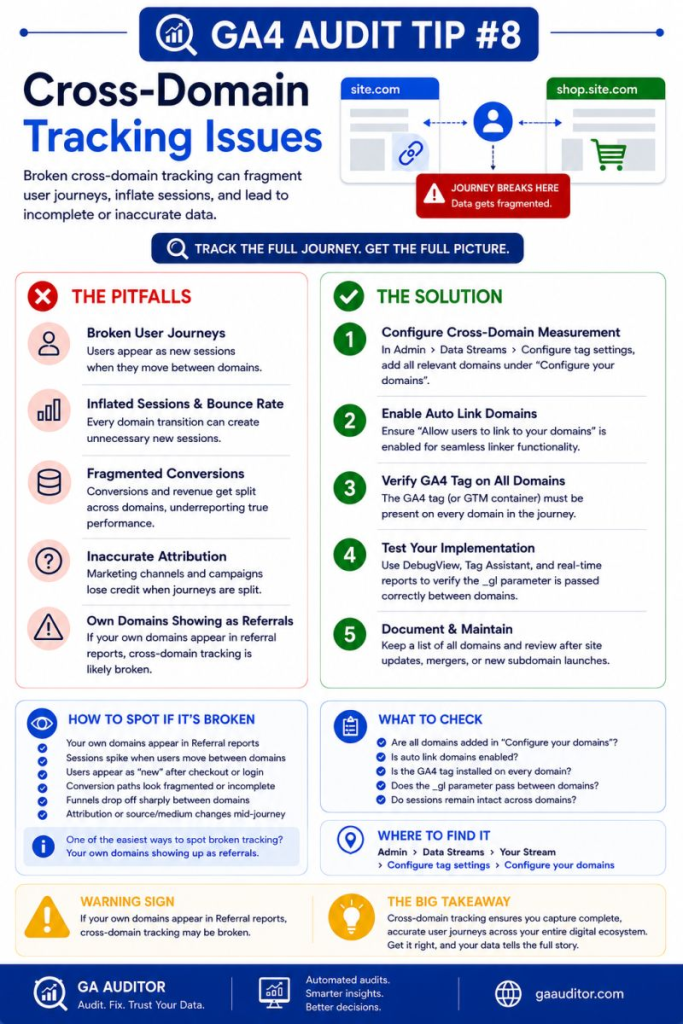
Admin → Data Streams → Select Your Web Stream → Configure Tag Settings → Configure Your Domains
Review the domains listed.
Ask yourself:
- Which domains are part of the same customer journey?
- Are all relevant domains included?
- Have new domains been introduced recently?
- Does the configuration reflect the current website ecosystem?
If users move between domains that support the same experience, those domains should be reviewed carefully.
Questions Worth Asking During an Audit
I often ask businesses the following questions:
- Does checkout occur on another domain?
- Do customers use a booking engine?
- Is there a separate customer portal?
- Do you operate multiple websites?
- Has the website changed in the past year?
- Have any acquisitions introduced additional domains?
These conversations usually uncover domains that were forgotten during implementation.
How to Validate Cross-Domain Tracking
Configuration alone isn’t enough.
You need to test.
Use:
DebugView
Review session continuity while navigating across domains.
Tag Assistant
Validate whether linker parameters pass correctly.
Realtime Reports
Monitor activity as users move through the journey.
Test Purchases
Follow the same path your customers take.
Start from acquisition.
End with conversion.
Then review the resulting reports.
Testing often reveals problems that documentation misses.
Signs That Cross-Domain Tracking Might Be Broken
Watch for:
- Self-referrals from your own domains.
- Unexpected referral traffic.
- Sudden session increases.
- Lower-than-expected conversion paths.
- Funnel drop-offs occurring between domains.
- Marketing channels losing conversion credit.
None of these automatically confirm a problem.
But they usually justify investigation.
Best Practices
A few habits can prevent cross-domain problems from becoming long-term reporting issues.
- Document every domain involved in customer journeys.
- Review configurations after website changes.
- Test user journeys regularly.
- Include new domains in implementation reviews.
- Monitor reports for self-referrals.
- Validate configurations after migrations.
- Collaborate with developers before launching new platforms.
Customer journeys evolve.
Your tracking setup should evolve with them.
Cross-Domain Tracking Audit Checklist
Use this checklist during your next review:
□ Identify all domains involved in customer journeys.
□ Review the Configure Your Domains settings.
□ Validate linker functionality.
□ Test real user journeys.
□ Review reports for self-referrals.
□ Check referral traffic for owned domains.
□ Include recently launched domains.
□ Document cross-domain decisions.
□ Revalidate after major website updates.
Wrapping Up
Cross-domain tracking isn’t one of those GA4 settings you configure once and forget forever.
Businesses change.
Platforms change.
Customer journeys become more complicated.
The danger is that attribution problems often remain invisible until someone starts questioning the reports.
By then, campaigns may already have been optimized using incomplete information.
A few minutes spent reviewing cross-domain tracking can protect the integrity of your reporting and help ensure your data reflects how customers actually move through your business.
Because customers don’t think in domains.
And your analytics shouldn’t either.