
A few months ago, I was reviewing a GA4 implementation for a company investing heavily in Google Ads. Their campaigns were generating leads, budgets were increasing, and the marketing team was confident they had a solid measurement setup.
Then someone asked a simple question:
“Are we actually optimizing Google Ads using the right conversions?”
Silence.
Everyone assumed the integration between Google Ads and GA4 was working properly because the accounts were linked.
When we started digging deeper, we found several issues:
- Some GA4 Key Events had never been imported into Google Ads.
- The wrong conversions were marked as primary.
- Audience sharing wasn’t enabled.
- Nobody had checked whether auto-tagging was working.
The accounts were technically connected.
But they weren’t working together the way the business expected.
This is why reviewing the Google Ads integration is one of my favorite GA4 audit checks.
How GA Auditor Helps
Integrations have a way of creating false confidence.
You see a “Linked” status in GA4 and assume everything is functioning correctly.
But successful integration isn’t just about connecting two platforms.
It’s about making sure:
- The right conversions are shared.
- Campaigns optimize toward meaningful outcomes.
- Audiences flow correctly.
- Attribution supports decision-making.
GA Auditor reviews Google Ads integrations as part of its 150+ point GA4 audit checklist, helping businesses identify hidden gaps that can affect campaign performance, reporting quality, and budget allocation.
The goal isn’t simply to connect accounts.
It’s to make sure those connections deliver value.
Why the GA4 and Google Ads Integration Matters
Google Ads and GA4 are designed to complement each other.
GA4 helps explain what users do.
Google Ads helps acquire those users.
When the integration works properly, businesses gain access to:
- Conversion imports
- Audience sharing
- Improved campaign optimization
- Better attribution insights
- Cross-platform reporting
When it doesn’t, advertising decisions become much harder.
Common Issues Found During Audits
The Accounts Are Linked, but Nobody Checks Them
This happens more often than you’d think.
The link was established during implementation.
Years later, nobody has reviewed it.
The assumption becomes:
“It should still be working.”
Sometimes it is.
Sometimes it isn’t.
The Wrong Conversions Are Imported
Google Ads optimization depends heavily on the conversions you provide.
I’ve seen businesses optimize campaigns using:
- Scroll events
- Button clicks
- Newsletter sign-ups
while ignoring:
- Qualified leads
- Purchases
- Demo requests
The platform can only optimize for the outcomes it receives.
Primary and Secondary Conversions Are Misconfigured
Not every conversion deserves equal importance.
Yet many accounts treat all imported conversions the same way.
As a result, automated bidding strategies may prioritize actions that don’t drive meaningful business outcomes.
Auto-Tagging Was Disabled
Auto-tagging is essential for preserving important campaign information.
Without it, attribution becomes less reliable.
The reports may still contain data.
They simply won’t tell the complete story.
Audience Sharing Was Never Enabled
Businesses often expect remarketing audiences to flow automatically.
Then they discover:
The audiences never reached Google Ads.
A connected account doesn’t guarantee an active audience strategy.
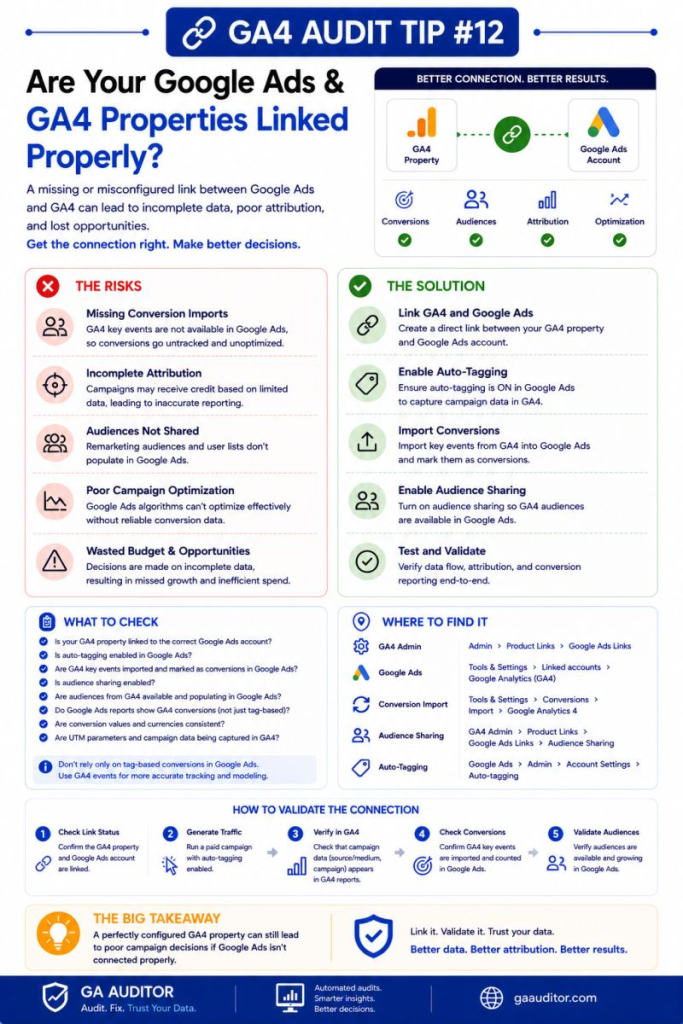
How to Audit the Google Ads Integration
Start by reviewing the connection itself.
Navigate to:
GA4 → Admin → Product Links → Google Ads Links
Ask:
- Is the correct Google Ads account linked?
- Was the link recently reviewed?
- Does the business still use this account?
Even simple checks can uncover outdated configurations.
Review Conversion Imports
Then move to Google Ads.
Navigate to:
Google Ads → Goals → Conversions
Review:
- Which GA4 Key Events are imported?
- Which conversions are marked as Primary?
- Which conversions are Secondary?
- Do these choices align with business objectives?
This is often where the biggest improvements can be made.
Verify Auto-Tagging
In Google Ads, review:
Admin → Account Settings → Auto-Tagging
Confirm that auto-tagging is enabled.
Without it, campaign reporting becomes less dependable.
Review Audience Sharing
Navigate to:
Google Ads → Tools → Audience Manager
Ask:
- Are audiences populating?
- Are they large enough to be useful?
- Are they actively used in campaigns?
Creating audiences is one thing.
Using them effectively is another.
Questions Worth Asking During an Audit
I often ask stakeholders:
- Which conversions matter most to the business?
- What actions should campaigns optimize toward?
- Are remarketing audiences being used?
- When was the last integration review?
- Has campaign strategy changed recently?
- Do acquisition reports align with advertising expectations?
These conversations frequently reveal opportunities for improvement.
Signs the Integration Needs Attention
Watch for situations such as:
- Campaigns optimizing toward low-value actions.
- Audience lists remaining empty.
- Missing GA4 conversions in Google Ads.
- Unexpected differences in reported performance.
- Teams unsure which conversions matter.
- Stakeholders relying on outdated assumptions.
None of these guarantee a problem.
But they almost always justify investigation.
Best Practices
A few simple habits can strengthen the relationship between Google Ads and GA4.
- Review integrations quarterly.
- Import only meaningful conversions.
- Clearly define Primary and Secondary conversions.
- Keep auto-tagging enabled.
- Monitor audience health.
- Document integration decisions.
- Align advertising goals with business objectives.
- Revisit configurations whenever strategy changes.
An integration review should be part of ongoing governance, not a one-time setup task.
Google Ads Integration Audit Checklist
Use this checklist during your next review:
□ Verify the Google Ads link.
□ Confirm the correct account is connected.
□ Review imported GA4 conversions.
□ Validate Primary and Secondary conversion settings.
□ Check whether auto-tagging is enabled.
□ Review audience sharing.
□ Confirm audiences are populating.
□ Align optimization goals with business objectives.
□ Document integration decisions.
□ Include Google Ads reviews in recurring audits.
Wrapping Up
Connecting Google Ads and GA4 takes only a few minutes.
Making that connection useful takes ongoing attention.
I’ve worked with businesses spending thousands of dollars each month on advertising without realizing their campaigns were optimizing toward the wrong outcomes.
The data existed.
The integration existed.
The strategy simply hadn’t been reviewed.
A periodic audit helps ensure that your reporting, optimization, and audience strategies continue working together as your business evolves.
Because when marketing budgets are involved, “connected” shouldn’t automatically mean “configured correctly.”