
I was reviewing an ecommerce GA4 implementation recently when the client proudly told me:
“We have ecommerce tracking set up.”
Naturally, my next question was:
“Great. Can you walk me through your funnel?”
They opened GA4 and showed me the purchase reports.
Then they paused.
There was no product view tracking.
No add-to-cart data.
No checkout events.
No way to understand where customers dropped off before purchasing.
Technically, they weren’t wrong.
They did have ecommerce tracking.
But they were only measuring the finish line.
They had no visibility into the race.
This is one of the most common issues I see during GA4 audits. Businesses track purchases and assume their ecommerce implementation is complete. The reality is that purchases are only one part of the story.
If you want to understand how customers buy, optimize conversion rates, and identify friction points, you need to measure the entire journey.
How GA Auditor Helps
Ecommerce implementations often look healthy at first glance.
Revenue appears in reports.
Purchase events are firing.
Management dashboards update every morning.
The problem is that hidden gaps in the funnel remain invisible until someone asks questions such as:
- Why are people abandoning checkout?
- Which products receive attention but rarely sell?
- Which checkout step causes friction?
- How can we improve conversion rates?
GA Auditor reviews ecommerce implementations as part of its 150+ point GA4 audit checklist, helping businesses validate whether recommended ecommerce events, item parameters, and funnel steps are implemented correctly.
The goal isn’t simply to track revenue.
It’s to understand how revenue happens.
Why Ecommerce Events Matter
Imagine trying to improve a sales process while only measuring closed deals.
You wouldn’t know:
- How many prospects entered the funnel.
- Which stage caused drop-offs.
- What influenced purchasing decisions.
- Which products attracted interest.
The same principle applies to ecommerce.
A complete implementation helps answer questions such as:
- Which products generate interest?
- What percentage of visitors add products to their cart?
- Where do users abandon checkout?
- Which products perform best?
- Which promotions influence purchases?
Without that visibility, optimization becomes guesswork.
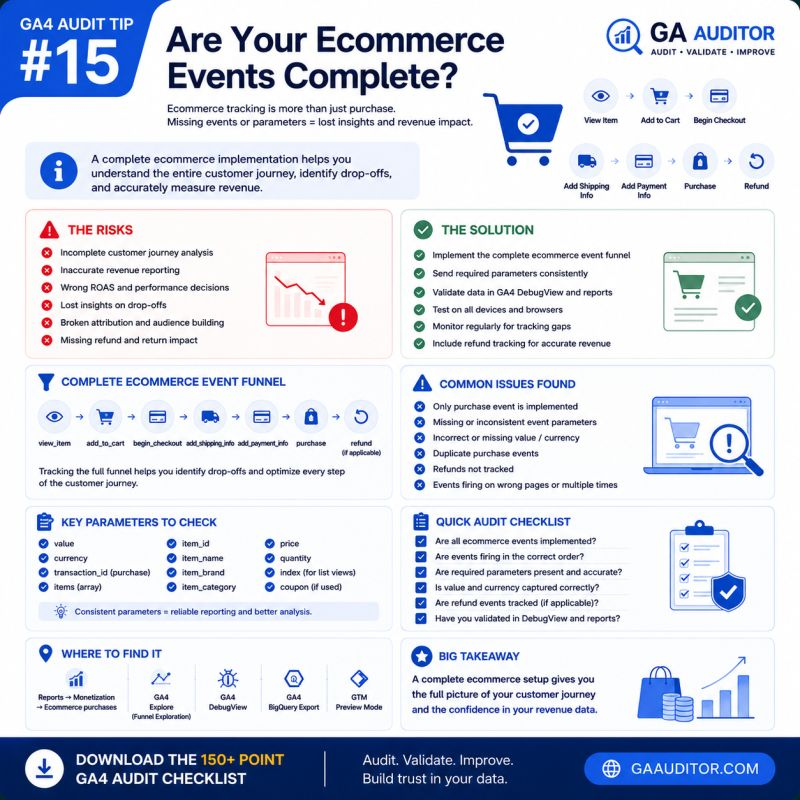
The Recommended GA4 Ecommerce Journey
Google provides a recommended set of ecommerce events designed to reflect the customer journey.
Not every business uses every event, but the framework is useful.
Product Discovery
Events include:
view_item_listselect_itemview_item
These help you understand product exposure and engagement.
Shopping Intent
Events include:
add_to_cartremove_from_cartview_cart
These indicate purchase intent.
Checkout Progression
Events include:
begin_checkoutadd_shipping_infoadd_payment_info
These reveal how users progress toward conversion.
Conversion
Events include:
purchaserefund
These capture the final business outcome.
Most businesses only implement the last step.
That’s where problems begin.
Common Ecommerce Issues Found During Audits
Only Purchase Events Exist
This is by far the most common issue.
Businesses track revenue but have no visibility into:
- Product engagement
- Cart activity
- Checkout progression
Optimization opportunities disappear.
Missing Item Arrays
Purchase events fire successfully, but the item data is incomplete.
Missing parameters often include:
- item_id
- item_name
- item_category
- quantity
Without them, product-level analysis becomes limited.
Missing Revenue Parameters
Sometimes purchase events exist without:
- value
- currency
Revenue reports become unreliable.
Checkout Steps Are Missing
Businesses know people purchase.
They don’t know where others abandon the process.
As a result, conversion rate optimization efforts become much more difficult.
Duplicate Purchases
Improper thank-you page implementations, page refreshes, or GTM configurations can trigger duplicate transactions.
Revenue appears higher than reality.
Refund Tracking Doesn’t Exist
Businesses measure sales.
They ignore refunds.
This can create an overly optimistic picture of performance.
How to Audit Ecommerce Tracking in GA4
Start by mapping the customer journey.
Ask:
- How do users discover products?
- How do they express purchase intent?
- What checkout steps exist?
- How is a purchase completed?
- How are refunds processed?
Then compare those answers to the events being collected.
Gaps become obvious very quickly.
Where to Check
Monetization Reports
Navigate to:
Reports → Monetization
Review:
- Ecommerce purchases
- Product performance
- Revenue metrics
DebugView
Validate the sequence of ecommerce events.
Test complete customer journeys.
Realtime Reports
Confirm that events appear during testing.
Google Tag Manager
Review triggers, variables, and event payloads.
BigQuery
If available, inspect raw ecommerce event data for anomalies and inconsistencies.
Questions Worth Asking During an Audit
These conversations often uncover hidden opportunities.
- Can we identify where users abandon checkout?
- Which products generate interest but don’t convert?
- Are all recommended ecommerce events implemented?
- How are duplicate purchases prevented?
- Are refunds measured?
- Can leadership trust the revenue reports?
If the answer to several of these questions is “I’m not sure,” an audit is likely worthwhile.
Parameters Worth Reviewing
Ecommerce reporting depends heavily on item data.
Common parameters include:
Transaction-Level Parameters
- transaction_id
- value
- currency
- coupon
Item-Level Parameters
- item_id
- item_name
- item_brand
- item_category
- item_variant
- quantity
- price
The event itself matters.
The supporting context matters just as much.
Best Practices
A few habits can dramatically improve ecommerce reporting quality.
- Track the complete funnel.
- Validate item arrays regularly.
- Test purchases after website updates.
- Monitor for duplicate transactions.
- Include refund tracking.
- Review revenue parameters periodically.
- Document ecommerce implementations.
- Include ecommerce validation in recurring audits.
Ecommerce websites evolve constantly.
Your measurement strategy should evolve with them.
Ecommerce Audit Checklist
Use this checklist during your next review:
□ Validate view_item tracking.
□ Review add_to_cart events.
□ Confirm begin_checkout tracking.
□ Validate add_shipping_info.
□ Validate add_payment_info.
□ Review purchase events.
□ Verify refund tracking.
□ Review item parameters.
□ Check revenue and currency values.
□ Monitor for duplicate purchases.
□ Test the complete customer journey.
Wrapping Up
Revenue is one of the most important metrics in any ecommerce business.
But revenue alone doesn’t explain customer behavior.
It doesn’t reveal friction.
It doesn’t uncover missed opportunities.
It doesn’t tell you why some products convert while others don’t.
The businesses that improve conversion rates aren’t simply measuring outcomes.
They’re measuring the journey that leads to those outcomes.
Because understanding how customers buy is often more valuable than simply knowing that they bought.