
A client once told me:
“We don’t really need to worry about engagement tracking because GA4 captures everything automatically.”
I hear this a lot.
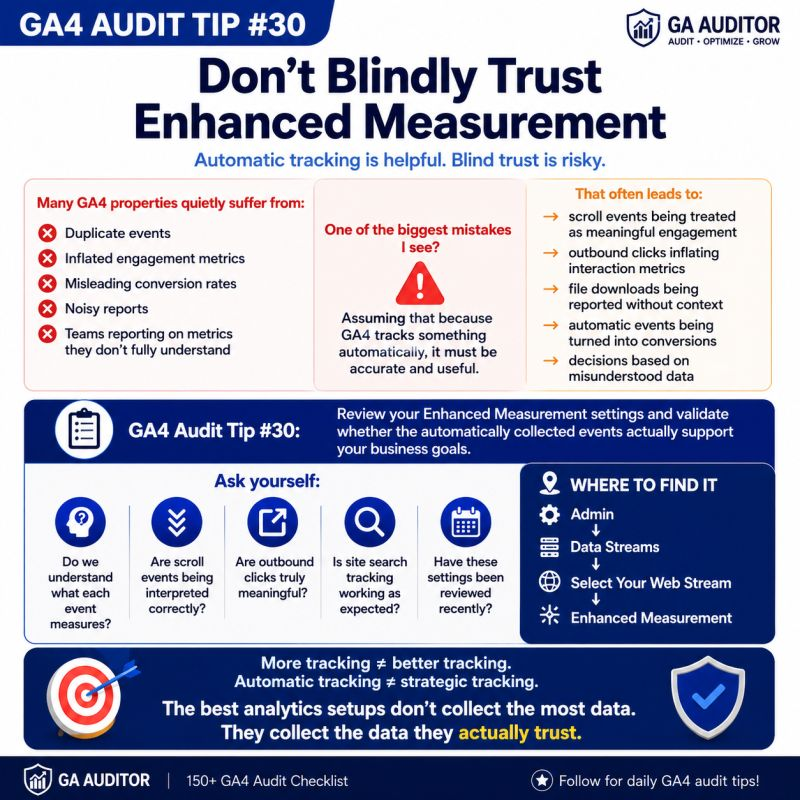
Enhanced Measurement is one of GA4’s most attractive features. Turn it on, and suddenly you’re collecting scrolls, outbound clicks, site searches, video engagement, file downloads, and more.
No developers.
No custom tagging.
No extra effort.
It sounds perfect.
But during that same audit, we found thousands of outbound clicks from pages that barely contained external links. Scroll events were being used in executive dashboards as evidence that visitors were “reading” content. File downloads were being reported, but nobody knew whether those files actually mattered to the business.
Nothing was technically wrong.
GA4 was doing exactly what it was designed to do.
The problem was that everyone trusted the data without ever validating what it actually meant.
That’s why Enhanced Measurement deserves a place in every GA4 audit.
Because automatic tracking can save time, but it should never replace critical thinking.
How GA Auditor Helps
Enhanced Measurement settings are often enabled during implementation and forgotten.
Months later, teams build reports using those events.
Executives review dashboards.
Marketers optimize campaigns.
Analysts create audiences.
Very few people stop to ask:
Do we actually trust these metrics?
GA Auditor reviews Enhanced Measurement as part of its 150+ point GA4 audit checklist, helping organizations validate which automatic events are enabled, whether they work as expected, and whether stakeholders understand how those events should be interpreted.
The goal isn’t to disable automatic tracking.
It’s to make sure you’re using it wisely.
What Is Enhanced Measurement?
Enhanced Measurement is a GA4 feature that automatically tracks certain user interactions without requiring additional implementation work.
When enabled, GA4 can collect events such as:
- Page views
- Scrolls
- Outbound clicks
- Site search
- File downloads
- Video engagement
- Form interactions
For many businesses, these events provide valuable insights.
The challenge is understanding what they actually represent.
Why Enhanced Measurement Matters
The easiest mistake to make in analytics is assuming that more data automatically leads to better decisions.
It doesn’t.
Every metric that appears in a report influences how people interpret performance.
If those metrics are misunderstood, they can lead teams in the wrong direction.
Enhanced Measurement events often find their way into:
- Engagement reports
- Executive dashboards
- Explorations
- Audience definitions
- Marketing reviews
- Optimization discussions
Before relying on them, you need confidence that they reflect meaningful behavior.
Common Issues Found During Audits
Scroll Events Become “Content Quality” Metrics
This happens all the time.
Someone sees that 85% of users triggered a scroll event and concludes:
“People are consuming our content.”
But the default GA4 scroll event fires when users reach approximately 90% of the page.
It doesn’t tell you:
- Whether they actually read the content.
- Whether they found it useful.
- Whether they were engaged.
It simply tells you they reached a certain point on the page.
Those are very different conclusions.
Outbound Clicks Create Confusion
Businesses are often surprised by what qualifies as an outbound click.
I’ve seen events triggered by:
- Embedded widgets
- Third-party tools
- Social sharing plugins
- External integrations
Not every outbound click reflects meaningful intent.
Without validation, these events can inflate engagement metrics.
Site Search Tracking Doesn’t Work Properly
Enhanced Measurement identifies internal searches using query parameters.
If your website uses a different structure, search activity may not be captured correctly.
Teams assume site search reporting is complete when it isn’t.
File Downloads Lack Business Context
A file download event may appear in reports.
But is that file important?
Was it intentionally promoted?
Does downloading it correlate with business outcomes?
The event itself rarely answers those questions.
Video Metrics Are Misunderstood
Stakeholders often assume all videos are tracked automatically.
The reality depends on how videos are embedded and configured.
If teams rely heavily on video reporting, validation becomes essential.
Nobody Reviews the Settings
This is probably the biggest issue of all.
Enhanced Measurement gets enabled during setup.
Then nobody revisits it.
Years later, teams are making decisions based on assumptions instead of understanding.
How to Audit Enhanced Measurement in GA4
Navigate to:
Admin → Data Streams → Select Your Web Stream → Enhanced Measurement
Review every enabled event individually.
Ask:
- Is this event useful for our business?
- Do we understand how it works?
- Is it being used in reports?
- Would anyone notice if it disappeared?
- Have we tested it recently?
Simple questions often uncover hidden risks.
Events Worth Reviewing
Page Views
Usually straightforward.
Still worth validating after website redesigns or implementation changes.
Scrolls
Understand what the event measures before using it as an engagement KPI.
Outbound Clicks
Review whether third-party tools influence reporting.
Site Search
Validate that search terms are being captured accurately.
File Downloads
Determine whether downloads represent meaningful actions.
Video Engagement
Confirm that the tracked interactions align with how your business uses video.
Form Interactions
Understand what constitutes genuine engagement versus incidental activity.
Not every automatically collected event deserves equal attention.
Questions Worth Asking During an Audit
These conversations often reveal whether teams truly understand their reporting.
- Which Enhanced Measurement events appear in executive dashboards?
- Are any automatic events treated as conversions?
- Do stakeholders understand how these metrics work?
- When were these settings last reviewed?
- Have major website changes occurred recently?
- Which events actually influence decisions?
Analytics maturity often comes down to asking better questions.
Signs Your Enhanced Measurement Setup Needs Attention
A review may be worthwhile if:
- Teams rely heavily on engagement metrics.
- Scroll rates seem unusually high.
- Outbound click reports look inflated.
- Site search activity appears incomplete.
- Automatic events are used as conversions.
- Enhanced Measurement has never been reviewed.
None of these automatically indicate a problem.
But they almost always justify investigation.
Automatic Doesn’t Mean Strategic
One of the biggest misconceptions in GA4 is this:
“Google tracks it automatically, so it must be useful.”
Automatic collection solves an implementation challenge.
It doesn’t solve a business challenge.
The value of any metric depends on whether it helps people make better decisions.
Some automatically collected events provide tremendous value.
Others create noise.
Knowing the difference is what separates thoughtful measurement from passive reporting.
Best Practices
A few habits can improve confidence in your Enhanced Measurement setup.
- Review settings at least annually.
- Validate events after major website changes.
- Educate stakeholders about how events work.
- Avoid using engagement events as conversions without justification.
- Document which events support business objectives.
- Test events periodically using DebugView and Preview Mode.
- Include Enhanced Measurement reviews in recurring audits.
Good analytics isn’t about collecting everything.
It’s about understanding what deserves attention.
Enhanced Measurement Audit Checklist
Use this checklist during your next review:
□ Review Enhanced Measurement settings.
□ Validate page view tracking.
□ Test scroll event behavior.
□ Review outbound click reporting.
□ Verify site search tracking.
□ Validate file download events.
□ Review video engagement tracking.
□ Test form interaction events.
□ Document how events are used.
□ Include Enhanced Measurement reviews in recurring audits.
Wrapping Up
Enhanced Measurement is one of GA4’s most useful features.
It helps organizations get started quickly and uncover valuable behavioral insights without extensive implementation work.
But convenience should never replace validation.
The events showing up in your reports influence how teams understand users, evaluate performance, and make decisions.
A few minutes spent reviewing those events can prevent months of assumptions built on misunderstood metrics.
Because in analytics, collecting data automatically is easy.
Understanding whether that data deserves your trust is where the real work begins.