
If you’ve ever made a business decision based on your GA4 data — only to discover months later that the tracking was broken — you know exactly what’s at stake. Marketing budgets allocated to campaigns that weren’t actually converting. Revenue dashboards showing numbers that didn’t match the payment processor. Attribution models built on a foundation of bad data.
This is not a rare edge case. It’s the daily reality for most marketing teams operating at any kind of scale.
GA Auditor was built to fix this. It’s a comprehensive analytics audit and monitoring platform that systematically checks your GA4, GTM, and BigQuery implementations — and keeps checking them over time. This guide covers every feature in detail, including the new GA4 Companion Chrome Extension and the free audit checklists that any team can use today.
The Problem: You Don’t Know What You Don’t Know
Most marketing teams assume their analytics are fine. The dashboards are loading. The numbers are moving. Reports look plausible. But “plausible” isn’t “accurate” — and the gap between the two is where real money gets lost.
Common analytics issues that go undetected for months — sometimes years — include:
- Duplicate GA4 tags firing on checkout pages, inflating conversion counts and distorting ROAS
- Missing UTM parameters routing paid campaign traffic into Direct, making organic look better than it is
- Broken conversion events that stopped firing silently after a site redesign or CMS update
- Misconfigured attribution settings that misrepresent channel contribution to revenue
- Undetected direct traffic spikes caused by missing session parameters — a sign of dark traffic or tagging failures
- BigQuery export gaps creating invisible holes in your analytics pipeline that skew any downstream model
- Consent mode not implemented correctly, risking both compliance and data accuracy
⚠ The Danger Zone: Without a structured audit process, teams only discover these issues when a stakeholder asks a question nobody can answer — or when a campaign report comes back looking suspiciously good (or bad) in a way nobody can explain.
The Analytics Health Dashboard
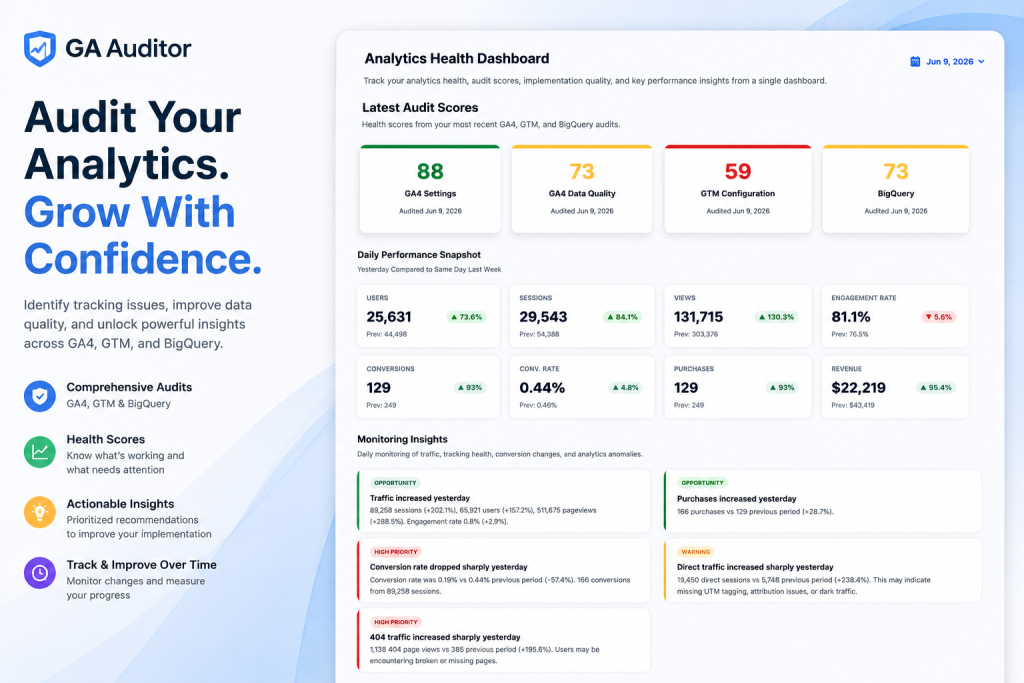
The central dashboard is where everything comes together. At a glance, you can see your latest audit scores across all four audit types, daily performance metrics with week-over-week comparisons, and the monitoring insights from the last 24 hours.

The health scores are color-coded for immediate comprehension — no need to read deeply to understand where problems are:

The Daily Performance Snapshot compares yesterday’s KPIs against the same day last week — users, sessions, views, engagement rate, conversions, conversion rate, purchases, and revenue. These aren’t vanity metrics: the week-over-week delta is what separates a genuine performance shift from a tracking anomaly.
If sessions jumped 84% but conversion rate dropped 57% simultaneously, something changed in the implementation — not just the marketing. That kind of cross-signal insight is what the dashboard is designed to surface instantly.
The Five Core Audit Modules
GA Auditor is not a single-check tool. It covers five distinct layers of your measurement stack, each targeting a different failure mode.
1. GA4 Configuration Audit
Your GA4 property settings are the foundation of everything downstream. Get them wrong and every report built on top is suspect — even if data collection itself is working. This audit performs a systematic review of the settings most teams configure once at implementation and rarely revisit.
⚙️Property Configuration Review
Validates property structure, time zone, industry categorization, and data stream setup.
🔀Attribution Settings Validation
Checks that attribution models are correctly configured and cross-channel data-driven attribution is set up where appropriate.
🗓Data Retention Checks
Flags retention settings that may be creating data loss — GA4 defaults are conservative and catch many teams off-guard.
🎯Key Event & Conversion Review
Verifies conversion events are correctly defined with no duplicate or conflicting definitions inflating reported rates.
👥Audience & Integration Validation
Checks GA4 audiences and integrations with Google Ads, Search Console, and other connected platforms.

2. GA4 Data Quality Audit
A perfectly configured property can still produce unreliable data if the underlying tracking implementation is flawed. This audit analyzes the actual data being collected — not just the settings — and flags measurement issues affecting reporting accuracy.
🔍Unassigned Traffic Source Analysis
Quantifies how much traffic lands in “Unassigned” and identifies likely causes — missing referral exclusions, cross-domain tracking gaps, or broken UTMs.
💰Revenue Tracking Validation
Validates purchase events are firing consistently, revenue values match expected totals, and no duplicate transaction IDs are inflating reported revenue.
📊Session Attribution Checks
Examines channel attribution patterns, identifying Direct traffic spikes, referral exclusion gaps, and source/medium inconsistencies.
📋Event Collection Quality Review
Reviews key events for firing consistency, required parameter completeness, and data quality issues like null values or truncated strings.

3. Google Tag Manager Audit
GTM’s accessibility is its greatest strength and its biggest liability. When anyone on the team can add a tag, the container accumulates technical debt fast. GA Auditor surfaces the implementation risks that slow teams down and introduce silent measurement errors.
🔁Duplicate GA4 Tags
Identifies configuration or event tags firing multiple times — doubling session counts, conversion figures, and event data in reports.
⏸Paused Tags & Triggers
Surfaces all paused elements so your team can make a deliberate decision: clean them up or reactivate them.
🧹Unused Variables
Lists all orphaned variables no longer referenced by any tag or trigger — reducing clutter and cognitive overhead.
🛡Missing Consent Controls
Verifies consent mode is properly implemented and tags respect user consent signals before firing — critical for GDPR and CCPA.
📡Broad Trigger Detection
Flags triggers whose scope is broader than necessary, reducing unwanted tag fires and improving implementation precision.

4. BigQuery Audit
For teams doing advanced analytics, building data models, or running custom attribution — GA4’s BigQuery export is the foundation of everything. If the export is incomplete, delayed, or misconfigured, every query, dashboard, and model built on top is unreliable.
✅Export Validation Checks
Verifies export frequency (daily vs. streaming), confirms the correct GA4 property is linked to the right BigQuery project, and checks for uninterrupted flow.
🕳Missing Data Detection
Scans for date gaps — days where event data is missing or significantly lower than expected — silently skewing historical analysis.
🗂Schema & Coverage Review
Checks that expected fields are present and event parameter coverage is consistent across the dataset.
🔗Attribution Quality Validation

5. Insights & Monitoring
Audits catch the issues that already exist. Monitoring catches the ones being introduced right now. GA Auditor’s monitoring layer runs continuously and surfaces important trends and anomalies automatically — so you find out about a broken conversion event the next morning, not three weeks later.
📈Traffic & Revenue Trends
Tracks daily changes in users, sessions, pageviews, and revenue against the same day last week. Significant deviations in either direction are surfaced as insights.
🔔Conversion Rate Changes
Monitors conversion rate daily and alerts when it moves significantly — a sudden drop is one of the clearest signals of broken tracking or a failed integration.
🤖Anomaly Detection
Identifies patterns beyond simple thresholds — unexpected direct traffic spikes, 404 event surges, engagement drops that don’t track with session volume.
🕐Ongoing Analytics Monitoring
Daily monitoring runs automatically with prioritized alerts — no manual report review required across every property every morning.
Insights are categorized by severity so you always know what to act on first:
- Opportunity Positive trends worth capitalizing on — traffic increase, purchase volume up, engagement improvement
- High Priority Issues requiring immediate investigation — conversion rate drop, 404 spike, sharp change in key metrics
- Warning Changes that warrant attention and may indicate a developing problem — direct traffic surge, attribution anomaly
GA4 Companion Chrome Extension
Beyond the platform audits, GA Auditor has built a free Chrome extension that brings real-time tracking diagnostics directly into your browser — no switching tabs, no digging through source code, no waiting for a report to run.

GA4 Companion by GA Auditor
Free Chrome Extension · 5.0 ★ · Install from Chrome Web Store →
The extension gives you instant visibility into analytics and measurement signals on any website directly from your browser — whether you’re reviewing your own site or auditing a client’s.
Scan
Detect tracking tools, GA4 IDs, consent signals, and alert you to issues in real time
Insights
View live GA4 metrics — users, sessions, revenue, conversions — connected to your property
Learn
Daily practical GA4 and GTM tips to improve your implementation quality
Scan Tab: Real-Time Tracking Diagnostics
The Scan tab is the extension’s most powerful feature for day-to-day QA work. Open it on any page and you immediately see what tracking tools are running, what GA4 IDs are firing, whether consent signals are present, and what GA4 request activity is happening in real time.

The Tracking Tools Observed panel shows every analytics and marketing tool active on the current page, organized by category. In the example above: Google Tag Manager (Loaded), GA4 (Fired across multiple IDs), and Microsoft Clarity (Detected) are all visible at a glance — no DevTools required.
The Consent Signals panel is where the extension earns its keep for compliance-conscious teams. It shows the current consent state and immediately flags implementation issues — in this case, “Consent state not detected” and “Consent Mode is not implemented correctly” are surfaced without any manual investigation.
The Alerts section is the extension’s early warning system. When the extension detects a problem worth flagging, it surfaces it at the top of the Scan panel with a clear, plain-language description:
- “Multiple GA4 IDs are firing” — one of the most common causes of inflated session and event counts, immediately visible without any investigation
- “Consent signals not detected” — a compliance and data quality flag that most teams only discover during a formal audit or a regulatory review
The GA4 Request Activity feed below the alerts shows every GA4 event being sent from the current page in real time — the event name, the GA4 property ID it’s going to, and whether consent was given before it fired. This level of visibility used to require opening the network tab in DevTools and knowing what to look for.
Insights Tab: Live GA4 Metrics in Your Browser
Connect your GA4 property and the Insights tab becomes a live analytics dashboard inside the extension. The metrics shown include:
- Users, Sessions, and Views with period-over-period percentage changes
- Conversion rate, Revenue, and Purchases
- A collapsible Conversions breakdown
- Automated channel-level insights — for example: “Paid Search revenue increased,” “Mobile conversion dropped,” “Email campaign drove 42 purchases”
The comparison period is adjustable (Today vs Yesterday, this week vs last week, and more), making it practical for daily performance monitoring without opening GA4 at all.
🎉 Free to install: GA4 Companion is free on the Chrome Web Store. Connect y
our GA4 account to unlock the Insights tab. Install GA4 Companion →

Learn Tab: Daily Analytics Tips
The Learn tab delivers a rotating “Today’s Quick Fix” — practical GA4 and GTM guidance that helps marketers and analysts incrementally improve their implementation quality over time. It’s a subtle but genuinely useful feature: instead of just surfacing problems, the extension actively helps users understand how to fix them.

Free Resource
GA4 & GTM Audit Checklists
Alongside the platform, GA Auditor offers two free downloadable audit checklists — practical frameworks any team can use independently, whether or not they’re using the paid platform.Free Resource

150+ GA4 Audit Checks Every Team Should Review
A comprehensive GA4 auditing framework covering tracking, attribution, ecommerce, consent, GTM, reporting, governance, BigQuery, and implementation quality — available as a free PDF download.
⚙ Account & Property Review
Validate property config, enhanced measurement, filters, data retention, consent mode, and stream setup.
</> GTM & Event Tracking Audit
Review event naming, duplicate tracking, parameters, trigger quality, folders, and container health.
🛒 Ecommerce & Attribution QA
Validate purchase tracking, transaction IDs, UTMs, attribution quality, checkout flows, and revenue accuracy.
🛡 Privacy, Reporting & BigQuery
Review consent handling, PII exposure, reporting quality, audience setup, BigQuery exports, and governance.
Download GA4 Checklist (Free PDF) →
Free Resource
85+ GTM Audit Checks Every Team Should Review

A practical Google Tag Manager auditing framework covering tags, triggers, variables, consent, governance, data quality, security, performance, and container health — available as a free Excel download.
⚙ Container Governance
Review ownership, naming conventions, folder organization, documentation, version history, and change management.
</> Tags, Triggers & Variables
Identify duplicate tags, unused triggers, unnecessary variables, custom HTML risks, and firing issues.
✓ Consent & Data Quality
Validate Consent Mode implementation, privacy controls, event naming standards, and parameter consistency.
🛡 Security & Performance
Review community templates, exposed secrets, third-party scripts, container size, and performance impact.
Download GTM Checklist (Free Excel) →
💡 How to use them together: Use the free checklists to understand your full audit scope, then run GA Auditor to automate the checks — especially the ones that require analyzing live data rather than reading through configuration settings manually.
Monitoring & Automated Insights
One of the most practically valuable aspects of GA Auditor is that it doesn’t just audit on demand — it monitors continuously. The distinction matters: a point-in-time audit catches issues that already exist, while ongoing monitoring catches issues as they’re introduced.
In practice this means: when a developer deploys a site update that silently breaks a checkout conversion event, the monitoring layer surfaces a conversion rate anomaly the following morning rather than letting it go undetected for two or three reporting cycles.
Real examples of what monitoring surfaces:
- 89,258 sessions in a single day — flagged as an Opportunity with breakdown by users (+157.2%) and pageviews (+288.5%)
- Conversion rate dropped from 0.44% to 0.19% — flagged as High Priority alongside 166 conversions from 89,258 sessions
- 19,450 direct sessions vs 5,748 the prior period (+238.4%) — Warning flagging potential missing UTM tagging, attribution issues, or dark traffic
- 1,138 404 pageviews vs 385 prior period (+195.6%) — High Priority alert that users may be encountering broken or missing pages
- 166 purchases vs 129 prior period (+28.7%) — Opportunity worth investigating and capitalizing on
The monitoring layer turns GA Auditor from a periodic audit tool into an always-on analytics health system — a meaningful shift in how teams relate to their data quality.
Reporting, Historical Tracking & Executive Summaries
Historical Audit Tracking
GA Auditor tracks your audit scores over time so you can measure whether fixes are actually working. A GTM score that moves from 59 to 82 after a cleanup sprint is compelling evidence of progress — and the historical chart makes it visible in a way that a static report never could.
Executive-Friendly Reporting
Technical audit findings are hard to communicate to stakeholders who don’t live in GA4 every day. GA Auditor’s reporting translates complex implementation issues into clear scores, summaries, and issue categories that non-technical audiences can understand and act on.
Reports are available as:
- Interactive web-based reports — shareable, drill-down views of every check
- PowerPoint exports — for client presentations and leadership reviews
- Word document exports — for formal audit documentation and procurement processes
Implementation Quality Checks
Beyond the named audit categories, GA Auditor runs implementation quality checks spanning the full stack — identifying missing conversions, unusual traffic patterns, weak campaign tagging, broken events, and configuration gaps that don’t fit neatly into a single audit category but still materially affect reporting accuracy.
Who Should Use GA Auditor?

🏢Digital Marketing Agencies
Fast client onboarding audits, client-ready PowerPoint/Word reports, and ongoing monitoring across accounts without manual daily review.
🏠In-House Marketing Teams
Ongoing confidence in campaign attribution data and conversion tracking without needing a dedicated analytics engineer.
👤Analytics Consultants
Professional-grade audit framework that replaces hours of manual work, with structured exportable findings for client communication.
🚀Performance Marketers
Protects the integrity of attribution data — the foundation of every budget allocation decision across paid channels.
🔬Data Analysts
BigQuery pipeline validation ensures every query, dashboard, and model built on GA4 export data is trustworthy.
📱Website Owners
The GA4 Companion extension makes it easy to spot tracking issues on your own site without any technical background.
🎉 Free trial available: Get 1 GA4 Settings Audit at no cost — no credit card required. Start free →
Final Verdict
GA Auditor is one of the most practically useful analytics tools available to marketers in 2026 — not because it’s clever, but because it solves a real, costly, and chronically underserved problem: the gap between what analytics implementations are supposed to do and what they’re actually doing.
The combination of structured platform audits, real-time browser extension scanning, automated daily monitoring, free checklist resources, and professional-grade reporting makes it a complete analytics quality ecosystem rather than a point solution.
The business case is straightforward:
- Bad data leads to bad decisions — and bad decisions at scale cost real money
- Issues compound over time and the historical data that’s lost can’t be recovered
- A specialist analytics audit used to cost thousands and take weeks — GA Auditor delivers the same rigor in minutes for a fraction of the price
- The free GA4 Companion extension and audit checklists provide genuine standalone value even before purchasing a platform audit
The free GA4 Settings Audit is the lowest-friction starting point. Run one and you’ll have a clearer picture of your analytics health than most teams ever get — and a concrete action plan for what to fix next.
Start Trusting Your Analytics Data
Run a free GA4 audit, install the Chrome extension, or download the checklists — all free to get started.
