
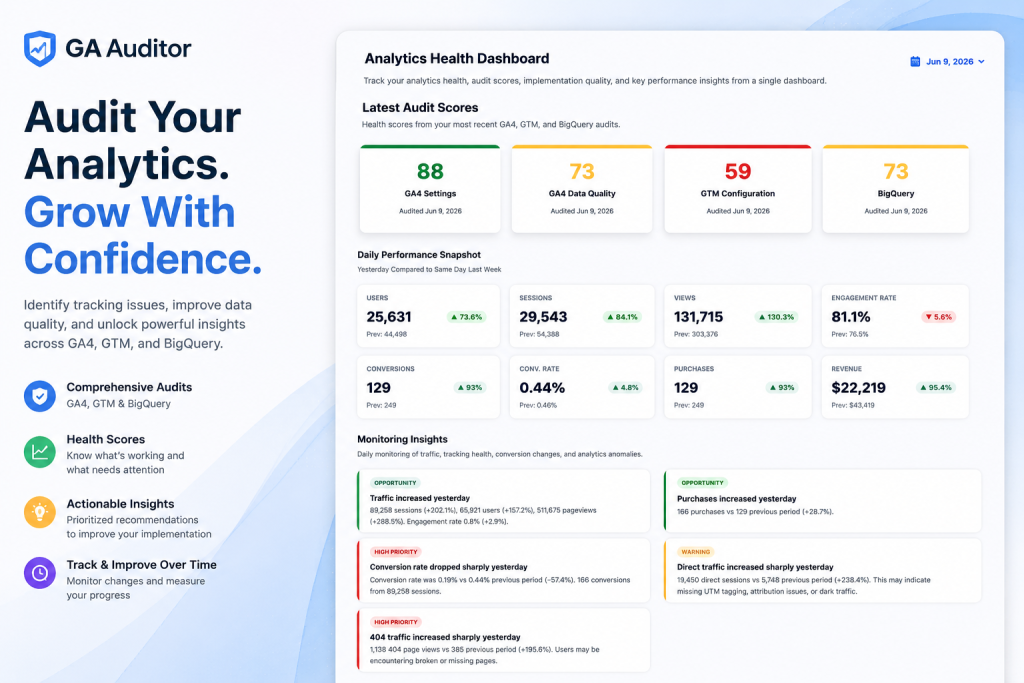
Most analytics tools are built to help you use your data. Dashboards, reports, visualizations, attribution models — all of it assumes one thing: that the data underneath is accurate.
But what if it isn’t?
That’s the question GA Auditor exists to answer. It’s not another reporting layer on top of GA4. It’s the layer underneath — the one that verifies whether the data feeding all your reports, dashboards, and decisions can actually be trusted in the first place.
GA Auditor combines implementation audits, health scoring, monitoring, and insights into a single analytics quality platform spanning GA4, Google Tag Manager, and BigQuery. This is a complete tour of what it does and why each piece matters.
The Core Idea: Audit, Score, Monitor, Fix
Before getting into individual features, it’s worth understanding the philosophy that ties them together.
Every audit GA Auditor runs produces three things: actionable findings (what’s actually wrong), prioritized recommendations (what to fix first), and a clear understanding of your analytics health (where you stand overall). It doesn’t just hand you a score and leave you to figure out the rest — it shows you the specific checks that passed, failed, or need review, so your team knows exactly where to focus.
That “score to specific fix” principle runs through every feature. A number on its own creates anxiety. A number paired with a prioritized list of exactly what to do about it creates action.
With that framing, let’s walk through the platform.
Feature 1: GA4 Configuration Audit
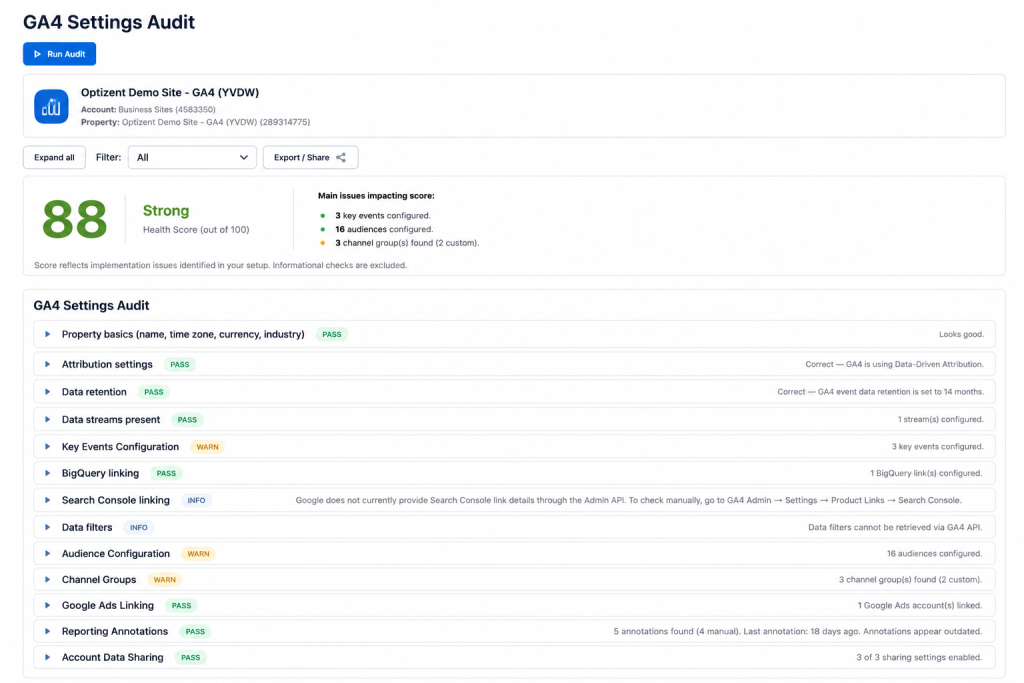
Review your GA4 property configuration.
Your GA4 property settings are the foundation everything else is built on. Get them wrong and every report downstream inherits the error — even when data collection itself is working perfectly. The trouble is that most teams configure these settings once, during implementation, and never revisit them.
The GA4 Configuration Audit performs a systematic review of exactly these settings:
Property Configuration Review validates your property structure, time zone, industry categorization, and data stream setup — the foundational settings that quietly affect how all your data gets sliced and interpreted.
Attribution Settings Validation checks that your attribution model is correctly configured and that cross-channel data-driven attribution is set up appropriately for your business, so credit gets assigned to channels the way you actually intend.
Data Retention Checks flag retention settings that may be creating silent data loss. GA4’s defaults are conservative, and many teams don’t realize their event-level history is being deleted on a rolling basis until they go to run an analysis on data that no longer exists.
Key Event & Conversion Review verifies your conversion events are correctly defined, with no duplicate or conflicting definitions inflating your reported conversion rates.
Audience & Integration Validation checks your GA4 audiences and confirms that integrations with Google Ads, Search Console, and other connected platforms are actually functioning — not just configured at some point in the past.
The value here is catching the structural issues that never announce themselves. A misaligned attribution window doesn’t throw an error; it just quietly shifts credit between channels every reporting day until someone checks.
Feature 2: GA4 Data Quality Audit
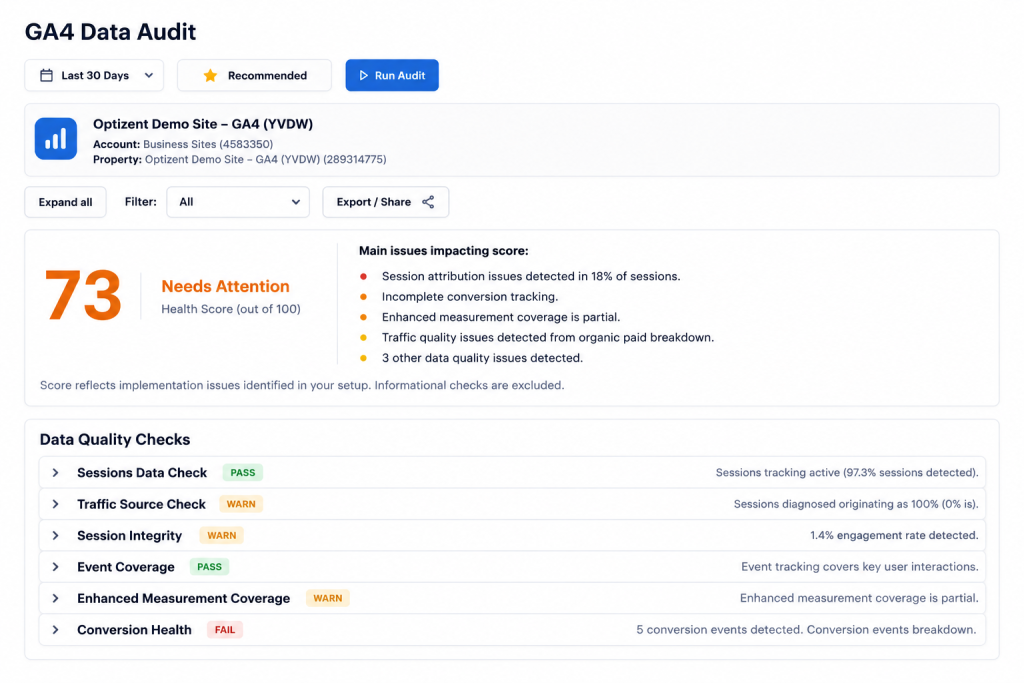
Identify data quality issues that impact reporting accuracy and business decisions.
A perfectly configured property can still produce unreliable data if the underlying tracking implementation is flawed. Configuration is about intent; data quality is about what actually happens when real users navigate real pages. This audit examines the data itself, not just the settings.
Unassigned Traffic Source Analysis quantifies how much of your traffic lands in GA4’s “Unassigned” bucket and identifies the likely causes — missing referral exclusions, cross-domain tracking gaps, or broken UTM parameters. Unassigned traffic is a direct signal that attribution broke somewhere, and it often gets absorbed into Direct, distorting your entire channel picture.
Revenue Tracking Validation confirms purchase events are firing consistently, that revenue values match expected totals, and that no duplicate transaction IDs are inflating your reported revenue — the kind of issue that makes GA4 revenue disagree with your payment processor.
Session Attribution Checks examine channel attribution patterns, surfacing Direct traffic spikes, referral exclusion gaps, and source/medium inconsistencies that signal attribution is breaking down.
Event Collection Quality Review reviews your key events for firing consistency, required parameter completeness, and data quality problems like null values or truncated strings that quietly undermine any segmentation built on them.
This is the audit to run before making major decisions on GA4 data, or whenever your numbers don’t quite match what other platforms are telling you.
Feature 3: Google Tag Manager Audit
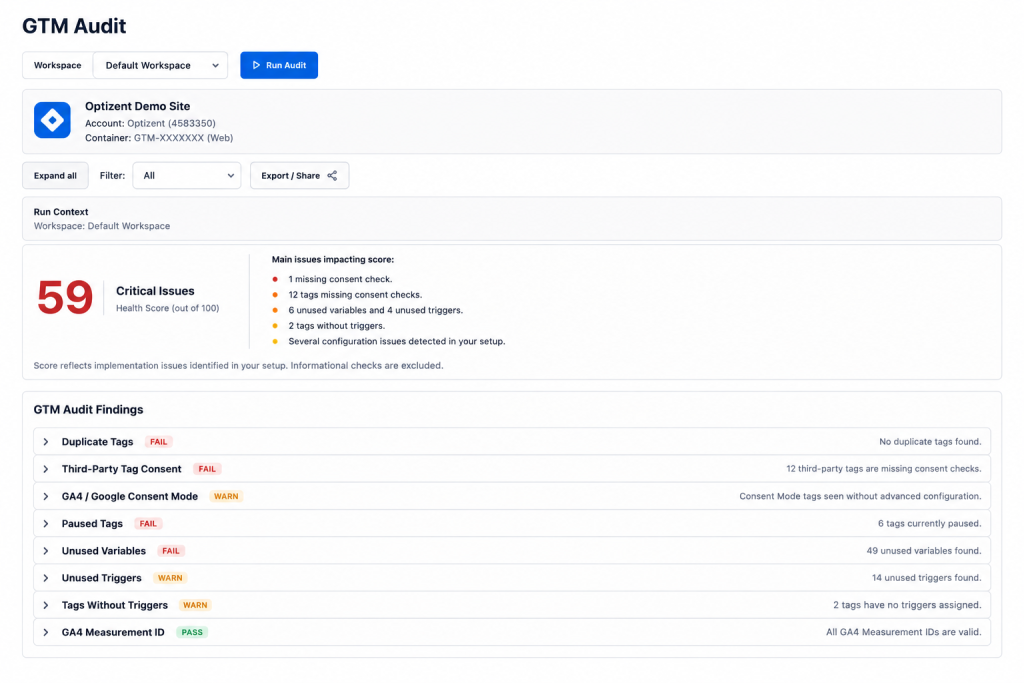
Improve container quality by surfacing implementation risks, governance issues, and configuration problems.
GTM’s accessibility is its greatest strength and its biggest liability. When anyone on the team can deploy a tag, the container accumulates technical debt fast — and that debt shows up as distorted data in GA4.
Duplicate GA4 Tags is the highest-impact check. Configuration or event tags firing more than once per page load double your session counts, conversion figures, and event data across every report. It’s the single most common issue found in GTM audits, and because the inflated numbers trend upward, it almost never gets questioned.
Paused Tags & Triggers surfaces all paused elements so your team can make a deliberate decision — clean them up or reactivate them — rather than leaving organizational debt that a future editor might accidentally re-enable without understanding why it was paused.
Unused Variables lists orphaned variables no longer referenced by any tag or trigger, reducing the clutter that makes every future container change slower and riskier.
Missing Consent Controls verifies that consent mode is properly implemented and that tags actually respect user consent signals before firing — critical for GDPR, CCPA, and the growing set of regional privacy frameworks. A consent banner that looks compliant while tags fire regardless of user choice is both a compliance risk and a data quality problem.
Broad Trigger Detection flags triggers whose scope is broader than necessary — a conversion tag firing on “All Pages” instead of only the confirmation page, for example — reducing unwanted tag fires and improving implementation precision.
Because GTM is the deployment layer for GA4, a clean container isn’t a technical nicety. It’s a prerequisite for data you can trust.
Feature 4: BigQuery Audit
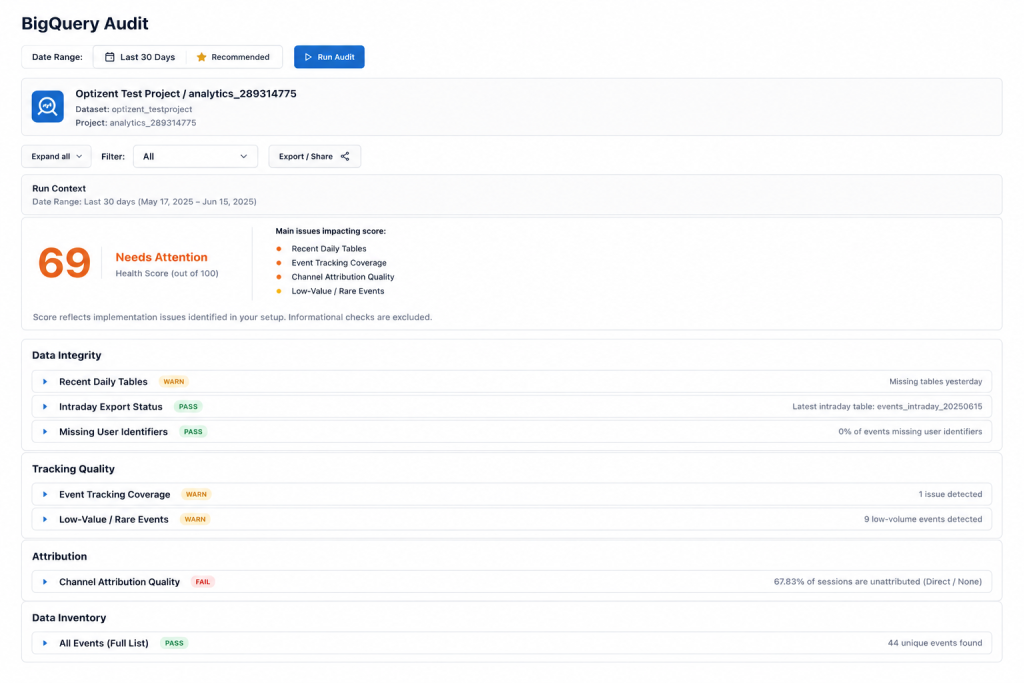
Validate your analytics data pipeline to ensure exported GA4 data is complete, reliable, and ready for reporting.
For teams running advanced analytics, custom attribution models, or BI dashboards on GA4 data, the BigQuery export is the actual source of truth. If the export is incomplete, delayed, or misconfigured, every query and model built on top is unreliable — and BigQuery doesn’t throw an error when data is missing. It just returns results that are quietly wrong.
Export Validation Checks verify export frequency (daily vs. streaming), confirm the correct GA4 property is linked to the right BigQuery project, and check for uninterrupted data flow.
Missing Data Detection scans for date gaps — days where event data is absent or significantly lower than expected — that silently skew any historical analysis spanning that period. This is the highest-value BigQuery check, because a date gap is both common and devastatingly easy to miss.
Schema & Coverage Review confirms expected fields are present and that event parameter coverage is consistent across the dataset — catching the schema drift that causes downstream models to return unexpected nulls after a GA4 update.
Attribution Quality Validation validates traffic source fields and checks session-level attribution against event-level data, flagging the systematic attribution breakdowns that any custom model would otherwise inherit from the raw export.
If your team does anything analytically serious in BigQuery, this audit confirms the foundation is actually there before you build on it.
Feature 5: Insights & Monitoring
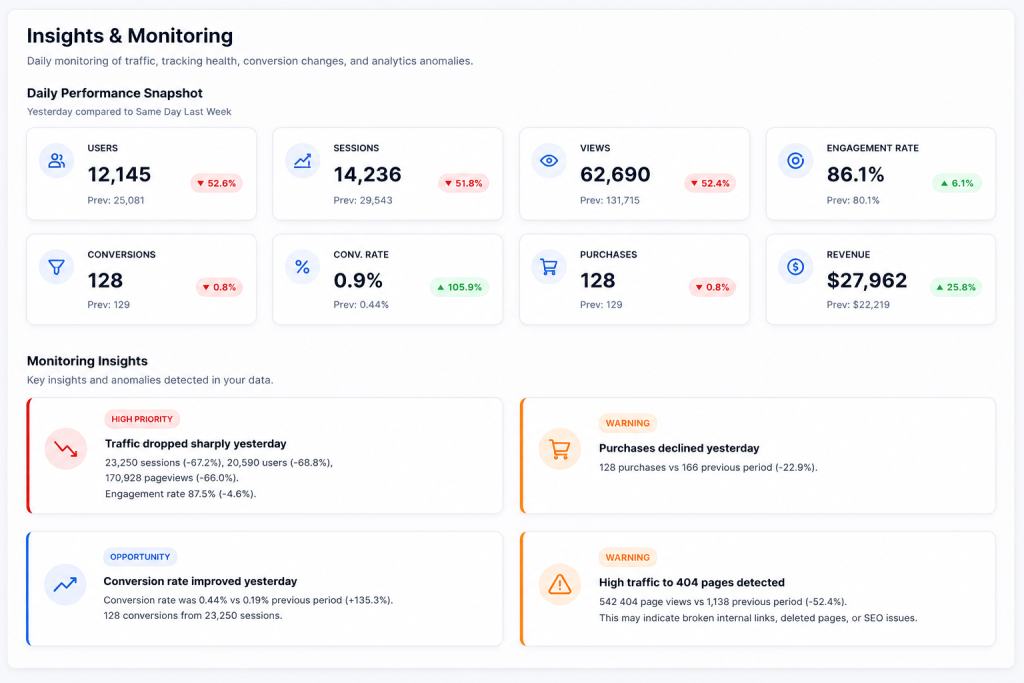
Monitor changes automatically — surfacing important trends, anomalies, and opportunities without manually reviewing reports every day.
Audits catch the issues that already exist. Monitoring catches the ones being introduced right now. This is the feature that turns GA Auditor from a periodic check into an always-on analytics health system.
Traffic & Revenue Trends track daily changes in users, sessions, pageviews, and revenue against the same day last week, surfacing significant deviations in either direction as insights.
Conversion Rate Changes monitor your conversion rate daily and alert you when it moves significantly — one of the clearest early signals of a broken form, a failed payment integration, or a tracking issue introduced by a recent change.
Anomaly Detection identifies patterns beyond simple thresholds — unexpected direct traffic spikes, 404 event surges, engagement drops that don’t track with session volume — the kinds of signals that get buried in standard dashboards but get flagged automatically here.
Ongoing Analytics Monitoring runs daily, automatically, with prioritized alerts, so nobody has to manually review reports across every property every morning.
Insights are categorized by severity — Opportunity, High Priority, and Warning — so your team always knows what to act on first. A conversion rate drop flagged High Priority gets investigated today; a Direct traffic surge flagged Warning gets reviewed within a day or two; a traffic increase flagged Opportunity gets capitalized on when it makes strategic sense.
The practical impact: instead of discovering a broken conversion event three weeks after a site update, you get an alert the next morning — turning weeks of contaminated data into hours.
Beyond the Five Audits: Platform-Level Features
The five audit modules are the core, but several platform-level capabilities are what make GA Auditor usable as an ongoing system rather than a one-time check.
Audit Detail — From Score to Specific Fixes. GA Auditor doesn’t just give you a score. Each audit expands into the specific checks that passed, failed, or need review, so your team knows exactly where to focus rather than guessing what a number means.
Historical Audit Tracking. Compare results over time and measure whether your implementation is actually improving after each round of fixes. A GTM score moving from 59 to 82 after a cleanup sprint is concrete, visible evidence of progress — far more compelling than a static report.
Executive-Friendly Reporting. Share simple summaries, scores, and issue categories with stakeholders without overwhelming them with technical detail. This translation layer is what makes audit findings actionable for marketing directors, clients, and leadership who don’t live in GA4 every day.
Implementation Quality Checks. Beyond the named categories, GA Auditor identifies missing conversions, unusual traffic patterns, weak campaign tagging, broken events, and configuration gaps that span the full stack — the cross-cutting issues that don’t fit neatly into one audit type but still materially affect accuracy.
Why This Combination Matters
Plenty of tools do one piece of this. There are GTM debuggers, GA4 configuration checkers, BigQuery validators, anomaly monitors. What’s rare is having all of it in one place, scored consistently, tracked over time, and translated into both technical fix lists and executive summaries.
That combination is the actual value. Analytics quality isn’t a single check you pass or fail — it’s a property of the whole stack, from property configuration down through GTM, into the data itself, and out to the BigQuery pipeline. A problem anywhere in that chain corrupts everything downstream. GA Auditor’s strength is treating the whole chain as one system to be verified, rather than four separate tools that each assume the others are working.
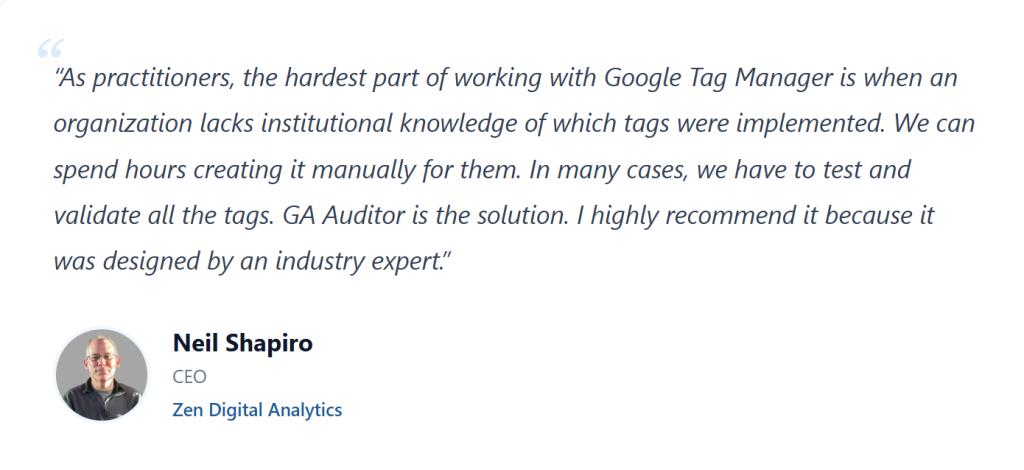
As Neil Shapiro, CEO of Zen Digital Analytics, put it: the hardest part of working with GTM is when an organization lacks institutional knowledge of which tags were implemented — hours of manual testing and validation that GA Auditor automates directly.
Stop Guessing. Start Verifying.
The premise behind every feature is the same: stop guessing whether your analytics implementation is reliable, and start verifying it. Run an audit, see exactly where the issues are, fix the ones that matter most, and track whether your implementation actually improves over time.
The dashboard will keep loading either way. The only question worth answering is whether what’s on it is actually true.
Run your first audit free at gaauditor.com — and find out where your analytics health really stands.