
The question usually arrives through a data protection officer, and it is always the same one:
“Does Google ever receive our visitors’ IP addresses?”
The honest answer is yes. Briefly, for the purpose of working out roughly where the visitor is, and then discarded before anything is stored. GA4 handles this automatically and you cannot turn it off.
For most sites that is the end of the conversation. For a healthcare client, a bank, or anyone whose DPO sits in Germany, it is the start of one. Because “received, processed, then discarded” is a different statement from “never received at all”, and some organisations need the second one.
This post covers what GA4 actually does by default, why that is enough for most people, the specific situations where it is not, and how to replace the IP address before it ever reaches Google using a server-side container.
One thing up front: I am not a lawyer, and nothing here is legal advice. Whether you need this is a decision for your legal or privacy team. What I can tell you is what the setup does technically and how to build it correctly.
What GA4 does with IP addresses by default
If you worked with Universal Analytics, you will remember anonymize_ip. It was a setting you had to remember to switch on, and plenty of implementations shipped without it.
GA4 removed the decision. There is no setting, because the behaviour is always on.
The sequence is straightforward. A hit arrives carrying the visitor’s IP address, because every HTTP request does. GA4 uses that address to derive geographic information, meaning country, region and city at the granularity it reports. Then it discards the address before the hit is logged or stored.
So the IP is used in transit and does not survive into your reports, your BigQuery export or anywhere else you can query.
You can watch this happen if you run a server-side container. In the sGTM preview, look at the outgoing request to Google Analytics and find the _uip parameter, which carries the user IP. It gets stripped on Google’s side without you doing anything.
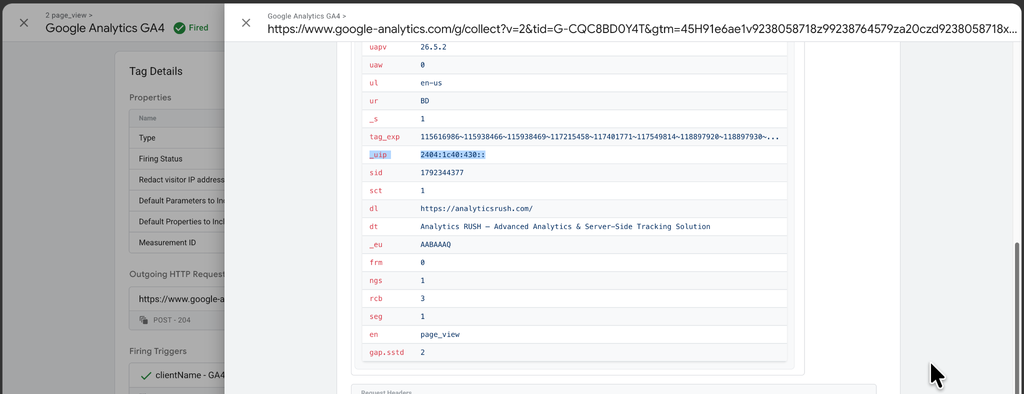
This is a reasonable design. It gets you usable geography without GA4 retaining an identifier it does not need. For the large majority of websites it is the right amount of privacy engineering, and adding more would cost you accuracy for no real gain.
Where Consent Mode v2 complicates the picture
Since March 2024, advertisers using certain Google advertising and measurement features in the EEA, the UK and Switzerland have had to pass consent signals to keep using them. That is Consent Mode v2, and it changes what happens when someone says no.
With consent granted, nothing unusual happens. GA4 collects according to your configuration.
With analytics consent denied under advanced consent mode, the tags do not go silent. They continue sending cookieless pings to Google, which feed the modelling Google uses to estimate behaviour it could not measure directly.
Those pings carry no analytics cookies. But they are still HTTP requests, and an HTTP request cannot exist without a source IP. So Google receives the IP address, processes it as part of handling the request, and does not log or store it in GA4.
That last sentence is the whole issue in miniature. The data is not retained. It is still received, and it is received specifically in the case where the visitor declined.
For most organisations this is acceptable and consistent with how Google describes its privacy-first measurement. For some it is exactly the thing their policy forbids.
Receipt is not the same as storage
Two things get conflated in these conversations, and separating them makes the decision much easier.
Storage is about what a vendor keeps. GA4’s default handles this well. The IP does not persist.
Receipt is about what a vendor is handed in the first place. GA4’s default does nothing about this, because it cannot. The IP arrives with the request.
Under GDPR, an IP address can be personal data. That holds in context even when the address is truncated or partially masked, particularly when it could be combined with other information to distinguish a user. The built-in anonymisation reduces how much personally identifiable information GA4 processes. It does not remove the fact that the address was transmitted to a third party.
And the built-in behaviour does not make anyone compliant on its own. Compliance depends on what you collect, your legal basis for processing it, how your consent is implemented, and what you share with whom. No vendor default settles that.
So the real question is not “is GA4 anonymising IPs?” It is: in the specific case where a visitor declined, is it acceptable to us that Google’s servers see their IP address at all?
Most organisations answer yes. The ones that answer no need the rest of this post.
Who actually needs this
I want to be clear that this is not a best practice everyone should adopt. It is extra configuration to maintain, and on most sites it buys nothing a regulator or customer will ever ask about.
The cases where it genuinely comes up:
Your own privacy policy already promises it. Some organisations have written commitments that personal data is anonymised before any third party receives it. If that sentence is in your policy, your current setup may not match it.
Enterprise customers demand it. In B2B, security reviews and vendor questionnaires increasingly ask what personal data flows to which processors. Being able to answer “analytics never receives visitor IP addresses” closes the question.
You handle sensitive subject matter. Healthcare, mental health, pharma, medtech, financial services, banking, insurance, government and education. The issue is not only the identifier, it is what the page itself reveals about the person visiting it. These organisations often prefer an architecture where the analytics vendor never receives the original address.
You operate where regulators have taken a stricter line. Germany, Austria, France and the Netherlands have a history of reading analytics implementations more narrowly than the market average. If your traffic or your legal entity sits there, the bar may be higher than the default clears.
If none of those describe you, the correct engineering decision is to leave it alone and spend the time on something that moves revenue.
And if one of them might describe you, confirm it with your legal or privacy team before building anything. The list above is a pattern I see in practice, not a legal test.
Replacing the IP before GA4 ever sees it
This is only possible with server-side tracking, and that is the whole reason server-side matters here. Your container sits between the browser and Google. Requests land on infrastructure you control, you modify them, and only then do they continue.
The logic we are building is conditional, not blanket:
- Analytics consent granted: pass the real IP through. GA4 applies its normal handling, geography stays accurate.
- Analytics consent denied: replace the real IP with a substitute before the request leaves your server.
I want to stress the conditional part. Replacing the IP for everyone costs you geographic accuracy across your entire dataset to solve a problem that only exists in the denied case. Scope it.
What you need before starting
- A server-side GTM container with GA4 already configured and working
- A consent management platform, properly wired
- Advanced Consent Mode v2 implemented in your tracking configuration
- A Stape account (the pieces used below are available on the free plan)
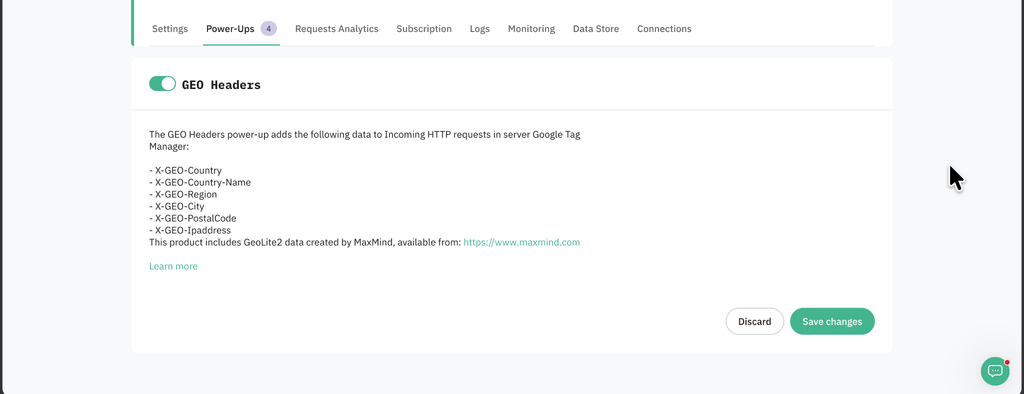
Step 1: turn on the GEO Headers power-up
This is what supplies the replacement address. It populates geographic location headers derived from the visitor’s actual IP on the incoming request, which means the substitute keeps approximately the right location without being the visitor’s real address.
In your Stape account: open your container, go to Power-ups, find GEO Headers, click Use, enable the toggle, save.
Step 2: confirm which header carries the real IP
Do not skip this. The header name varies by hosting setup, and using the wrong one gives you a variable that silently returns nothing.
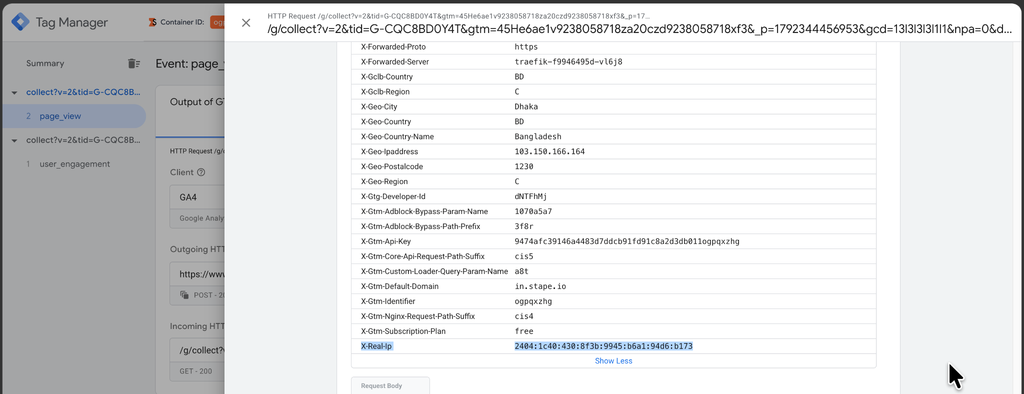
Run preview in both your web and server containers, trigger any event, then open the Request tab and look at Incoming HTTP Request. Find the header holding your actual IP address.
On Stape this is typically x-real-ip. On other hosting it may be x-forwarded-for, which can contain a comma-separated chain rather than a single address. Use whatever your own preview shows you.
Step 3: build the variables
Three small variables, then one that combines them.
The consent signal. A variable reading the Google Consent State from the incoming request.
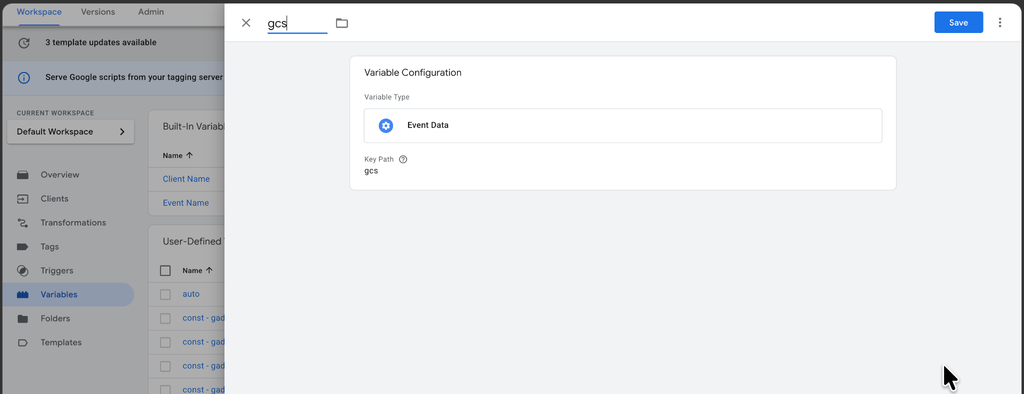
- Variable Type: Event Data
- Key Path: gcs
The real IP.
- Variable Type: Request Header
- Name: x-real-ip

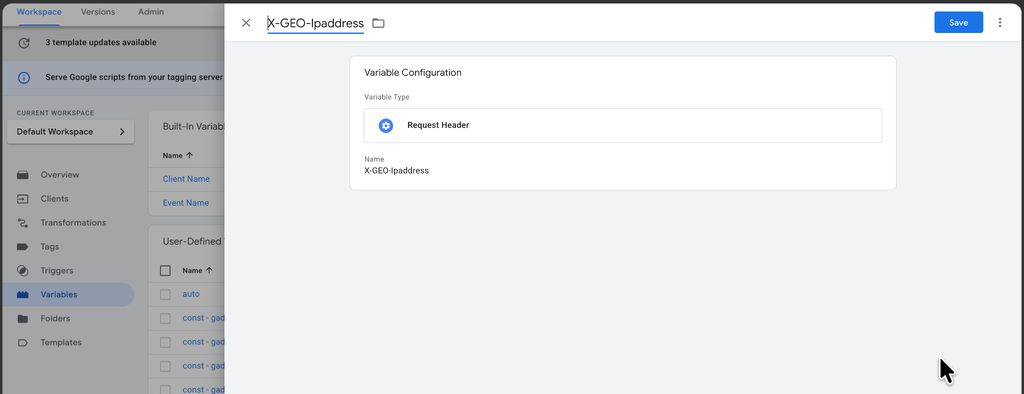
The replacement IP, supplied by the power-up.
- Variable Type: Request Header
- Name: X-GEO-Ipaddress
Step 4: combine them with an Advanced Lookup Table
Add the template first: in your server container, go to Templates, click Search Gallery, find Advanced Lookup Table, and add it to your workspace.
Then create the variable. Go to Variables, click New, and choose Advanced Lookup Table.
The rule is a single row plus a default:
| Input (gcs) | Output |
| G101 or G111 | the real IP variable |
| anything else (default) | the X-GEO-Ipaddress variable |
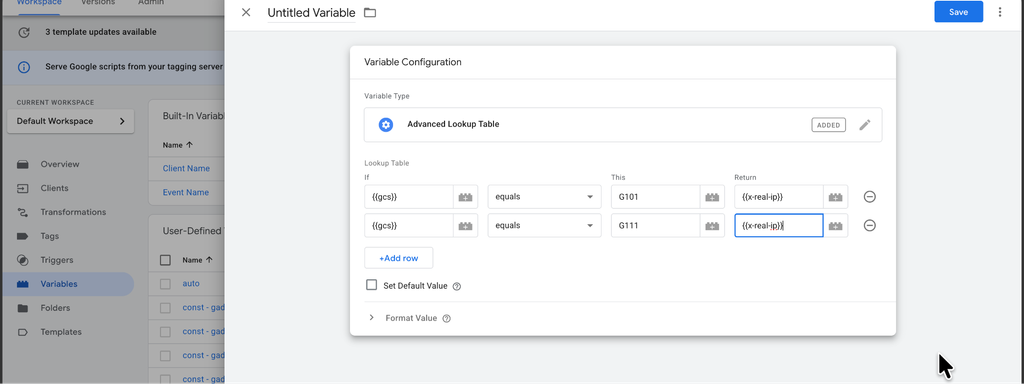
The GCS string encodes consent state, and the fourth character is the analytics one. G101 means analytics granted with advertising denied; G111 means both granted. Those are the two cases where analytics consent exists, so those are the two that pass the real address.
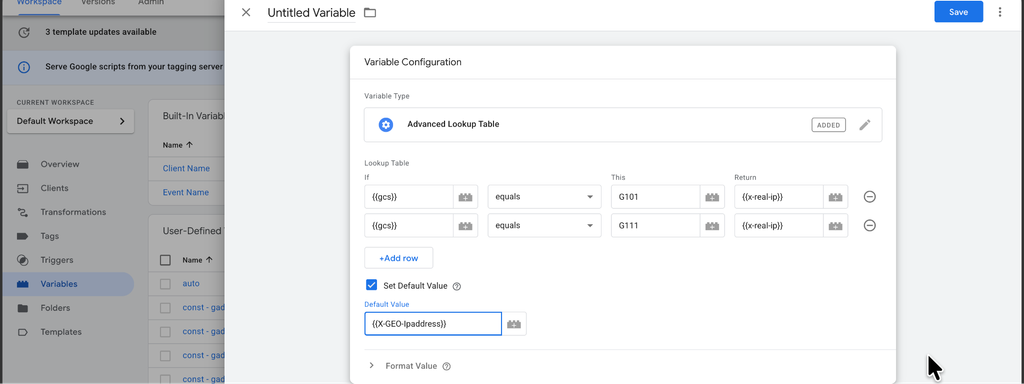
Tick Set Default Value and point it at the X-GEO-Ipaddress variable. The default is doing the real work here: anything that is not an explicit analytics grant, including a missing or malformed gcs, falls through to the replacement. That is the behaviour you want.
Step 5: apply it to the GA4 tag
Open your GA4 tag in the server container, expand Event Parameters, and under Parameters to Add/Edit add:
- Parameter name: ip_override
- Value: your Advanced Lookup Table variable
Save.
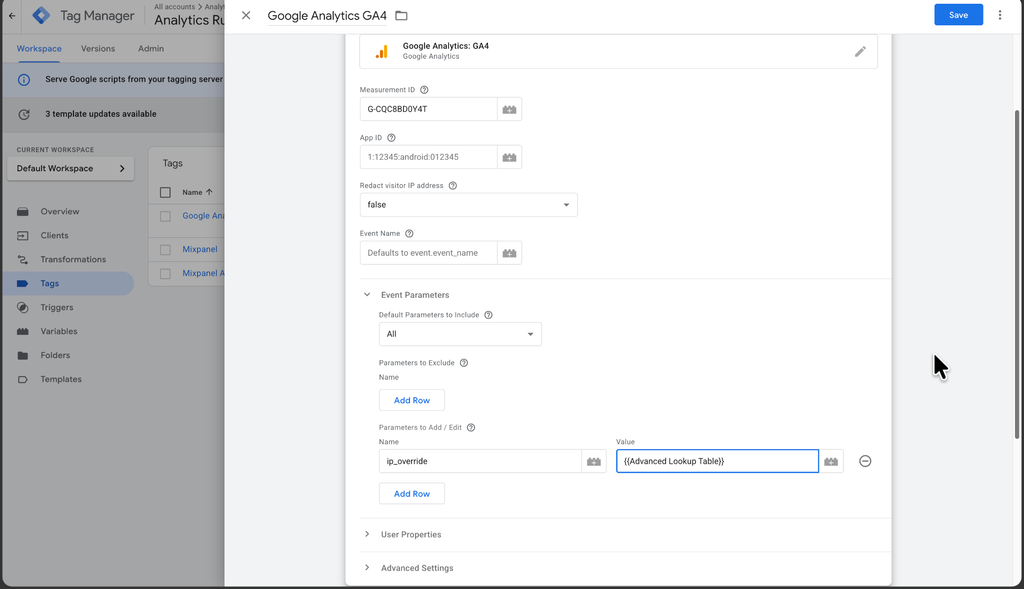
ip_override tells GA4 which address to treat as the client’s. Because the variable resolves per request, every hit now carries either the real address or the substitute depending on that visitor’s consent.
Verifying it actually works
This is the part people skip, and it is the part that matters. A setup like this fails silently. Nothing errors, nothing turns red, the real IP just keeps going out.
Test the denied path specifically, because that is the one you built.
1. Run preview in both containers. Web and server, at the same time.
2. Reject consent on your banner, then trigger any event that fires a GA4 tag.
3. Open the server preview, go to the Request tab, and under Outgoing HTTP Requests from Server find the request going to Google Analytics.
4. Find the _uip parameter and read it. If the setup is correct, it is not your IP address. It should resemble the value the GEO Headers power-up put on the incoming request, though slightly modified, because GA4’s own anonymisation still applies on top. That modification is expected and fine.
5. Now test the granted path. Accept consent, trigger the same event, and confirm _uip carries the real address. If both branches return the substitute, your gcs variable is not resolving and the lookup is falling through to its default every time.
One tool worth installing: the Stape GTM Helper Chrome extension. Server GTM preview does not show consent status natively, and this adds it, which removes most of the guesswork from exactly this test. It also lays request data out more readably, and on Shopify it lets you debug checkout events that the standard preview cannot reach.
Mistakes to avoid
Assuming the header name. x-real-ip is common but not universal. Check your own incoming request. A Request Header variable pointed at a header that does not exist returns nothing, and an empty ip_override does not fail loudly.
Replacing the IP for everyone. Tempting, because the logic is simpler. It also degrades geography for every consented visitor to solve a problem that only exists for the non-consented ones. Keep it conditional.
Getting the GCS values wrong. Only G101 and G111 represent analytics consent granted. If you add G110 to that list you will be passing real addresses for visitors who declined analytics, which is the exact opposite of what you built this for.
Forgetting the default. Without Set Default Value, requests with no gcs or an unexpected value return nothing, and you end up sending an empty override rather than a substitute. The default is the safety net, and it should point at the replacement.
Testing only the happy path. Accepting consent and seeing data arrive proves nothing here. The denied path is the one you changed.
Thinking this covers your whole stack. It covers GA4. Your Meta CAPI, Google Ads and any other server-side destination still receive the IP from the same container unless you handle each one. If the policy driving this says “no third party receives visitor IP addresses”, GA4 alone does not satisfy it.
Not writing it down. Six months from now somebody will ask why GA4 geography looks slightly off for a slice of traffic. Document this in your tracking notes and in your privacy documentation, where it is also a point in your favour.
What this buys you, and what it does not
What you get is a specific, defensible statement: when a visitor declines analytics consent, Google never receives that visitor’s IP address, because it was replaced on infrastructure you control before the request left. You can demonstrate it in a preview session, which is worth more in a security review than any policy paragraph.
What you do not get is compliance. Server-side tracking is a control layer, not a legal position. It gives you the ability to inspect, modify, enrich or block data before it reaches a vendor, and that ability is genuinely useful for honouring consent properly. It does not decide whether your collection has a lawful basis, whether your banner is valid, or whether your retention is appropriate. Those are questions for your legal team, and this setup is one input to them rather than an answer.
You also give up a small amount of geographic precision on non-consented traffic. Because the substitute address is derived from the visitor’s real one, the location stays approximately right rather than becoming random, so the cost is usually acceptable. Confirm it is acceptable to you before rolling out.
The broader point is the one I would leave you with. GA4’s default handles storage well, and for most sites that is the appropriate stopping point. The reason to go further is not that the default is bad. It is that some organisations need to control what a vendor receives, not just what it keeps, and that control only exists if you own the layer in between.
If you are weighing up whether your situation calls for this, or you have a server container and want this built and verified properly, get in touch.