
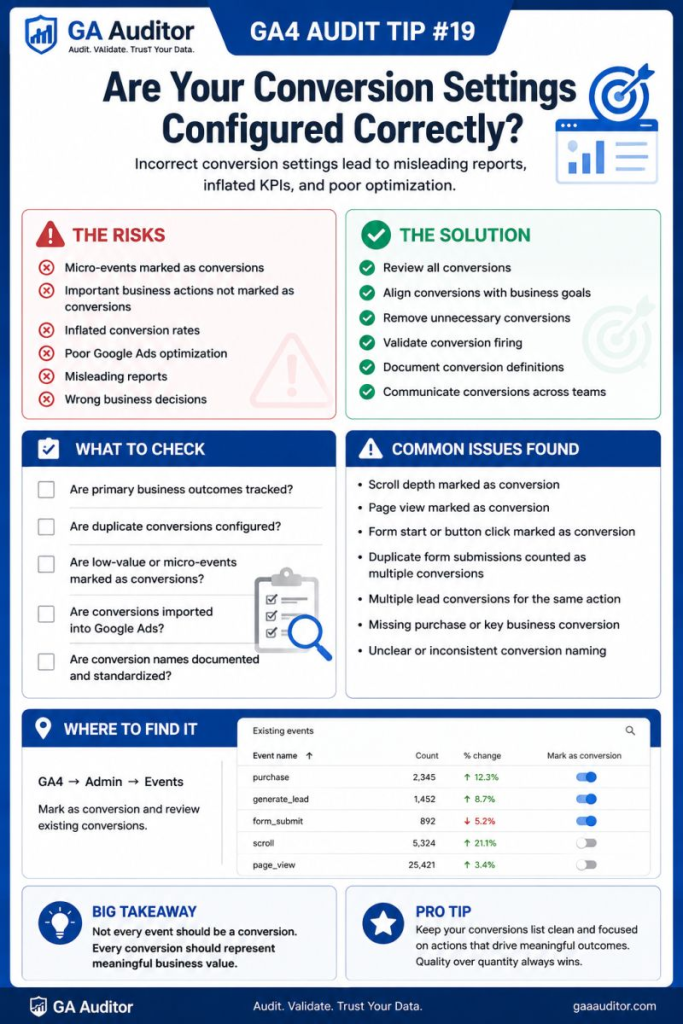
I was auditing a GA4 property for a company running a significant Google Ads budget when I noticed something odd.
Their conversion rate looked fantastic.
The marketing team was thrilled.
Campaigns appeared to be outperforming expectations.
Then I asked:
“Which conversions are you optimizing toward?”
The answer surprised everyone.
The account was optimizing toward a scroll event.
Not leads.
Not purchases.
Not demo requests.
Scrolls.
Technically, the setup worked exactly as configured. GA4 was recording conversions, Google Ads was receiving them, and campaigns were optimizing accordingly.
The problem wasn’t broken tracking.
The problem was that nobody had stopped to ask whether the conversions being measured actually reflected business success.
That’s why reviewing conversion settings is one of the most important checks in any GA4 audit.
Because not every event deserves to become a conversion.
How GA Auditor Helps
Conversion issues rarely look like tracking problems.
Events are firing.
Reports are populating.
Dashboards look impressive.
In some cases, conversion rates even improve.
The challenge is that businesses often optimize toward the easiest actions to track instead of the actions that create value.
GA Auditor reviews conversion settings as part of its 150+ point GA4 audit checklist, helping organizations determine whether their Key Events align with business objectives and whether marketing platforms are optimizing toward meaningful outcomes.
The goal isn’t to increase the number of conversions.
It’s to improve the quality of the conversions you’re measuring.
Why Conversion Settings Matter
Conversions influence almost everything in GA4 and Google Ads.
They shape:
- Marketing performance reporting.
- Campaign optimization.
- Automated bidding decisions.
- Executive dashboards.
- Attribution analysis.
- Audience creation.
- Budget allocation.
If the wrong actions are classified as conversions, every decision built on top of those metrics becomes less reliable.
A high conversion rate doesn’t necessarily mean strong business performance.
It depends entirely on what you’re counting.
Common Issues Found During Audits
Low-Value Actions Are Marked as Conversions
This is probably the issue I encounter most often.
Businesses configure events such as:
- Scrolls.
- Video plays.
- Button clicks.
- File downloads.
as conversions simply because they represent engagement.
Those actions may be interesting.
They don’t always indicate business success.
Important Actions Aren’t Marked as Conversions
Sometimes the opposite happens.
Businesses track meaningful events but never designate them as conversions.
Examples include:
- Lead submissions.
- Purchases.
- Demo requests.
- Consultation bookings.
- Trial sign-ups.
The data exists.
The reporting doesn’t prioritize it.
Too Many Conversions Exist
I’ve audited properties with dozens of conversions.
When everything becomes equally important, it becomes difficult to understand what actually matters.
Marketing teams lose focus.
Leadership receives noisy reports.
Optimization becomes less effective.
Duplicate Conversions Inflate Performance
Improper triggers, thank-you page refreshes, or implementation issues can cause the same action to be counted multiple times.
Conversion rates increase.
Reality doesn’t.
Nobody Knows Why the Conversions Were Chosen
One of my favorite audit questions is:
“Why is this event marked as a conversion?”
The answer is often:
“I think the previous agency set it up that way.”
Measurement strategies shouldn’t depend on historical guesswork.
How to Audit Conversion Settings
Navigate to:
Admin → Events → Key Events
Review each conversion individually.
Ask:
- Does this action represent meaningful business value?
- Would leadership celebrate if this number increased?
- Does it influence revenue or customer acquisition?
- Would we optimize campaigns toward this action?
- Is it still relevant today?
Those five questions usually uncover most problems.
A Simple Framework for Evaluating Conversions
I often group conversions into three categories.
Primary Business Outcomes
These almost always deserve conversion status.
Examples:
- Purchases.
- Qualified lead submissions.
- Demo requests.
- Trial registrations.
- Subscription purchases.
High-Intent Actions
These may qualify depending on the business model.
Examples:
- Quote requests.
- Financing applications.
- Appointment scheduling.
- Contact requests.
Engagement Metrics
These generally belong in behavioral reporting rather than conversion reporting.
Examples:
- Scroll depth.
- Video engagement.
- File downloads.
- Navigation clicks.
They can explain user behavior.
They rarely define success.
Questions Worth Asking During an Audit
I often ask stakeholders:
- What actions drive business growth?
- Which conversions are reported to leadership?
- Which actions influence advertising budgets?
- Which events are simply “nice to know”?
- Have conversion definitions changed over time?
- Does everyone agree on what success looks like?
The answers often reveal a gap between implementation and strategy.
Reviewing Google Ads Alongside GA4
If Google Ads uses GA4 conversions, this step becomes even more important.
Review:
- Which conversions are imported?
- Which conversions are Primary?
- Which conversions are Secondary?
- What are bidding strategies optimizing toward?
Because Google Ads can only optimize using the signals you provide.
If those signals don’t represent value, the platform won’t magically know the difference.
Signs Your Conversion Setup Needs Attention
A review may be worthwhile if:
- Conversion rates look unusually high.
- Teams disagree on what constitutes a conversion.
- Marketing focuses on engagement metrics.
- Nobody remembers why conversions were configured.
- Campaign performance doesn’t align with business outcomes.
- Leadership questions reporting relevance.
These situations don’t always indicate a problem.
But they almost always justify a closer look.
Best Practices
A few habits can improve conversion quality significantly.
- Limit conversions to meaningful outcomes.
- Review conversion definitions quarterly.
- Document why each conversion exists.
- Align marketing and leadership expectations.
- Separate engagement metrics from business outcomes.
- Review Google Ads imports regularly.
- Validate conversion triggers after website updates.
Good reporting starts with clear definitions.
Conversion Audit Checklist
Use this checklist during your next GA4 review:
□ Review all Key Events.
□ Confirm they represent business value.
□ Remove unnecessary engagement-based conversions.
□ Verify important outcomes are included.
□ Review imported Google Ads conversions.
□ Validate Primary and Secondary conversion settings.
□ Investigate duplicate conversions.
□ Document conversion definitions.
□ Align stakeholders around success metrics.
□ Include conversion reviews in recurring audits.
Wrapping Up
One of the easiest ways to improve reporting quality is to be more intentional about what you call a conversion.
GA4 will happily count whatever you ask it to count.
The difficult part is deciding what actually matters.
I’ve seen businesses celebrate rising conversion rates while revenue remained unchanged because they were measuring activity instead of outcomes.
The companies that get the most value from analytics aren’t necessarily the ones tracking the most conversions.
They’re the ones measuring the right ones.
Because a conversion isn’t valuable simply because it happened.
It’s valuable because it represents progress toward a business objective.