
A few months ago, I was working with a team that wanted to analyze how user behavior had changed over the previous year.
They wanted to compare funnel performance, understand how returning customers interacted with the website, and identify trends using Explorations.
The data wasn’t there.
Not because GA4 had stopped collecting it.
Not because tracking had broken.
But because nobody had reviewed the property’s data retention settings.
The unfortunate reality is that many GA4 users don’t think about data retention until they need historical data that is no longer available.
By then, it’s too late.
That’s why reviewing data retention settings is an important part of every GA4 audit.
How GA Auditor Helps
Data retention issues rarely attract attention during implementation.
Events are being collected.
Reports continue to populate.
Dashboards work as expected.
Everything appears normal.
The problem usually surfaces when an analyst tries to build an Exploration, investigate historical user journeys, or answer a question that requires user-level data beyond the configured retention period.
GA Auditor reviews data retention settings as part of its 150+ point GA4 audit checklist, helping organizations understand how their current configuration affects analysis capabilities and whether their long-term data strategy supports business needs.
The objective isn’t simply to retain data.
It’s to ensure your organization can answer tomorrow’s questions using today’s information.
What Is Data Retention in GA4?
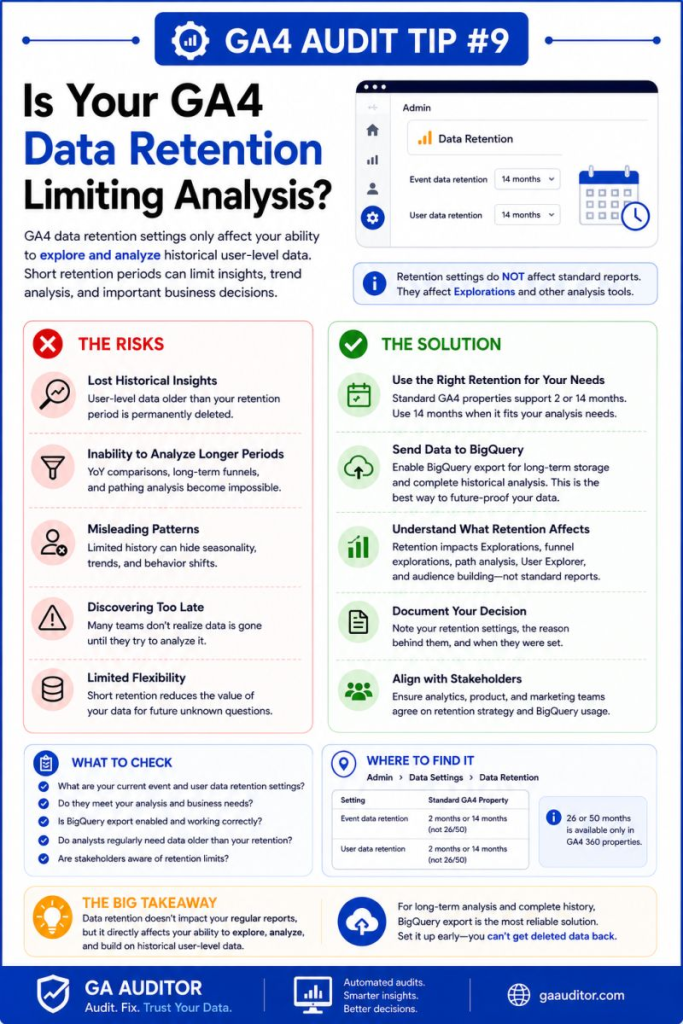
Data retention determines how long certain user-level and event-level data remains available within GA4 for advanced analysis.
This is one of the most misunderstood settings in the platform.
Many people assume data retention affects all GA4 reports.
It doesn’t.
Standard reports continue to display aggregated data.
The biggest impact is felt in features that rely on user-level information.
These include:
- Explorations
- Funnel explorations
- Path explorations
- Segment overlap analysis
- User-level analysis
If the underlying data is no longer retained, those analyses become limited.
What Data Retention Does Not Affect
This distinction is important.
Data retention settings generally do not affect:
- Standard GA4 reports
- Traffic acquisition reports
- Engagement reports
- Monetization reports
- Demographic summaries
This means many organizations don’t realize they have a problem until they attempt deeper analysis.
The reports still look fine.
The flexibility disappears.
Why This Matters
Business questions evolve.
Leadership may ask:
- How has user behavior changed over the past year?
- How do today’s customers compare to those acquired six months ago?
- How do long-term conversion paths differ by channel?
- What patterns exist among returning users?
If the necessary data has expired from GA4’s exploratory environment, those questions become difficult—or impossible—to answer.
Common Data Retention Issues Found During Audits
Nobody Knows the Current Setting
This happens surprisingly often.
Teams inherit a GA4 property and assume the default configuration is appropriate.
Years later, nobody remembers reviewing it.
Analysts Discover the Limitation Too Late
The request usually sounds something like this:
“Can we analyze user behavior from last year?”
Only then does someone realize the required data is unavailable.
Organizations Depend Entirely on the GA4 Interface
GA4 is an excellent reporting platform.
It isn’t designed to serve as a permanent data warehouse.
Businesses that rely exclusively on the interface eventually encounter limitations.
BigQuery Was Never Enabled
This is one of the most painful findings during audits.
Teams recognize the importance of historical analysis after months—or years—of operation.
Unfortunately, BigQuery exports only begin collecting data after activation.
Historical backfilling isn’t available.
How to Check Data Retention Settings
Navigate to:
Admin → Data Settings → Data Retention
Review:
- The current retention period
- Whether the setting aligns with analytical needs
- Whether stakeholders understand its implications
This simple review can prevent future frustration.
A Common Misunderstanding About GA4 Data Retention
One of the myths I hear frequently is:
“Our reports disappear after the retention period.”
That’s not how it works.
The issue is much more subtle.
Aggregated reporting remains available.
Advanced analysis capabilities become constrained.
This distinction explains why many organizations don’t discover the problem immediately.
Why BigQuery Changes the Conversation
Whenever data retention comes up during audits, I also ask another question:
Is BigQuery export enabled?
BigQuery provides access to raw event data outside the constraints of GA4’s exploratory interface.
It enables:
- Long-term storage
- Custom reporting
- Historical analysis
- Advanced attribution
- Data validation
- Flexible modeling
Many businesses view BigQuery as an advanced analytics tool.
Increasingly, I see it as a necessary part of a sustainable measurement strategy.
Questions Worth Asking During an Audit
Consider the following:
- Do analysts rely on Explorations?
- How frequently are user-level analyses performed?
- Does leadership request historical comparisons?
- Is long-term behavioral analysis important?
- Is BigQuery enabled?
- Is there a documented data retention strategy?
These conversations often reveal whether the current configuration supports the organization’s future needs.
Best Practices
A few habits can help avoid unpleasant surprises later.
- Review retention settings during implementation.
- Document the rationale behind the chosen configuration.
- Educate stakeholders about the difference between standard reports and Explorations.
- Enable BigQuery as early as possible.
- Incorporate retention reviews into annual audits.
- Align data strategy with business reporting requirements.
The earlier these conversations happen, the more options you’ll have later.
Data Retention Audit Checklist
Use this checklist during your next GA4 review:
□ Review current data retention settings.
□ Confirm analysts understand the limitations.
□ Identify reporting requirements that rely on Explorations.
□ Evaluate long-term analytical needs.
□ Verify whether BigQuery export is enabled.
□ Document retention decisions.
□ Include data retention in annual audits.
□ Educate stakeholders about what the setting affects.
Wrapping Up
Data retention isn’t the most exciting setting in GA4.
Most people never think about it.
Until they need data that no longer exists in the place they expected to find it.
The good news is that reviewing this setting takes only a few minutes.
The difficult part is realizing its importance after opportunities for analysis have already disappeared.
If your organization relies on user-level insights, Explorations, or historical behavioral analysis, now is a good time to revisit your retention strategy.
Because some analytics decisions can be corrected later.
Lost analytical opportunities are much harder to recover.