
I once worked with a company that couldn’t understand why their reports didn’t match across different parts of the business.
Marketing was reporting one number.
The ecommerce team had another.
The product team insisted their dashboards were correct.
Everyone was technically using GA4.
The problem wasn’t the reports.
It was the way the data streams had been configured.
One stream had Enhanced Measurement enabled.
Another didn’t.
Internal traffic filters were active in one property but missing from another.
Google Signals had been enabled years ago in one stream and never reviewed again.
Everyone thought they were measuring the same thing.
They weren’t.
As businesses grow, it’s common to end up with multiple GA4 data streams. You may have a website, mobile applications, regional sites, or separate environments for testing and production.
The challenge isn’t creating those streams.
The challenge is making sure they’re configured consistently.
How GA Auditor Helps
Data stream issues don’t usually break tracking completely.
Events still appear.
Reports still populate.
Dashboards still look convincing.
The problem is that teams start comparing numbers that were collected under different rules.
GA Auditor reviews data stream configurations as part of its 150+ point GA4 audit checklist, helping organizations identify inconsistencies that can affect reporting, attribution, audience creation, and stakeholder trust.
The objective isn’t simply to collect data.
It’s to ensure everyone is working from the same measurement foundation.
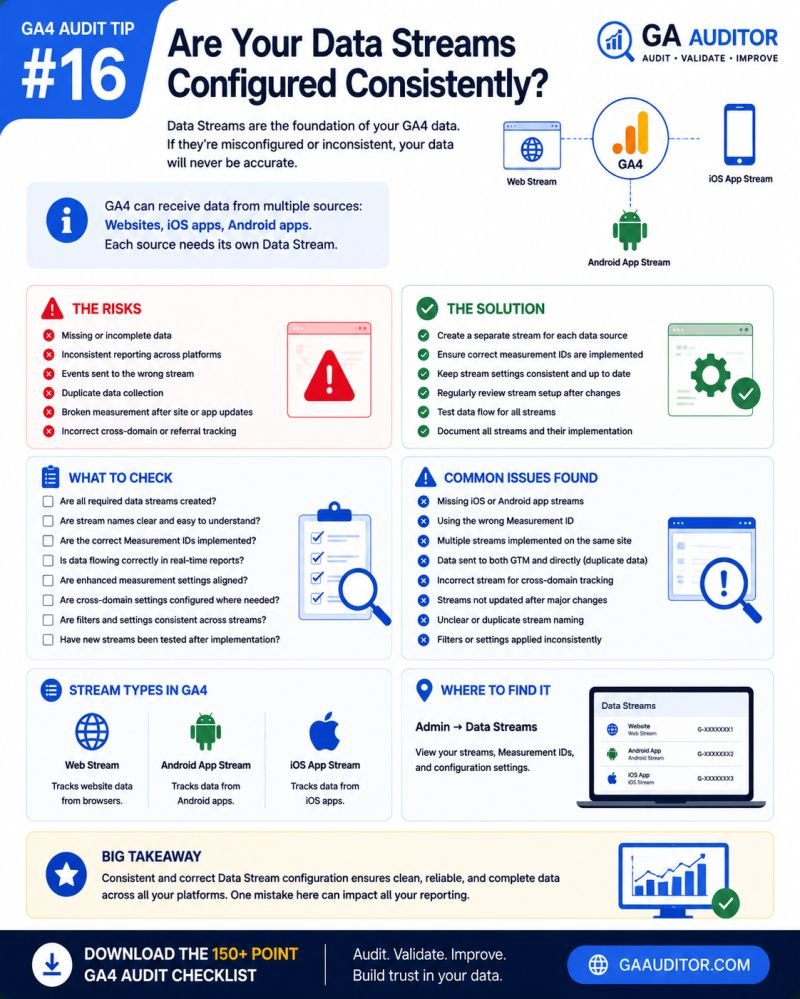
What Are Data Streams in GA4?
Data Streams are the sources that send data into your GA4 property.
Depending on your business, you may have:
- One website stream.
- Multiple website streams.
- An iOS application stream.
- An Android application stream.
Each stream can have its own settings and configurations.
That’s both helpful and dangerous.
Helpful because different platforms may require different approaches.
Dangerous because inconsistencies often go unnoticed.
Why Data Stream Consistency Matters
Imagine two teams reviewing the same marketing campaign.
One team sees strong performance.
The other reports disappointing results.
After investigation, the difference turns out to be configuration.
One stream excludes internal traffic.
The other doesn’t.
One stream collects Enhanced Measurement events.
The other does not.
The discussion shifts from:
“What happened?”
to
“Which report should we trust?”
When measurement standards differ, confidence in the data begins to erode.
Common Issues Found During Audits
Enhanced Measurement Settings Don’t Match
This happens frequently.
One stream tracks:
- Scrolls
- File downloads
- Outbound clicks
Another stream has those settings disabled.
Comparisons become misleading.
Internal Traffic Filters Are Applied Inconsistently
Different filtering approaches produce different reporting outcomes.
Teams unknowingly compare apples to oranges.
Google Signals Is Enabled Selectively
One stream includes advertising features and demographic reporting.
Another doesn’t.
User metrics and audiences behave differently.
Cross-Domain Tracking Exists in Some Streams Only
Businesses operating multiple domains sometimes configure cross-domain tracking for one experience but forget another.
Customer journeys become fragmented.
Testing and Production Environments Are Mixed Together
Development environments occasionally send data into production streams.
Noise enters the reports.
Nobody notices until unusual patterns emerge.
Nobody Documents Stream Configurations
Over time, new team members inherit the implementation.
Nobody remembers why certain decisions were made.
Small differences become permanent.
How to Audit Data Streams in GA4
Navigate to:
Admin → Data Streams
Review each stream individually.
Ask yourself:
- Which streams exist?
- Why do they exist?
- Are they still needed?
- Are they configured consistently?
- Do stakeholders understand the differences?
The answers often reveal opportunities to improve governance.
Areas Worth Reviewing
Enhanced Measurement
Compare settings across streams.
Determine whether differences are intentional.
Internal Traffic Rules
Review whether filtering approaches align with business requirements.
Google Signals
Confirm whether advertising-related settings support your current strategy.
Cross-Domain Tracking
Validate that relevant domains are configured properly.
Referral Settings
Review unwanted referrals and ensure they align across experiences.
Stream Ownership
Identify who owns each stream and who approves configuration changes.
Accountability reduces confusion.
Questions Worth Asking During an Audit
These conversations tend to uncover hidden issues.
- Why was this stream created?
- Is it still actively used?
- Which team owns it?
- Are configuration differences intentional?
- When was the last review conducted?
- Have website or app experiences changed recently?
Sometimes the biggest issue isn’t configuration.
It’s a lack of ownership.
Signs You May Have a Data Stream Problem
Consider reviewing your setup if:
- Teams report different numbers.
- Stakeholders disagree about performance.
- Multiple streams exist without documentation.
- Website and app reporting don’t align.
- New experiences have launched recently.
- Nobody knows why certain settings differ.
None of these guarantee an issue.
But they usually justify a closer look.
Best Practices
A few habits can keep data streams healthy over time.
- Document the purpose of every stream.
- Standardize settings where appropriate.
- Review configurations quarterly.
- Assign ownership responsibilities.
- Separate testing and production environments.
- Validate changes before deployment.
- Include stream reviews in recurring audits.
Consistency doesn’t happen by accident.
It requires intentional governance.
Data Stream Audit Checklist
Use this checklist during your next review:
□ Review all existing data streams.
□ Document the purpose of each stream.
□ Compare Enhanced Measurement settings.
□ Review internal traffic configurations.
□ Validate Google Signals settings.
□ Review cross-domain tracking configurations.
□ Check referral exclusion settings.
□ Separate production and testing environments.
□ Assign ownership responsibilities.
□ Schedule regular configuration reviews.
Wrapping Up
Data streams are easy to set up.
Maintaining them is where the real challenge begins.
As organizations grow, websites evolve, apps launch, and teams change, small differences in configuration can quietly influence the way people interpret performance.
Eventually, the question stops being:
“What do the reports say?”
and becomes:
“Which reports should we believe?”
A few hours spent reviewing data streams today can save countless conversations later.
Because confidence in analytics doesn’t come from having more reports.
It comes from knowing those reports were built on a consistent foundation.