
I was reviewing a GA4 implementation for a company investing heavily in Google Ads remarketing when the paid media manager said:
“We built all these audiences in GA4, but performance hasn’t improved.”
Naturally, I assumed the audience strategy needed refinement.
Then I opened Google Ads.
The audiences weren’t there.
Some had never been shared.
Others existed but weren’t populating.
A few were eligible but had never been used in campaigns.
Everyone thought the setup was complete because GA4 and Google Ads were linked.
Technically, they weren’t wrong.
The accounts were connected.
The problem was that nobody had verified whether audience sharing was actually working.
This is one of those checks that often gets overlooked because people assume linking the accounts is enough.
It isn’t.
If you’re relying on GA4 audiences for remarketing, customer segmentation, or audience-based bidding, you need to make sure those audiences are making it into Google Ads and being used effectively.
How GA Auditor Helps
Audience sharing issues don’t generate obvious warnings.
GA4 continues to build audiences.
Google Ads campaigns continue running.
Reports still populate.
The gap only becomes visible when someone asks:
“Are these audiences actually influencing our campaigns?”
GA Auditor reviews Google Ads audience sharing as part of its 150+ point GA4 audit checklist, helping organizations validate whether audiences move successfully between platforms and whether those audiences support current advertising goals.
The objective isn’t simply to build audiences.
It’s to activate them.
Why Audience Sharing Matters
Many businesses spend time creating thoughtful audiences in GA4.
Examples include:
- Cart abandoners.
- Returning visitors.
- High-value customers.
- Users who viewed pricing pages.
- Users who started checkout.
- Qualified leads.
These audiences can be incredibly valuable.
But only if they reach Google Ads and become part of your campaign strategy.
When audience sharing breaks down, businesses miss opportunities to:
- Improve remarketing performance.
- Personalize messaging.
- Refine targeting.
- Support Smart Bidding strategies.
- Focus spend on higher-intent users.
The audiences exist.
The activation doesn’t.
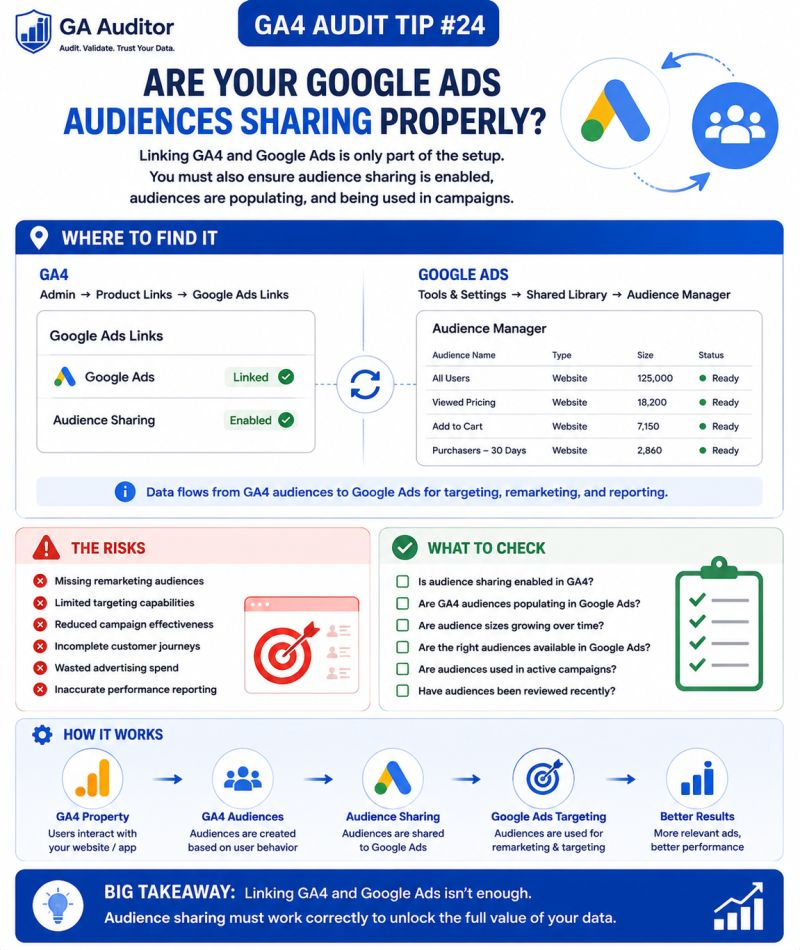
How Audience Sharing Works
The process is straightforward.
- GA4 creates the audience.
- The audience becomes eligible for sharing.
- Google Ads receives the audience.
- Campaigns use the audience for targeting, observation, or exclusions.
Problems can occur at any stage.
That’s why a quick review can be so valuable.
Common Issues Found During Audits
The Accounts Are Linked but Sharing Was Never Verified
This is probably the most common issue.
Businesses assume:
“The accounts are connected, so everything must be working.”
Nobody checks whether audiences actually appear in Google Ads.
Audiences Aren’t Populating
An audience exists in GA4.
Google Ads shows:
“Too small to serve.”
Sometimes the conditions are too restrictive.
Sometimes there simply hasn’t been enough traffic.
Audiences Exist but Aren’t Used
I often find businesses with excellent audience definitions that have never been applied to campaigns.
Remarketing opportunities sit unused.
Audience Definitions Are Outdated
Audiences built years ago may no longer align with current objectives.
Campaigns continue targeting users based on assumptions that no longer apply.
Nobody Owns Audience Governance
Marketing teams build audiences.
Agencies launch campaigns.
Analysts review reports.
No one owns the overall strategy.
Eventually, nobody knows which audiences matter.
How to Audit Google Ads Audience Sharing
Start in GA4.
Navigate to:
Admin → Product Links → Google Ads Links
Review:
- Is the correct Google Ads account linked?
- Is the link still active?
- Has it been reviewed recently?
Then move into Google Ads.
Navigate to:
Tools → Shared Library → Audience Manager
Review:
- Are GA4 audiences appearing?
- Are they populating?
- Are they eligible?
- Are they being used?
This review often uncovers simple fixes with meaningful impact.
Questions Worth Asking During an Audit
I usually ask:
- Which audiences support active campaigns?
- Are remarketing campaigns part of the strategy?
- Which audiences perform best?
- Are any audiences no longer useful?
- Does the team understand audience eligibility requirements?
- Who owns audience management?
These conversations often reveal that the biggest issue isn’t technical.
It’s operational.
Signs Your Audience Sharing Needs Attention
A review is worthwhile if:
- Remarketing performance has declined.
- Audience sizes remain small.
- Teams aren’t sure which audiences are active.
- Google Ads campaigns rely heavily on broad targeting.
- Nobody has reviewed audience sharing recently.
- Audience definitions haven’t changed in years.
None of these automatically indicate a problem.
But they usually indicate an opportunity.
Audience Eligibility and Expectations
One thing worth remembering:
Not every audience becomes immediately usable.
Audience size depends on several factors, including:
- Website traffic volume.
- Audience conditions.
- Advertising requirements.
- User behavior.
A perfectly configured audience may still take time to grow.
The important thing is knowing whether it’s progressing as expected.
Best Practices
A few habits can strengthen audience activation.
- Review audience sharing quarterly.
- Assign ownership responsibilities.
- Remove outdated audiences.
- Align audiences with campaign objectives.
- Validate audience eligibility.
- Coordinate between analytics and paid media teams.
- Document why audiences exist.
- Include audience reviews in recurring audits.
The strongest audience strategies combine good measurement with clear ownership.
Google Ads Audience Sharing Audit Checklist
Use this checklist during your next review:
□ Verify the Google Ads link.
□ Confirm the correct account is connected.
□ Review Audience Manager.
□ Validate that GA4 audiences appear in Google Ads.
□ Review audience population status.
□ Confirm audiences are actively used in campaigns.
□ Remove outdated audience definitions.
□ Assign ownership responsibilities.
□ Align audiences with campaign objectives.
□ Schedule quarterly audience reviews.
Wrapping Up
Creating audiences in GA4 is relatively easy.
Turning those audiences into better advertising outcomes requires a little more attention.
I’ve seen businesses invest significant effort into audience strategy without realizing those audiences never reached the campaigns they were designed to support.
The opportunity wasn’t lost because of poor targeting.
It was lost because nobody checked whether the final step actually happened.
A few minutes reviewing audience sharing can uncover gaps that quietly limit campaign performance.
Because an audience doesn’t create value simply because it exists.
It creates value when it’s used to reach the people who matter most to your business.