
I was auditing a GA4 implementation for a company that had just launched a major campaign.
The marketing team had invested heavily in paid media.
New landing pages had been built.
Budgets had increased.
Everyone was excited to see the results.
A week later, they opened GA4.
Traffic looked lower than expected.
Conversions didn’t match advertising platforms.
Campaign performance seemed disappointing.
The immediate assumption was:
“The campaigns aren’t working.”
But when we started testing the landing pages, the problem became obvious.
The campaigns were working.
The landing pages weren’t being tracked.
Some pages were missing the GA4 tag entirely. Others had incomplete implementations. A few had been published outside the organization’s normal deployment process and never went through analytics QA.
The business wasn’t looking at poor performance.
It was looking at missing data.
This is one of those issues that quietly undermines attribution and reporting quality. Because if the first page in the customer journey isn’t measured correctly, everything that follows becomes harder to trust.
How GA Auditor Helps
Landing page tracking issues rarely generate alerts.
Campaigns continue running.
Clicks continue arriving.
Budgets continue being spent.
The problem is that users disappear before they ever enter your analytics ecosystem.
GA Auditor reviews landing page tracking as part of its 150+ point GA4 audit checklist, helping organizations identify untracked pages, incomplete implementations, and campaign experiences that create reporting blind spots.
The objective isn’t simply to track pageviews.
It’s to ensure the customer journey is visible from the very first interaction.
Why Landing Page Tracking Matters
Landing pages play a critical role in acquisition.
They’re often where:
- Paid campaigns send traffic.
- Email campaigns direct users.
- Organic visitors arrive.
- Partnerships drive users.
- Offline campaigns point customers.
If those pages aren’t measured correctly, businesses lose visibility into:
- Campaign effectiveness.
- Traffic sources.
- User behavior.
- Conversions.
- Funnel progression.
- Attribution paths.
The campaign may still succeed.
Your reporting won’t reflect it accurately.
What Is a Landing Page?
A landing page is simply the first page users see when they arrive on your website.
Examples include:
- Paid media campaign pages.
- Product pages from organic search.
- Promotional offer pages.
- Webinar registration pages.
- Service-specific pages.
- Microsites.
- Seasonal campaign experiences.
Because these pages sit at the beginning of the journey, tracking problems here tend to have a ripple effect throughout your reports.
Common Issues Found During Audits
Campaign Landing Pages Were Never Tagged
This is probably the issue I encounter most often.
Marketing launches new campaign pages.
Developers publish them.
Nobody verifies that GA4 is working.
Traffic disappears from reporting.
Microsites Operate Outside Standard Processes
Businesses launch:
- Event microsites.
- Promotional domains.
- Temporary campaign experiences.
Analytics implementation is treated as an afterthought.
New Website Templates Exclude Tracking
A redesigned template accidentally omits the GA4 tag.
Only certain sections of the website stop reporting.
The issue can remain unnoticed for weeks.
Tag Manager Doesn’t Fire Correctly
Triggers behave differently on specific pages.
The implementation works on most of the website.
It fails where it matters most.
Testing Never Happens
Perhaps the most common issue of all:
Everyone assumes tracking exists.
Nobody checks.
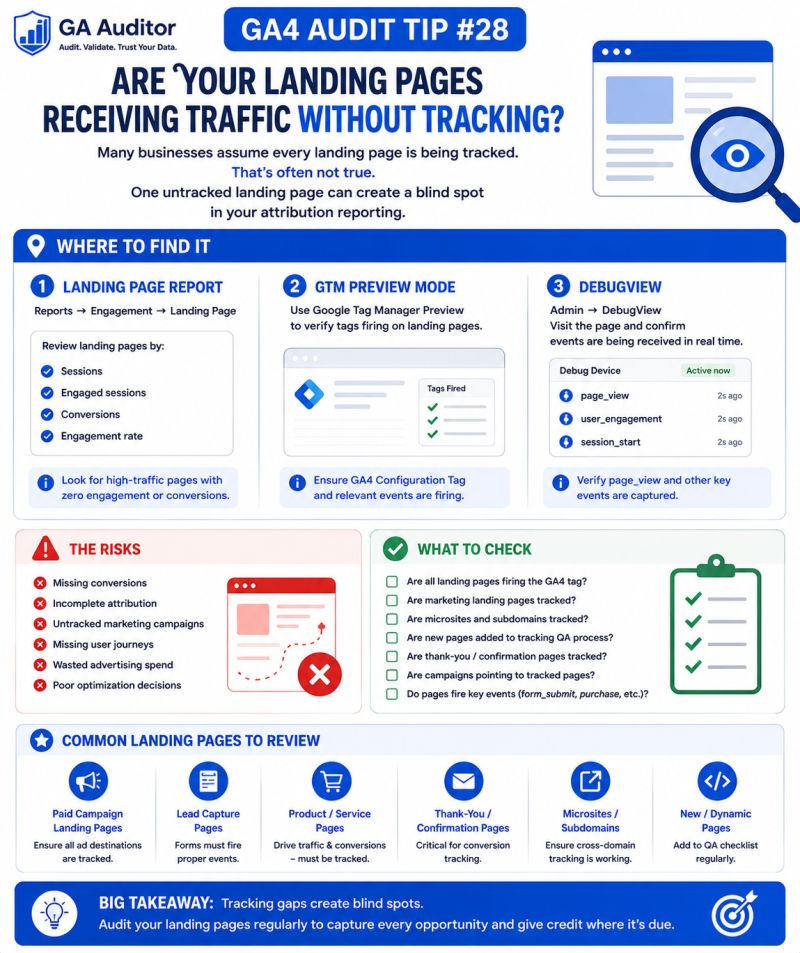
How to Audit Landing Page Tracking in GA4
Start by identifying your most important landing pages.
Review:
- Paid media destinations.
- High-traffic organic pages.
- Email campaign URLs.
- Promotional experiences.
- Recently launched pages.
Then ask:
- Are these pages tracked?
- Do they send page_view events?
- Are campaign parameters preserved?
- Do they participate in attribution correctly?
The answers often reveal hidden gaps.
Where to Check
Landing Page Reports
Navigate to:
Reports → Engagement → Landing Page
Review:
- Traffic patterns.
- Unexpected declines.
- Missing campaign destinations.
If an important page never appears, that’s worth investigating.
DebugView
Navigate to:
Admin → DebugView
Visit the landing page yourself and confirm:
- Events are firing.
- Parameters are collected.
- User journeys behave as expected.
Google Tag Manager Preview Mode
Validate:
- Tag firing.
- Trigger conditions.
- Variable values.
Preview mode often uncovers issues before they affect reporting.
Realtime Reports
Use Realtime reports to confirm activity appears immediately after testing.
Questions Worth Asking During an Audit
These conversations often uncover process gaps.
- How are new landing pages launched?
- Who validates tracking?
- Are campaign pages reviewed before launch?
- Have new templates been introduced?
- Are microsites included in analytics QA?
- Does marketing know how to test tracking?
Sometimes the issue isn’t technical.
It’s procedural.
Signs Your Landing Pages Need Attention
A review may be worthwhile if:
- Campaign performance looks unusually weak.
- Advertising platforms report more traffic than GA4.
- New pages launched recently.
- Microsites exist outside the main website.
- Teams don’t perform analytics QA.
- Certain pages rarely appear in reports.
None of these automatically indicate a problem.
But they often point toward one.
Why This Matters for Attribution
Landing pages represent the beginning of the customer journey.
If the first interaction isn’t measured correctly:
- Source attribution may be lost.
- Sessions may never begin.
- Conversions may appear disconnected.
- Campaign ROI becomes harder to evaluate.
You can’t optimize journeys you can’t see.
Best Practices
A few habits can dramatically improve landing page data quality.
- Include analytics QA in launch processes.
- Test campaign pages before activation.
- Review landing page reports regularly.
- Validate newly published templates.
- Maintain a list of critical landing pages.
- Train marketing teams to verify tracking.
- Include microsites in implementation reviews.
- Audit landing pages after major website updates.
The strongest analytics programs don’t assume tracking works.
They verify it.
Landing Page Tracking Audit Checklist
Use this checklist during your next review:
□ Identify critical landing pages.
□ Review Landing Page reports.
□ Validate page_view tracking.
□ Test pages using DebugView.
□ Use GTM Preview Mode to validate tag firing.
□ Review newly launched templates.
□ Include microsites in tracking reviews.
□ Compare advertising traffic with GA4.
□ Document QA procedures.
□ Include landing page validation in recurring audits.
Wrapping Up
I’ve seen businesses spend thousands of dollars driving people to landing pages that weren’t measured properly.
The campaigns weren’t the problem.
The messaging wasn’t the problem.
The reporting simply couldn’t see what was happening.
That’s what makes landing page audits so valuable.
They help answer a fundamental question:
Are we actually measuring the beginning of the customer journey?
Because attribution doesn’t start at the conversion.
It starts with the very first page a potential customer visits.
And if that moment isn’t captured correctly, every insight that follows becomes a little less certain.