
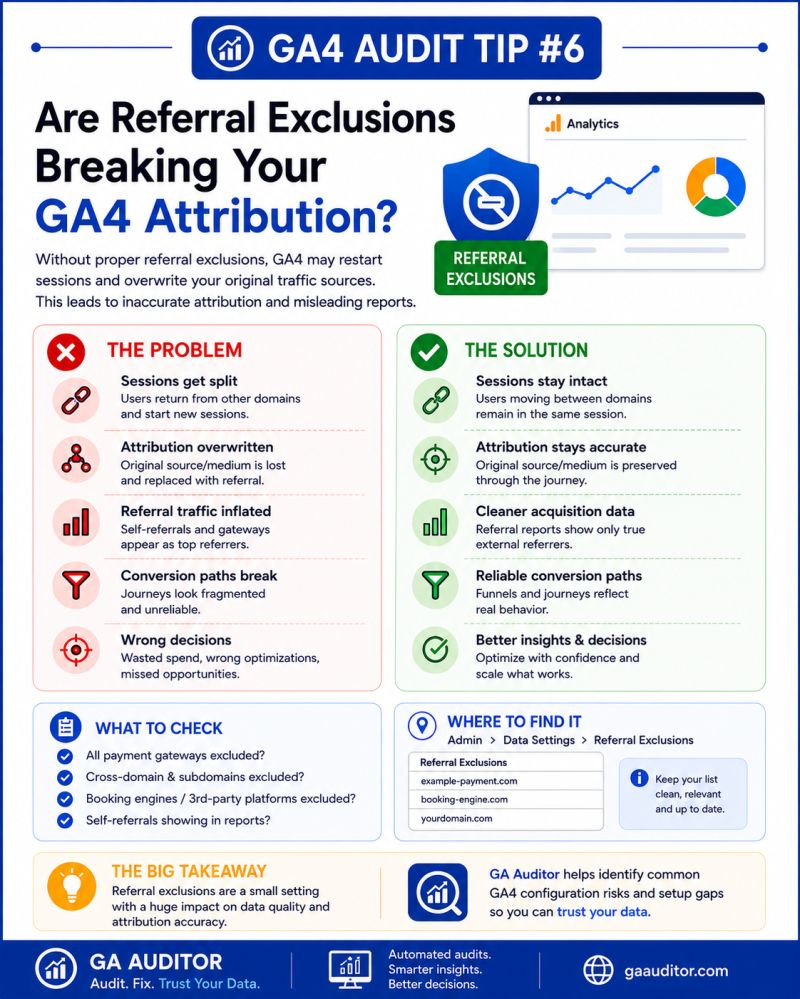
You launch a successful Google Ads campaign.
Visitors arrive on your website.
They browse products, begin the checkout process, and complete a purchase.
Then you open GA4 to review performance and notice something strange.
Instead of Google receiving credit for the sale, the conversion is attributed to PayPal.
Or Stripe.
Or your booking platform.
Or another third-party domain that was simply part of the customer journey.
I’ve seen this happen more times than I’d like to admit.
Nothing is technically broken. The purchase happened. GA4 collected the data. But because referral exclusions weren’t configured properly, attribution became misleading.
If you’re making budget decisions based on acquisition reports, referral exclusions deserve your attention.
How GA Auditor Helps
Referral issues are frustrating because they often hide in plain sight.
Traffic looks normal.
Conversions continue to come in.
The problem usually surfaces when someone asks a simple question:
“Why is our payment gateway one of our top-performing traffic sources?”
GA Auditor reviews referral settings as part of its 150+ GA4 audit checks, helping businesses identify domains that may be interrupting sessions, stealing conversion credit, or creating attribution confusion.
The goal isn’t simply to collect conversions.
It’s to understand what actually influenced them.
What Are Referral Exclusions in GA4?
Referral exclusions tell GA4 to ignore certain domains as sources of new sessions.
Without them, GA4 may interpret a user’s return from another platform as the beginning of a new journey.
That means the original acquisition source loses credit.
Common examples include:
- Payment providers
- Booking systems
- Third-party checkout platforms
- Appointment scheduling tools
- External form providers
- Customer portals
These tools support the user journey, but they aren’t responsible for acquiring the user.
Why Referral Exclusions Matter
Attribution influences decisions.
When attribution is inaccurate, businesses may invest more heavily in channels that aren’t actually generating customers while undervaluing the campaigns that are.
Improper referral handling can affect:
- Traffic acquisition reports
- Conversion attribution
- Marketing ROI calculations
- Assisted conversion analysis
- Campaign optimization
- Channel performance reporting
You could be making smart marketing decisions based on the wrong story.
Common Referral Issues Found During Audits
Payment Gateways Receiving Conversion Credit
This is probably the scenario I encounter most often.
A customer arrives through a marketing campaign, completes checkout through a payment provider, and returns to the website.
GA4 attributes the purchase to:
- paypal.com
- stripe.com
- checkout.shopify.com
instead of the original source.
The sale still appears.
The attribution doesn’t.
Booking Platforms Showing as Referrals
Businesses using appointment scheduling systems sometimes discover that their booking tools appear among their top referral sources.
Examples include:
- Calendly
- Acuity Scheduling
- Mindbody
These platforms facilitate conversions but shouldn’t receive acquisition credit.
Third-Party Checkout Interruptions
Complex ecommerce journeys involving external systems can create unexpected session breaks.
When users return, the customer journey becomes fragmented.
Internal Domains Missing Cross-Domain Configuration
Organizations operating across multiple domains may accidentally attribute their own websites as referrals.
This often happens when cross-domain tracking hasn’t been implemented correctly.
How to Check Referral Exclusions in GA4
Navigate to:
Admin → Data Streams → Select Your Web Stream → Configure Tag Settings → List Unwanted Referrals
Review the domains listed.
Ask yourself:
- Should this domain receive acquisition credit?
- Is it simply supporting the customer journey?
- Is this a domain we own?
- Is this interrupting attribution?
If the answer suggests the domain isn’t responsible for acquiring users, review whether it should be excluded.
Questions Worth Asking During an Audit
Sometimes the easiest way to identify problems is to map the customer journey.
Ask:
- How do users complete purchases?
- Are payment providers involved?
- Do visitors leave the site to schedule appointments?
- Are external forms being used?
- Does the business operate across multiple domains?
- Have new tools been introduced recently?
Every new platform added to the website ecosystem introduces the possibility of attribution disruption.
Common Domains to Review
The right exclusions depend on your setup, but these domains frequently deserve attention:
Payment Providers
- paypal.com
- stripe.com
- checkout.shopify.com
Booking Platforms
- calendly.com
- acuityscheduling.com
External Tools
- Third-party checkout systems
- Membership portals
- External registration platforms
The important thing isn’t copying someone else’s exclusion list.
It’s understanding your own customer journey.
Best Practices
A few habits can prevent referral issues from becoming long-term reporting problems.
- Review referral reports regularly.
- Audit unwanted referrals after major website changes.
- Document why domains were excluded.
- Coordinate with developers when new tools are introduced.
- Validate attribution after implementing checkout changes.
- Review cross-domain tracking alongside referral settings.
Your website changes over time.
Your referral settings should evolve with it.
Referral Exclusion Audit Checklist
Use this checklist during your next review:
□ Review the List Unwanted Referrals setting.
□ Identify payment gateways involved in conversions.
□ Review booking and scheduling tools.
□ Check for self-referrals from owned domains.
□ Validate cross-domain tracking.
□ Investigate unexpected referral sources.
□ Document excluded domains and the rationale behind them.
□ Revisit referral settings after website updates.
Wrapping Up
Attribution is never perfect, but it shouldn’t be misleading because of avoidable configuration issues.
Referral exclusions don’t receive much attention until someone notices that PayPal has become one of the company’s top-performing marketing channels.
By then, important decisions may already have been influenced by incomplete information.
Taking a few minutes to review these settings can give you a much clearer picture of how customers actually find and convert on your website.
And when you’re trying to understand what drives growth, that clarity matters.