
I was reviewing a GA4 property for an ecommerce business when the marketing manager proudly showed me their acquisition reports.
Google Ads was performing well.
Email campaigns were driving revenue.
Organic search was growing steadily.
Then I noticed something strange.
One of their top-performing referral sources was PayPal.
Not Google.
Not Facebook.
PayPal.
A few minutes later, I found another familiar name.
Their booking platform.
At first, the team thought it was good news.
Maybe these partners were driving more business than expected.
They weren’t.
The problem was that GA4 was giving credit to systems that simply helped users complete their journey.
The actual marketing channels that acquired those customers were losing attribution.
Nothing was technically broken.
GA4 was doing exactly what it had been configured to do.
Unfortunately, the configuration hadn’t been reviewed in years.
That’s why unwanted referrals deserve a place in every GA4 audit.
Because when the wrong sources receive credit, every marketing decision built on top of that data becomes harder to trust.
How GA Auditor Helps
Unwanted referral issues rarely announce themselves.
Conversions continue to appear.
Revenue continues to grow.
Dashboards look normal.
The problem usually surfaces when someone asks questions such as:
“Why is our payment provider one of our top traffic sources?”
or
“Why are customers apparently coming from our booking engine?”
GA Auditor reviews referral configurations as part of its 150+ point GA4 audit checklist, helping organizations identify whether third-party platforms are interrupting user journeys and taking credit away from the channels that actually influenced conversions.
The objective isn’t simply to reduce referral traffic.
It’s to preserve accurate attribution.
What Are Unwanted Referrals?
An unwanted referral occurs when GA4 attributes a session to a domain that shouldn’t receive acquisition credit.
These domains often support the customer journey rather than initiate it.
Examples include:
- Payment gateways.
- Booking systems.
- Appointment scheduling tools.
- Membership platforms.
- Third-party checkout providers.
- External registration systems.
When these domains aren’t handled correctly, GA4 may start a new session and overwrite the original acquisition source.
Why Unwanted Referrals Matter
Attribution influences decisions.
Businesses use it to answer questions like:
- Which channels generate customers?
- Which campaigns deserve more budget?
- Which marketing efforts influence revenue?
- Which channels should be optimized?
If a payment gateway receives credit for a conversion that originated from Google Ads, the story changes completely.
Over time, these small inaccuracies can influence:
- Budget allocation.
- Campaign optimization.
- ROI calculations.
- Channel performance reporting.
- Executive dashboards.
- Marketing strategy discussions.
The reports may still look healthy.
The conclusions become less reliable.
Common Issues Found During Audits
Payment Providers Receive Conversion Credit
This is probably the most common issue I encounter.
A customer:
- Clicks a Google Ads campaign.
- Browses the website.
- Completes checkout through PayPal or Stripe.
- Returns to the confirmation page.
GA4 attributes the conversion to:
- paypal.com
- stripe.com
- checkout.shopify.com
instead of the original marketing source.
Booking Platforms Break Attribution
Businesses using booking tools often discover that these systems appear among their top referral sources.
Examples include:
- Calendly.
- Mindbody.
- Acuity Scheduling.
These tools facilitate conversions.
They don’t acquire users.
Membership Platforms Create New Sessions
External login systems or membership areas can interrupt user journeys and fragment attribution.
Third-Party Registration Systems Receive Credit
Event registration platforms sometimes appear as major traffic sources despite playing no role in customer acquisition.
Nobody Reviews Referral Reports
One of the biggest problems isn’t technical.
It’s operational.
Teams simply stop looking.
Years pass without anyone questioning why certain referrals exist.
How to Audit Unwanted Referrals in GA4
Navigate to:
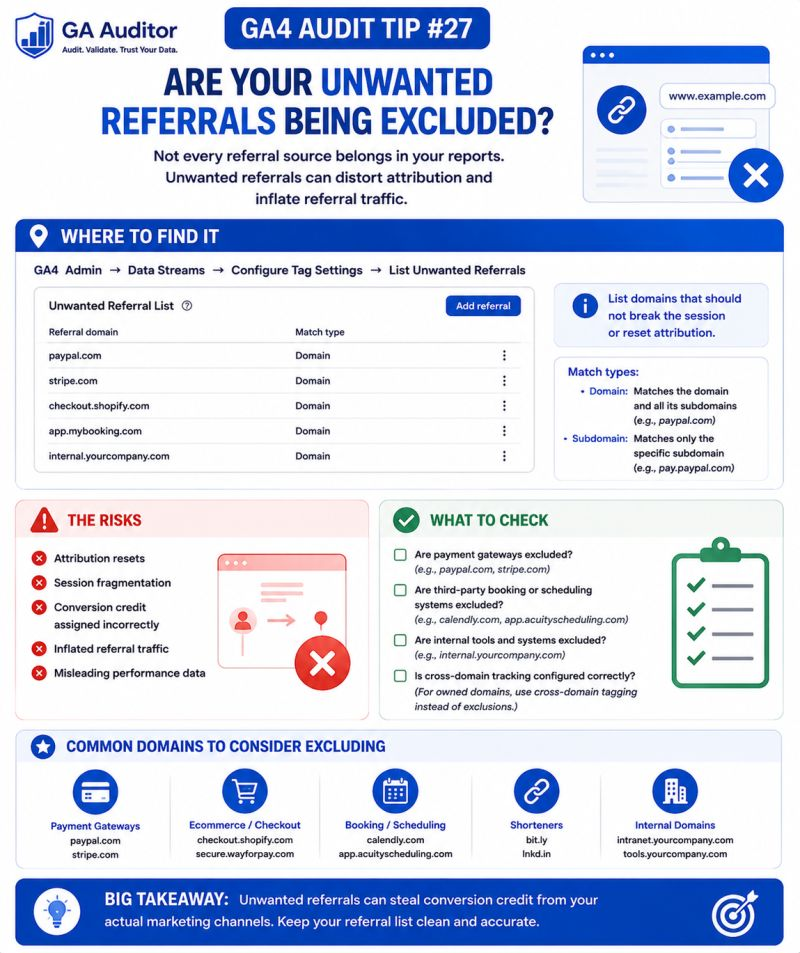
Admin → Data Streams → Select Your Web Stream → Configure Tag Settings → List Unwanted Referrals
Review the domains listed.
Then ask:
- Should this domain receive acquisition credit?
- Is it part of our customer journey?
- Does it support transactions?
- Is it one of our own systems?
- Would marketing teams intentionally invest budget into this source?
If the answer is no, further investigation is usually worthwhile.
Review Your Referral Reports
Also navigate to:
Reports → Acquisition → Traffic Acquisition
Review:
- Session Source.
- Session Medium.
Look for referral sources that seem unusual.
Questions to ask include:
- Why is this domain appearing?
- Does it help users convert?
- Is it interrupting sessions?
- Does it belong to us?
The answers often reveal attribution gaps.
Questions Worth Asking During an Audit
These conversations frequently uncover overlooked systems.
- Which payment providers do we use?
- Do we rely on booking platforms?
- Are external registration systems involved?
- Have new tools been introduced recently?
- Have checkout processes changed?
- Who reviews referral reports regularly?
Most businesses have more third-party tools than they realize.
Each one deserves consideration.
Signs Your Referral Strategy Needs Attention
A review may be worthwhile if:
- Payment gateways appear in acquisition reports.
- Booking systems rank among top referrals.
- Marketing teams question attribution.
- Referral traffic suddenly increases.
- Customer journeys span multiple platforms.
- Nobody remembers reviewing referral settings.
None of these automatically indicate a problem.
But they almost always justify a closer look.
Unwanted Referrals vs Self-Referrals
It’s worth understanding the difference.
Self-Referrals
These occur when your own domains receive referral credit.
They often point toward cross-domain issues.
Unwanted Referrals
These involve third-party systems that participate in the journey but shouldn’t influence attribution.
Both deserve attention.
The causes are simply different.
Best Practices
A few habits can help maintain cleaner attribution.
- Review referral reports regularly.
- Document why domains are excluded.
- Revisit referral settings after website changes.
- Coordinate with developers when introducing new tools.
- Test customer journeys periodically.
- Review payment flows after checkout updates.
- Include referral audits in recurring reviews.
Your technology stack changes over time.
Your attribution strategy should evolve with it.
Unwanted Referral Audit Checklist
Use this checklist during your next review:
□ Review the List Unwanted Referrals settings.
□ Identify payment providers involved in conversions.
□ Review booking and scheduling platforms.
□ Investigate unusual referral sources.
□ Validate customer journeys.
□ Review recently introduced tools.
□ Document excluded domains.
□ Reassess referral settings after website updates.
□ Include referral reviews in recurring audits.
Wrapping Up
I’ve yet to meet a marketing team that intentionally wanted PayPal to become one of its top-performing channels.
Yet it happens all the time.
Not because GA4 is broken.
Not because campaigns failed.
But because nobody revisited a small configuration setting that quietly shaped attribution behind the scenes.
The tricky thing about unwanted referrals is that they don’t stop data collection.
They simply rewrite the story.
And when you’re deciding where to invest time, effort, and marketing budget, the story your data tells matters just as much as the numbers themselves.