
Most guides stop at “add a webhook URL.” This one goes all the way to fbp, fbc, gclid, and UTM parameters landing cleanly in your server-side tags.
If you’ve tried connecting Jotform to Google Tag Manager Server-Side, you’ve probably seen this,
Your webhook fires. GTM receives the request. And in the debug panel, Event Data shows exactly five fields — client_id, event_name: “Data”, ip_override, timestamp, unique_event_id — and absolutely nothing from your actual form.
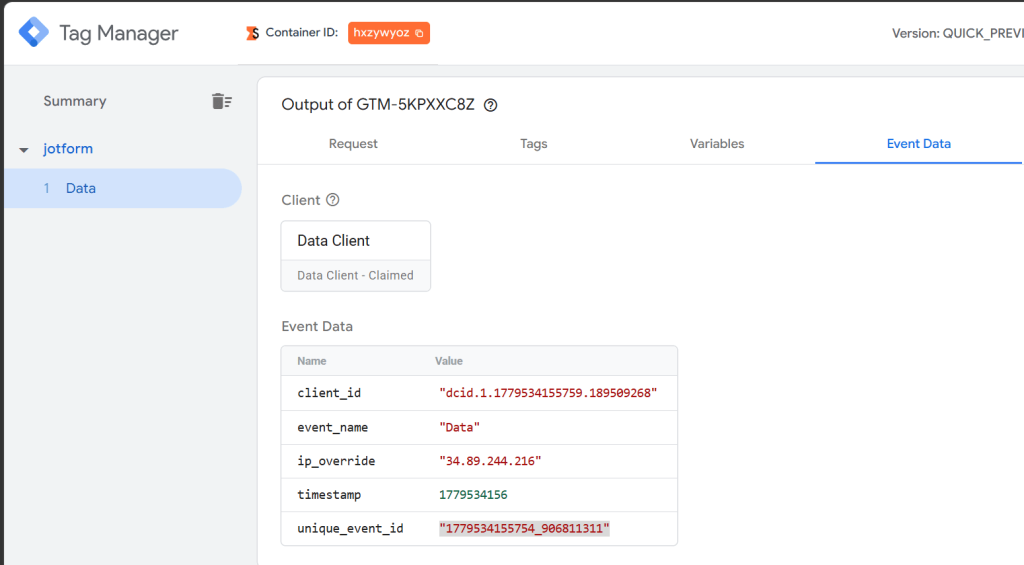
No email. No name. No submission ID. No attribution.
The reason is simple but not obvious: Jotform sends webhooks as multipart/form-data. GTM Server-Side’s Stape Data Client only understands JSON and URL-encoded payloads. So it receives the request, can’t parse the body, and just returns a generic empty event.
This guide fixes that completely. By the end you’ll have:
- Every Jotform form field parsed and available as event data
- _fbp, _fbc, gclid, fbclid, and UTM parameters captured from the user’s browser and sent through the form
- A reusable GTM SS client template you can import in one click
What’s Actually Happening
When a user submits your Jotform form, two things happen:
- The user’s browser sends the form data to Jotform’s servers
- Jotform’s servers send a webhook POST to your GTM SS endpoint
That second request — the one your GTM SS container receives — comes from Jotform’s servers , not from the user’s browser,. Which means:
- No browser cookies (_fbp, _fbc, _ga)
- No URL parameters (gclid, fbclid, utm_source)
- No user agent from the actual visitor
- The body is multipart/form-data which GTM SS cannot parse natively
So the fix has two parts. First, teach GTM SS to parse multipart. Second, capture attribution data in the browser before the user submits and pass it through the form as hidden fields.
Part 1 — The Custom GTM SS Client
GTM Server-Side processes incoming requests through clients — templates that claim requests, parse them, and fire events into the container. The built-in Data Client handles JSON. We need a custom one that handles multipart.
Why You Can’t Just Use a Tag or Variable
The multipart parsing has to happen in a client, not a tag or variable, because:
- Only clients can call claimRequest() to take ownership of an incoming HTTP request
- Only clients can call runContainer() to fire tags
- Tags only run after a client has already parsed and fired the event
The Quick Way: Import the Template
I’ve published a ready-to-use GTM SS client template on GitHub:
→Jotform-Multipart-Data-Client
To use it:
- In your GTM SS container go to Templates → New → Import
- Upload the template.tpl file from the repository
- Go to Clients → New and select Jotform Multipart Client
- Configure the webhook path (default /jotform), your cookie domain, and save
- Set the client Priority to 10 so it runs before the Data Client
That’s it for the server side.
The Manual Way: Build It Yourself
If you prefer to understand what’s happening or need to customise the logic, here’s how to build it from scratch.
Create the Template
Templates → New → Client Template in your GTM SS container.
Set Permissions
In the Permissions tab, enable:
- Reads request — Body, Headers, Path, Query Parameters
- Claims request
- Runs container
- Sets cookies — add _dcid with your domain
- Reads cookie values — add _dcid
- Logs to console
- Accesses response — Status, Headers, Body
The Code
Paste this into the Code tab:
const claimRequest = require(‘claimRequest’);
const getRequestBody = require(‘getRequestBody’);
const getRequestHeader = require(‘getRequestHeader’);
const getRequestPath = require(‘getRequestPath’);
const getTimestampMillis = require(‘getTimestampMillis’);
const getRemoteAddress = require(‘getRemoteAddress’);
const getCookieValues = require(‘getCookieValues’);
const setCookie = require(‘setCookie’);
const generateRandom = require(‘generateRandom’);
const makeInteger = require(‘makeInteger’);
const returnResponse = require(‘returnResponse’);
const runContainer = require(‘runContainer’);
const setResponseHeader = require(‘setResponseHeader’);
const setResponseStatus = require(‘setResponseStatus’);
const logToConsole = require(‘logToConsole’);
const JSON = require(‘JSON’);
const path = getRequestPath();
const contentType = getRequestHeader(‘content-type’) || ”;
// Only handle multipart — everything else falls through to Data Client
if (contentType.indexOf(‘multipart/form-data’) === -1) return;
claimRequest();
const rawBody = getRequestBody();
let fields = {};
// Parse multipart boundary
const boundaryKey = ‘boundary=’;
const boundaryStart = contentType.indexOf(boundaryKey);
if (boundaryStart !== -1) {
let boundaryValue = contentType.substring(boundaryStart + boundaryKey.length);
const semiIdx = boundaryValue.indexOf(‘;’);
if (semiIdx !== -1) boundaryValue = boundaryValue.substring(0, semiIdx);
boundaryValue = boundaryValue.split(‘ ‘).join(”);
const boundary = ‘–‘ + boundaryValue;
const parts = rawBody.split(boundary);
parts.forEach(function(part) {
if (part === ” || part === ‘–\r\n’ || part === ‘–‘) return;
const separatorIndex = part.indexOf(‘\r\n\r\n’);
if (separatorIndex === -1) return;
const headerSection = part.substring(0, separatorIndex);
let value = part.substring(separatorIndex + 4);
if (value.substring(value.length – 2) === ‘\r\n’) {
value = value.substring(0, value.length – 2);
}
const nameKey = ‘name=”‘;
const nameStart = headerSection.indexOf(nameKey);
if (nameStart !== -1) {
const nameEnd = headerSection.indexOf(‘”‘, nameStart + nameKey.length);
if (nameEnd !== -1) {
const fieldName = headerSection.substring(nameStart + nameKey.length, nameEnd);
fields[fieldName] = value;
}
}
});
}
logToConsole(‘Jotform parsed fields:’, JSON.stringify(fields));
// Get or generate client_id
let clientId = ”;
const dcid = getCookieValues(‘_dcid’);
if (dcid && dcid[0]) {
clientId = dcid[0];
} else {
clientId = ‘dcid.1.’ + getTimestampMillis() + ‘.’ + generateRandom(100000000, 999999999);
try {
setCookie(‘_dcid’, clientId, {
domain: ‘yourdomain.com’, // replace with your domain
path: ‘/’,
samesite: ‘Lax’,
secure: true,
‘max-age’: 63072000,
httpOnly: false
});
} catch (e) {
logToConsole(‘setCookie failed:’, e);
}
}
// Parse rawRequest JSON (contains individual form field answers)
let rawRequest = {};
if (fields.rawRequest) {
rawRequest = JSON.parse(fields.rawRequest) || {};
}
// Build event model
const eventModel = {
event_name: ‘jotform_submission’,
client_id: clientId,
ip_override: fields.ip || getRemoteAddress(),
user_agent: getRequestHeader(‘User-Agent’),
timestamp: makeInteger(getTimestampMillis() / 1000),
unique_event_id: getTimestampMillis() + ‘_’ + generateRandom(100000000, 999999999),
form_id: fields.formID || ”,
form_title: fields.formTitle || ”,
submission_id: fields.submissionID || ”,
// Attribution — map to your hidden field question IDs
fbp: rawRequest.q52_fbp || rawRequest.fbp || ”,
fbc: rawRequest.q53_fbc || rawRequest.fbc || ”,
gclid: rawRequest.gclid || ”,
fbclid: rawRequest.fbclid || ”,
utm_source: rawRequest.utm_source || ”,
utm_medium: rawRequest.utm_medium || ”,
utm_campaign: rawRequest.utm_campaign || ”,
event_id: rawRequest.event_id || ”,
};
// Auto-map all remaining fields
for (let key in fields) {
if (!eventModel[key]) {
eventModel[key] = fields[key];
}
}
setResponseHeader(‘Access-Control-Allow-Origin’, getRequestHeader(‘origin’) || ‘*’);
setResponseHeader(‘Access-Control-Allow-Credentials’, ‘true’);
setResponseStatus(200);
let responseSent = false;
runContainer(eventModel, function() {
if (!responseSent) {
responseSent = true;
returnResponse();
}
});
Important: GTM SS Sandbox Restrictions
The GTM SS sandbox is not full Node.js. Several things that work in a browser or Node don’t work here:
| What you’d normally write | What to use in GTM SS |
| /regex/g | indexOf() + substring() |
| Object.keys(obj) | for (let key in obj) |
| JSON.stringify() | const JSON = require(‘JSON’) first |
| decodeURIComponent() | require(‘decodeUriComponent’) |
| try/catch on permissions | Always wrap setCookie in try/catch |
Part 2 — Capturing Attribution Data
The GTM SS client is now ready to parse Jotform’s multipart body. But the attribution fields — _fbp, _fbc, gclid — still won’t appear unless we explicitly pass them from the browser into the form.
Here’s the approach: when the user lands on your page, JavaScript reads the relevant cookies and URL parameters and injects them into the Jotform iframe as URL query parameters. Jotform reads those parameters and silently pre-fills the matching hidden fields. When the user submits, those values travel in the webhook payload to GTM SS.
Step 1 — Add Hidden Fields in Jotform
In your Jotform form builder, add hidden fields (Add Form Element → Hidden Field) with these exact unique names (set under Advanced → Feld-Infos → Unique Name):
| Unique name | What it captures |
| fbp | _fbp cookie (Facebook browser ID) |
| fbc | _fbc cookie (Facebook click ID) |
| gclid | Google Ads click ID |
| fbclid | Facebook Ads click ID |
| utm_source | UTM source parameter |
| utm_medium | UTM medium parameter |
| utm_campaign | UTM campaign parameter |
Mark each field as Hidden so they don’t appear to the user.
Step 2 — Add a GTM Web Tag to Fill Them
In your web GTM container (not server-side), create a new Custom HTML tag:
<script>
(function() {
function getCookie(name) {
var match = document.cookie.match(new RegExp(‘(^| )’ + name + ‘=([^;]+)’));
return match ? decodeURIComponent(match[2]) : ”;
}
function getParam(name) {
try {
return new URLSearchParams(window.location.search).get(name) || ”;
} catch(e) { return ”; }
}
// Persist click IDs across page navigation using sessionStorage
if (getParam(‘gclid’)) sessionStorage.setItem(‘gclid’, getParam(‘gclid’));
if (getParam(‘fbclid’)) sessionStorage.setItem(‘fbclid’, getParam(‘fbclid’));
if (getParam(‘utm_source’)) sessionStorage.setItem(‘utm_source’, getParam(‘utm_source’));
if (getParam(‘utm_medium’)) sessionStorage.setItem(‘utm_medium’, getParam(‘utm_medium’));
if (getParam(‘utm_campaign’)) sessionStorage.setItem(‘utm_campaign’, getParam(‘utm_campaign’));
function fillForm() {
var iframe = document.querySelector(‘iframe[src*=”jotform”]’)
|| document.querySelector(‘iframe[id*=”JotForm”]’);
// Bail if no iframe found or already filled
if (!iframe || iframe.src.indexOf(‘fbp=’) !== -1) return;
var params = [];
var fbp = getCookie(‘_fbp’);
var fbc = getCookie(‘_fbc’) || sessionStorage.getItem(‘fbclid’) || ”;
var gclid = sessionStorage.getItem(‘gclid’) || ”;
var fbclid = sessionStorage.getItem(‘fbclid’) || ”;
var utm_source = sessionStorage.getItem(‘utm_source’) || ”;
var utm_medium = sessionStorage.getItem(‘utm_medium’) || ”;
var utm_campaign = sessionStorage.getItem(‘utm_campaign’) || ”;
if (fbp) params.push(‘fbp=’ + encodeURIComponent(fbp));
if (fbc) params.push(‘fbc=’ + encodeURIComponent(fbc));
if (gclid) params.push(‘gclid=’ + encodeURIComponent(gclid));
if (fbclid) params.push(‘fbclid=’ + encodeURIComponent(fbclid));
if (utm_source) params.push(‘utm_source=’ + encodeURIComponent(utm_source));
if (utm_medium) params.push(‘utm_medium=’ + encodeURIComponent(utm_medium));
if (utm_campaign) params.push(‘utm_campaign=’ + encodeURIComponent(utm_campaign));
if (!params.length) return;
var sep = iframe.src.indexOf(‘?’) !== -1 ? ‘&’ : ‘?’;
iframe.src = iframe.src + sep + params.join(‘&’);
}
// Small delay ensures iframe is mounted in DOM
setTimeout(fillForm, 500);
})();
</script>
Trigger: DOM Ready → fire on pages containing your Jotform embed.
Why This Works
Jotform supports URL-based field prepopulation natively. When you load the iframe with:
https://form.jotform.com/YOUR_FORM_ID?fbp=fb.1.xxx&gclid=EAIaIQ…
Jotform reads those query parameters and pre-fills any hidden field whose unique name matches. The user never sees them. When they hit submit, those values go into the webhook payload inside the rawRequest JSON object — where our GTM SS client extracts them.
The Event Data You Get
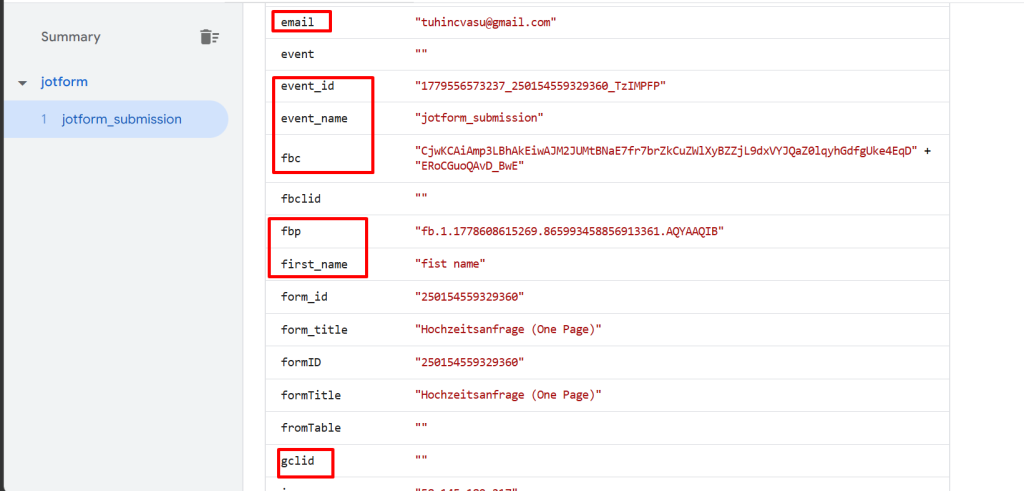
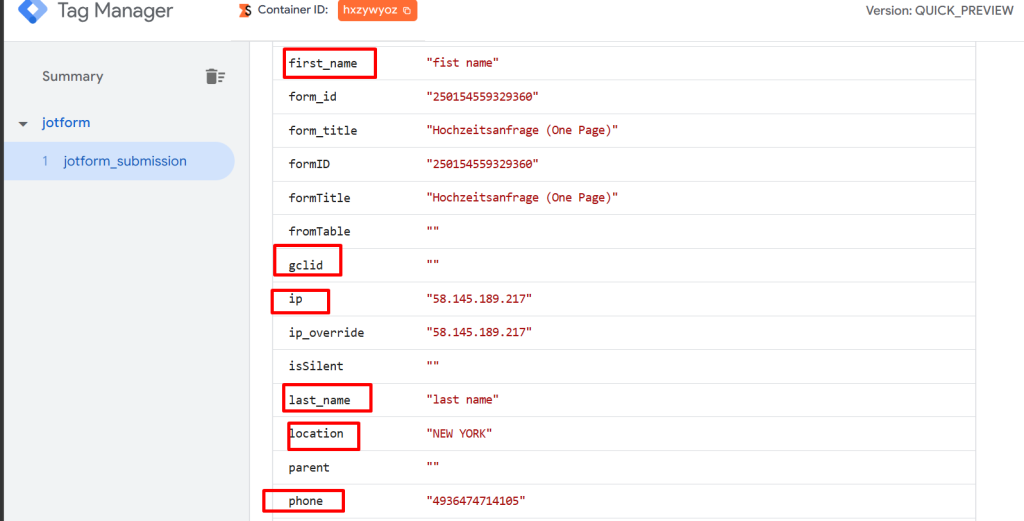
After setup, every Jotform submission fires a jotform_submission event in GTM SS with these fields available to your tags:
| Field | Value example |
| event_name | jotform_submission |
| form_id | 250154559329360 |
| form_title | Wedding Photography Inquiry |
| submission_id | 6553615007127856847 |
| client_id | dcid.1.1779552643897.588504567 |
| ip_override | 58.145.189.217 |
| jane@example.com | |
| first_name | Jane |
| last_name | Smith |
| phone | +491234567890 |
| fbp | fb.1.1778608615269.865993… |
| fbc | fb.1.1779552950787.CjwKCAi… |
| gclid | EAIaIQobChMI… |
| utm_source | |
| utm_medium | cpc |
| utm_campaign | promo |
| event_id | 1779552911696_250154559329360_8UYZq9H |
Setting Up Your Tags
GA4 Lead Event
Create a GA4 tag in GTM SS:
- Event name: generate_lead
- Trigger: Custom Event — jotform_submission
- Parameters: map form_id, submission_id, email as custom parameters
Meta Conversions API
Create a Meta CAPI tag:
- Event name: Lead
- Trigger: Custom Event — jotform_submission
- User data:
- Email → {{Event Data – email}}
- Phone → {{Event Data – phone}}
- fbp → {{Event Data – fbp}}
- fbc → {{Event Data – fbc}}
- Event ID → {{Event Data – event_id}} (for deduplication)
Common Errors and How to Fix Them
Event name shows “Data” and no form fields appear The Data Client is claiming the request before your custom client. Set your custom client’s Priority higher (e.g. 10 vs Data Client’s 0).
Permission ‘read_request’ failed You haven’t granted the template permission to read the request body. Go to the template’s Permissions tab and enable Reads Request — Body, Headers, Path, Query Parameters.
Permission ‘set_cookies’ failed Add _dcid to the Sets Cookies permission with your exact domain. The domain in the permission must match the domain passed in setCookie() in the code.
No client claimed the request Either priority is wrong, or the code is crashing before claimRequest(). If you have a permission error earlier in the code, execution stops there. Always put claimRequest() before any code that might throw.
‘JSON’ is not defined GTM SS sandbox requires const JSON = require(‘JSON’). The global JSON object is not available. This is one of the most common gotchas when writing GTM SS custom templates.
Object.keys() is not defined Use for (let key in obj) instead. GTM SS sandbox does not expose Object.keys(), Object.values(), or Object.entries().
No regex literals You cannot write /pattern/g in GTM SS sandboxed JavaScript. Use indexOf(), substring(), split(), and string methods instead.
Attribution fields are empty Check that your Jotform hidden field unique names exactly match the URL parameter names the script appends. The match is case-sensitive. Open browser DevTools and inspect the iframe src attribute after the page loads to confirm the parameters are being appended.
Get the Template
The ready-to-import GTM SS client template is on GitHub:
→ https://github.com/tuhin-gtm-analytics/Jotform-Multipart-Data-Client
The repository includes:
- template.tpl — import directly into GTM SS
- README.md — setup instructions
- The companion GTM web tag script for attribution injection
If this saved you time, a star on the repo helps others find it.
Wrapping Up
Jotform and GTM Server-Side can work together — it just takes a custom client to bridge the multipart gap, and a small JavaScript tag to carry attribution data through the form submission.
The result is server-side conversion tracking with the same quality of attribution data you’d get from a native browser event: click IDs, cookies, UTM parameters — all present, all correctly attributed.
If you’re sending the same data to Meta Conversions API, the fbp, fbc, and event_id fields this setup provides are exactly what Meta needs for high-quality server-side event matching.
Questions or issues? Drop them in the comments below.