
Most GA4 audits begin by answering a simple question:
Are the events firing?
If the answer is yes, many organizations assume their implementation is working correctly.
But as a GA4 analyst, I’ve learned that this is often where the real problems begin.
Events firing doesn’t necessarily mean your data is useful.
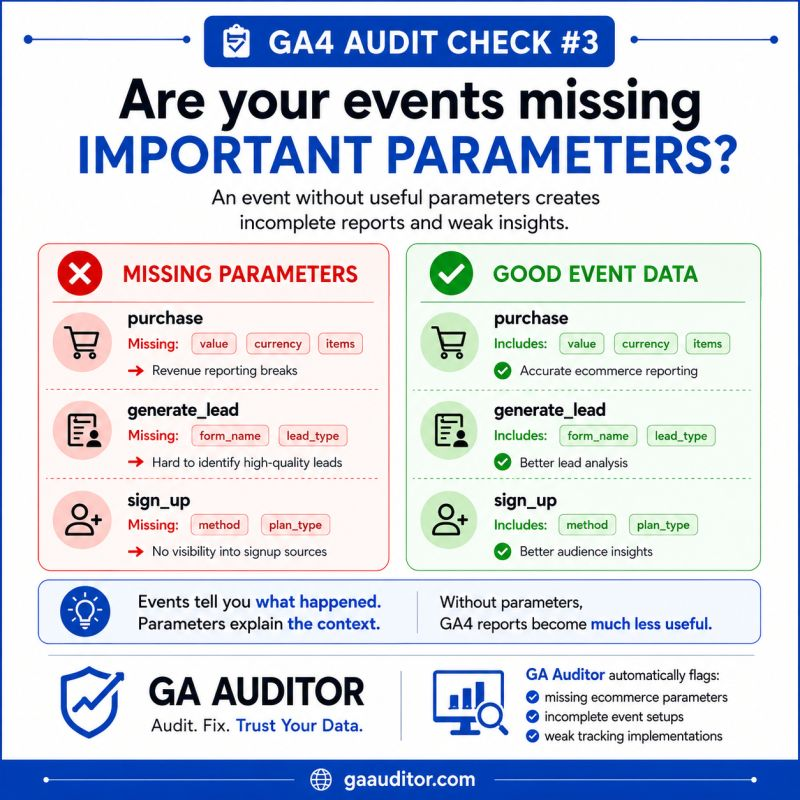
One of the most common issues I uncover during GA4 audits is missing or inconsistent event parameters. Businesses track the right events but fail to capture the details needed to answer meaningful business questions.
For example, they know that a lead was generated.
But they can’t tell:
- Which form generated the lead.
- Which service the prospect was interested in.
- Which product category drove the purchase.
- Which content piece influenced the conversion.
The event exists.
The context doesn’t.
And without context, reporting becomes significantly less valuable.
What Are Event Parameters in GA4?
Event parameters provide additional details about an event.
Think of events as answering:
What happened?
While parameters answer:
What exactly happened?
For example:
Event
generate_lead
Parameters
form_name: Demo Request
service_type: Server-Side Tracking
page_location: /services/server-side-tracking
Without parameters, you only know that someone submitted a form.
With parameters, you understand the circumstances surrounding that conversion.
This additional context transforms data collection into actionable insights.
Why Event Parameters Matter
Many businesses invest considerable effort into implementing event tracking.
However, they don’t spend enough time considering what questions they actually want their data to answer.
Eventually, stakeholders begin asking questions such as:
- Which forms generate the highest-quality leads?
- Which products contribute most to revenue?
- Which service pages influence conversions?
- Which content attracts engaged users?
- Which campaigns generate specific lead types?
Without the right parameters, these questions become impossible to answer.
The data technically exists.
But the insights do not.
Common Event Parameter Issues Found During GA4 Audits
After reviewing numerous GA4 implementations, I’ve noticed several recurring problems.
Generic Form Tracking
This is probably the issue I encounter most frequently.
Every form submission triggers the same event:
generate_lead
However, no information identifies which form was completed.
As a result, businesses cannot distinguish between:
- Contact forms
- Demo request forms
- Consultation requests
- Newsletter sign-ups
- Quote requests
All leads appear identical.
That limits reporting and optimization opportunities.
Missing Ecommerce Details
Ecommerce implementations often contain events but lack essential item information.
Commonly missing parameters include:
- item_id
- item_name
- item_category
- item_variant
- coupon
- affiliation
Without these details, product-level analysis becomes difficult.
You might know revenue occurred.
But you won’t understand what drove it.
Missing Lead Classification
Many businesses offer multiple services or product lines.
Yet their lead events don’t indicate which offering generated interest.
For example, an agency might provide:
- GA4 Audits
- Server-Side Tracking
- Google Ads Tracking
- Training Services
If all inquiries appear as “generate_lead,” determining which services perform best becomes nearly impossible.
Inconsistent Naming Conventions
Sometimes parameters exist, but they aren’t standardized.
For example:
One implementation sends:
form_name
Another sends:
form_title
A third sends:
formType
Although these parameters describe similar concepts, the inconsistency complicates analysis and reporting.
How to Audit Event Parameters in GA4
If you’re conducting a GA4 audit, start with your most important events.
Ask yourself:
For Lead Generation Businesses
Can you identify:
- Which form was submitted?
- Which service was requested?
- Which page generated the lead?
- What type of lead was captured?
For Ecommerce Businesses
Can you identify:
- Which products sold?
- Which categories perform best?
- Which coupons influence purchases?
- Which items are frequently purchased together?
For SaaS Businesses
Can you identify:
- Which plan users selected?
- Which subscription tier converted?
- Which features drive upgrades?
- Which acquisition sources produce high-value customers?
If the answer to these questions is no, missing parameters may be limiting your analysis.
Where to Check Event Parameters in GA4
Several tools can help you validate parameter collection.
DebugView
Navigate to:
Admin → DebugView
This allows you to inspect incoming events and review their associated parameters in real time.
Google Tag Manager Preview Mode
If you use Google Tag Manager, Preview Mode can help verify:
- Whether events are firing correctly.
- Whether parameter values are populated.
- Whether variables resolve as expected.
Realtime Reports
Realtime reporting provides a quick way to confirm whether events are being received.
While not as detailed as DebugView, it can help validate recent activity.
BigQuery Export
For more advanced audits, BigQuery is invaluable.
Raw event data often reveals:
- Missing parameters
- Inconsistent naming conventions
- Unexpected values
- Tracking anomalies
Many issues hidden within the GA4 interface become obvious when reviewing the underlying dataset.
Recommended Event Parameters to Consider
The parameters you collect should support meaningful business analysis.
Lead Generation
Recommended parameters:
- form_name
- lead_type
- page_location
- service_interest
Ecommerce
Recommended parameters:
- item_id
- item_name
- item_category
- quantity
- value
- currency
Content Marketing
Recommended parameters:
- content_type
- content_category
- author
- content_topic
SaaS
Recommended parameters:
- subscription_plan
- trial_type
- account_type
- feature_selected
The exact parameters will vary by organization.
The principle remains the same:
Collect enough context to answer the questions your stakeholders care about.
How GA Auditor Helps
One of the challenges with event parameter audits is that problems often remain hidden.
Reports populate.
Dashboards update.
Traffic appears normal.
Everything seems fine.
Meanwhile, analysts struggle to answer simple business questions because critical context was never collected.
GA Auditor helps uncover these gaps through a structured review process that includes more than 150 GA4 audit checks covering:
- Configuration
- Data quality
- Attribution
- Ecommerce
- Privacy
- Reporting readiness
The goal isn’t simply to verify that events exist.
The goal is to ensure your data can support confident decision-making.
Event Parameter Audit Checklist
Use this checklist during your next GA4 review.
□ Review your most important events.
□ Identify the business questions each event should answer.
□ Verify required parameters exist.
□ Check parameter naming consistency.
□ Validate parameter values using DebugView.
□ Audit ecommerce item parameters.
□ Review lead generation parameters.
□ Examine BigQuery exports for anomalies.
□ Document parameter definitions.
□ Review parameter strategy quarterly.
Final Thoughts
One of the biggest mistakes organizations make is assuming that event collection alone guarantees useful data.
It doesn’t.
Events tell you that something happened.
Parameters explain what happened.
Without that context, reporting becomes shallow, analysis becomes limited, and business decisions become harder to make.
If your team frequently asks questions that GA4 cannot answer, missing event parameters may be the reason.
Because in analytics, context matters just as much as collection.
Want to Go Deeper?
If you’re working on improving your GA4 implementation, data quality, or tracking setup:
- GA Auditor helps identify common GA4 and GTM implementation issues
- Optizent Academy offers practical courses on analytics insights, audits, and implementation guidance
- UTM Manager helps standardize campaign tracking and attribution data