
A few months ago, I was reviewing a GA4 implementation for a company that had recently launched a new cookie banner. Shortly afterward, the marketing team noticed something alarming.
Users had dropped.
Sessions were lower.
Conversions appeared to decline.
Naturally, everyone assumed something had broken.
The developers were asked to investigate. Marketing questioned campaign performance. Leadership wanted explanations.
Nothing was actually wrong.
The issue was that nobody understood how Consent Mode had been implemented or how it influenced reporting.
Over the last couple of years, Consent Mode has become one of the most important—and misunderstood—areas of a GA4 audit. Many businesses implement it because they have to comply with privacy requirements. Very few stop to evaluate how it affects the data they rely on every day.
If your organization uses a consent banner, this is one of the settings worth reviewing carefully.
How GA Auditor Helps
Consent Mode issues don’t usually appear as obvious errors.
Events continue to fire.
Reports continue to populate.
Conversions still happen.
The challenge is understanding whether the data you’re seeing reflects actual user behavior or the effects of your consent implementation.
GA Auditor reviews Consent Mode as part of its 150+ point GA4 audit checklist, helping organizations understand whether consent settings align with their privacy requirements and whether stakeholders understand the reporting implications.
The objective isn’t simply compliance.
It’s ensuring that everyone using the data understands what it represents.
What Is Consent Mode?
Consent Mode allows websites to adjust how Google tags behave based on the consent choices users make through a consent banner.
Instead of treating all visitors the same way, tags respond differently depending on the permissions granted.
Consent Mode helps organizations balance two important priorities:
- Respecting user privacy choices.
- Maintaining useful measurement capabilities.
However, how those priorities are balanced depends heavily on implementation.
Why This Matters
Many organizations view Consent Mode as a legal requirement and move on.
The reality is that Consent Mode can influence several important metrics.
Including:
- Users
- Sessions
- Conversions
- Attribution
- Audiences
- Google Ads optimization
- Remarketing capabilities
If stakeholders don’t understand this relationship, changes in reporting can be misinterpreted as performance problems.
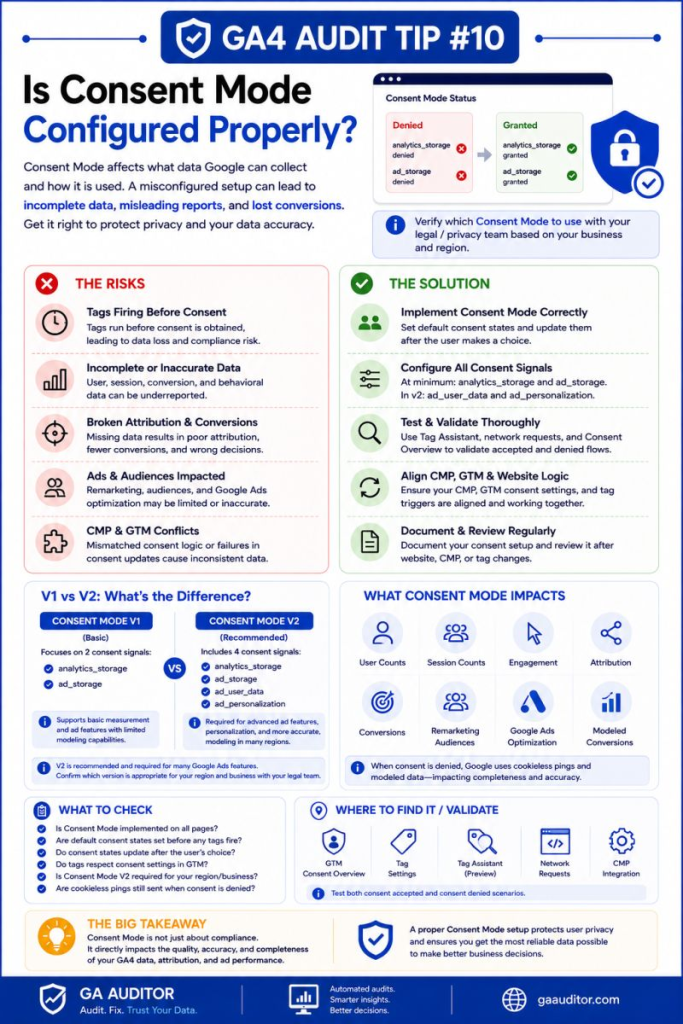
Consent Mode V1 vs Consent Mode V2
One of the first things I review during an audit is which version of Consent Mode is being used.
Consent Mode V1
The original version focused primarily on storage-related permissions.
It introduced controls such as:
analytics_storagead_storage
These settings determine whether analytics and advertising cookies can be used.
Consent Mode V2
Consent Mode V2 expanded the framework by introducing additional signals.
These include:
ad_user_dataad_personalization
These parameters communicate whether user data can be used for advertising purposes and whether personalized advertising is permitted.
Many organizations implemented V1 and assumed they were finished.
Today, reviewing whether the implementation aligns with current requirements is an important audit step.
How Consent Mode Can Affect Reporting
One of the most common questions I hear is:
Does Consent Mode change my GA4 data?
The short answer is yes.
The extent depends on implementation and user consent behavior.
You may notice changes in:
User Counts
If fewer users grant consent, reported users may decline.
Session Counts
Sessions can fluctuate depending on how measurement behaves when consent isn’t granted.
Conversion Reporting
Some conversions may be modeled or measured differently.
Attribution
Attribution paths can shift because the underlying signals available for measurement change.
Audience Sizes
Remarketing audiences and behavioral segments may differ from historical expectations.
Advertising Performance
Campaign optimization may be affected if signals available to Google Ads change.
Understanding these impacts helps prevent unnecessary panic when reporting trends evolve.
Common Consent Mode Issues Found During Audits
Nobody Knows Which Version Is Implemented
This is surprisingly common.
Organizations know they have a cookie banner.
They don’t know whether they’re using V1 or V2.
Stakeholders Expect Historical Consistency
Reporting changes after Consent Mode implementation are often treated as errors rather than expected outcomes.
Legal Teams Were Never Involved
Privacy decisions shouldn’t be made exclusively by marketing or analytics teams.
Legal and compliance stakeholders should participate.
Consent Signals Aren’t Validated
Many teams implement Consent Mode but never verify whether the appropriate signals are being sent.
Teams Assume Consent Mode Improves Accuracy
Consent Mode isn’t designed to improve reporting accuracy.
It’s designed to support privacy-conscious measurement.
Understanding that distinction is important.
How to Audit Consent Mode
Start by reviewing your implementation.
Ask:
- Which version of Consent Mode are we using?
- Is it configured through GTM or directly on the website?
- Have the signals been validated?
- Do stakeholders understand the reporting implications?
- Have legal requirements been reviewed?
Then validate the behavior using available tools.
Where to Check
Review:
Google Tag Manager
Inspect consent settings and consent initialization.
Tag Assistant
Validate whether consent signals are being sent correctly.
DebugView
Review incoming events and consent-related behavior.
Consent Banner Testing
Test the website under different consent scenarios.
For example:
- Accept all.
- Reject all.
- Customize preferences.
The experience should align with organizational requirements.
Questions Worth Asking During an Audit
These conversations often reveal important gaps.
- Has the legal team reviewed the implementation?
- Have privacy policies been updated?
- Do analysts understand how reporting may change?
- Were stakeholders informed when Consent Mode launched?
- Is the current implementation still appropriate?
Privacy expectations evolve.
Your implementation should evolve with them.
Best Practices
A few habits can make Consent Mode reviews much smoother.
- Document which version is implemented.
- Include legal stakeholders in decision-making.
- Educate teams about reporting implications.
- Validate consent signals regularly.
- Test banner behavior periodically.
- Review implementation after significant regulatory changes.
- Include Consent Mode in annual GA4 audits.
Consent Mode isn’t a one-time project.
It’s part of ongoing measurement governance.
Consent Mode Audit Checklist
Use this checklist during your next review:
□ Identify whether V1 or V2 is implemented.
□ Review consent signal configuration.
□ Validate analytics_storage.
□ Validate ad_storage.
□ Validate ad_user_data.
□ Validate ad_personalization.
□ Test different banner scenarios.
□ Review legal and privacy requirements.
□ Educate stakeholders about reporting impacts.
□ Include Consent Mode in recurring audits.
Wrapping Up
Consent Mode sits at the intersection of privacy, measurement, and business expectations.
The technical implementation matters.
The legal considerations matter.
But just as importantly, the people using the reports need to understand what the data represents.
A decrease in users after launching a consent banner doesn’t automatically mean campaigns are underperforming.
A shift in attribution doesn’t necessarily indicate a tracking failure.
Sometimes it simply means your measurement strategy has changed to reflect user choices.
And in today’s environment, understanding that difference is just as important as collecting the data itself.