
A while back, I was working with a SaaS company that couldn’t understand why their user numbers looked inflated.
Their CRM showed around 8,000 active customers.
GA4 reported more than 13,000 users.
The marketing team assumed GA4 was wrong.
The product team questioned the CRM.
Leadership wanted an explanation.
After reviewing the implementation, the answer became clear.
The company had a login system, but they weren’t using User_ID in GA4.
The same customer was being counted multiple times.
They visited the website from a laptop during work hours, checked their account from a mobile phone on the train home, and occasionally logged in from a tablet. GA4 saw multiple devices instead of one person.
Nothing was broken.
The platform was simply reporting what it had been configured to measure.
This is why User_ID is one of my favorite GA4 audit checks. It forces organizations to think about an important question:
Are we trying to understand devices, or are we trying to understand people?
How GA Auditor Helps
User_ID issues rarely trigger obvious errors.
Reports populate normally.
Users appear in dashboards.
Conversions continue to be recorded.
The problem usually surfaces when teams start asking more sophisticated questions.
Questions like:
- How many customers do we actually have?
- How many people use multiple devices?
- How do users move through the customer journey over time?
- Why don’t our numbers align with other systems?
GA Auditor reviews User_ID implementations as part of its 150+ point GA4 audit checklist, helping businesses determine whether identity settings align with the way customers interact with their digital properties.
The objective isn’t simply counting users.
It’s understanding who those users actually are.
What Is User_ID in GA4?
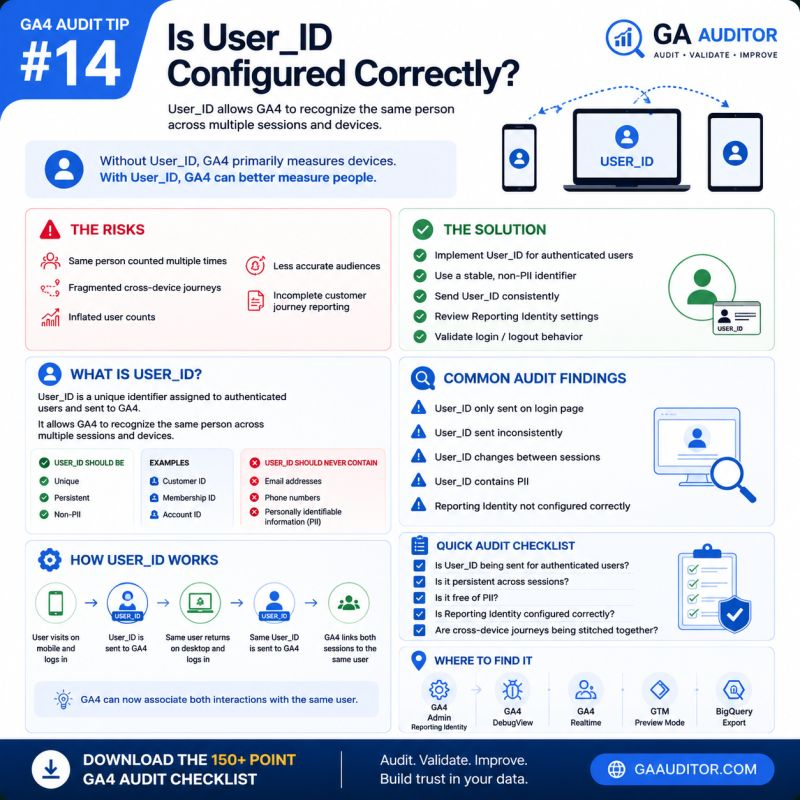
User_ID is a unique identifier that businesses can send to GA4 after a user authenticates.
Unlike cookies or device identifiers, User_ID allows GA4 to recognize the same person across multiple sessions and devices.
For example:
Without User_ID:
- Laptop = User 1
- Mobile Phone = User 2
- Tablet = User 3
With User_ID:
- Laptop + Mobile + Tablet = One User
That difference can significantly change how you interpret your reports.
Why User_ID Matters
Modern customer journeys rarely happen on a single device.
A typical journey might look like this:
- Research on mobile.
- Return on desktop.
- Complete a purchase on a laptop.
- Access the account from a tablet.
Without User_ID, those interactions may appear disconnected.
With User_ID, GA4 can better understand the relationship between them.
User_ID can influence:
- User counts
- Cross-device analysis
- Audience creation
- Customer journey reporting
- Retention analysis
- Funnel interpretation
- Stakeholder confidence in the data
It doesn’t make the data perfect.
But it often makes it more representative of reality.
Common User_ID Issues Found During Audits
User_ID Was Never Implemented
This is the most common scenario.
Businesses have authenticated users but rely entirely on device-based identification.
As a result, the same customer may appear multiple times.
User_ID Is Only Sent During Login
Sometimes User_ID fires once during the authentication event and then disappears.
Subsequent sessions lose continuity.
Identity stitching becomes inconsistent.
Different Systems Use Different Identifiers
Businesses occasionally send:
- CRM IDs
- Membership IDs
- Temporary identifiers
without a documented strategy.
The same user may receive different identifiers over time.
User_ID Contains Personally Identifiable Information
I’ve encountered implementations using:
- Email addresses
- Phone numbers
This creates privacy concerns and violates Google’s policies.
User_ID should always use a non-PII identifier.
Nobody Understands the Impact
One of the most common findings isn’t technical.
It’s educational.
Teams often don’t understand how User_ID changes reporting.
They expect user counts to remain exactly the same.
They don’t.
How to Audit User_ID in GA4
Start by asking a simple question:
Does the business have authenticated users?
If the answer is no, User_ID may not apply.
If the answer is yes, investigate further.
Ask:
- Is User_ID implemented?
- What identifier is being used?
- Is it stable over time?
- Is it sent consistently?
- Is it documented?
The answers reveal a lot about the maturity of the implementation.
Where to Check
DebugView
Navigate to:
Admin → DebugView
Review authenticated sessions and verify whether User_ID appears consistently.
Realtime Reports
Confirm that logged-in activity reflects expected behavior.
Google Tag Manager
Review variables and tags responsible for sending User_ID.
BigQuery Export
If BigQuery is enabled, examine whether User_ID values appear consistently within exported data.
Reporting Identity
Navigate to:
Admin → Reporting Identity
Review how User_ID interacts with your selected identity strategy.
Questions Worth Asking During an Audit
These conversations often uncover opportunities for improvement.
- Do customers log in?
- How many devices do they typically use?
- Which systems generate identifiers?
- Is User_ID documented?
- Does leadership understand the reporting implications?
- Have privacy considerations been reviewed?
Identity decisions shouldn’t happen in isolation.
They should align with business objectives and customer behavior.
Best Practices
A few principles can improve User_ID implementations significantly.
- Use a stable identifier.
- Avoid personally identifiable information.
- Send User_ID consistently after authentication.
- Document the implementation.
- Validate behavior during testing.
- Review Reporting Identity settings regularly.
- Educate stakeholders about changes in reporting.
Identity management isn’t just a technical exercise.
It’s a measurement strategy.
User_ID Audit Checklist
Use this checklist during your next review:
□ Determine whether authenticated users exist.
□ Verify whether User_ID is implemented.
□ Confirm a stable identifier is used.
□ Ensure User_ID does not contain PII.
□ Validate User_ID in DebugView.
□ Review GTM configurations.
□ Examine Reporting Identity settings.
□ Document implementation decisions.
□ Educate stakeholders on reporting implications.
□ Include User_ID reviews in recurring audits.
Wrapping Up
One of the biggest lessons I’ve learned auditing GA4 implementations is that user metrics aren’t always measuring what people think they are.
Sometimes they’re measuring devices.
Sometimes they’re measuring people.
Neither approach is automatically right or wrong.
The important thing is understanding which one your business relies on and whether your implementation supports that objective.
If your customers log in, use multiple devices, and return over time, User_ID deserves a place on your audit checklist.
Because the more accurately you understand your users, the more confidently you can make decisions based on their behavior.