
A client once reached out because their revenue numbers didn’t match.
The ecommerce team trusted Shopify.
The finance team relied on their ERP system.
Marketing looked at GA4.
Each team had slightly different numbers, and nobody could explain why.
Naturally, everyone assumed there was a tracking issue.
There wasn’t.
The problem turned out to be much simpler.
GA4 had been configured using a different timezone than the business used for reporting.
A few months later, I encountered a similar situation where a company operating internationally had configured the wrong reporting currency. Revenue wasn’t missing, but stakeholders were comparing reports generated in different currencies and arriving at different conclusions.
Neither of these problems involved broken tags or missing events.
They were configuration decisions that had quietly shaped reporting for years.
That’s why timezone and currency settings deserve a place in every GA4 audit.
How GA Auditor Helps
Timezone and currency issues rarely trigger alerts.
Events continue to fire.
Revenue appears in reports.
Dashboards update every morning.
The challenge usually emerges when someone compares GA4 against another source of truth.
Questions start appearing:
- Why don’t daily sales match?
- Why is yesterday’s revenue different?
- Why do dashboards disagree?
- Which system should we trust?
GA Auditor reviews timezone and currency settings as part of its 150+ point GA4 audit checklist, helping organizations identify whether reporting configurations align with business requirements and stakeholder expectations.
The goal isn’t simply to collect accurate data.
It’s to ensure everyone interprets that data using the same frame of reference.
Why These Settings Matter
Most businesses don’t operate based on UTC timestamps or default settings.
They have reporting cycles.
Leadership meetings.
Monthly close processes.
Regional teams.
Financial systems.
If GA4 isn’t configured to reflect how the business actually operates, confusion follows.
These settings influence how people interpret:
- Daily performance reports.
- Revenue trends.
- Marketing dashboards.
- Campaign performance.
- Executive reporting.
- Cross-platform comparisons.
The data itself may be correct.
The timing and presentation may not align with business reality.
Common Issues Found During Audits
The Property Uses the Wrong Timezone
This is more common than most people realize.
A business operating in New York may discover its GA4 property was configured using UTC years ago during implementation.
As a result:
- Daily reports close at unexpected times.
- Marketing teams compare different reporting periods.
- Revenue appears shifted between days.
Nobody notices until numbers are questioned.
Reporting Currency Doesn’t Match the Business
International businesses often expand into new markets.
Sometimes the original currency setting remains unchanged.
Stakeholders then compare:
- GA4 reports.
- Ecommerce platforms.
- Financial systems.
Each using different assumptions.
Nobody Knows Why the Settings Were Chosen
This is probably my favorite audit finding.
I ask:
“Why is the property configured this way?”
The response is often:
“I think that’s how it was set up.”
Configuration decisions become permanent simply because nobody revisits them.
Multiple Teams Use Different Reporting Standards
Regional teams may report using local conventions while GA4 follows a completely different structure.
The result isn’t incorrect reporting.
It’s inconsistent reporting.
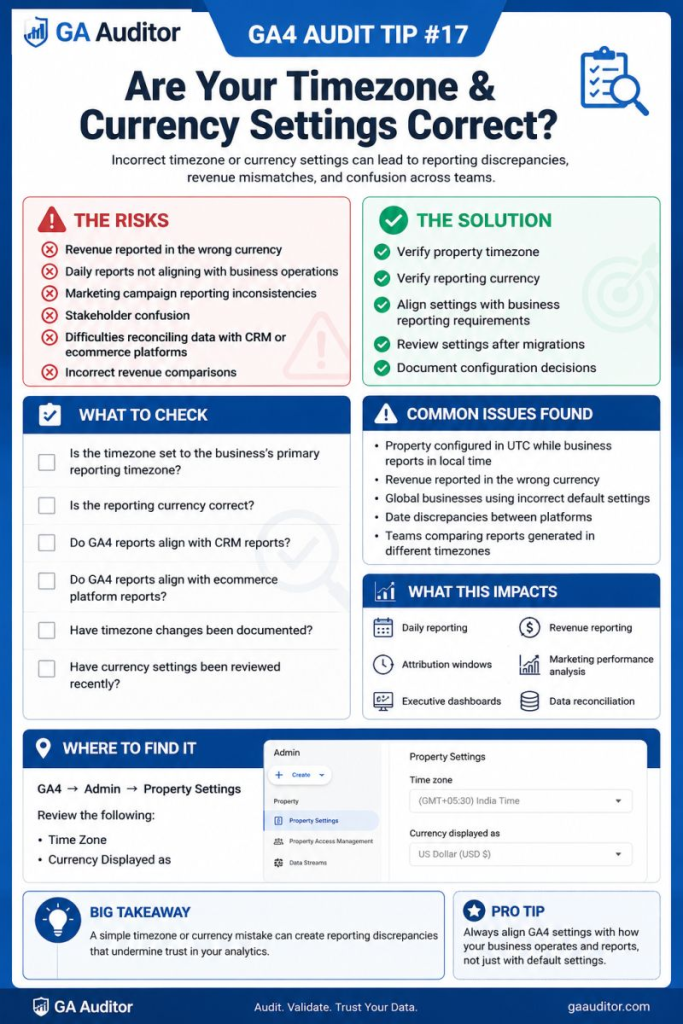
How to Audit Timezone and Currency Settings
Navigate to:
Admin → Property Settings
Review:
- Reporting Time Zone
- Currency Displayed As
Then ask:
- Does this match how the business reports performance?
- Would finance agree?
- Would leadership expect these settings?
- Do regional teams understand the implications?
The conversation is often more important than the configuration itself.
Questions Worth Asking During an Audit
I usually ask stakeholders:
- Which timezone drives business reporting?
- When does the reporting day officially end?
- Which currency is used in executive reports?
- How do finance teams report revenue?
- Have these settings ever been reviewed?
- Have international operations expanded since implementation?
Simple questions often uncover years of assumptions.
Signs Your Settings Need Attention
A review is worthwhile if:
- Daily revenue doesn’t align with other systems.
- Teams disagree on reporting periods.
- International expansion has occurred.
- Stakeholders question dashboards regularly.
- Nobody remembers choosing the settings.
- Executive reports require manual adjustments.
None of these automatically indicate a problem.
But they often point toward one.
What Happens If You Change Them?
This is usually the first question people ask.
The answer is:
Changing these settings can affect how future reporting appears.
It won’t rewrite historical decisions or magically align every external platform.
Before making changes:
- Understand why the current settings exist.
- Communicate the implications.
- Document the rationale.
- Align stakeholders beforehand.
Small configuration updates can create large reporting conversations.
Best Practices
A few habits can prevent unnecessary confusion.
- Review property settings annually.
- Align GA4 with business reporting standards.
- Involve finance when discussing revenue reporting.
- Document configuration decisions.
- Revisit settings after international expansion.
- Educate stakeholders on reporting implications.
- Include timezone and currency reviews in recurring audits.
The settings themselves are simple.
The organizational impact often isn’t.
Timezone and Currency Audit Checklist
Use this checklist during your next review:
□ Review the property’s reporting timezone.
□ Review the reporting currency.
□ Confirm alignment with business reporting standards.
□ Compare reporting periods with other systems.
□ Consult finance stakeholders.
□ Document the rationale behind the settings.
□ Review configurations after expansion or restructuring.
□ Educate stakeholders about reporting implications.
□ Include these checks in annual GA4 audits.
Wrapping Up
Some of the biggest reporting debates I’ve witnessed had nothing to do with broken tracking.
They came down to simple questions like:
“What time does the reporting day actually end?”
or
“Which currency are we looking at?”
Timezone and currency settings don’t receive much attention because they rarely cause obvious problems.
Instead, they create subtle misunderstandings that slowly erode confidence in the data.
The good news is that reviewing them takes only a few minutes.
And sometimes, those few minutes are enough to prevent months of unnecessary conversations about whose numbers are “right.”
Because trustworthy reporting isn’t only about collecting the right data.
It’s also about presenting that data in a way the business understands.