
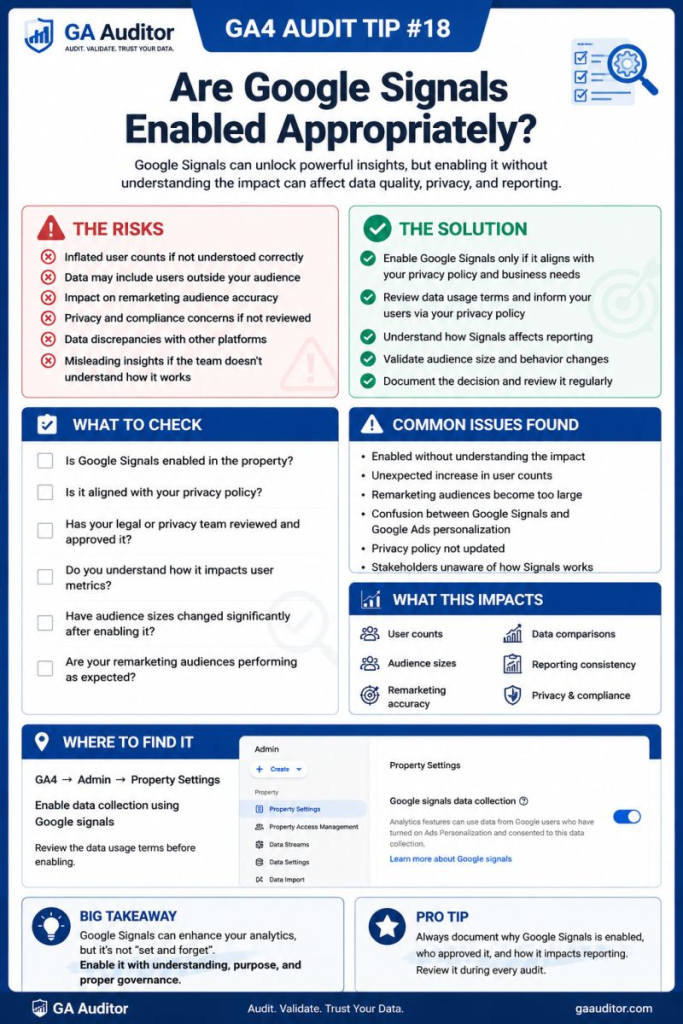
A few months ago, I was reviewing a GA4 property for a client who noticed that their user numbers looked different from what they expected.
Their CRM reported one figure.
GA4 showed another.
Google Ads audiences appeared smaller than anticipated.
The marketing team assumed there was a tracking issue.
After a quick review, I asked a simple question:
“Why is Google Signals enabled?”
Nobody knew.
The setting had been turned on years ago during implementation. Someone probably clicked through the setup wizard, accepted the recommended settings, and moved on.
Since then, the business had changed.
Their marketing strategy had evolved.
Privacy requirements had matured.
But Google Signals had never been reviewed.
That conversation has happened more times than I can count.
Google Signals isn’t inherently good or bad. It can provide valuable capabilities for some organizations and unnecessary complexity for others.
The important thing is making sure the decision to enable it is intentional.
How GA Auditor Helps
Google Signals issues don’t usually announce themselves.
There are no warning messages saying:
“You enabled this three years ago and should probably revisit it.”
Reports still populate.
Audiences continue to build.
User data keeps flowing.
The challenge is understanding whether Google Signals still aligns with your business objectives, advertising strategy, and privacy requirements.
GA Auditor reviews Google Signals configurations as part of its 150+ point GA4 audit checklist, helping organizations determine whether the setting supports their current use cases and whether stakeholders understand its impact on reporting.
The goal isn’t to enable every available feature.
It’s to ensure every enabled feature has a purpose.
What Is Google Signals?
Google Signals allows GA4 to use aggregated data from users who:
- Are signed into their Google accounts.
- Have Ads Personalization enabled.
- Have provided the necessary permissions where applicable.
When enabled, Google Signals can unlock additional capabilities within GA4.
For some organizations, those capabilities are valuable.
For others, they may not justify the trade-offs.
What Google Signals Enables
One reason this setting often gets enabled is because it unlocks features that many businesses want.
Cross-Device Reporting
People rarely use a single device anymore.
A customer might:
- Discover your business on mobile.
- Research products on a desktop computer.
- Return later using a tablet.
Google Signals helps GA4 better understand those interactions.
Demographic Reporting
Google Signals enables reports related to:
- Age.
- Gender.
- Interests.
For organizations that actively use demographic insights, this can be useful.
Audience Building
Audience creation and remarketing capabilities often depend on Google Signals.
Businesses running Google Ads campaigns may rely on these audiences for targeting and optimization.
Advertising Features
Some advertising capabilities within the Google ecosystem become available when Google Signals is enabled.
This is often why the setting gets activated during implementation.
Why Google Signals Matters During an Audit
Most businesses don’t revisit this setting after implementation.
That becomes problematic because business priorities change.
Questions worth asking include:
- Are we using demographic reports?
- Are we actively remarketing through Google Ads?
- Do we still need these capabilities?
- Have our privacy obligations changed?
A setting that made sense three years ago may not make sense today.
Common Issues Found During Audits
Nobody Knows Why It Was Enabled
This is by far the most common finding.
I ask:
“Why are you using Google Signals?”
The response is often:
“I think Google recommended it.”
That isn’t necessarily a strategy.
Privacy Teams Were Never Consulted
Marketing teams sometimes enable Google Signals without involving legal or compliance stakeholders.
Privacy decisions shouldn’t happen in isolation.
Stakeholders Don’t Understand Reporting Differences
User metrics can behave differently depending on identity and advertising settings.
When nobody understands why, confidence in the data declines.
The Business Doesn’t Use the Features
Organizations occasionally discover they aren’t using:
- Demographic reports.
- Remarketing audiences.
- Advertising capabilities.
The setting remains enabled simply because nobody questioned it.
The Configuration Has Never Been Reviewed
Business requirements evolve.
Implementation decisions should evolve too.
How to Audit Google Signals
Navigate to:
Admin → Data Collection and Modification → Data Collection
Review whether Google Signals data collection is enabled.
Then ask:
- Why was it enabled?
- Which teams use the resulting features?
- Does the current strategy justify it?
- Have stakeholders reviewed the implications?
The answers often provide more value than the setting itself.
Questions Worth Asking During an Audit
I often ask teams:
- Do we actively use demographic reporting?
- Are Google Ads audiences important to our strategy?
- Has legal reviewed the implementation?
- When was the last time this setting was evaluated?
- Would anyone notice if it were disabled?
- Does leadership understand its reporting implications?
These conversations usually reveal whether the setting is intentional or inherited.
Does Google Signals Affect Reporting?
Yes.
That’s one of the reasons it deserves attention.
Depending on your broader configuration, Google Signals can influence areas such as:
- User reporting.
- Cross-device analysis.
- Audience behavior.
- Demographic insights.
- Advertising capabilities.
That doesn’t mean it’s causing inaccuracies.
It simply means stakeholders should understand what they’re looking at.
Best Practices
A few habits can help organizations make better decisions around Google Signals.
- Document why it is enabled.
- Review the setting annually.
- Involve legal and privacy stakeholders.
- Educate teams about reporting implications.
- Align the configuration with advertising objectives.
- Reassess the need for demographic reporting.
- Include Google Signals in recurring audits.
The right decision depends on your business.
Not on default recommendations.
Google Signals Audit Checklist
Use this checklist during your next review:
□ Confirm whether Google Signals is enabled.
□ Document why it was enabled.
□ Review the use of demographic reports.
□ Review audience requirements.
□ Evaluate advertising dependencies.
□ Involve legal and privacy stakeholders.
□ Educate stakeholders about reporting implications.
□ Review the setting annually.
□ Include Google Signals in recurring audits.
Wrapping Up
One of the biggest lessons I’ve learned from auditing GA4 implementations is that “recommended” doesn’t always mean “necessary.”
Google Signals can provide meaningful value when it supports your measurement and advertising strategy.
It can also become another setting that nobody remembers enabling and nobody understands years later.
The important thing isn’t whether you choose to enable it or disable it.
The important thing is being able to answer a simple question:
Why are we using it?
Because every setting that influences reporting should have a clear purpose, an owner, and a reason for existing.