
I was reviewing acquisition reports with a client when someone from the paid media team said:
“There’s no way Paid Social only generated five conversions.”
The SEO team was equally confused.
Email campaigns looked weaker than expected.
Referral traffic appeared unusually high.
Everyone trusted the data.
Nobody trusted the conclusions.
After digging deeper, we discovered the problem wasn’t campaign performance.
It was channel classification.
The business had grown over the years. New marketing channels had been added. Agencies changed. UTM conventions evolved. But GA4 was still relying entirely on default channel definitions that no longer reflected how the company actually marketed itself.
The numbers weren’t wrong.
The story they were telling was.
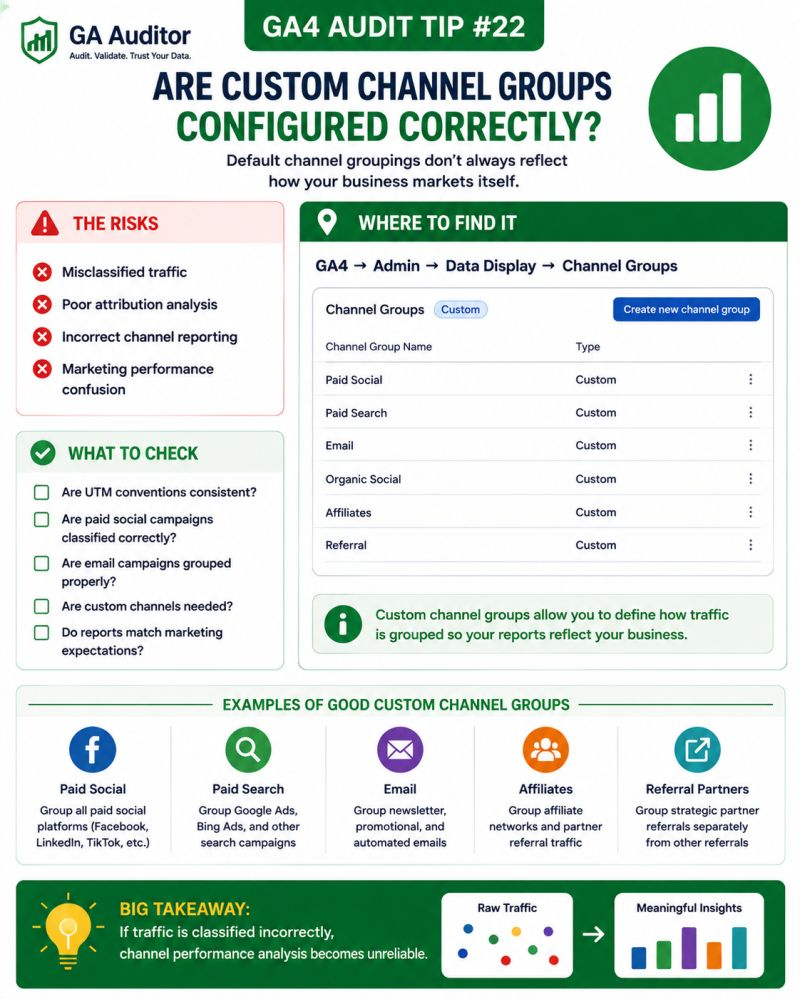
This is why Custom Channel Groups deserve attention during a GA4 audit.
Because if your channels aren’t classified correctly, it’s very difficult to understand which marketing efforts are actually working.
How GA Auditor Helps
Channel classification problems don’t break tracking.
Traffic still flows into GA4.
Campaigns still generate conversions.
Dashboards continue to update.
The challenge is that stakeholders start making decisions based on channels that don’t accurately represent reality.
GA Auditor reviews channel definitions as part of its 150+ point GA4 audit checklist, helping organizations determine whether traffic sources are classified correctly and whether acquisition reports align with their marketing strategy.
The objective isn’t simply to organize traffic.
It’s to ensure your reports tell the right story.
What Are Custom Channel Groups?
GA4 automatically groups traffic into channels such as:
- Organic Search
- Paid Search
- Organic Social
- Paid Social
- Referral
- Direct
These default channels work reasonably well for many businesses.
But they aren’t perfect.
Every business has unique marketing activities.
You might use:
- Influencer campaigns.
- Affiliate partnerships.
- Podcasts.
- QR codes.
- Sponsorship campaigns.
- Partner newsletters.
- Offline campaigns.
If your acquisition strategy has evolved, the default groupings may no longer reflect reality.
That’s where Custom Channel Groups become valuable.
Why Channel Classification Matters
Marketing budgets are often allocated based on channel performance.
Leadership asks questions such as:
- Which channels generate the highest-quality traffic?
- Which campaigns drive revenue?
- Should we invest more in Paid Social?
- Is email still performing?
- Are partnerships worth the investment?
If the underlying channel definitions are inaccurate, the decisions built on them become less reliable.
You don’t just lose reporting accuracy.
You lose confidence in your optimization efforts.
Common Issues Found During Audits
Paid Social Traffic Is Classified Incorrectly
This is probably the issue I encounter most frequently.
Traffic from platforms such as:
- TikTok
ends up split across multiple channels because UTM conventions aren’t consistent.
Paid campaigns may appear as referrals.
Organic traffic may appear as paid.
The result is confusion.
Email Campaigns Are Fragmented
Different teams use different naming conventions.
Examples include:
- newsletter
- email_campaign
GA4 interprets them differently.
Email performance becomes fragmented across reports.
Affiliates and Partnerships Get Buried
Businesses investing in partnerships often discover those campaigns disappear into generic referral traffic.
There is no easy way to understand their true contribution.
Offline Campaigns Lack Visibility
QR codes, print materials, event sponsorships, and direct mail campaigns frequently lack a dedicated reporting structure.
Everything gets grouped together.
Nobody Reviews Channel Definitions
One of the most common findings isn’t technical.
It’s operational.
The business changes.
The reporting framework doesn’t.
How to Audit Channel Grouping in GA4
Start by reviewing your acquisition reports.
Navigate to:
Reports → Acquisition → Traffic Acquisition
Look at:
- Session Default Channel Group
- Session Source
- Session Medium
- Session Campaign
Ask yourself:
- Do these channels reflect reality?
- Would the marketing team agree?
- Are important initiatives visible?
- Are campaigns classified as expected?
The answers often reveal hidden opportunities.
When Should You Consider Custom Channel Groups?
You don’t always need them.
But they become valuable when:
- Multiple agencies manage campaigns.
- UTM conventions vary.
- Affiliate marketing is important.
- Influencer campaigns exist.
- Offline campaigns drive traffic.
- Leadership requires more granular reporting.
- Default channels no longer match the business.
The larger the marketing ecosystem becomes, the more useful custom definitions tend to be.
Questions Worth Asking During an Audit
I often ask stakeholders:
- How do you categorize marketing channels internally?
- Which channels influence budget decisions?
- Which campaigns are difficult to report on?
- Are affiliate partnerships important?
- How are influencers tracked?
- Does leadership trust acquisition reports?
These conversations often highlight the gap between how the business operates and how GA4 reports.
Signs Your Channel Strategy Needs Attention
A review is worthwhile if:
- Teams disagree about channel performance.
- Paid Social numbers don’t look right.
- Referral traffic appears unusually high.
- Email performance seems fragmented.
- Partnership traffic is difficult to isolate.
- Leadership questions acquisition reports.
These situations don’t always indicate a problem.
But they usually indicate an opportunity to improve reporting clarity.
Best Practices
A few habits can strengthen channel reporting significantly.
- Standardize UTM conventions.
- Document channel definitions.
- Review acquisition reports regularly.
- Create custom channels only when necessary.
- Align channel groupings with business terminology.
- Educate teams responsible for campaign tagging.
- Revisit definitions as marketing strategies evolve.
Good reporting frameworks evolve alongside the business.
Custom Channel Group Audit Checklist
Use this checklist during your next review:
□ Review Traffic Acquisition reports.
□ Validate Session Default Channel Group classifications.
□ Review source and medium naming conventions.
□ Identify campaigns that are difficult to categorize.
□ Evaluate the need for Custom Channel Groups.
□ Document channel definitions.
□ Align reporting with stakeholder expectations.
□ Train teams on UTM standards.
□ Review channel structures annually.
Wrapping Up
One of the easiest ways to misinterpret marketing performance is to assume default channel definitions perfectly represent your business.
Sometimes they do.
Often, they don’t.
As new campaigns, platforms, and partnerships emerge, the gap between how marketing actually works and how GA4 classifies it tends to grow.
A quick review of your channel strategy won’t magically improve campaign performance.
But it can improve something just as important:
Your confidence in the decisions you’re making.
Because the value of acquisition reporting isn’t just knowing where traffic came from.
It’s understanding which efforts truly deserve the credit.