
I was reviewing a GA4 property with a client when the SEO manager asked a question that sounded simple:
“Which organic landing pages generate the most engaged users?”
The marketing team opened GA4.
The SEO team opened Search Console.
The answers didn’t match.
GA4 showed engagement metrics.
Search Console showed clicks and impressions.
Neither platform provided the complete picture.
After a few minutes, we discovered the issue.
The Search Console integration had never been configured.
The SEO team was working in one tool.
The analytics team was working in another.
Nobody had connected the two.
This is one of the most overlooked GA4 integrations I encounter during audits. Businesses invest heavily in SEO, publish content regularly, and monitor rankings, yet they never connect Search Console to GA4.
As a result, SEO reporting remains fragmented.
You know how many clicks a page receives.
You know how users behave.
But you can’t easily bring those insights together.
How GA Auditor Helps
Search Console issues rarely trigger concern.
Organic traffic appears in acquisition reports.
Search Console continues collecting data.
Content teams publish new pages.
Everything seems to be working.
The problem is that SEO and behavioral insights remain disconnected.
GA Auditor reviews Search Console integrations as part of its 150+ point GA4 audit checklist, helping organizations validate whether the integration is configured correctly and whether stakeholders can connect search visibility with on-site engagement.
The objective isn’t simply to link two Google products.
It’s to help teams understand what happens after users click through from search results.
Why the Search Console Integration Matters
SEO teams often focus on questions such as:
- Which queries generate clicks?
- Which pages receive impressions?
- What are our average rankings?
- Which pages are gaining visibility?
Analytics teams ask different questions:
- Which pages generate engagement?
- Which pages convert?
- Which users return?
- Which content influences business outcomes?
Both perspectives matter.
Without integration, they’re difficult to connect.
When Search Console and GA4 work together, you can begin answering questions like:
- Which organic landing pages generate conversions?
- Do highly ranked pages actually engage visitors?
- Which pages attract traffic but fail to convert?
- Which SEO efforts contribute to business outcomes?
That’s when SEO reporting becomes much more valuable.
Common Issues Found During Audits
The Integration Was Never Configured
This is the most common finding.
Businesses simply assume:
“Organic traffic already appears in GA4, so we’re covered.”
They aren’t.
Organic traffic reports and Search Console reports answer different questions.
The Wrong Property Was Linked
Organizations with multiple domains often connect the wrong Search Console property.
Reports populate.
The insights become misleading.
Nobody Uses the Reports
Sometimes the integration exists, but nobody knows where to find the reports.
The data quietly sits unused.
SEO and Analytics Teams Operate Separately
The SEO team lives inside Search Console.
The analytics team lives inside GA4.
Neither team sees the complete picture.
Website Migrations Were Never Reviewed
Domains change.
HTTPS migrations happen.
Subdomains evolve.
Search Console integrations often don’t keep up.
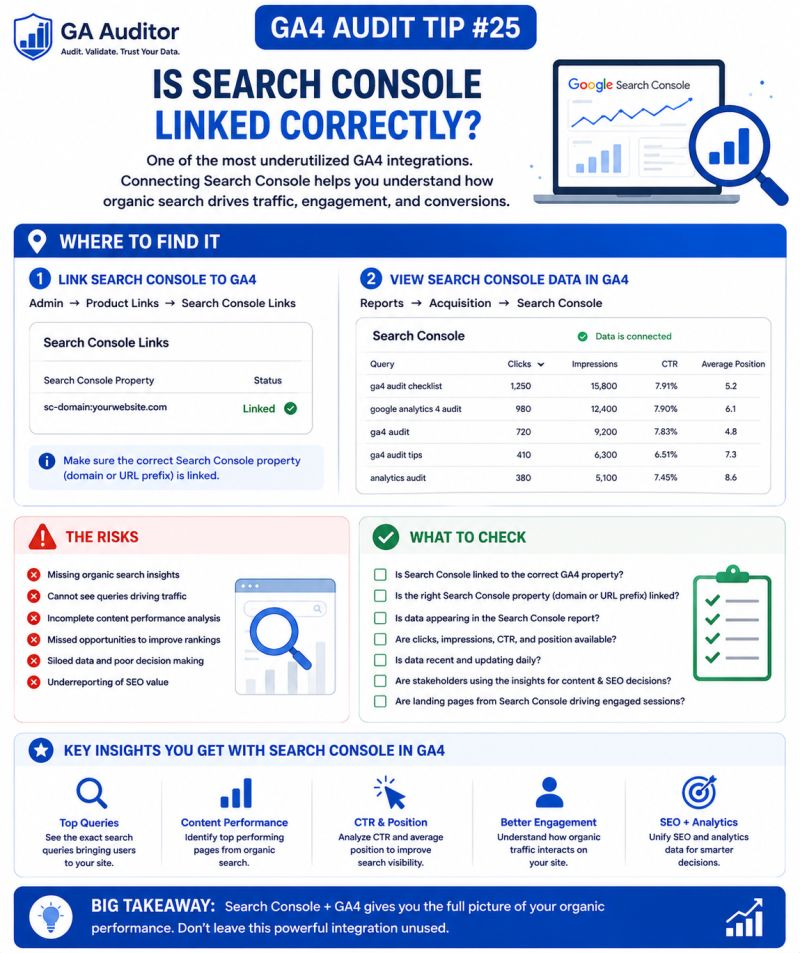
How to Audit the Search Console Integration
Navigate to:
GA4 → Admin → Product Links → Search Console Links
Review:
- Is Search Console linked?
- Is the correct property connected?
- Does the integration reflect the current website structure?
- Has it been reviewed recently?
If the answer to any of these questions is unclear, it’s worth investigating further.
Where to Find the Reports
Once the integration is active, navigate to:
Reports → Search Console
You’ll typically see reports such as:
Queries Report
Helps you understand:
- Organic search queries.
- Clicks.
- Impressions.
- Average position.
Organic Search Traffic Report
Helps connect:
- Landing pages.
- Engagement metrics.
- Organic performance.
These reports don’t replace Search Console.
They complement it.
Questions Worth Asking During an Audit
I often ask stakeholders:
- Which pages drive the most organic traffic?
- Which pages generate business outcomes?
- Which SEO reports influence decisions?
- Do SEO and analytics teams collaborate?
- Has the website structure changed recently?
- Does leadership understand the relationship between visibility and engagement?
These conversations often uncover reporting gaps that technology alone can’t solve.
Signs Your SEO Reporting Needs Attention
A review may be worthwhile if:
- SEO teams rely exclusively on Search Console.
- Analytics teams rarely discuss organic performance.
- Organic traffic is growing without corresponding business outcomes.
- Nobody knows whether the integration exists.
- The website has migrated recently.
- Content performance discussions focus only on rankings.
None of these automatically indicate a problem.
But they often indicate an opportunity.
What the Integration Doesn’t Do
It’s also important to set expectations.
The Search Console integration won’t:
- Replace Search Console.
- Provide real-time data.
- Solve attribution challenges.
- Automatically improve SEO performance.
What it does provide is context.
And context often leads to better decisions.
Best Practices
A few habits can improve the value of this integration.
- Review the Search Console link annually.
- Confirm the correct property is connected.
- Encourage collaboration between SEO and analytics teams.
- Review landing page engagement alongside rankings.
- Investigate pages with high clicks but poor outcomes.
- Document integration ownership.
- Include SEO reporting reviews in recurring audits.
The strongest SEO strategies combine visibility with user behavior.
Search Console Integration Audit Checklist
Use this checklist during your next review:
□ Verify that Search Console is linked.
□ Confirm the correct property is connected.
□ Review Search Console reports in GA4.
□ Validate landing page reporting.
□ Compare organic visibility with engagement metrics.
□ Review high-traffic pages for business outcomes.
□ Confirm the integration reflects the current website structure.
□ Assign ownership responsibilities.
□ Encourage collaboration between SEO and analytics teams.
□ Include Search Console reviews in recurring audits.
Wrapping Up
I’ve worked with organizations that track every ranking movement and celebrate increases in impressions.
I’ve also worked with teams that focus entirely on engagement and conversions without understanding where users came from.
The most effective organizations bring those perspectives together.
Because rankings don’t pay the bills.
Clicks don’t guarantee outcomes.
What matters is understanding how organic visibility translates into meaningful business results.
The Search Console integration won’t transform your SEO strategy overnight.
But it can help answer a much more valuable question:
What happens after someone clicks?
And for most businesses, that’s where the real opportunity begins.