
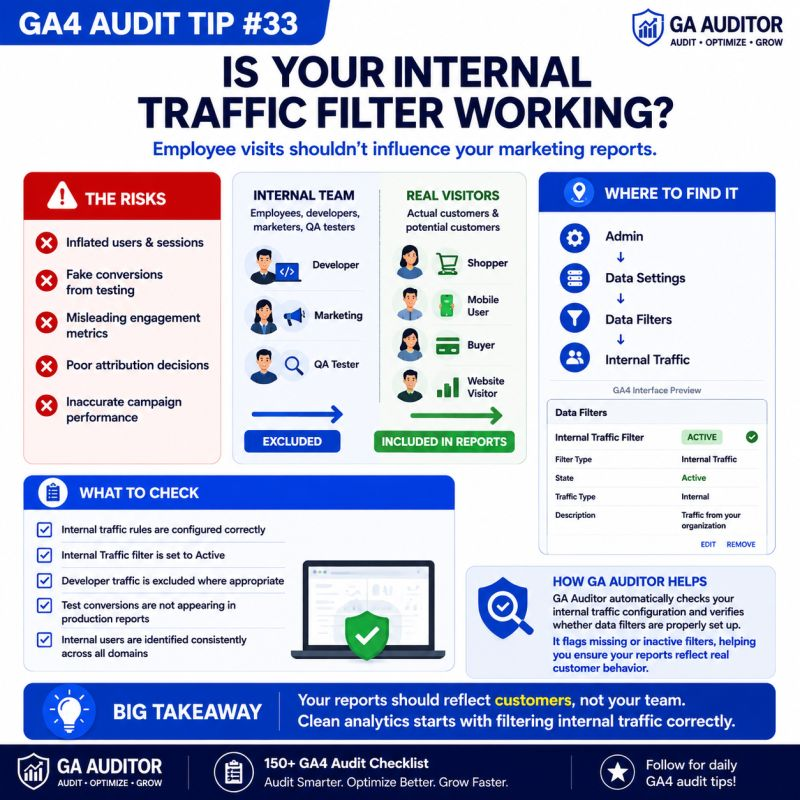
Part of the GA Auditor 150+ GA4 Audit Checklist Series
I was auditing a GA4 property for a SaaS company when the marketing manager proudly showed me their latest dashboard.
Traffic was growing.
Engagement looked fantastic.
Conversions were steadily increasing.
Everything pointed toward a successful quarter.
Then I asked a simple question.
“How many of these visitors are actually your employees?”
Nobody knew.
After a few minutes of testing, we found the issue.
The company’s internal traffic filter had never been activated.
Every visit from the marketing team, developers, designers, customer support, and sales representatives was being recorded as if they were real customers.
Developers were testing new features.
The marketing team was reviewing landing pages.
Support agents were reproducing customer issues.
All of those visits were inflating the reports that leadership relied on.
Nothing was wrong with GA4.
The platform was simply measuring every visitor equally.
The problem was that nobody had told GA4 which visitors should be excluded.
That’s why reviewing internal traffic filters is an essential part of every GA4 audit.
Because your reports should reflect customer behavior—not your team’s daily work.
How GA Auditor Helps
Internal traffic is one of the easiest sources of inaccurate data to overlook.
Reports continue to populate.
Dashboards look healthy.
Marketing campaigns appear more successful than they really are.
Without regular reviews, employee activity slowly becomes part of your business metrics.
GA Auditor reviews your internal traffic configuration as part of its 150+ point GA4 audit checklist, helping you verify that internal traffic rules are correctly configured, data filters are active, and employee activity isn’t distorting your reports.
The goal isn’t simply to exclude traffic.
It’s to ensure your data reflects real customer behavior.
Why Internal Traffic Matters
Your team interacts with your website very differently from your customers.
Employees regularly:
- Test forms.
- Browse new pages.
- Check marketing campaigns.
- Validate ecommerce purchases.
- Review product updates.
- Troubleshoot customer issues.
Every one of those actions generates analytics data.
If internal traffic isn’t excluded, it can influence:
- Users
- Sessions
- Engagement rate
- Conversion rate
- Landing page reports
- Audience creation
- Attribution analysis
For websites with low or moderate traffic, even a small number of employee visits can noticeably affect reporting.
Common Issues Found During Audits
Internal Traffic Was Never Configured
This is the most common issue I see.
Many businesses assume that GA4 automatically knows which visitors are employees.
It doesn’t.
Unless you define internal traffic, every visit is treated as a genuine user session.
The Filter Exists but Isn’t Active
GA4 allows Internal Traffic filters to operate in Testing mode before becoming Active.
During audits, I often find organizations that completed the setup but never activated the filter.
The configuration exists.
The data still includes employee visits.
Remote Employees Aren’t Included
Years ago, excluding office IP addresses was often enough.
Today, many organizations work remotely or follow hybrid work models.
Developers work from home.
Marketing teams work remotely.
Agencies access the website from different locations.
Old filtering rules rarely reflect modern working environments.
Test Conversions Appear in Reports
I’ve seen companies celebrate an increase in conversions, only to discover that employees testing forms and checkout flows were responsible for many of them.
Internal testing is important.
It just shouldn’t influence production reports.
Nobody Owns the Configuration
During many audits, nobody knows:
- Who created the filter.
- When it was last updated.
- Which IP addresses are included.
- Whether it still works.
Analytics governance often ends after implementation.
How to Audit Internal Traffic Filters
Start by navigating to:
Admin → Data Settings → Data Filters
Review the Internal Traffic filter.
Ask yourself:
- Is the filter Active?
- Has it been tested?
- Does it still reflect your current organization?
- Has it been reviewed recently?
Next, review how internal traffic is identified.
Navigate to:
Admin → Data Streams → Select Your Web Stream → Configure Tag Settings → Define Internal Traffic
Review:
- IP-based rules.
- Traffic definitions.
- Naming conventions.
- Documentation.
If your business has changed significantly since implementation, your traffic definitions probably need updating too.
Questions Worth Asking During an Audit
These conversations usually uncover hidden problems.
- Do employees regularly test the website?
- Does your team work remotely?
- Do external agencies access your website?
- Who is responsible for maintaining internal traffic rules?
- When was the filter last reviewed?
- Have your office locations changed?
Good analytics isn’t only about configuration.
It’s also about governance.
Signs Your Internal Traffic Filter Needs Attention
A review is worthwhile if:
- Employees frequently test the website.
- Your company has adopted remote or hybrid work.
- Marketing teams regularly review landing pages.
- Developers perform production testing.
- Internal conversions appear in reports.
- Nobody remembers the last configuration review.
None of these automatically indicate a problem.
But they usually justify a closer look.
Best Practices
To maintain clean reporting over time:
- Review Internal Traffic filters at least once a year.
- Update IP definitions when your organization changes.
- Test filters before enabling them.
- Exclude developer and QA activity where appropriate.
- Document who owns the configuration.
- Validate reports after major infrastructure changes.
- Include internal traffic checks in every GA4 audit.
Clean analytics requires ongoing maintenance, not a one-time setup.
Internal Traffic Audit Checklist
Use this checklist during your next audit:
□ Review Internal Traffic definitions.
□ Confirm the Internal Traffic filter is Active.
□ Verify IP-based rules.
□ Consider remote and hybrid employees.
□ Exclude developer and QA testing where appropriate.
□ Review agency access.
□ Test filter behavior.
□ Document ownership.
□ Update configurations after organizational changes.
□ Include internal traffic validation in recurring GA4 audits.
Wrapping Up
When teams see higher traffic and stronger engagement, it’s natural to assume the business is growing.
Sometimes that’s true.
Sometimes it’s simply your own employees visiting the website every day.
Internal traffic doesn’t usually create obvious reporting errors.
Instead, it quietly adds noise that makes every metric a little less reliable.
That’s why this audit check matters.
Because better decisions start with cleaner data.
And cleaner data starts by making sure your reports represent your customers—not the people building, testing, and maintaining your website.