
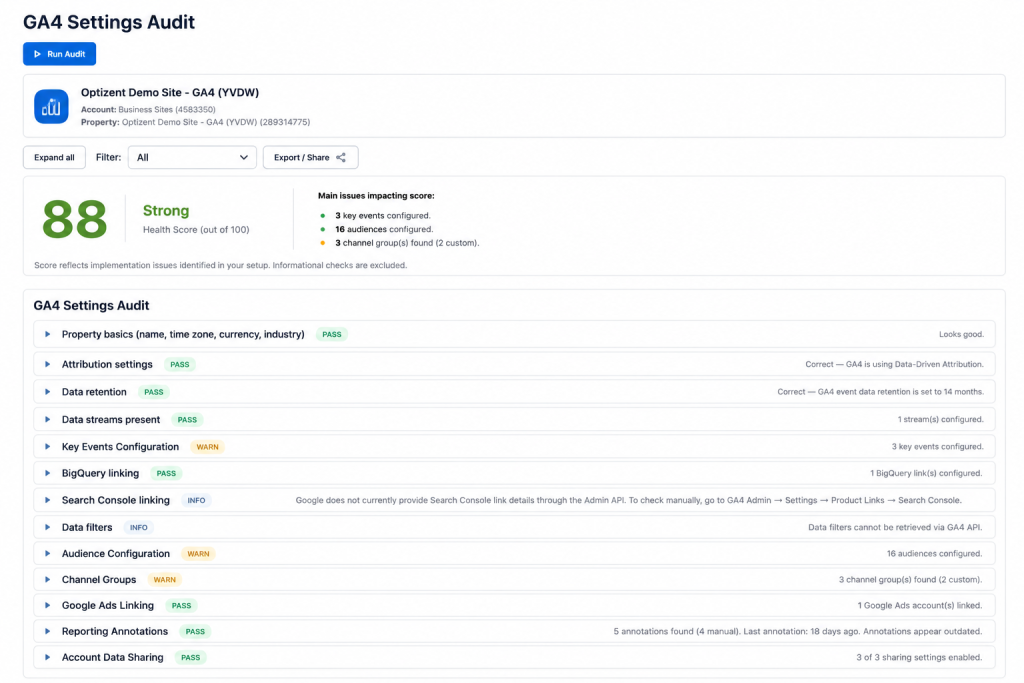
Here’s something most analytics teams don’t want to admit: the settings that control how your GA4 property collects, attributes, and stores data were probably configured once — during initial implementation — and haven’t been touched since.
Maybe that was six months ago. Maybe two years. Maybe the person who set it up left the company.
Meanwhile, your business changed. Your marketing stack changed. Your campaigns changed. Your team changed. The GA4 property? Largely unchanged.
This is the core problem the GA4 Configuration Audit exists to solve.
What the GA4 Configuration Audit Actually Does
Most GA4 audits focus on what’s firing — tags, events, pixels. The configuration audit goes a layer deeper: it examines the property-level settings that determine how all that firing data gets interpreted, attributed, and stored.
These aren’t the settings you check every day. They’re the settings you configure once and forget — which is exactly why they’re so often wrong.
Property Configuration Review
The audit starts with the foundational settings that affect every report downstream.
Time zone alignment. If your GA4 property’s time zone doesn’t match your business’s actual operating time zone, “daily” data gets sliced incorrectly. A campaign that launches at 11pm local time gets split across two reporting days. Day-over-day comparisons look off. Seasonal trends don’t line up. This is a one-click fix that most properties have wrong simply because nobody checked.
Currency settings. For ecommerce businesses operating internationally, a mismatch between GA4’s currency setting and the actual transaction currency produces silently distorted revenue figures — every single day, in every revenue report.
Data stream configuration. Every data stream (web, iOS, Android) should be correctly configured and actively receiving data. It’s surprisingly common to find a stream that was set up during a project kickoff and never properly connected, silently collecting nothing while the team assumes it’s working.
Enhanced measurement settings. GA4 automatically collects certain events — scrolls, outbound clicks, site search, video engagement, file downloads — based on toggles in the enhanced measurement settings. The defaults are often either too broad or too narrow for any specific business. This check confirms each toggle reflects a deliberate choice, not an inherited default nobody reviewed.
Internal traffic filtering. If your team’s own traffic — from office IPs, developer machines, staging environments — isn’t filtered out, you’re polluting your user data with internal behavior every single day. This is especially damaging for smaller sites where internal traffic represents a meaningful percentage of total sessions.
Attribution Settings Validation
Attribution configuration is where the biggest silent distortions live — because misconfigured attribution doesn’t produce an error, it just quietly shifts credit between channels every single reporting day.
Attribution model selection. GA4 supports multiple attribution models, and the choice between them materially changes which channels get credit for conversions. Many properties are sitting on a default model that doesn’t match how the business actually evaluates channel performance — not because anyone made a wrong choice, but because nobody made a deliberate choice at all.
Lookback window settings. The acquisition and conversion lookback windows determine how far back GA4 looks when assigning credit. A business with a 60-day consideration cycle running a 30-day lookback window will systematically undercount the channels that play an early role in long conversion paths. This is a quiet, compounding distortion that affects budget decisions every single cycle.
Data-driven attribution eligibility. GA4 offers data-driven attribution, which uses machine learning to distribute credit based on observed patterns. But it requires sufficient conversion volume to function correctly — below the threshold, GA4 silently falls back to a different model. The audit checks whether your property actually meets the eligibility threshold, or whether you’re running a model that’s essentially in fallback mode without anyone knowing.
Google Ads linking status. The connection between GA4 and Google Ads is one of the most commonly broken integrations. It can fail silently after account changes, team offboarding, or permission restructuring — meaning conversion data stops flowing to Google Ads for bid optimization while everything in GA4 looks normal.
Data Retention Checks
This is the configuration issue with the least obvious immediate impact and the most permanent consequences.
GA4’s default data retention period is relatively short. If your team ever needs to do year-over-year analysis, long-term cohort studies, or historical attribution modeling — and your property is sitting on the default retention setting — that historical event-level data simply won’t exist when you need it.
The auditing point isn’t complicated: confirm your retention setting matches your actual analytical needs, and make any necessary change before another month of data rolls off the window. Data that’s already been deleted can’t be recovered.
The related check — whether retention resets on user activity — has implications for how long individual user-level data persists and is worth confirming against your actual data governance policy.
Key Event & Conversion Review
Conversion definitions are surprisingly fragile. They’re set up with care during implementation and then accumulate drift as the business, the website, and the team change around them.
Duplicate or conflicting key events. It’s common to find the same underlying user action tracked by two differently-named events, both marked as key events. The result: total conversion counts are inflated, and conversion rate calculations are wrong, but nothing visible signals that this is happening.
Stale conversion definitions. Events marked as conversions during an initial implementation — lead form submissions, newsletter signups, PDF downloads — are often still marked as conversions years later, even when the business no longer considers them meaningful outcomes. These inflate conversion counts and distort conversion rate metrics across every report.
Missing value parameters. For any conversion event tied to revenue or lead value, the audit verifies that the value parameter is actually being passed correctly. A purchase event that fires but passes a null or zero value is recording conversion volume without recording business impact — which distorts every revenue-per-conversion metric downstream.
Conversion counting method. GA4 lets you count a conversion “once per session” or “every time.” Depending on the conversion type and the business, the right choice differs — but many properties are using the default without anyone having made a deliberate choice about what’s appropriate.
Audience & Integration Validation
Audiences built in GA4 get used across advertising platforms, remarketing campaigns, and lookalike modeling — which means a stale or incorrectly configured audience has consequences well beyond GA4 itself.
Audience relevance review. Most GA4 properties accumulate audiences over time — built for specific campaigns, seasonal promotions, or A/B tests — that are never cleaned up afterward. These aren’t just clutter; they can continue syncing to ad platforms, consuming audience list limits, and occasionally causing unexpected targeting behavior.
Integration health checks. The audit verifies that active integrations — Google Ads, Display & Video 360, Search Console — are actually functioning, not just configured. These links break more silently than they get fixed. A Search Console integration that disconnected three months ago quietly breaks organic search reporting without any visible error in the GA4 interface.
Why This Audit Is Often the Most Valuable Starting Point
When teams run their first GA4 Configuration Audit, the most common reaction is something like: “I had no idea this was wrong.”
Not because the issues are obscure or technical. Because they’re in settings that look fine at a glance — they’re configured, they’re not throwing errors, and nobody has reason to check them unless they know what to look for.
A time zone misconfiguration isn’t going to crash your analytics. An attribution lookback window that doesn’t match your sales cycle isn’t going to show up as a red flag in any standard report. Data retention set to the wrong period isn’t going to announce itself until the day you go to run an analysis on data that no longer exists.
These are quiet, structural problems that compound silently. The configuration audit is the check that surfaces them — before they cost you a budget decision, a compliance issue, or a piece of history that can’t be recovered.
Ready to see where your GA4 property configuration actually stands?
GA Auditor runs this check automatically — alongside data quality, GTM, and BigQuery audits — and gives you a scored, prioritized breakdown of exactly what to fix.
Start your free audit at gaauditor.com → no credit card required.