
I can’t tell you how many times I’ve had this conversation.
A company wants to investigate a sudden drop in conversions from six months ago.
An analyst wants to build a custom attribution model.
Leadership asks for a cohort analysis that isn’t possible inside the GA4 interface.
Someone says:
“Can’t we just pull it from BigQuery?”
Then comes the awkward pause.
BigQuery export was never enabled.
Or worse, it was enabled last month.
By that point, there’s nothing anyone can do.
Unlike many settings in GA4, BigQuery doesn’t go back in time. It starts collecting data from the day you enable it. If it wasn’t turned on, the historical raw data simply doesn’t exist in BigQuery.
That’s why I consider this one of the most important checks in any GA4 audit.
Not because every company needs BigQuery today.
But because many eventually wish they had it.
How GA Auditor Helps
BigQuery issues usually aren’t discovered during implementation.
GA4 reports work.
Dashboards look fine.
Revenue appears in reports.
The problem only emerges when teams ask more sophisticated questions that GA4’s interface can’t answer.
GA Auditor reviews BigQuery configurations as part of its 150+ point GA4 audit checklist, helping organizations understand whether they have access to the raw event data needed for future analysis, validation, and reporting flexibility.
The objective isn’t to push every business into advanced analytics.
It’s to ensure future opportunities aren’t lost because of a setting nobody reviewed.
Why BigQuery Matters
GA4 is an excellent reporting platform.
It was never designed to be your long-term data warehouse.
The interface is built to answer common questions quickly.
Eventually, businesses grow beyond those questions.
Teams begin asking things such as:
- Can we build custom funnels?
- Can we validate our ecommerce implementation?
- Can we investigate duplicate events?
- Can we compare different attribution models?
- Can we combine analytics data with CRM information?
- Can we retain raw event data beyond GA4 limitations?
That’s where BigQuery becomes valuable.
The Biggest Misconception About BigQuery
One of the most common assumptions I hear is:
“We can always enable it later.”
Technically, that’s true.
Strategically, it can be expensive.
BigQuery exports only begin from the moment they’re activated.
They don’t backfill historical event-level data.
If your leadership team asks for a two-year analysis next year, but BigQuery was enabled yesterday, yesterday is where your raw dataset begins.
Common Issues Found During Audits
BigQuery Was Never Enabled
This is by far the most common finding.
Businesses assume they won’t need it.
Then eventually they do.
BigQuery Was Enabled Too Late
The second most common finding.
The export exists.
The historical data doesn’t.
Nobody Knows Whether It’s Working
I often ask:
“Are exports running successfully?”
The response is usually:
“I think so.”
No one has verified the dataset recently.
Permissions Are Too Restrictive
Analysts need access.
Developers need access.
Data teams need access.
Sometimes nobody outside the original implementation team can use the exported data.
No One Owns It
BigQuery gets enabled.
Then forgotten.
There are no validation procedures.
No documentation.
No ownership.
Where to Find It
Navigate to:
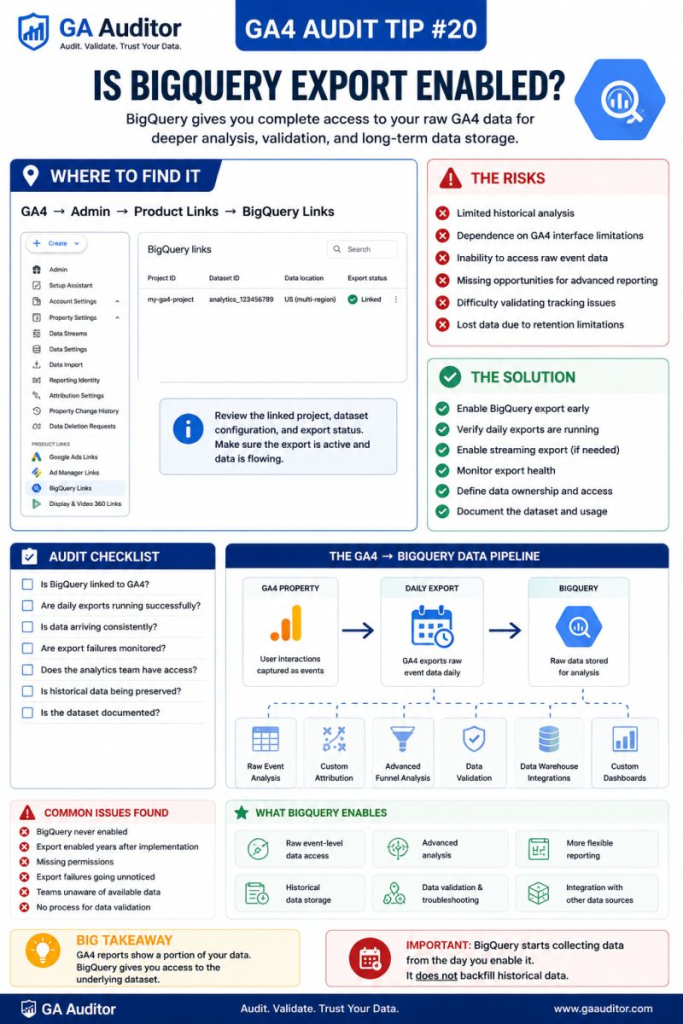
GA4 → Admin → Product Links → BigQuery Links
Review:
- Is BigQuery linked?
- Which Google Cloud project is connected?
- Is the correct dataset being used?
- Are exports active?
This review takes less than five minutes.
It can save years of frustration.
How to Validate BigQuery Export
If BigQuery is connected, don’t stop there.
Confirm that it actually works.
Review:
- Are daily exports arriving consistently?
- Are datasets updating?
- Have there been export failures?
- Do analysts have appropriate access?
- Does the exported data align with expectations?
A linked status isn’t enough.
Healthy exports require occasional validation.
What BigQuery Enables
One reason I encourage businesses to enable BigQuery early is because it creates options.
You may never need all of them.
But it’s difficult to predict future analytical requirements.
BigQuery enables capabilities such as:
Raw Event Analysis
Review the underlying event data powering GA4.
Advanced Funnel Reporting
Build custom analyses beyond standard reports.
Attribution Modeling
Explore alternative approaches to conversion credit.
Data Validation
Investigate duplicate events, missing parameters, and tracking anomalies.
CRM Integrations
Combine analytics data with customer information.
Long-Term Storage
Retain access to raw event-level data outside the GA4 interface.
Custom Dashboards
Support reporting environments tailored to your business.
Questions Worth Asking During an Audit
I often ask stakeholders:
- Is BigQuery enabled?
- Why was the decision made?
- Who owns the dataset?
- Who has access?
- How often is it reviewed?
- What questions can’t GA4 answer today?
- What questions might leadership ask next year?
These conversations tend to shift BigQuery from a technical topic to a business discussion.
Signs Your Organization Might Need BigQuery
A review becomes especially valuable if:
- Analysts rely heavily on Explorations.
- Marketing teams question attribution.
- Ecommerce tracking needs validation.
- CRM integrations are planned.
- Leadership requests historical analysis.
- Teams regularly export GA4 data into spreadsheets.
- Reporting requirements continue to evolve.
You don’t have to be an enterprise organization to benefit.
You simply have to value flexibility.
Best Practices
A few habits can prevent future regret.
- Enable BigQuery early.
- Assign ownership responsibilities.
- Review exports regularly.
- Validate dataset health.
- Document access permissions.
- Educate stakeholders on its capabilities.
- Include BigQuery reviews in recurring audits.
The cost of enabling it is often much lower than the cost of wishing you had.
BigQuery Audit Checklist
Use this checklist during your next review:
□ Verify BigQuery is linked.
□ Confirm the correct Google Cloud project.
□ Review export status.
□ Validate daily exports.
□ Check dataset health.
□ Review user access permissions.
□ Document ownership responsibilities.
□ Identify future reporting requirements.
□ Include BigQuery reviews in recurring audits.
Wrapping Up
Most organizations don’t wake up one morning thinking:
“Today is the day we finally need BigQuery.”
The need usually appears gradually.
A question leadership wants answered.
A report that GA4 can’t produce.
An investigation into unexpected trends.
A desire to connect analytics with other business systems.
By then, the value of historical raw data becomes obvious.
I’ve never had a client complain that they enabled BigQuery too early.
I have had many wish they had enabled it sooner.
Because in analytics, some opportunities can be recreated.
Historical data usually isn’t one of them.