
A few years ago, I was auditing a GA4 implementation for a client that had invested heavily in tracking.
They had dozens of custom parameters.
Customer type.
Content category.
Membership level.
Lead source.
Product attributes.
Sales territories.
At first glance, it looked impressive.
The implementation team had clearly put in a lot of effort.
Then I asked a simple question:
“Which of these custom dimensions do you actually use?”
Nobody knew.
The marketing team had never heard of some of them.
Analysts were exporting data into spreadsheets because they couldn’t find the dimensions they needed in reports.
Leadership still couldn’t answer basic business questions.
After a deeper review, we discovered the problem.
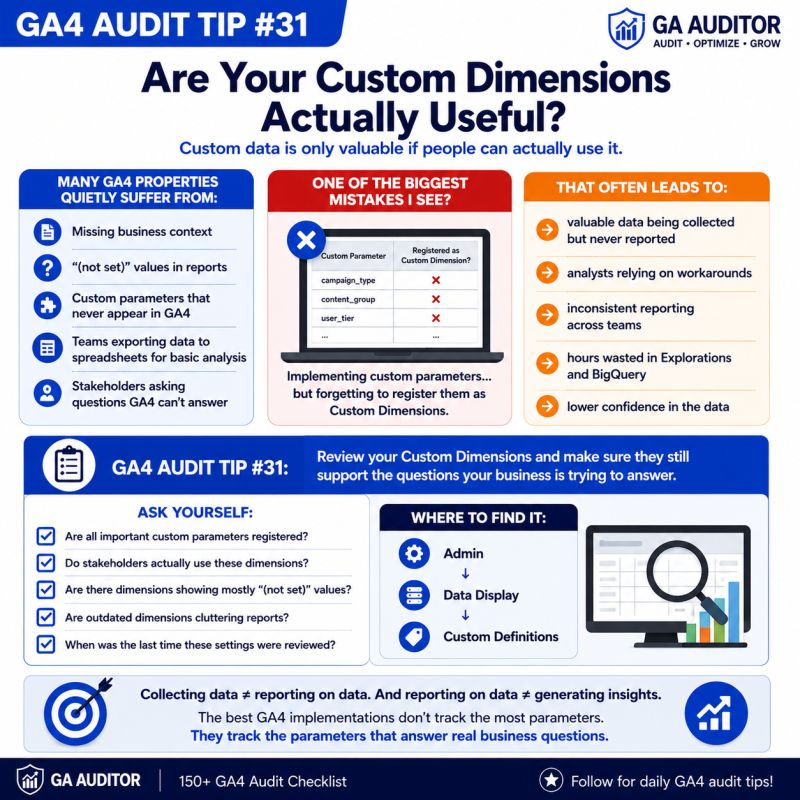
Some custom parameters had never been registered as Custom Dimensions.
Others were created years ago and never used again.
A few showed “(not set)” for almost every user.
Nothing was technically broken.
GA4 was collecting data.
The problem was that the data wasn’t helping anyone make decisions.
This is why Custom Dimensions deserve a place in every GA4 audit.
Because collecting data isn’t the same as creating insights.
How GA Auditor Helps
Custom Dimensions often grow quietly over time.
A developer adds a parameter.
An agency launches a campaign.
A product team requests new tracking.
Eventually, nobody remembers:
- Why a dimension exists.
- Whether it’s still useful.
- If stakeholders actually use it.
GA Auditor reviews Custom Definitions as part of its 150+ point GA4 audit checklist, helping organizations identify missing registrations, outdated dimensions, reporting gaps, and opportunities to align tracking with business questions.
The goal isn’t to create more Custom Dimensions.
It’s to create useful ones.
What Are Custom Dimensions?
GA4 automatically collects a lot of information.
Things like:
- Page titles
- Traffic sources
- Devices
- Countries
But businesses often need additional context.
For example:
You might want to understand performance by:
- Customer type
- Membership status
- Author name
- Content category
- Product availability
- Subscription plan
- Sales region
- Logged-in status
That’s where Custom Dimensions come in.
They allow you to transform event parameters and user properties into something you can actually use in reports and explorations.
Without them, valuable context often stays hidden.
Why Custom Dimensions Matter
One of the biggest frustrations analysts face is having data that exists but isn’t accessible.
A parameter may be sent perfectly with every event.
But if it’s never registered properly, teams can’t easily use it in GA4 reports.
That often leads to questions such as:
- Which content categories generate the most engagement?
- Which customer segments convert best?
- Which subscription plans have the highest retention?
- How do logged-in users behave differently?
The answers may already exist in your implementation.
You just can’t see them.
Common Issues Found During Audits
Parameters Were Never Registered
This is probably the most common issue I encounter.
The implementation sends parameters correctly.
Nobody creates the corresponding Custom Dimension.
As a result:
- Analysts can’t use the data.
- Stakeholders assume tracking doesn’t exist.
- Teams build workarounds.
Nobody Uses the Dimensions
I’ve audited properties with dozens of Custom Dimensions.
When I ask:
“Which ones support business decisions?”
The room goes quiet.
Just because something can be tracked doesn’t mean it should be.
“(not set)” Appears Everywhere
Dimensions filled with “(not set)” often indicate:
- Inconsistent implementation.
- Missing parameters.
- Partial rollouts.
- Configuration problems.
These dimensions create confusion instead of clarity.
Dimensions Become Outdated
Businesses evolve.
Products change.
Campaigns end.
Teams restructure.
The dimensions remain exactly the same.
Months later, nobody remembers why they were created.
Analysts Depend on Spreadsheets
When stakeholders can’t answer questions inside GA4, they start exporting data elsewhere.
Not because they want to.
Because they have to.
How to Audit Custom Dimensions in GA4
Navigate to:
Admin → Data Display → Custom Definitions
Review every Custom Dimension individually.
Ask yourself:
- Why does this dimension exist?
- Is it still relevant?
- Does anyone use it?
- Does it answer a business question?
- Is the underlying data accurate?
If nobody can explain its purpose, it deserves attention.
Questions Worth Asking During an Audit
I often ask stakeholders:
- Which business questions are hardest to answer?
- Which dimensions appear in dashboards?
- Which reports rely on Custom Dimensions?
- Are analysts using spreadsheets to fill reporting gaps?
- Are there dimensions nobody understands?
- What information would make decisions easier?
These conversations often reveal opportunities to simplify and improve.
Signs Your Custom Dimensions Need Attention
A review may be worthwhile if:
- Analysts frequently export GA4 data.
- Reports contain many “(not set)” values.
- Stakeholders struggle to answer basic questions.
- Nobody remembers why dimensions were created.
- New business requirements have emerged.
- Agencies or implementation teams have changed.
None of these automatically indicate a problem.
But they often indicate an opportunity.
What Makes a Good Custom Dimension?
The best Custom Dimensions share a few characteristics.
They are:
- Relevant to business objectives.
- Understood by stakeholders.
- Consistently populated.
- Used in decision-making.
- Documented clearly.
- Reviewed regularly.
A good Custom Dimension creates clarity.
A bad one creates noise.
Best Practices
A few habits can dramatically improve reporting quality.
- Register important parameters promptly.
- Remove outdated definitions.
- Review “(not set)” values regularly.
- Document the purpose of every dimension.
- Align dimensions with stakeholder needs.
- Train teams on available reporting capabilities.
- Review Custom Definitions annually.
- Include Custom Dimension reviews in recurring audits.
The strongest implementations focus on usefulness, not volume.
Custom Dimension Audit Checklist
Use this checklist during your next review:
□ Review all Custom Dimensions.
□ Confirm important parameters are registered.
□ Investigate “(not set)” values.
□ Remove outdated definitions.
□ Document the purpose of each dimension.
□ Validate data consistency.
□ Identify dimensions used in reporting.
□ Align tracking with business questions.
□ Review definitions annually.
□ Include Custom Dimensions in recurring audits.
Wrapping Up
One of the easiest ways to overwhelm a GA4 property is to keep adding Custom Dimensions without asking whether they actually help anyone.
I’ve seen organizations track hundreds of data points while still struggling to answer simple questions about their customers and performance.
The issue wasn’t a lack of data.
It was a lack of focus.
The most effective GA4 implementations don’t track everything possible.
They track the things that help people make better decisions.
Because collecting data doesn’t create value.
Turning that data into answers does.