
If you’re implementing Mixpanel on Shopify today, you shouldn’t send events directly from Shopify to Mixpanel.
Technically, you can.
Shopify’s Customer Events framework allows you to subscribe to events like product views, add-to-cart actions, and purchases, then send them directly to Mixpanel.
But in most implementations, that creates another tracking silo.
Now you have:
- GA4 events
- Google Ads conversions
- Meta Pixel events
- TikTok events
- Mixpanel events
all configured separately.
Every time a new event is needed, multiple platforms must be updated.
That’s why I prefer a different approach.
Instead of sending events directly to Mixpanel, push everything into the dataLayer first and let Google Tag Manager distribute events to Mixpanel and any other marketing or analytics platform.
This creates a single source of truth for your Shopify tracking setup.
In this guide, we’ll use:
Shopify Customer Events
↓
Custom Pixel
↓
DataLayer
↓
Google Tag Manager
↓
Mixpanel
By the end, you’ll be tracking:
- Product Views
- Collection Views
- Add To Cart
- Remove From Cart
- Cart Views
- Checkout Started
- Shipping Information
- Contact Information
- Payment Information
- Purchases
- Site Searches
along with rich ecommerce properties for analysis.
Prerequisites
Before getting started, you’ll need:
- A Shopify store
- A Mixpanel project
- Google Tag Manager installed
- Access to Shopify Customer Events
- Your GTM Container ID
- Your Mixpanel Project Token
If GTM isn’t installed yet, complete that first.
Everything in this guide relies on GTM handling event distribution.
Step 1: Create a Shopify Custom Pixel
Inside Shopify Admin:
Settings → Customer Events
Click:
Add Custom Pixel
Name it:
GTM DataLayer Tracking
This pixel will act as the bridge between Shopify and GTM.
Step 2: Load Google Tag Manager
Inside the Custom Pixel, load GTM and initialize the dataLayer.
window.dataLayer = window.dataLayer || [];
var pageLocation = init.context.document.location.href;
dataLayer.push({
page_location: pageLocation
});
Then load your GTM container.
Replace:
GTM-XXXXXX
with your actual GTM Container ID.
Once saved, Shopify events can now push data into GTM.
Step 3: Configure Product View Tracking
The first event I usually implement is Product Viewed.
Why?
Because every ecommerce journey starts here.
Inside the Custom Pixel:
analytics.subscribe(‘product_viewed’, function(event) {
Push:
optizent_view_item
to the dataLayer.
The payload should include:
- Product ID
- Product Name
- Variant ID
- SKU
- Brand
- Product Category
- Price
- Currency
A lot of implementations only send:
product_viewed
and call it a day.
Six months later someone asks:
Which product categories convert best?
Without product properties, you won’t have the answer.
Track the context from day one.
Step 4: Configure Collection View Tracking
Collection pages are often overlooked.
That’s a mistake.
Collection performance helps answer:
- Which categories generate purchases?
- Which collections attract engagement?
- Which product groups drive revenue?
Use Shopify’s:
collection_viewed
event and push:
optizent_view_item_list
to the dataLayer.
Include:
- Collection ID
- Collection Name
- Products Viewed
- Product Categories
- Total Collection Value
This becomes extremely useful later when building merchandising reports.
Step 5: Configure Add To Cart Tracking
This is usually the second most important ecommerce event after purchases.
Subscribe to:
product_added_to_cart
Push:
optizent_add_to_cart
to the dataLayer.
Recommended properties:
- Product ID
- Product Name
- Quantity
- SKU
- Brand
- Category
- Variant
- Price
Once implemented, you’ll be able to build a simple but powerful funnel:
Product Viewed
↓
Add To Cart
↓
Checkout Started
↓
Purchase
Step 6: Configure Remove From Cart Tracking
Many stores track Add To Cart.
Very few track Remove From Cart.
That’s unfortunate because cart removals often reveal friction.
Subscribe to:
product_removed_from_cart
Push:
optizent_remove_from_cart
to the dataLayer.
If certain products have unusually high removal rates, that’s worth investigating.
Step 7: Configure Cart View Tracking
Cart views indicate buying intent.
Use:
cart_viewed
Push:
optizent_view_cart
Include:
- Cart Value
- Products
- Quantity
- Currency
This event helps identify customers progressing toward checkout.
Step 8: Configure Checkout Tracking
Shopify exposes several checkout events.
I generally track all of them.
Checkout Started
checkout_started
Push:
optizent_begin_checkout
Contact Information Submitted
checkout_contact_info_submitted
Push:
optizent_add_contact_info
Shipping Information Submitted
checkout_shipping_info_submitted
Push:
optizent_add_shipping_info
Payment Information Submitted
payment_info_submitted
Push:
optizent_add_payment_info
These events help identify where users abandon checkout.
Instead of simply knowing checkout conversion dropped, you’ll know exactly which step is causing the issue.
Step 9: Configure Purchase Tracking
This is your primary conversion event.
Subscribe to:
checkout_completed
Push:
optizent_purchase
Recommended properties:
- Transaction ID
- Revenue
- Currency
- Shipping
- Tax
- Coupon
- Product Details
- Quantity
- SKU
- Category
Don’t only track revenue.
The additional context becomes extremely valuable when analyzing purchasing behavior.
Step 10: Configure Search Tracking
Site search is one of the strongest indicators of intent.
Use:
search_submitted
Push:
view_search_result
Track:
- Search Query
- Products Returned
- Product Categories
- Search Result Value
A surprising amount of revenue insight comes from understanding what customers search for.
Step 11: Create GTM Triggers
Now switch to Google Tag Manager.
For every Shopify dataLayer event:
Create a Custom Event Trigger.
Examples:
optizent_view_item
optizent_add_to_cart
optizent_begin_checkout
optizent_purchase
Each trigger should fire when the corresponding event appears in the dataLayer.
Here is the datalayer code for pushing all the events
window.dataLayer = window.dataLayer || [];
var pageLocation = init.context.document.location.href;
dataLayer.push({
page_location: pageLocation
});
(function(w,d,s,l,i){w[l]=w[l]||[];w[l].push({‘gtm.start’:
new Date().getTime(),event:’gtm.js’});var f=d.getElementsByTagName(s)[0],
j=d.createElement(s),dl=l!=’dataLayer’?’&l=’+l:”;j.async=true;j.src=
‘https://www.googletagmanager.com/gtm.js?id=’+i+dl;f.parentNode.insertBefore(j,f);
})(window,document,’script’,’dataLayer’,’GTM-XXXXXX’);
// View Item List
analytics.subscribe(‘collection_viewed’, function(event) {
var totalValue = 0;
var items = [];
var dataLayerData = {
page_location: event.context.document.location.href,
page_referrer: event.context.document.referrer,
timestamp: event.timestamp,
shopifyClientId: event.clientId,
eventId: event.id,
page_path: event.context.document.location.pathname,
event: ‘optizent_view_item_list’,
ecommerce: {
item_list_id: event.data.collection.id,
item_list_name: event.data.collection.title,
currency: event.data.collection.productVariants[0]?.price.currencyCode,
}
};
var productVariants = event.data.collection.productVariants;
productVariants.forEach(function(productVariant) {
totalValue = totalValue + productVariant.price.amount;
var item = {
item_name: productVariant.product.title,
variant: productVariant.title === “Default Title” ? null : productVariant.title,
variant_id: productVariant.id,
item_id: productVariant.product.id,
quantity: 1,
price: productVariant.price.amount,
item_category: productVariant.product.type
}
items.push(item);
});
dataLayerData.ecommerce.items = items;
dataLayerData.ecommerce.value = totalValue;
dataLayer.push(dataLayerData);
eventLog(‘view_item_list’, dataLayerData);
});
// Add To Cart
analytics.subscribe(‘product_added_to_cart’, function(event) {
var dataLayerData = {
page_location: event.context.document.location.href,
page_referrer: event.context.document.referrer,
timestamp: event.timestamp,
shopifyClientId: event.clientId,
eventId: event.id,
page_path: event.context.document.location.pathname,
event: ‘optizent_add_to_cart’,
ecommerce: {
currency: event.data.cartLine.cost.totalAmount.currencyCode,
value: event.data.cartLine.cost.totalAmount.amount,
items: [
{
item_name: event.data.cartLine.merchandise.product.title,
variant: event.data.cartLine.merchandise.title,
variant_id: event.data.cartLine.merchandise.id,
item_id: event.data.cartLine.merchandise.product.id,
quantity: event.data.cartLine.quantity,
price: event.data.cartLine.merchandise.price.amount,
item_category: event.data.cartLine.merchandise.product.type,
item_brand: event.data.cartLine.merchandise.product.vendor,
sku: event.data.cartLine.merchandise.product.sku
}
]
}
};
dataLayer.push(dataLayerData);
eventLog(‘add_to_cart’, dataLayerData);
});
// Remove From Cart
analytics.subscribe(‘product_removed_from_cart’, function(event) {
var dataLayerData = {
page_location: event.context.document.location.href,
page_referrer: event.context.document.referrer,
timestamp: event.timestamp,
shopifyClientId: event.clientId,
eventId: event.id,
page_path: event.context.document.location.pathname,
event: ‘optizent_remove_from_cart’,
ecommerce: {
currency: event.data.cartLine.cost.totalAmount.currencyCode,
value: event.data.cartLine.cost.totalAmount.amount,
items: [
{
item_name: event.data.cartLine.merchandise.product.title,
variant: event.data.cartLine.merchandise.title,
variant_id: event.data.cartLine.merchandise.id,
item_id: event.data.cartLine.merchandise.product.id,
quantity: event.data.cartLine.quantity,
price: event.data.cartLine.merchandise.price.amount,
item_category: event.data.cartLine.merchandise.product.type,
item_brand: event.data.cartLine.merchandise.product.vendor,
sku: event.data.cartLine.merchandise.product.sku
}
]
}
};
dataLayer.push(dataLayerData);
eventLog(‘remove_from_cart’, dataLayerData);
});
// View Item
analytics.subscribe(‘product_viewed’, function(event) {
var dataLayerData = {
page_location: event.context.document.location.href,
page_referrer: event.context.document.referrer,
timestamp: event.timestamp,
shopifyClientId: event.clientId,
eventId: event.id,
page_path: event.context.document.location.pathname,
event: ‘optizent_view_item’,
ecommerce: {
currency: event.data.productVariant.price.currencyCode,
value: event.data.productVariant.price.amount,
items: [
{
item_name: event.data.productVariant.product.title,
variant: event.data.productVariant.title === “Default Title” ? null: event.data.productVariant.title,
variant_id: event.data.productVariant.id,
item_id: event.data.productVariant.product.id,
quantity: 1,
price: event.data.productVariant.price.amount,
item_category: event.data.productVariant.product.type,
item_brand: event.data.productVariant.product.vendor,
sku: event.data.productVariant.product.sku,
}
]
}
};
dataLayer.push(dataLayerData);
eventLog(‘view_item’, dataLayerData);
});
// View Cart
analytics.subscribe(‘cart_viewed’, function(event) {
var items = [];
var dataLayerData = {
page_location: event.context.document.location.href,
page_referrer: event.context.document.referrer,
timestamp: event.timestamp,
shopifyClientId: event.clientId,
eventId: event.id,
page_path: event.context.document.location.pathname,
event: ‘optizent_view_cart’,
ecommerce: {
currency: event.data.cart.cost.totalAmount.currencyCode,
value: event.data.cart.cost.totalAmount.amount,
}
};
var lines = event.data.cart.lines;
lines.forEach(function(line) {
var item = {
item_name: line.merchandise.product.title,
variant: line.merchandise.title === “Default Title” ? null : line.merchandise.title,
variant_id: line.merchandise.id,
item_id: line.merchandise.product.id,
quantity: line.quantity,
price: line.merchandise.price.amount,
item_category: line.merchandise.product.type,
item_brand: line.variant.product.vendor,
sku: line.variant.sku
}
items.push(item);
});
dataLayerData.ecommerce.items = items;
dataLayer.push(dataLayerData);
eventLog(‘view_cart’, dataLayerData);
});
// Begin Checkout
analytics.subscribe(‘checkout_started’, function(event) {
var items = [];
var dataLayerData = {
page_location: event.context.document.location.href,
page_referrer: event.context.document.referrer,
timestamp: event.timestamp,
shopifyClientId: event.clientId,
eventId: event.id,
page_path: event.context.document.location.pathname,
customer: {
email: event.data.checkout.email,
phone: event.data.checkout.phone,
billingAddress: event.data.checkout.billingAddress,
shippingAddress: event.data.checkout.shippingAddress
},
event: ‘optizent_begin_checkout’,
ecommerce: {
currency: event.data.checkout.currencyCode,
value: event.data.checkout.totalPrice.amount,
shipping: event.data.checkout.shippingLine.price.amount,
vat: event.data.checkout.totalTax.amount,
subTotal: event.data.checkout.subtotalPrice.amount,
coupon: (event.data?.checkout?.discountApplications || []).map(discount => discount.title).join(‘,’),
}
};
var lineItems = event.data.checkout.lineItems;
lineItems.forEach(function(line) {
var item = {
item_name: line.variant.product.title,
variant: line.variant.title,
variant_id: line.variant.id,
item_id: line.variant.product.id,
quantity: line.quantity,
price: line.variant.price.amount,
item_category: line.variant.product.type,
item_brand: line.variant.product.vendor,
sku: line.variant.sku
}
items.push(item);
});
dataLayerData.ecommerce.items = items;
dataLayer.push(dataLayerData);
eventLog(‘begin_checkout’, dataLayerData);
});
// Add Shipping Info
analytics.subscribe(‘checkout_shipping_info_submitted’, function(event) {
var items = [];
var dataLayerData = {
page_location: event.context.document.location.href,
page_referrer: event.context.document.referrer,
timestamp: event.timestamp,
shopifyClientId: event.clientId,
eventId: event.id,
page_path: event.context.document.location.pathname,
customer: {
email: event.data.checkout.email,
phone: event.data.checkout.phone,
billingAddress: event.data.checkout.billingAddress,
shippingAddress: event.data.checkout.shippingAddress
},
event: ‘optizent_add_shipping_info’,
ecommerce: {
currency: event.data.checkout.currencyCode,
value: event.data.checkout.totalPrice.amount,
shipping: event.data.checkout.shippingLine.price.amount,
vat: event.data.checkout.totalTax.amount,
subTotal: event.data.checkout.subtotalPrice.amount,
coupon: (event.data?.checkout?.discountApplications || []).map(discount => discount.title).join(‘,’),
}
};
var lineItems = event.data.checkout.lineItems;
lineItems.forEach(function(line) {
var item = {
item_name: line.variant.product.title,
variant: line.variant.title,
variant_id: line.variant.id,
item_id: line.variant.product.id,
quantity: line.quantity,
price: line.variant.price.amount,
item_category: line.variant.product.type,
item_brand: line.variant.product.vendor,
sku: line.variant.sku
}
items.push(item);
});
dataLayerData.ecommerce.items = items;
dataLayer.push(dataLayerData);
eventLog(‘add_shipping_info’, dataLayerData);
});
// Add Contact Info
analytics.subscribe(‘checkout_contact_info_submitted’, function(event) {
var items = [];
var dataLayerData = {
page_location: event.context.document.location.href,
page_referrer: event.context.document.referrer,
timestamp: event.timestamp,
shopifyClientId: event.clientId,
eventId: event.id,
page_path: event.context.document.location.pathname,
customer: {
email: event.data.checkout.email,
phone: event.data.checkout.phone,
billingAddress: event.data.checkout.billingAddress,
shippingAddress: event.data.checkout.shippingAddress
},
event: ‘optizent_add_contact_info’,
ecommerce: {
currency: event.data.checkout.currencyCode,
value: event.data.checkout.totalPrice.amount,
shipping: event.data.checkout.shippingLine.price.amount,
vat: event.data.checkout.totalTax.amount,
subTotal: event.data.checkout.subtotalPrice.amount,
coupon: (event.data?.checkout?.discountApplications || []).map(discount => discount.title).join(‘,’),
}
};
var lineItems = event.data.checkout.lineItems;
lineItems.forEach(function(line) {
var item = {
item_name: line.variant.product.title,
variant: line.variant.title,
variant_id: line.variant.id,
item_id: line.variant.product.id,
quantity: line.quantity,
price: line.variant.price.amount,
item_category: line.variant.product.type,
item_brand: line.variant.product.vendor,
sku: line.variant.sku
}
items.push(item);
});
dataLayerData.ecommerce.items = items;
dataLayer.push(dataLayerData);
eventLog(‘add_contact_info’, dataLayerData);
});
//Add Payment Info
analytics.subscribe(‘payment_info_submitted’, function(event) {
var items = [];
var dataLayerData = {
page_location: event.context.document.location.href,
page_referrer: event.context.document.referrer,
timestamp: event.timestamp,
shopifyClientId: event.clientId,
eventId: event.id,
page_path: event.context.document.location.pathname,
customer: {
email: event.data.checkout.email,
phone: event.data.checkout.phone,
billingAddress: event.data.checkout.billingAddress,
shippingAddress: event.data.checkout.shippingAddress
},
event: ‘optizent_add_payment_info’,
ecommerce: {
currency: event.data.checkout.currencyCode,
value: event.data.checkout.totalPrice.amount,
shipping: event.data.checkout.shippingLine.price.amount,
vat: event.data.checkout.totalTax.amount,
subTotal: event.data.checkout.subtotalPrice.amount,
coupon: (event.data?.checkout?.discountApplications || []).map(discount => discount.title).join(‘,’),
}
};
var lineItems = event.data.checkout.lineItems;
lineItems.forEach(function(line) {
var item = {
item_name: line.variant.product.title,
variant: line.variant.title,
variant_id: line.variant.id,
item_id: line.variant.product.id,
quantity: line.quantity,
price: line.variant.price.amount,
item_category: line.variant.product.type,
item_brand: line.variant.product.vendor,
sku: line.variant.sku
}
items.push(item);
});
dataLayerData.ecommerce.items = items;
dataLayer.push(dataLayerData);
eventLog(‘add_payment_info’, dataLayerData);
});
// Purchase
analytics.subscribe(‘checkout_completed’, function(event) {
var items = [];
var dataLayerData = {
page_location: event.context.document.location.href,
page_referrer: event.context.document.referrer,
timestamp: event.timestamp,
shopifyClientId: event.clientId,
eventId: event.id,
page_path: event.context.document.location.pathname,
customer: {
email: event.data.checkout.email,
phone: event.data.checkout.phone,
billingAddress: event.data.checkout.billingAddress,
shippingAddress: event.data.checkout.shippingAddress
},
event: ‘optizent_purchase’,
ecommerce: {
transaction_id: event.data.checkout.order.id,
currency: event.data.checkout.currencyCode,
value: event.data.checkout.totalPrice.amount,
shipping: event.data.checkout.shippingLine.price.amount,
vat: event.data.checkout.totalTax.amount,
subTotal: event.data.checkout.subtotalPrice.amount,
coupon: (event.data?.checkout?.discountApplications || []).map(discount => discount.title).join(‘,’),
}
};
var lineItems = event.data.checkout.lineItems;
lineItems.forEach(function(line) {
var item = {
item_name: line.variant.product.title,
variant: line.variant.title,
variant_id: line.variant.id,
item_id: line.variant.product.id,
quantity: line.quantity,
price: line.variant.price.amount,
item_category: line.variant.product.type,
item_brand: line.variant.product.vendor,
sku: line.variant.sku
}
items.push(item);
});
dataLayerData.ecommerce.items = items;
dataLayer.push(dataLayerData);
eventLog(‘purchase’, dataLayerData);
});
// View Search Result
analytics.subscribe(‘search_submitted’, function(event) {
var value = 0;
var currency = init.data.shop.paymentSettings.currencyCode;
var dataLayerData = {
event: ‘view_search_result’,
page_location: event.context.document.location.href,
page_referrer: event.context.document.referrer,
timestamp: event.timestamp,
shopifyClientId: event.clientId,
eventId: event.id,
page_path: event.context.document.location.pathname,
search_query: event.data.searchResult.query,
ecommerce: {
currency: currency
}
}
var items = [];
var totalValue = 0;
var productVarients = event.data.searchResult.productVariants;
productVarients.forEach(function(product, index) {
totalValue = totalValue + product.price.amount;
var item = {
item_id: product.product.id,
sku: product.sku,
varient_id: product.id,
item_name: product.product.title,
index: index,
item_variant: product.title === “Default Title” ? undefined : product.title,
item_category: product.product.type,
price: product.price.amount,
quantity: 1
}
items.push(item);
});
dataLayerData.ecommerce.items = items;
dataLayerData.ecommerce.value = totalValue;
dataLayer.push(dataLayerData);
eventLog(‘view_search_result’, dataLayerData);
});
// Form Submit
analytics.subscribe(‘form_submitted’, function(event) {
var formInputs = {};
var elements = event.data.element.elements;
elements.forEach(function(element) {
if(element.name && element.type !== “hidden”) {
var key = element.name.replace(‘contact[‘, ”).replace(‘]’, ”);
var value = element.value;
formInputs[key] = value;
}
});
if(Object.keys(formInputs).length) {
var dataLayerData = {
event: ‘form_submit’,
id: event.data.element.id,
inputs: formInputs
}
dataLayer.push(dataLayerData);
eventLog(‘form_submit’, dataLayerData);
}
});
Step 12: Configure Mixpanel Tags
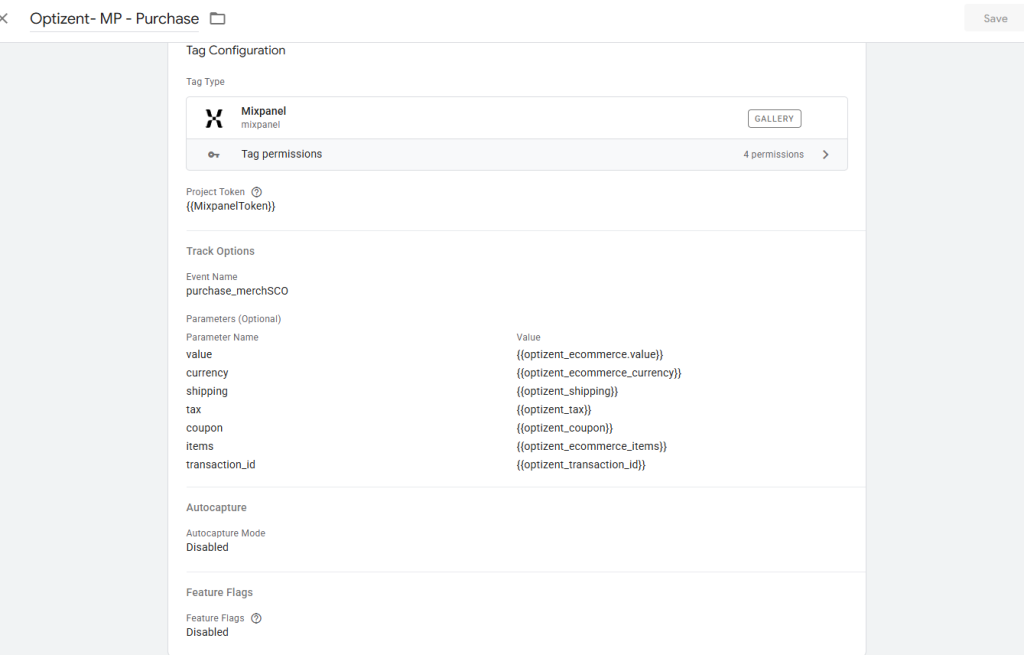
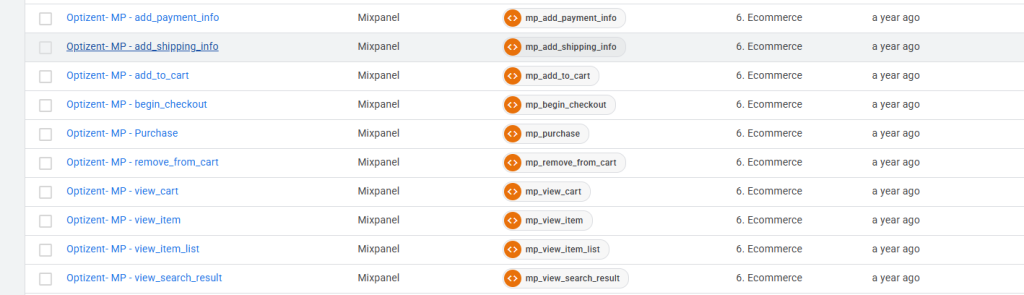
Install the Mixpanel GTM Template.
Create a Mixpanel Init Tag.
Trigger:
Initialization – All Pages
Then create Track tags for:
Product Viewed
Collection Viewed
Add To Cart
Remove From Cart
Cart Viewed
Checkout Started
Purchase Completed
Map the ecommerce properties from the dataLayer into Mixpanel event properties.
This is where the real value comes from.
The event itself is important.
The properties are what make reporting powerful.
Step 13: Configure User Identification
A lot of Shopify implementations stop after event tracking.
That leaves a huge amount of value on the table.
Once a customer logs in or completes a purchase:
mixpanel.identify(customer_id)
Use:
customer_id
Not:
Customers change emails.
Customer IDs remain stable.
A stable identifier creates cleaner reporting and better customer journeys.
Step 14: Verify Everything
Before publishing:
Open GTM Preview Mode.
Visit your Shopify store.
Perform:
- Product View
- Add To Cart
- Cart View
- Checkout Start
- Purchase
Verify:
Shopify Pixel
Events are firing.
DataLayer
Events are pushed correctly.
GTM
Tags fire correctly.
Mixpanel
Events appear in Live View.
Never skip validation.
Fixing bad data later is significantly harder.
Recommended Reports
Once data starts flowing, I typically build three reports immediately.
Purchase Funnel
Product Viewed
↓
Add To Cart
↓
Checkout Started
↓
Purchase
Product Performance
Questions answered:
- Which products get views?
- Which products get purchases?
- Which products lose customers?
Repeat Purchase Analysis
Questions answered:
- How many customers return?
- How long until a second purchase?
- Which products drive repeat revenue?