
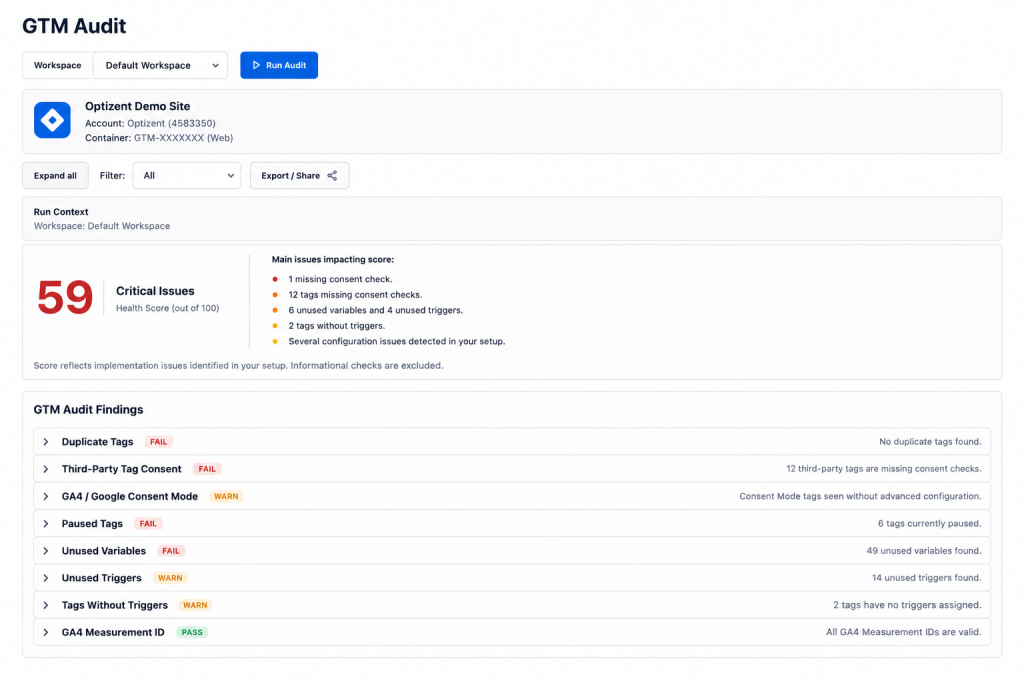
Google Tag Manager was designed to make tracking deployment faster, more accessible, and less dependent on developer resources. It delivered on all three promises — and in doing so, created one of the most reliably messy layers in the analytics stack.
When anyone on the team can deploy a tag without touching code, the container becomes a shared artifact that accumulates the history of every marketing initiative, every agency engagement, every developer sprint, and every “quick test” anyone has ever run. Nobody deletes anything because nobody’s sure what’s safe to delete. Tags get paused instead of removed. Variables get created and orphaned. Triggers get scoped too broadly because “it works and we don’t want to break it.”
Over time, a GTM container that started clean becomes a container that nobody fully understands — and in the gap between “we think this is what it does” and “this is what it actually does” live some of the most common and most damaging data quality issues in GA4 reporting.
The GTM Audit exists to close that gap.
Why GTM Issues Affect Every Other Part of Your Analytics
Before getting into the specific checks, it’s worth being clear about why GTM problems are so upstream in their impact.
GTM is the deployment layer for GA4. Everything GA4 measures about your website — page views, events, conversions, ecommerce transactions — passes through GTM tags and triggers before it lands in GA4 as data. A problem in GTM doesn’t stay in GTM. It shows up as distorted data in GA4, which shows up as wrong numbers in your reports, which shows up as bad decisions built on numbers that were never accurate.
This is why GTM hygiene isn’t a technical nicety — it’s a prerequisite for data you can actually trust.
Duplicate GA4 Tags: The Most Expensive GTM Problem
If there’s one issue that shows up most consistently across GTM audits, it’s duplicate GA4 configuration tags — and it’s also the one with the most direct, measurable impact on reporting accuracy.
Here’s how it typically happens:
A site migration, a platform switch, or a redesign project introduces a new GA4 configuration tag into the container. The developer or analyst doing the implementation adds the new tag correctly, tests it, confirms it’s working — and then forgets that the old configuration tag is still there. Maybe it got paused, maybe it didn’t. Either way, both tags eventually end up firing.
The result: every page view generates two hits in GA4. Every event fires twice. Every session, every conversion, every engagement interaction gets double-counted.
In absolute terms, this looks like growth. Sessions are up. Conversions are up. Everything is trending in a positive direction. But engagement rate looks artificially low, because the denominator (sessions) has doubled while genuine engagement signals haven’t. Conversion rate looks artificially compressed. Cost-per-session metrics look better than they are.
Nobody notices — because the numbers are going up, and numbers going up don’t trigger the same “something might be wrong” instinct that a drop would.
The audit surfaces all GA4 configuration tags in the container simultaneously, checks which are active, and flags any situation where more than one tag is firing. Then it verifies this directly in real-time GA4 reporting, so there’s no ambiguity about whether duplication is actually affecting the data.
Paused Tags and Triggers: The Hidden Risk
A paused tag isn’t actively causing harm today. But it represents a specific kind of organizational risk that deserves attention.
Every paused tag in a GTM container is an artifact of a decision someone made — and then left incomplete. The tag was paused for a reason (a campaign ended, a vendor changed, something broke) but never actually removed. The intention was “we’ll clean this up later,” and later never came.
The risk isn’t the paused tag itself. The risk is what happens when someone who doesn’t know the container’s history encounters it. They see a paused tag with a descriptive name and think: “This looks like it was part of our previous setup — maybe it should be active again.” They reactivate it without understanding why it was paused. The data quality issue that caused it to be paused in the first place silently resumes.
The audit doesn’t just flag paused tags as clutter — it surfaces them as items requiring a deliberate decision: document why they’re paused and leave them, or remove them entirely. The goal is a container where every element’s status is intentional, not inherited from a decision nobody remembers making.
Unused Variables: The Overhead That Compounds
Variables in GTM are defined to be used by tags and triggers. When a tag or trigger gets removed — or when a variable gets created speculatively and never actually used — the variable stays in the container as an orphaned element.
Individually, unused variables are low-risk. Collectively, they create a container where understanding what’s actually happening requires reading through elements that aren’t doing anything, increasing the cognitive load of every future edit and increasing the odds that someone makes a mistake because they misread which variable is which.
The practical consequence: the more orphaned variables exist in a container, the more time every future implementer spends on orientation rather than work, and the more likely any change is to introduce a new issue because the container’s real structure is obscured by its historical artifacts.
Missing Consent Controls: The Compliance and Data Gap
Consent Mode implementation in GTM is one of the most commonly incomplete aspects of tag management — not because it’s technically difficult, but because it requires multiple components working together, and any gap in the chain produces a silent failure.
The typical scenario: a Consent Management Platform (CMP) gets added to the site, a consent banner appears for users, and the team marks consent mode as “implemented.” But the GTM container still has tags that fire regardless of what the user selected in the banner, because nobody wired the existing tags to actually read and respect the consent state the CMP is collecting.
Visually compliant. Functionally not.
The GA Auditor GTM audit checks consent controls specifically:
Are default consent states set before any tags fire? The consent initialization needs to happen at the earliest point in the page load — before GA4, before any advertising tags — so every tag knows the user’s consent posture from the very first request.
Are tags actually gated on consent state? Each tag should check the relevant consent category (analytics_storage, ad_storage, etc.) before firing. Tags added after the initial consent implementation are frequently missed.
Is Consent Mode v2 implemented, not just v1? The distinction matters for Google’s measurement and modeling features, and many implementations haven’t been updated since Google’s requirements changed.
The consequences of getting this wrong run in two directions: compliance exposure from firing tags for users who rejected consent, and potential data quality impact from incorrect consent state signaling affecting GA4’s modeling behavior.
Broad Trigger Detection: The Precision Problem
A trigger scoped to “All Pages” fires on every page load, regardless of context. For a GA4 configuration tag, that’s correct behavior — the configuration should fire everywhere. For a conversion tag that should only fire on a purchase confirmation page, “All Pages” is a catastrophic misconfiguration that records a conversion on every single page view.
The GTM audit flags triggers whose scope is broader than necessary given the tag they’re attached to. This catches not just the obviously wrong cases (conversion tags firing site-wide) but also the subtler ones: an event tag scoped to “All Pages” when it should only fire on specific page types, a remarketing tag firing before any user context exists, or a scroll-depth trigger with conditions so broad it fires on nearly every page load.
Overly broad triggers generate noise in your data — events firing in contexts they shouldn’t — and in some cases, actively distort reporting by counting user behaviors that weren’t intended to be counted.
What a Clean GTM Container Actually Looks Like
After a thorough GTM audit and cleanup, a few things are true about the container:
Every active tag has a clear, documented purpose. Every trigger is scoped as precisely as possible for its tag’s intent. Every variable is referenced by at least one active tag or trigger. Every paused element either has documented justification or has been removed. Consent controls gate every tag that requires consent before firing.
This isn’t a fantasy state — it’s achievable with a structured review and a deliberate cleanup pass. It’s also not a permanent state; containers drift back toward complexity as new work gets added. Which is exactly why the GTM Audit isn’t a one-time exercise — it’s a recurring check, ideally quarterly, that catches drift before it compounds into the kind of container nobody wants to touch anymore.
Is your GTM container working for you or against you?
GA Auditor’s GTM Audit identifies duplicate tags, consent gaps, broad triggers, and container hygiene issues — and gives you a scored, prioritized fix list rather than a generic list of concerns.
Start your free audit at gaauditor.com