
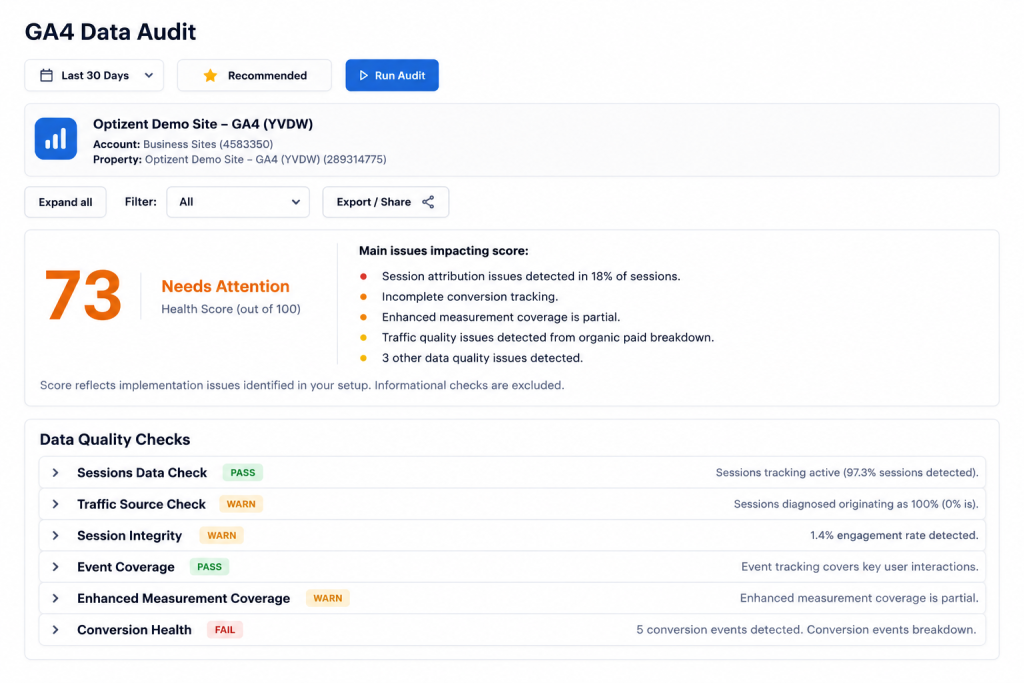
There’s a common misconception in analytics: if the setup looks right, the data must be right.
It’s understandable. If you’ve verified that GA4 is installed, events are configured, and the dashboard is populating — it feels reasonable to assume the numbers are accurate. But setup and accuracy are two completely different things.
A GA4 property can be configured correctly at the settings level while simultaneously producing measurement data that’s meaningfully wrong. This happens constantly, in ways that don’t announce themselves in any standard report.
The GA4 Data Quality Audit is specifically designed to catch this category of problem — not configuration issues, but actual data quality failures in what’s being collected.
The Difference Between Configuration and Data Quality
Think of it this way: the GA4 Configuration Audit checks whether the building is designed correctly. The Data Quality Audit checks whether anything is actually wrong with the building after people started using it.
A correctly configured attribution model doesn’t prevent UTM parameters from being dropped on campaign URLs. A correctly set up ecommerce tracking configuration doesn’t prevent a checkout redesign from silently breaking the purchase event. A correctly defined key event doesn’t prevent that event from firing inconsistently across different device types.
Configuration is about intent. Data quality is about reality. The gap between the two is where most reporting inaccuracies live.
Unassigned Traffic Source Analysis
If there’s one metric that most reliably signals data quality problems, it’s the percentage of traffic landing in GA4’s “Unassigned” channel grouping.
Unassigned traffic is GA4’s way of saying: “I received a session from this user but couldn’t determine where they came from.” It’s not neutral — it’s a direct signal that something in the attribution chain broke down.
The problem is that Unassigned traffic doesn’t just disappear from your reports. It has to go somewhere. Depending on how it’s handled downstream, it often gets absorbed into Direct traffic — inflating what looks like organic or direct performance at the expense of correctly attributing the channels that actually drove those sessions.
What causes it:
- Email campaigns launched without UTM parameters, so clicks from those emails land as unattributed sessions
- In-app browser traffic from social platforms that strips referrer information
- Server-side redirects that drop query parameters — including UTM parameters — along the way
- Cross-domain journeys where linker parameters weren’t configured, breaking the session handoff between domains
- Missing referral exclusions that cause legitimate traffic to be split into new, unattributed sessions mid-journey
The audit quantifies the percentage of sessions landing in Unassigned and cross-references landing pages and timing to identify the specific root cause — not just the presence of the problem, but where it’s coming from.
A property where 15–20% of traffic is unassigned isn’t just losing attribution data. It’s making budget allocation decisions based on a distorted channel mix, every single day, while those decisions look like real signal.
Revenue Tracking Validation
For any business with ecommerce, revenue tracking accuracy is the most direct line between data quality and real financial consequences.
GA4 purchase tracking is technically complex — it requires the right events to fire on the right pages, with the right parameters, in the right sequence. Every point in that chain is a potential failure. And unlike a configuration issue, a revenue tracking failure often doesn’t produce an obviously wrong number — it produces a subtly wrong number that can take months to identify.
What the audit checks:
Purchase event consistency. The event should fire on every successful purchase completion, not on every page load of the confirmation page (which can happen if the trigger isn’t properly scoped), and not on some purchases but not others (which happens when tracking breaks on specific device types or payment methods).
Revenue value accuracy. The value parameter on the purchase event should match the actual transaction total — including tax and shipping, or excluding them, consistently and in line with how the business reports revenue. Inconsistencies here mean GA4’s revenue figures don’t match what’s in the payment processor, which creates a trust problem that can undermine confidence in all analytics data.
Duplicate transaction IDs. If a user refreshes the order confirmation page, or the event fires multiple times due to a trigger issue, GA4 may record multiple purchase events for the same transaction. The audit checks for duplicate transaction IDs that indicate this is happening — an issue that inflates both revenue and conversion counts without any visible error.
Cross-device and cross-browser consistency. It’s common for purchase tracking to work correctly on desktop but fail silently on mobile, or in specific browsers, due to timing issues, DOM differences, or third-party cookie restrictions. The audit looks for patterns suggesting device- or browser-specific tracking failures.
Session Attribution Checks
Attribution at the session level is where strategic budget decisions get made — and where the most consequential data quality issues tend to accumulate silently.
Direct traffic inflation. “Direct” in GA4 should represent users who typed your URL, used a bookmark, or arrived from a source that genuinely provided no referrer information. In practice, it’s one of the most reliable signals of attribution breakdown. Any time attribution fails — a UTM that got stripped, a cross-domain handoff that broke, a session that timed out and restarted — the resulting session often lands in Direct.
A sudden spike in Direct traffic is almost never organic. It’s almost always a tracking issue that introduced on a specific date and can be correlated with a deployment, a campaign launch, or a platform change. The audit surfaces these spikes and traces them to their likely source.
Referral exclusion gaps. If your checkout is on a subdomain, or if you use a third-party payment processor that redirects users back to your confirmation page, you need referral exclusions configured to prevent those domains from appearing as referral traffic sources. Missing referral exclusions cause legitimate sessions to be artificially split, with the second half of the journey attributed to the referral source (your own subdomain or payment processor) rather than the actual acquisition channel.
Source/medium inconsistencies. The audit looks for inconsistencies between session-level and user-level attribution that can indicate cross-device tracking gaps, cross-domain issues, or specific UTM failures.
Event Collection Quality Review
Events are the raw material of everything in GA4 — and like any raw material, their value depends entirely on their consistency and completeness.
Firing consistency. An event that fires on 95% of the relevant occurrences but silently misses 5% — due to timing issues, trigger conditions that don’t match on all page templates, or intermittent JavaScript errors — produces data that looks accurate at the aggregate level while subtly understating whatever it’s measuring.
Parameter completeness. Custom events typically require specific parameters to be useful. A generate_lead event without a lead_type parameter can tell you that leads happened but not which type. A view_item event without item_id can tell you that product views occurred but not which products. The audit checks parameter completeness rates for key events — because an event that fires correctly but sends incomplete data is still data you can’t fully rely on.
Data type consistency. GA4 expects specific data types for standard parameters. A revenue value passed as a string instead of a number, for example, can cause GA4 to silently drop or mishandle that parameter. These data type inconsistencies tend to be invisible at the event level but show up as unexplained nulls or gaps in aggregate reports.
Null value rates. Parameters that are sometimes populated and sometimes null are a common sign of implementation inconsistency — a parameter being set in some page templates but not others, or under some conditions but not all. The audit identifies parameters with high null rates so they can be investigated and corrected.
Why Data Quality Issues Are Harder to Catch Than Configuration Issues
Configuration issues are relatively easy to identify with a systematic review — you check the settings, they’re either correct or they’re not.
Data quality issues are harder because they’re behavioral, not structural. They depend on what actually happens when real users navigate real pages — which can differ from what the implementation was designed to handle based on device types, browsers, traffic sources, and user paths that nobody specifically tested during implementation.
This is why a configuration audit and a data quality audit are complementary, not redundant. One checks whether the system was set up correctly. The other checks whether it’s actually behaving correctly once real traffic runs through it.
The practical implication: a GA4 property that passes a configuration review can still fail a data quality review — and often does, especially after site changes, platform migrations, or campaign launches that introduced new traffic patterns the original implementation wasn’t built to handle.
Want to know what’s actually in your GA4 data — not just what should be there?
GA Auditor’s Data Quality Audit surfaces the specific issues affecting your reporting accuracy, with prioritized findings and clear remediation guidance.
Run your free audit at gaauditor.com