
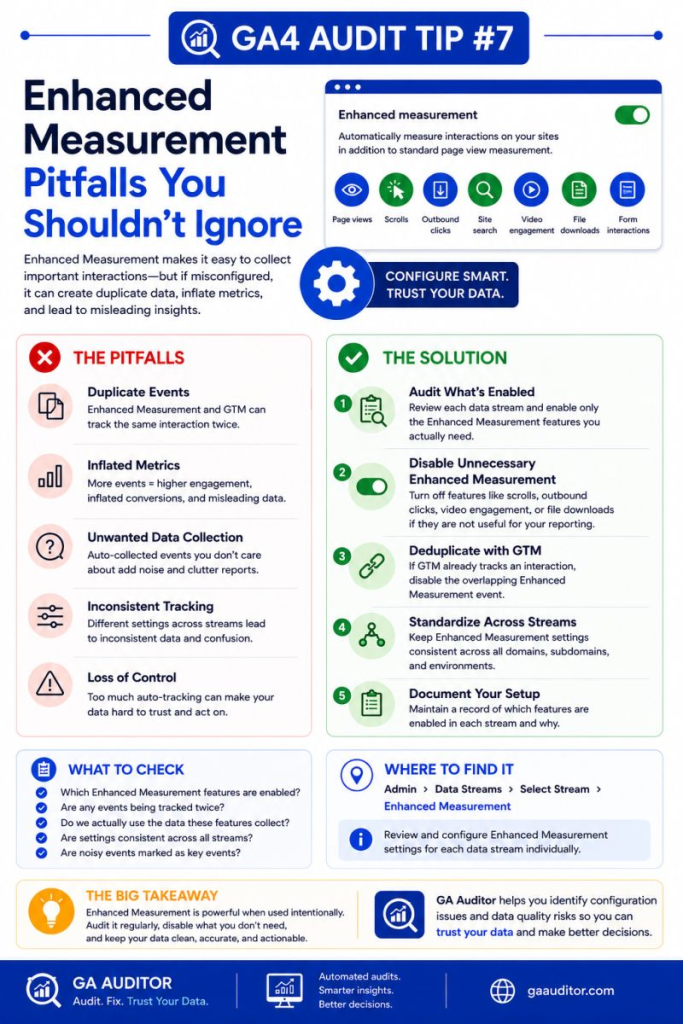
When Google launched GA4, Enhanced Measurement was one of its biggest selling points.
Turn it on, and GA4 automatically starts tracking interactions such as page views, scrolls, outbound clicks, file downloads, site searches, video engagement, and form interactions.
It sounds great.
And sometimes it is.
But during GA4 audits, I often find businesses that enabled Enhanced Measurement on day one and never looked at it again. Years later, nobody knows which features are active, whether they’re working correctly, or whether they’re creating noise in reports.
The assumption becomes:
“Google tracks it automatically, so it must be right.”
Unfortunately, that’s not always true.
Enhanced Measurement can save time and provide valuable insights. It can also introduce duplicate events, misleading metrics, and reporting confusion if it’s left unchecked.
That’s why it’s worth reviewing as part of every GA4 audit.
How GA Auditor Helps
Enhanced Measurement issues rarely trigger alarms.
Reports continue to populate.
Events keep appearing.
Dashboards still look healthy.
The problem is that teams often don’t realize they’re working with incomplete, duplicated, or low-value data until they start investigating unusual trends.
GA Auditor reviews Enhanced Measurement settings as part of its 150+ point GA4 audit checklist. Instead of assuming the default settings are appropriate, the audit evaluates whether the automatically collected events align with the way your website actually functions.
The goal isn’t to collect more events.
The goal is to collect events you can confidently use.
What Is Enhanced Measurement?
Enhanced Measurement is a set of events that GA4 can track automatically without requiring additional tagging.
Depending on your configuration, GA4 can collect:
- Page views
- Scrolls
- Outbound clicks
- Site search
- File downloads
- Video engagement
- Form interactions
For many businesses, these events provide a useful starting point.
The challenge is that “automatic” doesn’t always mean “accurate.”
Why This Matters
Enhanced Measurement events often make their way into dashboards, reports, and conversations with stakeholders.
If those events aren’t configured appropriately, they can create misleading interpretations of user behavior.
For example:
A team notices that scroll events have increased dramatically.
Did user engagement improve?
Maybe.
Or perhaps the website template changed and triggered more scroll events than before.
Another business reports a spike in form interactions.
Did lead generation improve?
Possibly.
Or perhaps form tracking is firing alongside a custom implementation, creating duplicates.
Without validation, it’s difficult to know.
Common Enhanced Measurement Issues Found During Audits
Duplicate Tracking
This is probably the issue I encounter most often.
A business implements custom GTM tracking for:
- File downloads
- Outbound clicks
- Form submissions
Meanwhile, Enhanced Measurement is collecting similar interactions automatically.
The result?
Duplicate events.
The reports look impressive.
The underlying numbers aren’t accurate.
Scroll Events Being Misinterpreted
GA4’s default scroll event fires when a visitor reaches approximately 90% of the page.
Many teams assume it represents meaningful engagement.
In reality, it simply indicates someone reached the bottom of the page.
It doesn’t tell you:
- Whether the content was read
- Whether it was valuable
- Whether it influenced conversion
It’s a behavioral signal, not a business outcome.
Site Search Isn’t Configured Properly
GA4 attempts to detect internal search activity automatically.
However, if the site’s query parameters differ from Google’s expectations, search activity may be missed entirely.
Businesses then assume:
“Nobody uses site search.”
When in fact, the data was never collected correctly.
Video Tracking Doesn’t Reflect Reality
Enhanced Measurement can track embedded YouTube videos.
But not every website uses YouTube.
Organizations using:
- Vimeo
- Wistia
- Custom video players
often assume video engagement is being measured when it isn’t.
Form Interactions Create Confusion
Form interaction tracking can vary depending on how forms are implemented.
In some cases, businesses believe they are tracking completed submissions when they are only measuring user interactions with the form itself.
Those are very different outcomes.
How to Audit Enhanced Measurement in GA4
Navigate to:
Admin → Data Streams → Select Your Web Stream
Review the Enhanced Measurement settings.
Ask yourself:
- Which features are enabled?
- Are they still useful?
- Are they duplicating custom tracking?
- Are stakeholders relying on these events?
- Do they accurately reflect user behavior?
Then validate the events using real user journeys.
What to Review
Page Views
Verify that page views are firing correctly and not duplicating custom implementations.
Scroll Tracking
Determine whether scroll events support meaningful analysis or simply add noise.
Outbound Clicks
Validate that important external links are being captured correctly.
Site Search
Test searches on your website and confirm they appear in GA4.
File Downloads
Download tracked files and verify event collection.
Video Engagement
Review which video platforms your website uses and confirm tracking compatibility.
Form Interactions
Understand exactly what the events represent before reporting them as performance indicators.
Questions Worth Asking
When reviewing Enhanced Measurement, I often ask:
- Would anyone notice if this event disappeared tomorrow?
- Does this event answer a meaningful business question?
- Is someone using this data to make decisions?
- Is custom tracking already collecting the same interaction?
- Are stakeholders interpreting the event correctly?
Those conversations usually reveal whether an event is valuable or simply “nice to have.”
Best Practices
A few habits can help keep Enhanced Measurement useful.
- Review settings at least twice a year.
- Disable features that duplicate custom tracking.
- Validate automatically collected events after website updates.
- Educate stakeholders about what the events actually represent.
- Separate engagement metrics from business outcomes.
- Document your tracking decisions.
Default settings should be reviewed.
Not blindly accepted.
Enhanced Measurement Audit Checklist
Use this checklist during your next review:
□ Review all Enhanced Measurement settings.
□ Identify duplicate tracking implementations.
□ Validate site search tracking.
□ Test file download events.
□ Verify outbound click tracking.
□ Review video engagement tracking.
□ Understand what form interactions represent.
□ Document enabled features and their purpose.
□ Reassess settings after major website changes.
Wrapping Up
Enhanced Measurement is one of the reasons GA4 is easier to implement than previous versions of Google Analytics.
For many organizations, it provides immediate value.
But convenience shouldn’t replace validation.
Automatic tracking can save time, but it still deserves scrutiny.
Before using these events to evaluate engagement or influence decisions, make sure you understand what they’re measuring, how they’re being collected, and whether they align with your reporting needs.
Because in analytics, “automatically collected” shouldn’t automatically mean “trusted.”