
Part of the GA Auditor 150
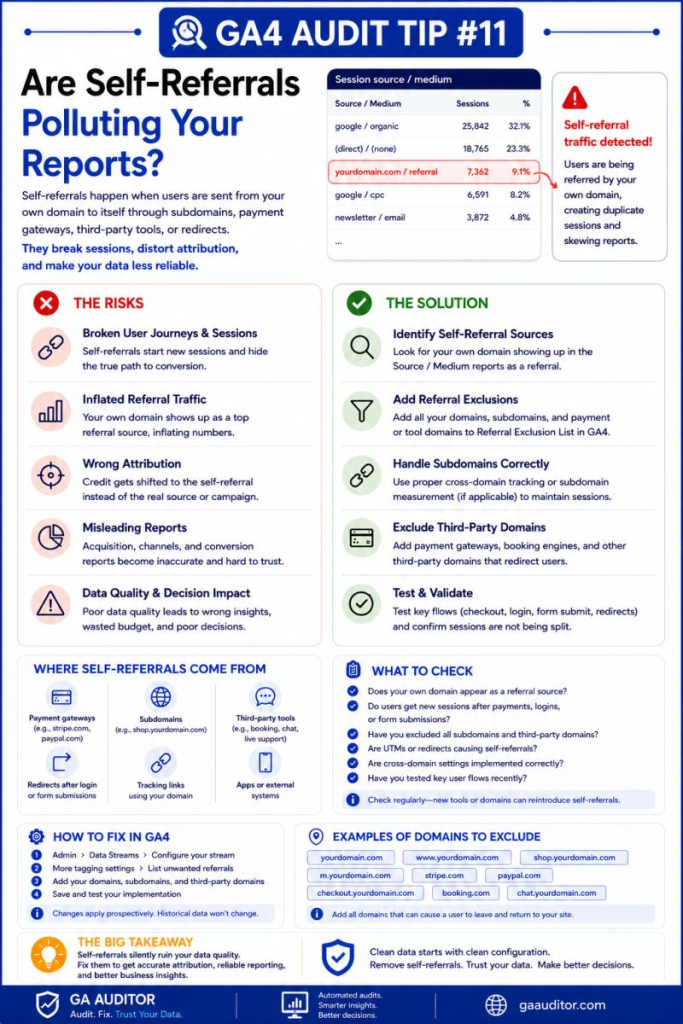
A few years ago, I was auditing a GA4 property for an ecommerce business that couldn’t understand why their acquisition reports looked strange.
Google Ads was driving traffic.
Email campaigns were generating sales.
Organic search seemed to be performing well.
Yet one of the company’s top traffic sources was…their own website.
Their domain was appearing in the referral reports.
At first, they assumed it was normal.
It wasn’t.
Self-referrals are one of those GA4 issues that don’t attract much attention until someone notices them in a report and asks:
“Why is our own website sending us traffic?”
The answer is usually a configuration problem.
And while it may seem harmless, self-referrals can distort attribution, fragment sessions, and make it much harder to understand how people actually find and convert on your website.
How GA Auditor Helps
Self-referrals rarely trigger obvious warning signs.
Traffic still appears.
Conversions still happen.
Revenue continues to show up in reports.
The problem is that the customer journey starts telling the wrong story.
Marketing channels lose credit.
Referral reports become inflated.
Attribution becomes less trustworthy.
GA Auditor reviews self-referrals as part of its 150+ point GA4 audit checklist, helping businesses identify whether sessions are breaking unexpectedly and whether attribution reflects reality.
The goal isn’t simply to eliminate unusual traffic sources.
It’s to ensure your reports accurately represent how customers move through your digital experience.
What Are Self-Referrals?
A self-referral occurs when your own website appears as a referral source in GA4.
In other words, GA4 treats a visitor moving through your own ecosystem as though they arrived from a completely new website.
For example:
A user may:
- Arrive from Google.
- Browse products.
- Navigate through the website.
- Complete a purchase.
But instead of Google receiving credit, the conversion ends up attributed to:
yourdomain.com / referral
That usually means something interrupted the original session.
Why Self-Referrals Matter
Attribution helps businesses answer important questions:
- Which channels generate customers?
- Which campaigns drive conversions?
- Where should marketing budgets be invested?
Self-referrals make those answers less reliable.
They can affect:
- Traffic acquisition reports
- Conversion attribution
- Session continuity
- Funnel analysis
- Channel performance reporting
- Marketing ROI calculations
- Stakeholder confidence in the data
The numbers themselves may not look wrong.
The story behind them often is.
Common Causes of Self-Referrals
Self-referrals don’t happen randomly.
They usually point to an underlying implementation issue.
Cross-Domain Tracking Isn’t Configured Correctly
Businesses often operate across:
- Multiple domains
- Checkout environments
- Customer portals
- Booking systems
If cross-domain tracking isn’t implemented properly, GA4 may treat users as new visitors when they move between domains.
Third-Party Tools Interrupt Sessions
External systems such as:
- Booking platforms
- Membership systems
- Scheduling tools
can break the original session if referral settings aren’t reviewed.
Payment Flows Create Attribution Issues
Some checkout experiences redirect users between multiple domains before returning them to the website.
Without proper configuration, those transitions can generate self-referrals.
Tracking Code Isn’t Consistent
In some cases, different parts of the website use:
- Different GA4 Measurement IDs
- Inconsistent GTM implementations
- Outdated configurations
This can interfere with session continuity.
Website Changes Were Never Reviewed
Businesses evolve.
New tools are introduced.
Checkout experiences change.
Microsites launch.
Tracking configurations often remain untouched.
How to Identify Self-Referrals in GA4
Navigate to:
Reports → Acquisition → Traffic Acquisition
Review:
- Session source
- Session medium
Look for entries similar to:
yourdomain.com / referral
or referrals from domains you own.
If they appear regularly, they deserve investigation.
Questions Worth Asking During an Audit
When I encounter self-referrals, I usually ask:
- Has the website changed recently?
- Are multiple domains involved?
- Does checkout occur elsewhere?
- Are external booking tools used?
- Have new plugins been installed?
- Has tracking been migrated recently?
The answers often reveal the source of the problem.
Where to Check
Several areas of GA4 deserve attention.
List Unwanted Referrals
Navigate to:
Admin → Data Streams → Configure Tag Settings → List Unwanted Referrals
Review whether third-party domains that support the customer journey have been considered appropriately.
Configure Your Domains
Navigate to:
Admin → Data Streams → Configure Tag Settings → Configure Your Domains
Verify that all domains involved in the customer journey are included.
Google Tag Manager
Review whether GA4 tags fire consistently across the website.
DebugView
Validate how sessions behave as users move through the journey.
How to Validate the Customer Journey
One of the simplest approaches is to behave like a customer.
Start from a known acquisition source.
For example:
- Click a campaign link.
- Browse the website.
- Move through checkout.
- Complete a conversion.
Then review the resulting reports.
Ask:
Did the original source retain credit?
If not, further investigation may be necessary.
Best Practices
To reduce the risk of self-referrals:
- Review acquisition reports regularly.
- Monitor for owned domains appearing as referrals.
- Validate cross-domain configurations.
- Test checkout journeys.
- Review referral settings after website updates.
- Document changes to the customer journey.
- Include self-referral reviews in recurring audits.
Small configuration issues can have a surprisingly large impact on attribution quality.
Self-Referral Audit Checklist
Use this checklist during your next review:
□ Review Traffic Acquisition reports.
□ Look for owned domains appearing as referrals.
□ Validate cross-domain tracking.
□ Review the List Unwanted Referrals settings.
□ Test real customer journeys.
□ Review GTM implementations.
□ Investigate recent website changes.
□ Document findings and resolutions.
□ Include self-referrals in ongoing audits.
Wrapping Up
Self-referrals are easy to overlook because they don’t stop data collection.
Traffic continues.
Conversions still happen.
Revenue remains visible.
The issue is that your reports begin telling a story that isn’t entirely true.
Marketing channels lose the recognition they deserve.
Customer journeys become fragmented.
Stakeholders start questioning why acquisition reports don’t align with expectations.
Fortunately, self-referrals are usually fixable once they’re identified.
And sometimes, a quick review of your reports is all it takes to uncover an issue that has been quietly influencing your data for months.
Because when it comes to attribution, understanding where customers actually come from matters far more than simply recording that they arrived.