
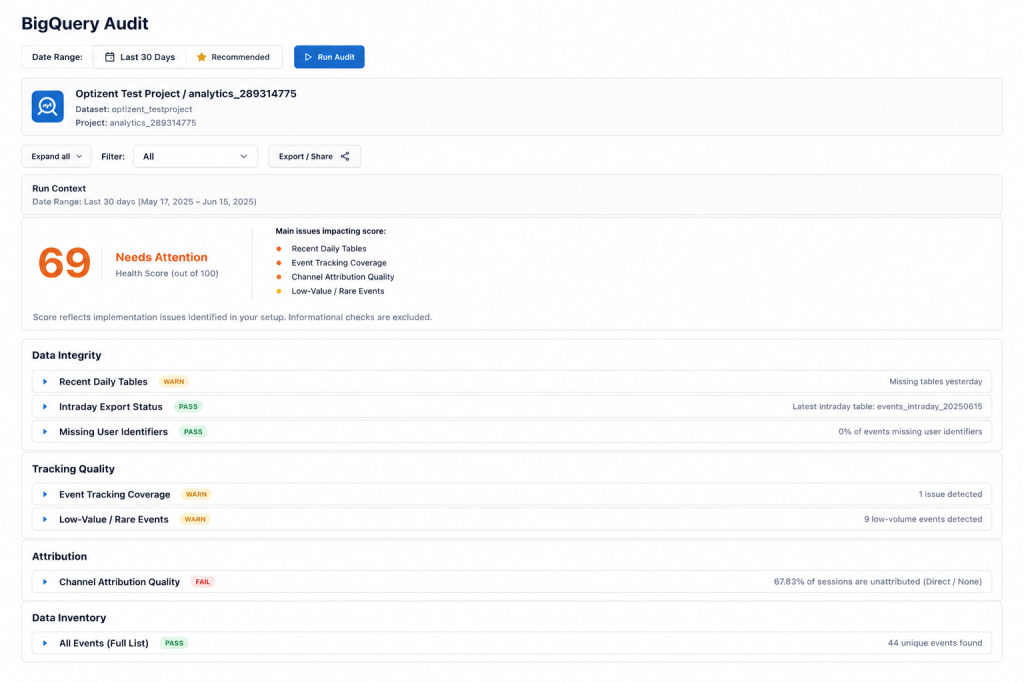
There’s a specific kind of confidence that comes from working with BigQuery. Raw data, SQL queries, custom models — it feels more rigorous than clicking around a GA4 dashboard. More technical. More trustworthy.
That confidence is warranted, with one important caveat: BigQuery is only as reliable as the pipeline feeding it. And the GA4-to-BigQuery export is, in practice, one of the most commonly broken and least frequently audited parts of the entire analytics stack.
Teams spend weeks validating model logic, debugging SQL, and stress-testing assumptions — while never once verifying that the export their model runs on is actually complete. Date gaps sit silently in datasets. Schema changes go undetected. Property-to-project linkages drift. Nobody notices because BigQuery doesn’t throw an error when data is missing — it just returns results that are quietly wrong.
The BigQuery Audit exists to catch this before it corrupts every analysis built on top of it.
Why BigQuery Pipeline Failures Are Uniquely Dangerous
Most GA4 data quality issues are visible to some degree — a strange number in a dashboard, a metric that doesn’t trend the way it should, a discrepancy someone notices in a report review. They’re imperfect signals, but they’re signals.
BigQuery pipeline failures are different. They fail silently, and their effects are downstream and diffuse. If your GA4 dashboard shows an anomaly, someone on the marketing team might notice. If your BigQuery export has a three-day gap in June, the data analysts building on top of it have no reason to know it’s there — and every query, every model, every dashboard that references that date range inherits the gap without any indication something’s wrong.
This is compounded by organizational structure. In most companies, the team managing GTM and GA4 implementation (marketing, analytics) and the team consuming BigQuery data (data engineering, business intelligence) operate largely independently. A tracking change on the marketing side can break upstream data quality in ways the BigQuery team can’t see. A BigQuery export issue can cascade into models the marketing team doesn’t know exist.
The audit creates visibility across this gap — treating the full pipeline as a single thing to be validated, not two separate systems that each assume the other is working.
Export Validation Checks
The most foundational check: is the export actually working?
Export frequency confirmation. GA4 offers daily batch export and (for GA4 360) streaming export. Confirm which is configured, whether it matches what downstream use cases require, and whether it’s been running continuously. A model built expecting near-real-time data on top of a daily batch export will exhibit unexpected behavior — not because the model is wrong, but because the data it’s built on doesn’t match the timing assumption.
Property-to-project linkage verification. This sounds obvious, but it’s more commonly wrong than it should be. GA4 properties get migrated. BigQuery projects get restructured. Sandbox environments get confused with production ones. The audit explicitly confirms the correct GA4 property is exporting to the correct BigQuery project — not just that an export is configured, but that it’s configured to the right destination.
Service account and permission health. BigQuery exports depend on a service account with specific permissions in both GA4 and BigQuery. If those permissions change — due to IAM policy updates, project restructuring, or team offboarding — the export can silently stop without any error in the GA4 interface. The audit checks permission health directly, not just whether the export was configured at some point in the past.
Export interruption detection. Combining the above: a verification that the export hasn’t experienced undetected interruptions — periods where it was configured but not actually running — that would create gaps in the dataset without anyone having noticed.
Missing Data Detection
This is the single highest-value check the BigQuery Audit performs, and the most commonly skipped in informal reviews.
A simple query — how many distinct event dates exist in the dataset over the trailing 90 days — immediately surfaces any date gaps in the export. This check costs seconds to run and catches the most damaging and most common BigQuery pipeline failure mode.
But date gaps aren’t the only form of missing data worth catching.
Partial-day gaps. A day with data but with anomalously low row counts relative to typical daily volume is a partial export failure — more insidious than a complete date gap because it looks like data is present while actually being meaningfully incomplete. Without an explicit check for count anomalies, a partial failure day can be indistinguishable from a genuinely low-traffic day.
Intraday vs. daily export inconsistencies. For sites using streaming (intraday) export, data arrives in intraday tables that get consolidated into daily tables overnight. Depending on how queries are structured, this can produce apparent gaps in “today’s” data that are actually just timing artifacts — or genuine gaps if the streaming export failed. The audit distinguishes between these cases rather than treating all apparent gaps the same way.
Schema & Coverage Review
GA4’s BigQuery export schema isn’t static. Google updates it periodically — adding new fields, deprecating old ones, changing how certain data is structured. A model or query built against an older schema version can silently produce incomplete results when the schema underneath it changes, rather than erroring in a way that would make the breakage obvious.
Schema drift detection. The audit compares the current export schema against expected structure and flags any fields that are absent, renamed, or newly added. This catches schema changes before they produce unexplained nulls in downstream models.
Event parameter coverage analysis. Custom event parameters aren’t guaranteed to be present on every event of a given type — especially if a parameter was added to the tracking implementation partway through the data history, or if it’s only collected under specific conditions. The audit measures parameter coverage rates for key event types, flagging any parameter with high null rates that might indicate collection inconsistency rather than genuine absence.
Event type completeness. Confirms that the expected event types — based on what the GA4 implementation is configured to collect — are actually present in the BigQuery export at expected volumes. An event type that exists in GA4’s interface but is absent or sparse in BigQuery points toward an export-level issue or a collection gap.
Attribution Quality Validation
The BigQuery export doesn’t fix bad attribution data — it gives you more granular access to it. If attribution is broken in GA4, those same broken attribution signals appear in the raw BigQuery tables, and any custom attribution model built on top of them inherits the same distortions.
Traffic source field completeness. The proportion of events with null or “(not set)” values in traffic source fields (source, medium, campaign) directly reflects the same unassigned-traffic problem visible in GA4’s standard interface — but because BigQuery analysis often involves larger time windows and more complex joins, the compounding effect of source-field nulls is more severe than it appears from a single query.
Session-level vs. event-level attribution consistency. GA4’s BigQuery export includes both event-level and session-level attribution fields. These should be consistent with each other, but discrepancies can emerge from the same root causes as standard attribution quality issues — missing UTMs, broken cross-domain tracking, session-splitting artifacts. If you’re building a custom attribution model on the raw export, these discrepancies will silently distort its output.
UTM coverage across event types. Checks that UTM parameters are consistently attached to the events where they should appear — not just overall session attribution figures, but at the event level where custom attribution models typically need to access them.
Building Ongoing Pipeline Validation Into Your Workflow
The BigQuery Audit is most valuable not as a one-time check but as a recurring validation process — ideally automated, running continuously against fresh data.
A practical starting point: a daily validation query that checks row counts per date over a rolling window and flags any day falling more than a threshold percentage below the trailing average. This catches both complete date gaps and partial failures without requiring manual review.
Paired with periodic schema comparison — running a check against the current export schema whenever GA4 releases an update — and a regular review of traffic source field null rates, this creates an ongoing pipeline health monitoring system that makes data quality a continuously verified property of the dataset rather than an assumption everyone makes and nobody checks.
The Underlying Point
BigQuery feels like the “serious” layer of analytics — and it is, for the analysis that happens once data lands there. But that rigor only applies downstream of the export. The export itself is as vulnerable to silent failure as any other part of the GA4 ecosystem, and the consequences of those failures are amplified by the sophistication of the models built on top of it.
The teams that catch BigQuery pipeline issues early are the ones with a systematic validation process — not the ones who discover a gap when a model produces results that don’t make sense and someone finally asks whether the underlying data is actually complete.
Is your GA4 BigQuery export actually complete?
GA Auditor’s BigQuery Audit validates export configuration, scans for date gaps and schema issues, and checks attribution quality in the raw data — so every model you build starts from a foundation you can actually trust.
Start your free audit at gaauditor.com