
An audit is a photograph. It shows you exactly where things stand at a specific moment in time — with clarity, detail, and actionable findings.
But a photograph of your house doesn’t tell you whether the roof started leaking last Tuesday.
This is the fundamental limitation of audit-only analytics quality programs: implementations don’t stay the way you left them. Sites get updated. Tags get added. Campaigns launch without UTM parameters. Developers make changes that affect tracking without realizing it. And unless something is continuously watching, these changes introduce new problems that won’t be discovered until the next formal audit — which might be weeks or months away.
GA Auditor’s Insights & Monitoring module is the part of the platform that addresses this gap. Where audits catch issues that already exist, monitoring catches issues as they’re introduced — before they compound into expensive data quality problems that affect decisions made during the weeks nobody was watching.
The Gap Between Audits
To understand why continuous monitoring matters, consider how tracking failures actually happen in practice.
A developer deploys a new checkout flow on a Tuesday afternoon. The deployment looked clean — QA passed, the site is functioning correctly, everything looks good. What nobody checked was whether the GTM trigger for the purchase event still fires correctly on the new checkout structure.
It doesn’t. The DOM changed in a way that broke the event listener.
Without monitoring: this goes undetected until someone happens to notice that revenue in GA4 looks lower than expected. Maybe that’s next week. Maybe it’s the week after. By then, two or three reporting cycles have passed with broken conversion tracking. Any campaigns running during that period have been evaluated against incorrect performance data. Budget decisions may have been made on the assumption that conversion performance was worse than it actually was.
With monitoring: the following morning, a High Priority alert fires. Conversion rate dropped 73% overnight. The team investigates immediately, traces it to the checkout deployment, gets it fixed by end of day. The window of bad data is hours, not weeks.
This is the operational difference between audit-only and audit-plus-monitoring. It’s not incremental — it’s the difference between problems getting caught before they cost you anything and problems getting caught after they already have.
What GA Auditor Monitors
The monitoring layer tracks a set of metrics that are most sensitive to tracking failures and implementation changes — chosen because they’re the earliest indicators of something going wrong, not just lagging signs that something already went wrong.
Session volume and user counts. Significant day-over-day changes in session or user counts often indicate either a genuine traffic change (worth knowing about) or a tracking issue (a duplicate tag suddenly active, a GA4 property receiving data from a new source, a filtering change that changed what gets included). The monitoring distinguishes between patterns that look like real traffic changes and patterns that look like implementation changes.
Conversion rate. This is the most sensitive early indicator of a broken tracking event. A genuine conversion rate drop correlates with changes in traffic quality, offer performance, or site experience. A tracking-caused conversion rate drop happens suddenly, without a corresponding change in traffic quality — just a number that’s wrong. Monitoring flags both, and the pattern difference between them is usually visible in the accompanying context.
Revenue figures. For ecommerce, revenue is the bottom-line metric — and also one of the first to reflect a broken purchase event. A revenue trend that’s disconnected from order volume (as reported by the payment processor) is a direct signal of tracking failure.
Traffic source distribution. Sudden shifts in channel mix — Direct traffic spiking without an obvious cause, a channel disappearing from the mix, Unassigned traffic growing as a percentage of total — are reliable early signals of attribution failures. These changes happen for real business reasons sometimes, but more often they reflect UTM gaps, referral exclusion issues, or campaign tracking that broke.
404 error events. A spike in 404 pageviews indicates users encountering broken pages — which affects both user experience and the reliability of any analysis that looks at page-level data. This is the kind of issue that’s easy to miss in standard reporting but immediately visible in monitoring.
Engagement rate trends. A sustained drop in engagement rate that doesn’t correspond to a known change in traffic source mix or content strategy is often a signal of duplicate tag activity inflating session counts — which would make engagement rate look lower without any genuine change in user behavior.
The Severity System: How Monitoring Tells You What to Act On
A monitoring system that alerts on everything is useless — it trains teams to ignore alerts because most of them don’t require action. GA Auditor’s monitoring categorizes every insight by its likely significance and urgency.
Opportunity signals are positive changes that merit attention and potentially capitalization — a traffic surge from a specific channel, a purchase volume increase, an engagement improvement that suggests a content or product change is working. These aren’t problems, but they’re patterns worth understanding and acting on.
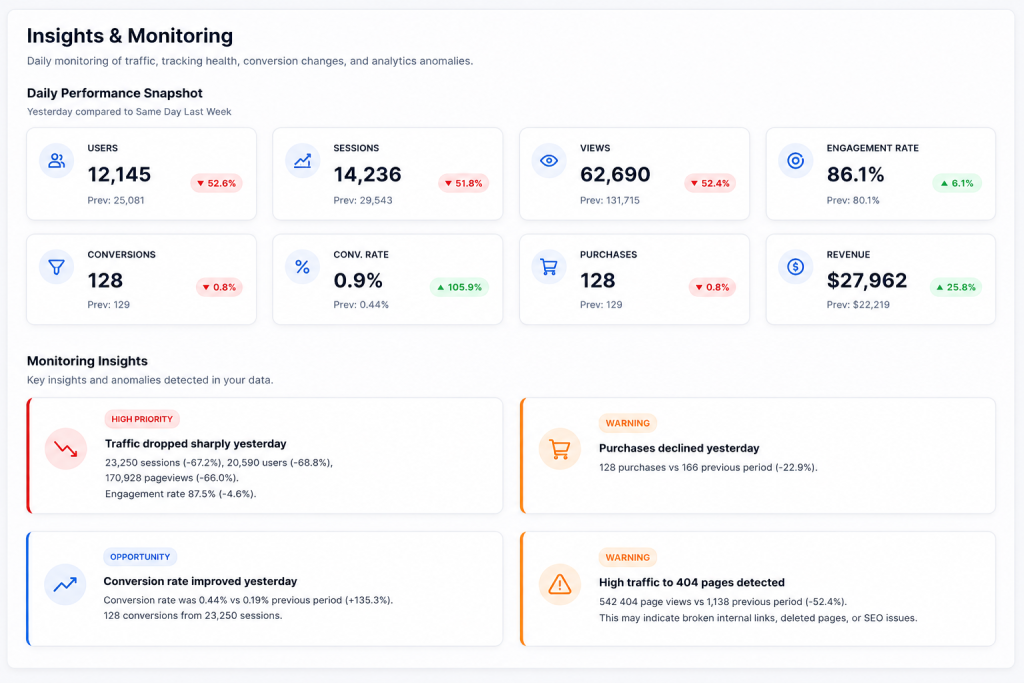
Example: 89,258 sessions in a single day — flagged as an Opportunity with breakdown showing users up 157.2% and pageviews up 288.5%.
High Priority signals are anomalies that require immediate investigation — patterns that are most likely the result of a tracking failure or a significant site problem rather than a real business change. These need to be looked at today, not at next week’s analytics review.
Example: Conversion rate dropped from 0.44% to 0.19% — flagged as High Priority. 166 conversions from 89,258 sessions. A session count that high combined with a conversion rate that low is an immediate signal that something changed in the tracking or the site.
Warning signals sit between the two — changes that warrant attention and may indicate a developing problem, but aren’t definitively anomalous yet. They’re worth investigating within the next day or two rather than immediately.
Example: 19,450 direct sessions vs 5,748 the prior period (+238.4%) — flagged as Warning. A 238% jump in Direct traffic often signals missing UTM tagging, a campaign launch without proper tracking, or an attribution issue introduced by a recent change.
This severity structure means the team knows exactly how to prioritize their time: High Priority items get addressed same-day, Warnings get reviewed within 48 hours, Opportunities get acted on when it makes strategic sense.
Real-World Examples of What Monitoring Catches
The value of monitoring becomes most concrete through the specific things it surfaces. Here are examples of actual insight types the monitoring layer produces:
Traffic increased sharply — A 200%+ session spike on a weekday that wasn’t preceded by a known campaign launch. Could be organic success, could be a bot traffic issue, could be a tracking change that’s now double-counting. Worth investigating immediately regardless.
Conversion rate dropped sharply — A sudden rate drop without a corresponding traffic quality change. First hypothesis: something broke in conversion tracking. Second hypothesis: something broke on the conversion page itself. Either way, an immediate investigation is warranted.
Direct traffic increased sharply — A Direct traffic spike without a campaign that would explain it. Most likely cause: a campaign that launched without UTM parameters, or a cross-domain tracking gap that was introduced by a recent site change.
404 traffic spiked — A significant increase in 404 page events indicates users are hitting broken links — either from external sources pointing to pages that moved or were deleted, or from internal navigation issues introduced by a site change.
Purchases increased significantly — A positive anomaly that’s still worth understanding. If a purchase spike wasn’t preceded by a campaign you’d expect to drive it, it’s worth investigating the source before assuming something is working particularly well.
The Compounding Value of Daily Monitoring
Individual alerts are valuable in isolation. But the real value of daily monitoring accumulates over time.
A team running daily monitoring builds a continuous, contextualized record of how their analytics implementation behaves — what normal looks like, what changes correlate with which types of anomalies, which types of site updates tend to break what. This institutional knowledge makes every future investigation faster, because the baseline is established and documented rather than having to be reconstructed from scratch each time something looks wrong.
It also changes the team’s relationship with their analytics data. Instead of periodic uncertainty (“I hope the tracking is still working”) punctuated by occasional crises (“the tracking was broken for how long?”), monitoring creates a steady state of confidence — not because the tracking is always perfect, but because problems get caught quickly enough that they never have time to become significant.
Monitoring Is Not a Replacement for Audits
It’s worth being clear about what monitoring doesn’t do. It doesn’t audit configuration settings. It doesn’t validate BigQuery schema integrity. It doesn’t review GTM container structure or check consent implementation.
Monitoring is a behavioral signal — it watches what the data is doing and flags anomalies. Audits are structural — they examine how the system is built and verify that the build is correct. Both are necessary, and they’re complementary rather than substitutes.
A correct audit baseline makes monitoring more effective, because you’re monitoring a system you’ve verified rather than one whose baseline state is unknown. And continuous monitoring makes audits more impactful, because issues introduced between audit cycles get caught immediately rather than accumulating until the next scheduled review.
Analytics implementations change constantly. Your monitoring should too.
GA Auditor’s Insights & Monitoring layer runs daily, automatically, across your GA4 property — surfacing the anomalies that matter while filtering the noise that doesn’t.
Start your free audit at gaauditor.com and activate monitoring alongside it.