
A few months ago, I was auditing a GA4 property for a lead generation company.
Everything looked great at first glance.
Conversion rates were increasing.
Google Ads campaigns were performing well.
Management was happy.
Then I started validating the actual conversion triggers.
Within ten minutes, I found the problem.
The lead form conversion was firing every time users refreshed the thank-you page.
A single lead could generate two, three, or even four conversions.
Nothing was technically broken.
GA4 was recording exactly what it was being told to record.
The problem was that everyone trusted the conversion numbers without validating how those numbers were generated.
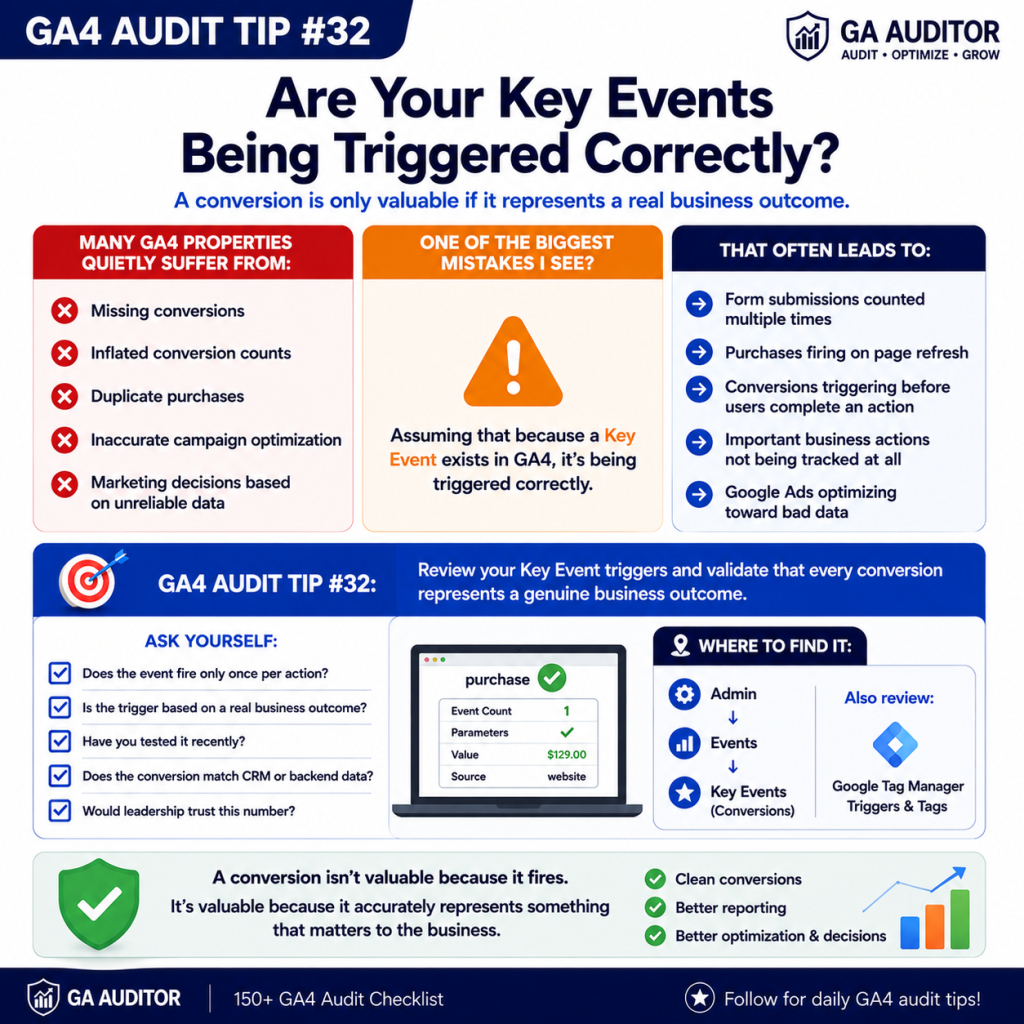
This is why auditing Key Event triggers is so important.
Because a conversion is only as reliable as the trigger behind it.
How GA Auditor Helps
Many organizations review whether conversions exist.
Far fewer review whether those conversions are accurate.
GA Auditor reviews Key Event implementation as part of its 150+ point GA4 audit checklist, helping organizations identify duplicate triggers, missing events, inflated conversions, and measurement issues before they impact reporting and advertising platforms.
The goal isn’t simply to track conversions.
It’s to trust them.
Why Key Event Validation Matters
Key Events influence some of the most important decisions in your organization.
They affect:
- Marketing performance reports
- Google Ads optimization
- Budget allocation
- Attribution analysis
- Executive dashboards
- Revenue forecasting
- Agency reporting
If a Key Event fires incorrectly, every report that depends on it becomes less reliable.
Bad conversion data creates bad decisions.
Common Issues Found During Audits
Duplicate Form Submissions
A form submission event fires correctly.
Then users refresh the confirmation page.
GA4 records another conversion.
And another.
The business celebrates higher conversion rates while lead volume remains unchanged.
Purchase Events Fire Multiple Times
This issue is especially common on ecommerce websites.
Page reloads, browser behavior, or implementation mistakes can create duplicate purchases.
Revenue reporting becomes inflated.
Events Trigger Too Early
Sometimes conversions fire before users complete the intended action.
Examples include:
- Clicking a submit button
- Starting checkout
- Beginning an application
The user never finishes the process.
GA4 still records a conversion.
Important Actions Aren’t Tracked
The opposite problem also occurs.
Businesses track pageviews, clicks, and engagement events but forget to measure actual outcomes.
Nobody Tests Conversions
The implementation works when it launches.
Months later:
- Forms change
- Websites are redesigned
- Plugins are updated
Nobody re-tests the conversions.
Problems go unnoticed.
How to Audit Key Event Triggers
Start by identifying your most important conversions.
Examples include:
- Lead submissions
- Purchases
- Demo requests
- Trial registrations
- Contact forms
- Appointment bookings
Then test each one manually.
Ask:
- Does the event fire?
- Does it fire only once?
- Does it include the correct parameters?
- Does it represent a real business outcome?
Never assume.
Always verify.
Where to Review Key Events
Navigate to:
Admin → Events → Key Events
Review:
- Active Key Events
- Recently created conversions
- Conversion naming conventions
Then review the implementation source.
For many businesses, that means:
Google Tag Manager → Tags → Triggers
This is often where duplicate logic becomes visible.
Questions Worth Asking During an Audit
I often ask stakeholders:
- When was this conversion last tested?
- How does it compare with CRM data?
- Who owns conversion governance?
- What happens if users refresh the page?
- What happens if users abandon the process?
- Would leadership trust these numbers?
These questions often uncover hidden issues quickly.
Signs Your Key Events Need Attention
A review is worthwhile if:
- Conversion rates suddenly increase.
- Google Ads performance seems unusually strong.
- CRM data doesn’t match GA4.
- Websites have been redesigned.
- Nobody remembers the last validation.
- Agencies or developers recently changed tracking.
None of these automatically indicate a problem.
But they deserve investigation.
Best Practices
A few habits dramatically improve conversion quality.
- Test conversions regularly.
- Compare GA4 against backend systems.
- Prevent duplicate firing.
- Document trigger logic.
- Review Key Events quarterly.
- Validate conversions after website updates.
- Include conversion QA in deployment processes.
The strongest analytics implementations prioritize accuracy over volume.
Key Event Trigger Audit Checklist
□ Review all Key Events.
□ Test every primary conversion.
□ Verify events fire only once.
□ Compare against CRM or backend systems.
□ Review GTM triggers.
□ Check for duplicate purchases.
□ Validate form submission tracking.
□ Document trigger logic.
□ Re-test after website updates.
□ Include conversion QA in recurring audits.
Wrapping Up
One of the fastest ways to lose confidence in analytics is to discover that your most important conversions aren’t accurate.
Unfortunately, that happens more often than most teams realize.
The problem isn’t usually GA4.
The problem is assuming that a conversion event is correct simply because it exists.
The best analytics teams don’t trust conversion numbers blindly.
They validate them.
Because a conversion should represent a real business outcome, not just a tag firing successfully.