
A few months ago, I was auditing a GA4 property for a B2B company when the marketing team proudly told me:
“We’ve excluded our employees from GA4.”
At first, that sounded like good news.
Internal traffic can distort engagement metrics, inflate conversions, and create unnecessary noise in reports.
Then I asked a simple question:
“How are you identifying internal users?”
Silence.
After a quick review, we discovered that the company had configured internal traffic exclusions years ago using office IP addresses.
Since then, the business had changed.
Employees worked remotely.
Agencies accessed the website from different locations.
Developers tested from home.
The original configuration no longer reflected reality.
Some employees were still being counted in reports.
Worse, a few legitimate users sharing similar IP ranges had the potential to be excluded accidentally.
Nothing was technically broken.
The problem was that nobody had reviewed the setup.
This is why internal traffic exclusions deserve regular attention during a GA4 audit.
Because the goal isn’t simply to remove traffic.
It’s to remove the right traffic.
How GA Auditor Helps
Internal traffic issues rarely trigger obvious warnings.
Reports continue to populate.
Conversions continue to be recorded.
Dashboards continue to update.
The challenge is understanding whether your reports reflect customer behavior or employee activity.
GA Auditor reviews internal traffic configurations as part of its 150+ point GA4 audit checklist, helping organizations validate whether exclusions are accurate, up to date, and aligned with the way teams actually work.
The objective isn’t to create perfectly clean reports.
It’s to ensure that the data supporting business decisions reflects genuine customer interactions.
Why Internal Traffic Matters
Employees interact with websites differently than customers.
They:
- Test forms.
- Review content updates.
- Validate ecommerce experiences.
- Access customer portals.
- Perform quality assurance.
- Train new staff.
- Troubleshoot issues.
These activities can influence:
- User counts.
- Session counts.
- Engagement metrics.
- Conversion reporting.
- Funnel analysis.
- Audience creation.
- Campaign evaluations.
The impact may be small for high-traffic websites.
For smaller organizations, it can significantly distort reporting.
What Is Internal Traffic in GA4?
GA4 allows you to define traffic originating from within your organization.
Most commonly, this is done using IP-based rules.
Once identified, internal traffic can be managed using Data Filters.
This provides flexibility.
You can:
- Observe the traffic.
- Test the configuration.
- Exclude it from reporting.
The important part is ensuring those definitions remain accurate over time.
Common Issues Found During Audits
Office IP Addresses Were Configured Years Ago
This is the most common finding.
The original implementation reflected a traditional office environment.
Then the business adopted hybrid or remote work.
The exclusions never evolved.
Remote Employees Aren’t Included
Employees working from home continue appearing in reports because their traffic isn’t identified.
Organizations assume internal traffic has been removed when it hasn’t.
Agencies and Contractors Were Forgotten
External partners often access websites regularly.
Examples include:
- Marketing agencies.
- Development teams.
- UX consultants.
- QA specialists.
Their activity can influence reporting if it’s not considered.
Filters Were Activated Without Testing
Someone moved a Data Filter directly to Active mode without validating the configuration.
The consequences weren’t fully understood.
Nobody Knows the Current Rules
I often ask:
“Which employees are excluded?”
The response is usually:
“I think IT set that up a while ago.”
Internal traffic shouldn’t be based on assumptions.
How to Audit Internal Traffic Exclusions
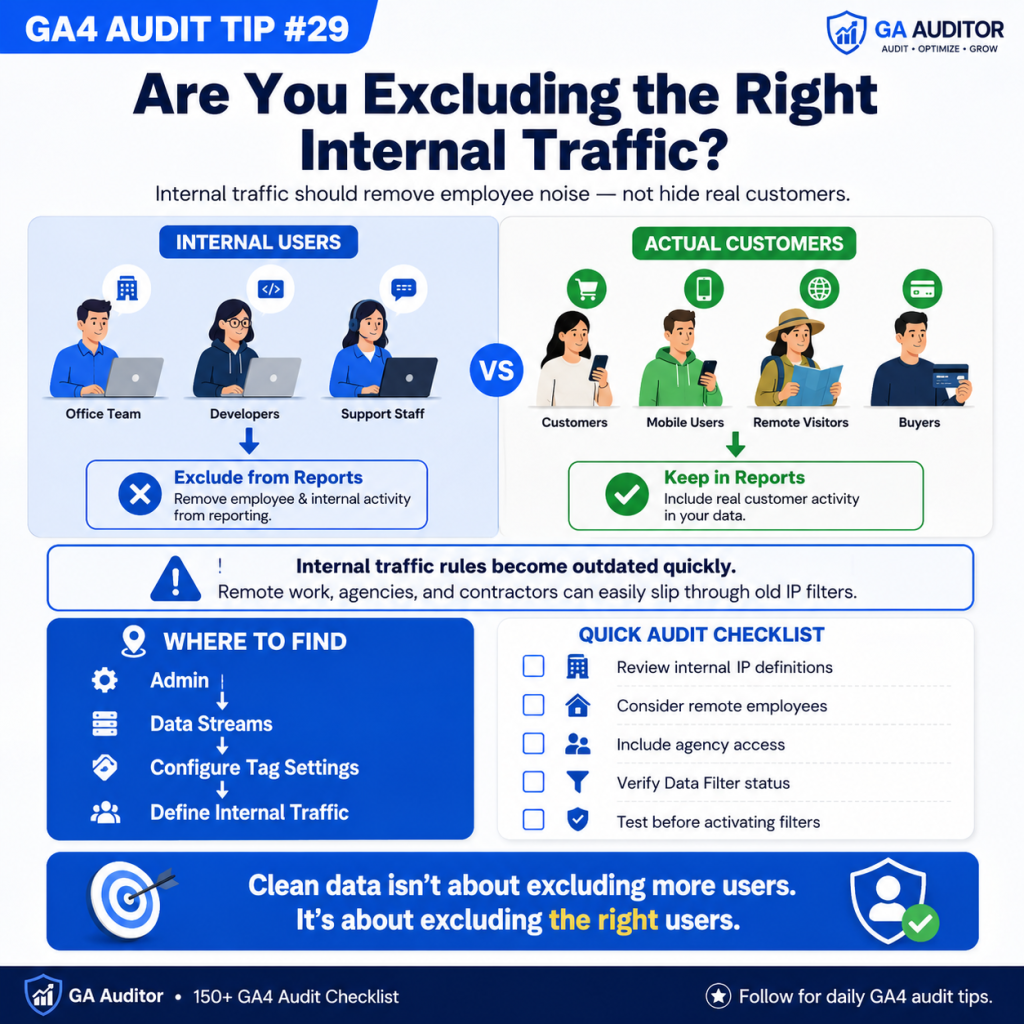
Navigate to:
Admin → Data Streams → Select Your Web Stream → Configure Tag Settings → Define Internal Traffic
Review:
- Which rules exist.
- Which IP addresses are included.
- When the rules were last updated.
- Whether they reflect current working practices.
Then ask:
- Has the business changed?
- Do employees work remotely?
- Have agencies been added?
- Are the definitions still accurate?
Simple questions often uncover overlooked issues.
Review Data Filters
Next, navigate to:
Admin → Data Settings → Data Filters
Review the status of the Internal Traffic filter.
Ask:
- Is it set to Testing?
- Is it Active?
- Was it validated before activation?
- Do stakeholders understand its impact?
A filter configuration is only as effective as the rules supporting it.
Questions Worth Asking During an Audit
I often ask stakeholders:
- How many employees regularly access the website?
- Do teams work remotely?
- Are contractors involved?
- When were the exclusions last reviewed?
- Does leadership understand their impact?
- Who owns this configuration?
These conversations usually reveal whether the implementation reflects reality.
Signs Your Internal Traffic Setup Needs Attention
A review may be worthwhile if:
- Employees frequently test the website.
- Remote work has become common.
- Agencies regularly access digital properties.
- Nobody remembers the exclusion criteria.
- Internal users still appear in reports.
- Filters haven’t been reviewed in years.
None of these automatically indicate a problem.
But they usually justify investigation.
Internal Traffic vs Developer Traffic
These concepts are related but different.
Internal Traffic
Represents people within the organization interacting with the website as part of normal operations.
Examples include:
- Marketing teams.
- Customer support staff.
- Sales teams.
- Executives.
Developer Traffic
Represents testing and debugging activities performed by technical teams.
Both deserve consideration.
They simply serve different purposes.
Best Practices
A few habits can improve internal traffic management significantly.
- Review exclusions annually.
- Update rules after organizational changes.
- Consider hybrid and remote work environments.
- Test filters before activation.
- Document exclusion criteria.
- Assign ownership responsibilities.
- Educate stakeholders about reporting implications.
- Include internal traffic reviews in recurring audits.
Clean reporting requires ongoing maintenance.
Not one-time decisions.
Internal Traffic Audit Checklist
Use this checklist during your next review:
□ Review Internal Traffic definitions.
□ Validate configured IP addresses.
□ Consider remote employees.
□ Review agency and contractor access.
□ Verify Data Filter status.
□ Confirm Testing mode validation.
□ Document exclusion criteria.
□ Assign ownership responsibilities.
□ Review configurations annually.
□ Include internal traffic reviews in recurring audits.
Wrapping Up
Most organizations understand that employee activity can influence analytics.
What they often underestimate is how quickly internal traffic definitions become outdated.
Businesses change.
Teams become distributed.
New partners gain access.
The rules created during implementation gradually drift away from reality.
The good news is that reviewing internal traffic exclusions doesn’t take long.
A few thoughtful updates can improve confidence in the reports your teams rely on every day.
Because the goal isn’t to remove more data.
It’s to remove the right data so that customer behavior remains at the center of your analysis.